> ## Documentation Index
> Fetch the complete documentation index at: https://docs.praxis-ai.com/llms.txt
> Use this file to discover all available pages before exploring further.
# AI Models
> Configure which AI models power your Digital Twin — platform defaults, custom BYOM endpoints, and reasoning effort settings.
## Model Usage
You can select which AI model suits you best for different uses from the list of models offered by the platform or plug in your own custom AI model.
Supported usages include:
* Conversation
* Image Analysis
* Image Generation
* Embeddings Generation
* Audio Transcription
* Text to Speech
* Document Summarization
* Speech to Speech (Conversation / Realtime)
* Moderation
These models have various functions, performance profiles, and feature sets.
Models used for Conversation must support Tools and streaming simultaneously.
## How Praxis AI Uses Models
Praxis AI can orchestrate multiple providers and models in parallel using a unified interface:
* Configure several providers in **Personalization and AI Models**.
* Assign preferred models to each **Model Use** (Conversation, Images, Audio, etc.).
* Overwrite the conversation provider for each **Assistant**
This orchestration is transparent to your LMS, Web SDK, or REST integrations.
## Model Selection
### Default for Your Digital Twin
Each Digital Twin in Praxis AI can use different models optimized for its domain.
To select or change models:
1. Go to the **Admin** section.
2. Edit your **Digital Twin**.
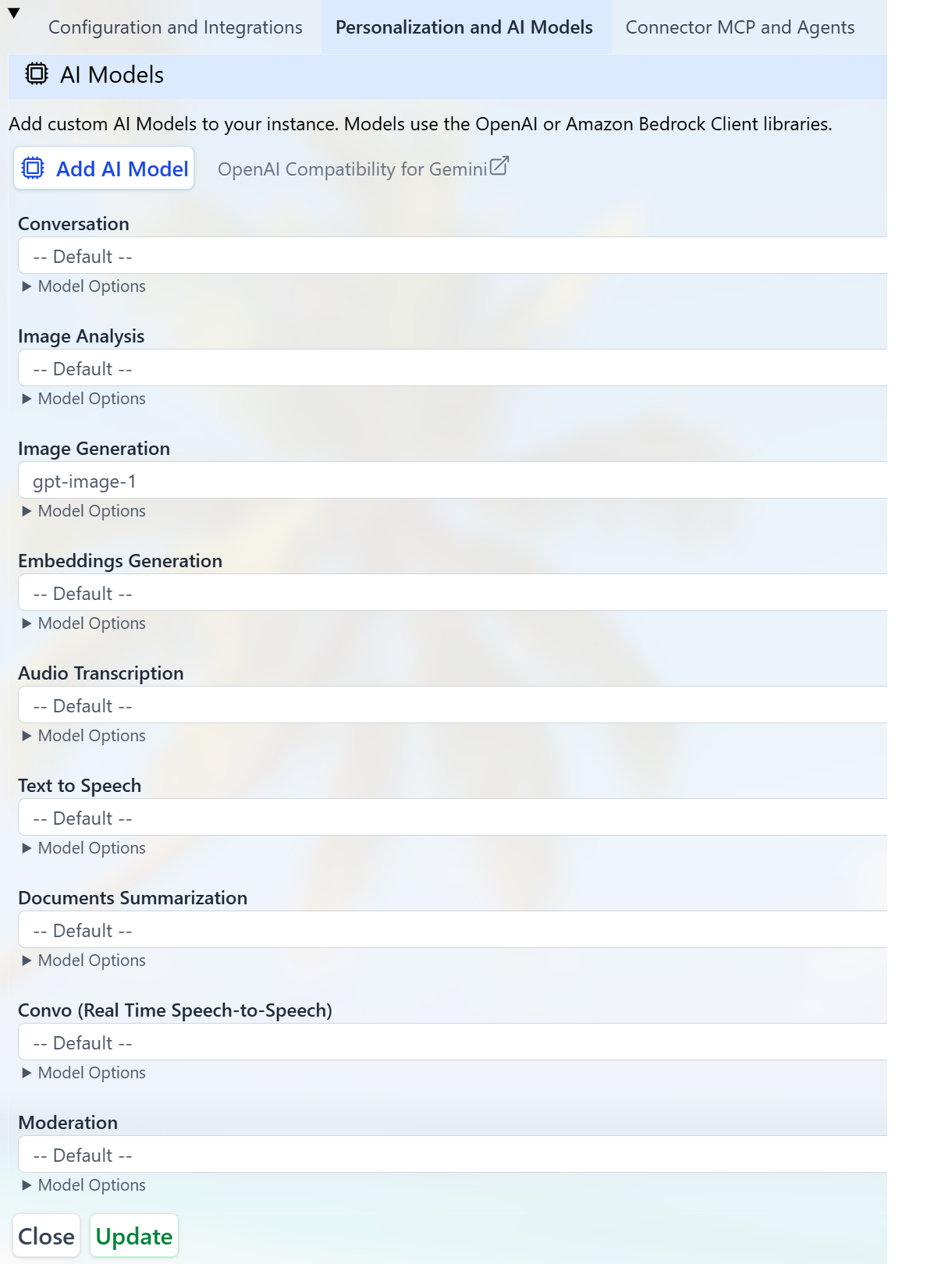
3. Open the **Personalization and AI Models** section.
4. Review or change the model used for each **Model Use** (Conversation, Images, Audio, etc.).
 ### Conversation at Runtime
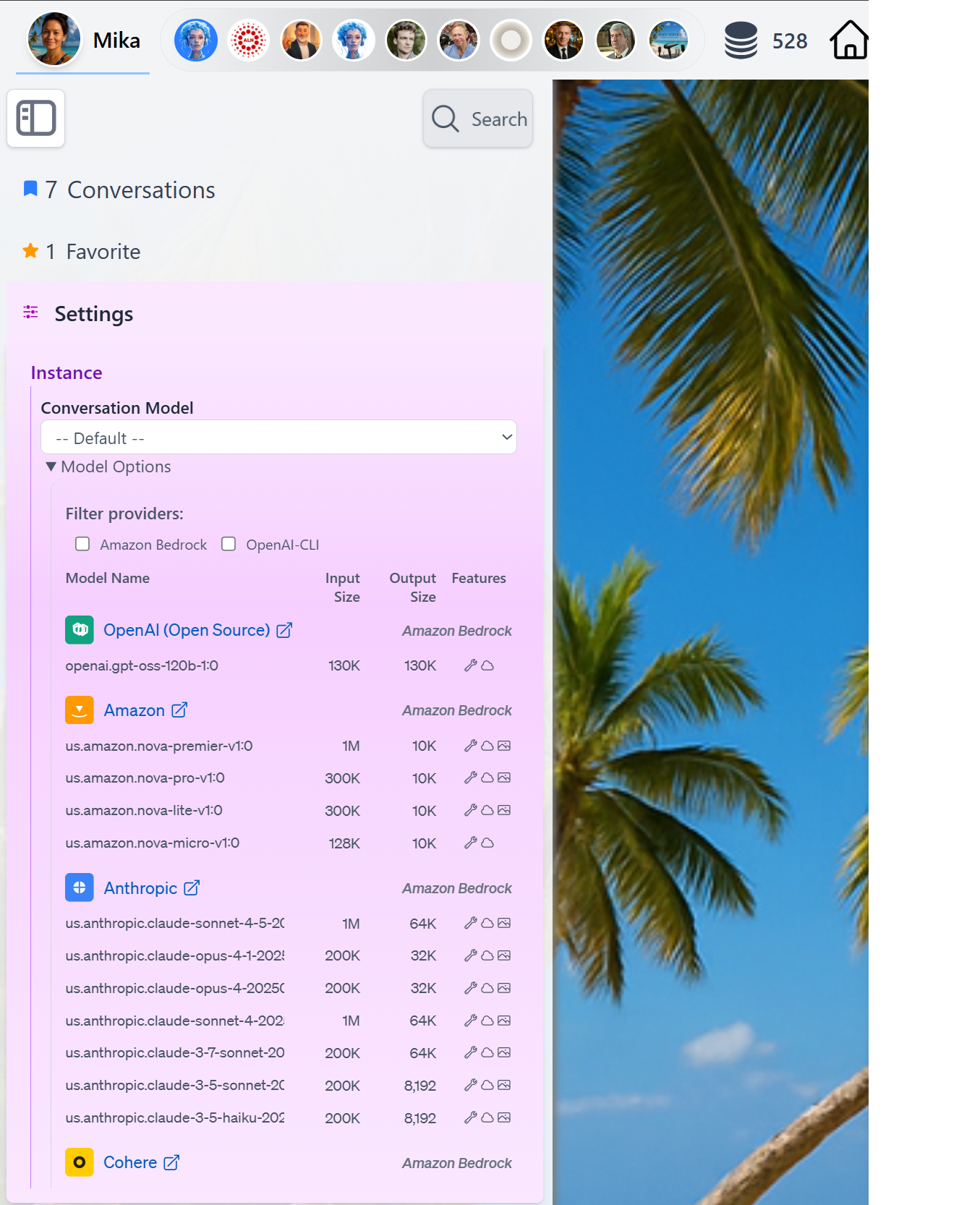
At runtime, you can easily switch the LLM used for `Conversation` by accessing the Settings in the Side Bar panel and review model capabilities by clicking the Model Options detail
### Conversation at Runtime
At runtime, you can easily switch the LLM used for `Conversation` by accessing the Settings in the Side Bar panel and review model capabilities by clicking the Model Options detail
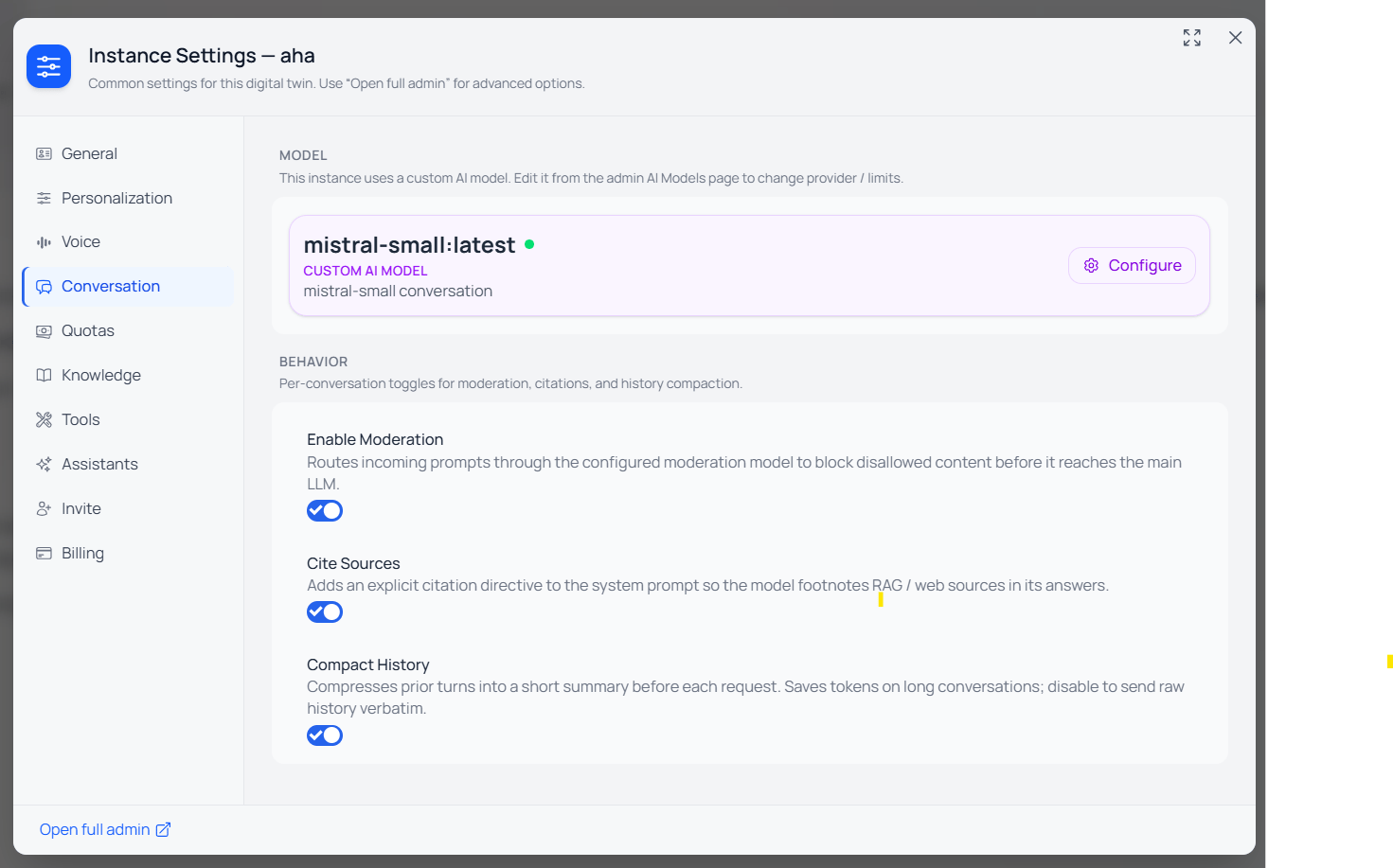
 Custom Model is displayed in the same section in the Side Bar
 ### Specific to each assistants
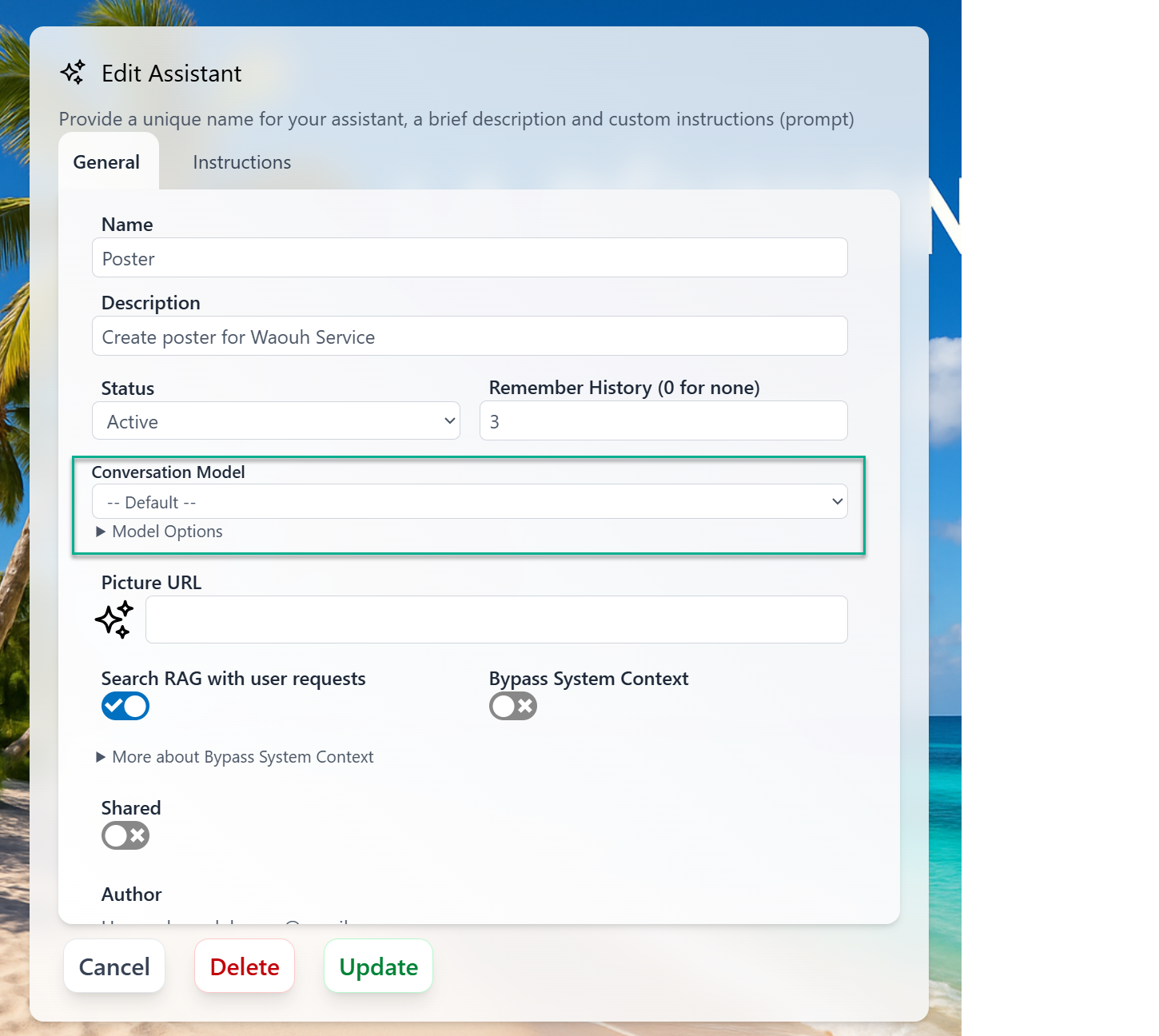
You can specify which Conversation model to use for each assistants
### Specific to each assistants
You can specify which Conversation model to use for each assistants
 Behind the scenes, Praxis AI's Neural Engine can route requests to different models based on:
* Use Case
* Assistant Specific model
* Token budget and cost constraints
* Model availability and latency
* User preferences and history
This allows you to balance quality, speed, and cost without changing your front-end integration.
## Per-Instance Model Selection
The model catalog described in this page is **platform-wide** — every Digital Twin has access to the same providers and models. What differs across Digital Twins is **which model is selected for each Model Use**.
* **Catalog** is curated by Praxis AI: providers, model identifiers, status (New / Current / Default / Deprecated), token limits, capabilities, and Thinking support.
* **Selection** is per Digital Twin: each instance picks its own model for Conversation, Image Analysis, Image Generation, Summary, Embeddings, Audio, TTS, Moderation, and Realtime — from the dropdowns under [Personalization](/mdx/admin-guide/personalization).
* **Overrides** can be set per Assistant (conversation model) or per Custom AI Model (BYOM). See the [Bring Your Own AI Model](#bring-your-own-ai-model-byom) section.
When the catalog changes (a model is added, deprecated, or removed), Digital Twins automatically fall back to the institution's default model for that capability. No manual update is required, but admins are encouraged to review their selections when a new "Default" model is published.
## Platform Models
Praxis AI middleware offers access to a broad catalog of state-of-the-art AI models. You can select the model that best fits your needs based on performance, cost, and capabilities.
The `default` model is configured to use the latest, most capable model available on the platform. In most cases, you should keep `default` selected unless you have a specific requirement (for example, strict cost control, specific provider, or latency constraints).
Models can be accessed using:
* The [OpenAI Client](https://platform.openai.com/docs/libraries?language=javascript)
* Or through [Amazon Bedrock](https://docs.aws.amazon.com/AWSJavaScriptSDK/v3/latest/client/bedrock/)
### Provider-Based Models
Praxis AI exposes conversation and related capabilities (vision, audio, embeddings, moderation, realtime) through multiple provider types:
* **Amazon Bedrock**
* **OpenAI-Compatible Clients** (OpenAI, Cohere)
* **Anthropic Direct API**
* **Google Gemini Native SDK**
* **Mistral AI Native SDK**
* **xAI Native API**
* **Stability AI Native API**
Each provider contains **groups** and individual models with specific capabilities and uses.
Anthropic models via Bedrock are platform models of choice, mainly for Conversation and Image Analysis. Models marked with **Extended** support the optional 1M token context window (see [Inference Settings](/mdx/admin-guide/personalization#inference-settings)).
> **Claude Fable 5 on Bedrock — data-sharing opt-in required.** Anthropic requires 30-day data retention for Fable/Mythos-class traffic on Bedrock. Your AWS account must set its Bedrock data-retention mode to `provider_data_sharing` (via the Bedrock Data Retention API — no console UI at launch) before `global.anthropic.claude-fable-5` can be invoked; otherwise requests fail with *"data retention mode 'default' is not available for this model."* If that data-sharing posture isn't acceptable for your deployment, use `claude-fable-5` on the Anthropic Direct API instead, which does not require the Bedrock opt-in.
| Model Name | Status | Capabilities | Input (tokens) | Output (tokens) | Thinking | Typical Uses |
| -------------------------------------------------- | ---------- | ------------------------ | -------------: | --------------: | -------------- | ------------------------------------- |
| `global.anthropic.claude-fable-5` | New | Tools, Streaming, Vision | 1,000,000 | 128,000 | Yes | Conversation, Image Analysis, Summary |
| `global.anthropic.claude-sonnet-5` | Default | Tools, Streaming, Vision | 1,000,000 | 128,000 | Yes (Adaptive) | Conversation, Image Analysis, Summary |
| `us.anthropic.claude-sonnet-5` | Deprecated | Tools, Streaming, Vision | 1,000,000 | 128,000 | Yes (Adaptive) | Conversation, Image Analysis, Summary |
| `global.anthropic.claude-sonnet-4-6` | New | Tools, Streaming, Vision | 1,000,000 | 128,000 | Yes (Extended) | Conversation, Image Analysis, Summary |
| `us.anthropic.claude-sonnet-4-6` | Deprecated | Tools, Streaming, Vision | 1,000,000 | 128,000 | Yes (Extended) | Conversation, Image Analysis, Summary |
| `global.anthropic.claude-sonnet-4-5-20250929-v1:0` | Current | Tools, Streaming, Vision | 200,000 | 64,000 | Yes (Extended) | Conversation, Image Analysis, Summary |
| `us.anthropic.claude-sonnet-4-5-20250929-v1:0` | Deprecated | Tools, Streaming, Vision | 200,000 | 64,000 | Yes (Extended) | Conversation, Image Analysis, Summary |
| `us.anthropic.claude-sonnet-4-20250514-v1:0` | Deprecated | Tools, Streaming, Vision | 200,000 | 64,000 | Yes (Extended) | Conversation, Image Analysis, Summary |
| `us.anthropic.claude-3-7-sonnet-20250219-v1:0` | Deprecated | Tools, Streaming, Vision | 200,000 | 64,000 | Yes | Conversation, Image Analysis, Summary |
| `us.anthropic.claude-3-5-sonnet-20241022-v2:0` | Deprecated | Tools, Streaming, Vision | 200,000 | 8,192 | — | Conversation, Image Analysis |
| `global.anthropic.claude-opus-5` | New | Tools, Streaming, Vision | 1,000,000 | 128,000 | Yes (Adaptive) | Conversation, Image Analysis, Summary |
| `global.anthropic.claude-opus-4-8` | Current | Tools, Streaming, Vision | 1,000,000 | 128,000 | Yes (Adaptive) | Conversation, Image Analysis, Summary |
| `us.anthropic.claude-opus-4-8` | Deprecated | Tools, Streaming, Vision | 1,000,000 | 128,000 | Yes (Adaptive) | Conversation, Image Analysis, Summary |
| `global.anthropic.claude-opus-4-7` | New | Tools, Streaming, Vision | 1,000,000 | 128,000 | Yes | Conversation, Image Analysis, Summary |
| `us.anthropic.claude-opus-4-7` | Deprecated | Tools, Streaming, Vision | 1,000,000 | 128,000 | Yes | Conversation, Image Analysis, Summary |
| `global.anthropic.claude-opus-4-6` | Current | Tools, Streaming, Vision | 1,000,000 | 128,000 | Yes (Extended) | Conversation, Image Analysis, Summary |
| `us.anthropic.claude-opus-4-6-v1` | Deprecated | Tools, Streaming, Vision | 1,000,000 | 128,000 | Yes (Extended) | Conversation, Image Analysis, Summary |
| `global.anthropic.claude-opus-4-5-20251101-v1:0` | Current | Tools, Streaming, Vision | 200,000 | 64,000 | Yes | Conversation, Image Analysis, Summary |
| `us.anthropic.claude-opus-4-5-20251101-v1:0` | Deprecated | Tools, Streaming, Vision | 200,000 | 64,000 | Yes | Conversation, Image Analysis, Summary |
| `us.anthropic.claude-opus-4-1-20250805-v1:0` | Deprecated | Tools, Streaming, Vision | 200,000 | 32,000 | Yes | Conversation, Image Analysis |
| `us.anthropic.claude-opus-4-20250514-v1:0` | Deprecated | Tools, Streaming, Vision | 200,000 | 32,000 | Yes | Conversation, Image Analysis |
| `global.anthropic.claude-haiku-4-5-20251001-v1:0` | Current | Tools, Streaming, Vision | 200,000 | 64,000 | Yes | Conversation, Image Analysis, Summary |
| `us.anthropic.claude-haiku-4-5-20251001-v1:0` | Deprecated | Tools, Streaming, Vision | 200,000 | 64,000 | Yes | Conversation, Summary, Image Analysis |
| `us.anthropic.claude-3-5-haiku-20241022-v1:0` | Deprecated | Tools, Streaming, Vision | 200,000 | 8,192 | — | Conversation, Image Analysis |
Deprecated models will be removed in a future release. Migrate to a newer model. When a deprecated model is removed, any assistant or configuration referencing it will automatically fall back to the institution's default model.
Amazon models hosted on Bedrock, used for Conversation, Image Analysis, Audio Transcription, Image Generation, and Embeddings.
#### Conversation / Vision / Summary
| Model Name | Status | Capabilities | Input (tokens) | Output (tokens) | Typical Uses |
| ----------------------------------- | ------------- | ------------------------ | -------------: | --------------: | ----------------------------------------- |
| `us.amazon.nova-2-lite-v1:0` | New | Tools, Streaming, Vision | 1,000,000 | 64,000 | Conversation, Image Analysis, Summary |
| `us.amazon.nova-premier-v1:0` | Deprecated | Tools, Streaming, Vision | 1,000,000 | 10,000 | Conversation, Image Analysis, Summary |
| `us.amazon.nova-pro-v1:0` | Current | Tools, Streaming, Vision | 300,000 | 5,000 | Conversation, Image Analysis, Summary |
| `us.amazon.nova-lite-v1:0` | Deprecated | Tools, Streaming, Vision | 300,000 | 10,000 | Conversation, Image Analysis, Summary |
| `us.amazon.nova-micro-v1:0` | Current | Tools, Streaming | 128,000 | 5,000 | Conversation, Summary |
| `transcribe` | Current | Audio Analysis | — | — | Audio transcription / translation |
| `amazon.nova-canvas-v1:0` | Deprecated | Vision | — | — | Image Generation |
| `amazon.titan-image-generator-v2:0` | Deprecated | Vision | — | — | Image Generation |
| `amazon.nova-reel-v1:1` | New — Default | Vision | — | — | Video Generation (text/image to 6s video) |
For image generation, Nova Canvas can produce sizes up to 2048×2048 and Titan up to its supported size set (around 1536 on the longest side) when a larger or differently-shaped image is requested; otherwise both default to 1024×1024. Requests beyond a model's limit are automatically reduced to the closest supported size.
#### Embeddings
| Model Name | Status | Input (tokens) | Vector Dimensions | Typical Uses |
| ------------------------------ | ---------- | -------------: | ----------------: | ------------ |
| `amazon.titan-embed-text-v2:0` | Current | 8,192 | 1,024 | Embeddings |
| `amazon.titan-embed-text-v1` | Deprecated | 8,192 | 1,536 | Embeddings |
More information on Amazon Bedrock models:
[https://docs.aws.amazon.com/bedrock/latest/userguide/model-ids.html](https://docs.aws.amazon.com/bedrock/latest/userguide/model-ids.html)
Open-source GPT models exposed via Bedrock-compatible infrastructure (us-east-1). Cost-effective and well-suited to background classification/extraction work, so they are also offered for Knowledge Graph (KAG) analysis and summarization.
| Model Name | Capabilities | Input (tokens) | Output (tokens) | Typical Uses |
| ------------------------------- | ---------------------------------------------- | -------------: | --------------: | -------------------------- |
| `openai.gpt-oss-120b-1:0` | Tools, Streaming, Structured Output | 128,000 | 16,000 | Conversation, KAG, Summary |
| `openai.gpt-oss-20b-1:0` | Tools, Streaming, Structured Output, Reasoning | 128,000 | 16,000 | Conversation, KAG, Summary |
| `openai.gpt-oss-safeguard-120b` | Structured Output | 128,000 | 16,000 | KAG, Summary |
| `openai.gpt-oss-safeguard-20b` | Structured Output | 128,000 | 16,000 | KAG, Summary |
More information:
[https://platform.openai.com/docs/models/gpt-oss-120b](https://platform.openai.com/docs/models/gpt-oss-120b)
Meta (Llama) models via Bedrock group, used for Summary and Image Analysis rather than Conversation.
| Model Name | Notes | Capabilities | Input (tokens) | Typical Uses |
| ------------------------------------------- | ----------------------------- | ------------------------ | -------------: | ----------------------- |
| `us.meta.llama3-2-11b-instruct-v1:0` | No tools+streaming together | Streaming, Vision | 128,000 | Summary, Image Analysis |
| `us.meta.llama4-maverick-17b-instruct-v1:0` | No tools+streaming together | Streaming, Vision | 1,000,000 | Summary, Image Analysis |
| `us.meta.llama4-scout-17b-instruct-v1:0` | Tools and streaming supported | Tools, Streaming, Vision | 1,000,000 | Summary, Image Analysis |
More information:
[https://www.llama.com/docs/get-started/](https://www.llama.com/docs/get-started/)
Cohere models via Bedrock, used for Conversation and Summary.
| Model Name | Status | Capabilities | Input (tokens) | Output (tokens) | Typical Uses |
| ---------------------------- | ---------- | ---------------- | -------------: | --------------: | --------------------- |
| `cohere.command-r-plus-v1:0` | Deprecated | Tools, Streaming | 128,000 | 4,000 | Conversation, Summary |
| `cohere.command-r-v1:0` | Current | Tools, Streaming | 128,000 | 4,000 | Conversation, Summary |
More information:
[https://docs.cohere.com/docs/models](https://docs.cohere.com/docs/models)
Mistral models in the Bedrock provider, used for Conversation, Summary, and Image Analysis.
| Model Name | Capabilities | Input (tokens) | Typical Uses |
| --------------------------------------- | ------------------------ | -------------: | ------------------------------------- |
| `mistral.devstral-2-123b` | Tools, Streaming | 128,000 | Conversation (Coding) |
| `mistral.mistral-large-3-675b-instruct` | Tools, Streaming, Vision | 128,000 | Summary, Conversation, Image Analysis |
| `mistral.magistral-small-2509` | Tools, Streaming | 128,000 | Conversation, Summary (Reasoning) |
| `us.mistral.pixtral-large-2502-v1:0` | Tools, Streaming, Vision | 128,000 | Summary, Image Analysis |
More information:
[https://docs.mistral.ai/getting-started/models/models\_overview](https://docs.mistral.ai/getting-started/models/models_overview)
Stability AI models are no longer available through Bedrock. They are now served via the Stability AI Native API — see the dedicated accordion below.
These models are configured against the OpenAI API and used across Conversation, Image Analysis, Summary, Audio, TTS, Moderation, and Realtime.
#### Conversation / Vision / Summary
| Model Name | Status | Capabilities | Input (tokens) | Output (tokens) | Thinking | Typical Uses |
| ----------------------- | ----------- | ----------------------------- | -------------: | --------------: | -------- | ------------------------------------- |
| `gpt-5.4` | New | Tools, Streaming, Vision, MCP | 1,050,000 | 128,000 | Yes | Conversation, Image Analysis, Summary |
| `gpt-5.4-pro` | New | Tools, Streaming, Vision, MCP | 1,050,000 | 128,000 | Yes | Conversation, Image Analysis, Summary |
| `gpt-5.4-mini` | New | Tools, Streaming, Vision, MCP | 400,000 | 128,000 | Yes | Conversation, Image Analysis, Summary |
| `gpt-5.4-nano` | New | Tools, Streaming, Vision, MCP | 400,000 | 128,000 | Yes | Conversation, Image Analysis, Summary |
| `gpt-5.2` | Current | Tools, Streaming, Vision, MCP | 400,000 | 128,000 | Yes | Conversation, Image Analysis, Summary |
| `gpt-5.1` | Current | Tools, Streaming, Vision, MCP | 400,000 | 128,000 | Yes | Conversation, Image Analysis, Summary |
| `gpt-5-2025-08-07` | Deprecated | Tools, Streaming, Vision, MCP | 272,000 | 128,000 | Yes | Conversation, Image Analysis, Summary |
| `gpt-5-mini` | Current | Tools, Streaming, Vision, MCP | 400,000 | 128,000 | Yes | Conversation, Image Analysis, Summary |
| `gpt-5-nano-2025-08-07` | Current | Tools, Streaming, Vision, MCP | 400,000 | 128,000 | Yes | Conversation, Image Analysis, Summary |
| `gpt-5` | Deprecated | Tools, Streaming, Vision, MCP | 272,000 | 128,000 | Yes | Conversation, Image Analysis, Summary |
| `gpt-4.1` | Deprecated | Tools, Streaming, Vision, MCP | 1,047,576 | 32,768 | — | Conversation, Image Analysis, Summary |
| `gpt-4.1-mini` | Deprecated | Tools, Streaming, Vision, MCP | 1,047,576 | 32,768 | — | Conversation, Image Analysis, Summary |
| `gpt-4.1-nano` | Deprecated | Tools, Streaming, Vision, MCP | 1,047,576 | 32,768 | — | Conversation, Image Analysis, Summary |
| `gpt-4o` | Deprecated | Tools, Streaming, Vision | 128,000 | 16,384 | — | Conversation, Image Analysis, Summary |
| `gpt-4o-mini` | Deprecated | Tools, Streaming, Vision | 128,000 | 16,384 | — | Conversation, Image Analysis, Summary |
| `o4-mini-deep-research` | Specialized | Streaming, Vision, MCP | 200,000 | 100,000 | Yes | Deep research, Image Analysis |
| `o4-mini` | Current | Tools, Streaming, Vision, MCP | 200,000 | 100,000 | Yes | Conversation, Image Analysis |
| `o3-deep-research` | Specialized | Streaming, Vision, MCP | 200,000 | 100,000 | Yes | Deep research, Image Analysis |
| `o3-pro` | Deprecated | Tools, Streaming, Vision, MCP | 200,000 | 100,000 | Yes | Conversation, Image Analysis |
| `o3` | Deprecated | Tools, Streaming, Vision, MCP | 200,000 | 100,000 | Yes | Conversation, Image Analysis |
| `o3-mini` | Deprecated | Tools, Streaming, Vision | 200,000 | 100,000 | Yes | Conversation, Image Analysis |
| `o1` | Deprecated | Tools, Streaming, Vision | 200,000 | 100,000 | Yes | Conversation, Image Analysis |
#### Image Generation
| Model Name | Status | Capabilities | Typical Uses |
| ------------------ | ------- | ------------ | ---------------- |
| `gpt-image-1.5` | New | Vision | Image Generation |
| `gpt-image-1` | Current | Vision | Image Generation |
| `gpt-image-1-mini` | Current | Vision | Image Generation |
| `dall-e-3` | Current | Vision | Image Generation |
When asked, Pria can produce these images in shapes beyond the default square — the `gpt-image` models support square (1024×1024), landscape (1536×1024) and portrait (1024×1536); `dall-e-3` supports square (1024×1024), landscape (1792×1024) and portrait (1024×1792). If a requested size isn't supported by the chosen model, Pria automatically uses the closest available size.
#### Video Generation
| Model Name | Status | Capabilities | Typical Uses |
| ------------ | ------ | ------------- | ------------------------------------------------------------------ |
| `sora-2` | New | Text to Video | Video Generation (4 / 8 / 12s) |
| `sora-2-pro` | New | Text to Video | Video Generation (higher fidelity, selected when `quality='high'`) |
#### Embeddings
| Model Name | Input (tokens) | Vector Dimensions | Typical Uses |
| ------------------------ | -------------: | ----------------: | ------------ |
| `text-embedding-3-small` | 8,191 | 1,536 | Embeddings |
| `text-embedding-3-large` | 8,191 | 3,072 | Embeddings |
#### Audio Transcription and Translation
| Model Name | Input (Hz) | Output (tokens) | Typical Uses |
| --------------------------- | ---------: | --------------: | --------------------------- |
| `whisper-1` | — | — | Audio Analysis |
| `gpt-4o-mini-transcribe` | 16,000 | 2,000 | Audio Analysis (Default) |
| `gpt-4o-transcribe` | 16,000 | 2,000 | Audio Analysis |
| `gpt-4o-transcribe-diarize` | 16,000 | 2,000 | Audio Analysis (Speaker ID) |
#### Text-to-Speech (TTS)
| Model Name | Typical Uses |
| ----------------- | ------------ |
| `tts-1` | TTS |
| `tts-1-hd` | TTS |
| `gpt-4o-mini-tts` | TTS |
#### Moderation
| Model Name | Typical Uses |
| ------------------------ | ------------ |
| `omni-moderation-latest` | Moderation |
#### Real-Time Speech-to-Speech (RT / STS)
| Model Name | Status | Input Tokens | Output Tokens | Reasoning | Typical Uses |
| ------------------------------ | ---------- | -----------: | ------------: | --------- | --------------------------------------------- |
| `gpt-realtime-2` | Default | 128,000 | 32,000 | Yes | Realtime voice agent (reasoning, GPT-5-class) |
| `gpt-realtime-1.5` | Current | 32,000 | 4,096 | — | Realtime voice agent |
| `gpt-realtime` | Current | 32,000 | 4,096 | — | Realtime voice agent |
| `gpt-realtime-mini` | Current | 32,000 | 4,096 | — | Realtime voice agent |
| `gpt-4o-realtime-preview` | Deprecated | 32,000 | 4,096 | — | Realtime voice agent |
| `gpt-4o-mini-realtime-preview` | Deprecated | 16,000 | 4,096 | — | Realtime voice agent |
**OpenAI Voices:** Cedar (New), Marin (New), Alloy, Ash, Ballad, Coral, Echo, Sage, Shimmer, Verse
More information:
[https://platform.openai.com/docs/models](https://platform.openai.com/docs/models)
ElevenLabs Conversational AI can be used as an alternative real-time speech-to-speech provider. When selected, Pria's Convo Mode connects to your configured ElevenLabs agent instead of OpenAI GPT-Realtime.
| Model Name | Typical Uses |
| ------------ | --------------------------------- |
| `elevenlabs` | Realtime voice agent (Convo Mode) |
Requires an ElevenLabs Agent ID and API Key configured in [Integrations](/mdx/admin-guide/configuration#elevenlabs). See [ElevenLabs Voice Agent](/mdx/integrations/elevenlabs/introduction) for setup instructions.
Gemini models are accessed through the Google GenAI native SDK and are used for Conversation, Image Analysis, Summary, and Image Generation. Requires an API key.
#### Conversation / Vision / Summary
| Model Name | Label | Capabilities | Input (tokens) | Output (tokens) | Thinking | Typical Uses |
| ------------------------ | ------------------ | ------------------------ | -------------: | --------------: | -------- | -------------------------------------------------------------------------- |
| `gemini-3.6-flash` | Fast | Tools, Streaming, Vision | 1,048,576 | 65,536 | Yes | Conversation, Image Analysis, Summary, Video Analysis, Meeting + Web roles |
| `gemini-3.5-flash` | Fast | Tools, Streaming, Vision | 1,048,576 | 65,536 | Yes | Conversation, Image Analysis, Summary, Video Analysis, Meeting + Web roles |
| `gemini-3.1-pro-preview` | Advanced Reasoning | Tools, Streaming, Vision | 1,048,576 | 65,536 | Yes | Conversation, Image Analysis, Summary |
| `gemini-3.1-flash-lite` | Ultra Fast | Tools, Streaming, Vision | 1,048,576 | 65,536 | Yes | Conversation, Image Analysis, Summary |
| `gemini-3-flash-preview` | Default | Tools, Streaming, Vision | 1,048,576 | 65,536 | Yes | Conversation, Image Analysis, Summary |
| `gemini-3-pro-preview` | Deprecated | Tools, Streaming, Vision | 1,048,576 | 65,536 | Yes | Conversation, Image Analysis, Summary |
| `gemini-2.5-flash` | Fast | Tools, Streaming, Vision | 1,048,576 | 65,536 | Yes | Conversation, Image Analysis, Summary |
| `gemini-2.5-flash-lite` | Ultra Fast | Tools, Streaming, Vision | 1,048,576 | 65,536 | Yes | Conversation, Image Analysis, Summary |
| `gemini-2.5-pro` | Production | Tools, Streaming, Vision | 1,048,576 | 65,536 | Yes | Conversation, Image Analysis, Summary |
#### Image Generation
| Model Name | Label | Capabilities | Typical Uses |
| -------------------------------- | ---------------- | ------------ | ---------------- |
| `gemini-2.5-flash-image` | Native Image Gen | Vision | Image Generation |
| `gemini-3.1-flash-image-preview` | Fast Image Gen | Vision | Image Generation |
| `gemini-3-pro-image-preview` | HQ Image Gen | Vision | Image Generation |
The flash image models generate at the standard 1024×1024. `gemini-3-pro-image-preview` can produce higher resolutions (up to 4K) and different aspect ratios when a larger or differently-shaped image is requested; otherwise it defaults to a standard square.
#### Embeddings
| Model Name | Input (tokens) | Vector Dimensions | Typical Uses |
| ---------------------------- | -------------: | ----------------: | ----------------------- |
| `gemini-embedding-2-preview` | 8,192 | 3,072 | Embeddings (multimodal) |
| `gemini-embedding-001` | 2,048 | 3,072 | Embeddings |
#### Text-to-Speech (TTS)
| Model Name | Typical Uses |
| ------------------------------ | ------------ |
| `gemini-2.5-flash-preview-tts` | TTS |
| `gemini-2.5-pro-preview-tts` | TTS |
#### Real-Time Speech-to-Speech (Gemini Live)
| Model Name | Status | Typical Uses |
| ----------------------------------------------- | ----------- | -------------------- |
| `gemini-3.1-flash-live-preview` | Default | Realtime voice agent |
| `gemini-2.5-flash-native-audio-preview-12-2025` | Alternative | Realtime voice agent |
**Gemini Voices:** Puck (Upbeat), Charon (Informative), Kore (Firm), Fenrir (Excitable), Aoede (Breezy), Zephyr (Bright), Leda (Youthful), Orus (Firm)
[Preview Gemini voices on Google AI Studio](https://aistudio.google.com)
More information:
[https://ai.google.dev/gemini-api/docs/models](https://ai.google.dev/gemini-api/docs/models)
Anthropic models via direct API, used for Conversation, Image Analysis, and Summary. Requires an API key. Models marked with **Extended** support the optional 1M token context window.
| Model Name | Status | Capabilities | Input (tokens) | Output (tokens) | Thinking | Typical Uses |
| ---------------------------- | ---------- | ------------------------ | -------------: | --------------: | -------------- | ------------------------------------- |
| `claude-fable-5` | New | Tools, Streaming, Vision | 1,000,000 | 128,000 | Yes | Conversation, Image Analysis, Summary |
| `claude-sonnet-5` | New | Tools, Streaming, Vision | 1,000,000 | 128,000 | Yes (Adaptive) | Conversation, Image Analysis, Summary |
| `claude-sonnet-4-6` | New | Tools, Streaming, Vision | 1,000,000 | 128,000 | Yes (Extended) | Conversation, Image Analysis, Summary |
| `claude-sonnet-4-5-20250929` | Current | Tools, Streaming, Vision | 200,000 | 64,000 | Yes (Extended) | Conversation, Image Analysis, Summary |
| `claude-haiku-4-5-20251001` | Current | Tools, Streaming | 200,000 | 64,000 | Yes | Conversation, Image Analysis, Summary |
| `claude-opus-5` | New | Tools, Streaming, Vision | 1,000,000 | 128,000 | Yes (Adaptive) | Conversation, Image Analysis, Summary |
| `claude-opus-4-8` | Current | Tools, Streaming, Vision | 1,000,000 | 128,000 | Yes (Adaptive) | Conversation, Image Analysis, Summary |
| `claude-opus-4-7` | New | Tools, Streaming, Vision | 1,000,000 | 128,000 | Yes | Conversation, Image Analysis, Summary |
| `claude-opus-4-6` | Current | Tools, Streaming, Vision | 1,000,000 | 128,000 | Yes (Extended) | Conversation, Image Analysis, Summary |
| `claude-opus-4-5-20251101` | Current | Tools, Streaming | 200,000 | 64,000 | Yes | Conversation, Image Analysis, Summary |
| `claude-opus-4-1-20250805` | Deprecated | Tools, Streaming, Vision | 200,000 | 32,000 | Yes | Conversation, Image Analysis, Summary |
| `claude-sonnet-4-20250514` | Deprecated | Tools, Streaming, Vision | 200,000 | 64,000 | Yes | Conversation, Image Analysis, Summary |
| `claude-opus-4-20250514` | Deprecated | Tools, Streaming, Vision | 200,000 | 32,000 | Yes | Conversation, Image Analysis, Summary |
More information:
[https://docs.anthropic.com/en/docs/about-claude/models/overview](https://docs.anthropic.com/en/docs/about-claude/models/overview)
Cohere model via OpenAI-compatible endpoint, used for Conversation, Image Analysis, and Summary. Requires an API key.
| Model Name | Capabilities | Input (tokens) | Output (tokens) | Typical Uses |
| ------------------- | ------------------------ | -------------: | --------------: | ------------------------------------- |
| `command-a-03-2025` | Tools, Streaming, Vision | 128,000 | 4,000 | Conversation, Image Analysis, Summary |
More information:
[https://docs.cohere.com/docs/models](https://docs.cohere.com/docs/models)
Moonshot Kimi K3 served through RunPod's OpenAI-compatible endpoint, used for Conversation — including agentic multi-turn tool orchestration (native tool calling). Reasoning is always on (low/high/max effort; Pria maps lower settings up automatically). Requires a RunPod API key (platform-wide or per-instance).
| Model Name | Capabilities | Input (tokens) | Output (tokens) | Thinking | Typical Uses |
| ---------- | ---------------- | -------------: | --------------: | -------- | ------------ |
| `kimi-k3` | Tools, Streaming | 1,000,000 | 16,384 | Yes | Conversation |
More information:
[https://runpod.io/kimi-k3](https://runpod.io/kimi-k3)
Mistral AI models are accessed through the native Mistral SDK (`@mistralai/mistralai`) and are used for Conversation, Image Analysis, Summary, Audio, TTS, Embeddings, and Moderation. Requires an API key.
#### Conversation / Vision / Summary
| Model Name | Label | Capabilities | Input (tokens) | Output (tokens) | Typical Uses |
| ----------------------- | ----------------- | ----------------------------------- | -------------: | --------------: | ------------------------------------- |
| `mistral-large-latest` | Default | Tools, Streaming, Vision | 128,000 | 8,192 | Conversation, Image Analysis, Summary |
| `mistral-large-2512` | Large 3 | Tools, Streaming, Vision | 256,000 | 8,192 | Summary (backend workers) |
| `mistral-medium-2604` | Medium 3.5 | Tools, Streaming, Vision | 256,000 | 8,192 | Conversation, Image Analysis |
| `mistral-medium-2508` | — | Tools, Streaming, Vision | 131,072 | 8,192 | Conversation, Image Analysis, Summary |
| `mistral-small-2603` | Small 4 | Tools, Streaming, Vision, Reasoning | 256,000 | 8,192 | Conversation, Image Analysis, Summary |
| `mistral-small-2506` | — | Tools, Streaming, Vision | 128,000 | 8,192 | Conversation, Image Analysis, Summary |
| `pixtral-large-latest` | Vision | Tools, Streaming, Vision | 128,000 | 8,192 | Conversation, Image Analysis |
| `magistral-medium-2509` | Reasoning | Tools, Streaming, Vision | 128,000 | 8,192 | Conversation, Image Analysis, Summary |
| `magistral-small-2509` | Reasoning Fast | Tools, Streaming, Vision | 40,000 | 8,192 | Conversation, Image Analysis, Summary |
| `codestral-2508` | Code | Tools, Streaming, Vision | 256,000 | 8,192 | Conversation, Summary |
| `devstral-2512` | Devstral 2 Coding | Tools, Streaming | 256,000 | 8,192 | Conversation (agentic coding) |
| `devstral-medium-2507` | Developer | Tools, Streaming, Vision | 128,000 | 8,192 | Conversation, Image Analysis, Summary |
| `mistral-saba-latest` | Multilingual | Tools, Streaming | 32,000 | 8,192 | Conversation, Summary |
#### Deprecated Conversation Models
| Model Name | Capabilities | Input (tokens) | Typical Uses |
| -------------------- | ------------------------ | -------------: | ---------------------------- |
| `pixtral-large-2411` | Tools, Streaming, Vision | 128,000 | Conversation, Image Analysis |
| `mistral-large-2411` | Tools, Streaming, Vision | 128,000 | Conversation, Summary |
#### Audio Transcription (STT)
| Model Name | Typical Uses |
| --------------------- | ----------------------------- |
| `voxtral-mini-2602` | Audio Analysis (Transcribe 2) |
| `voxtral-mini-latest` | Audio Analysis (Default) |
| `voxtral-mini-2507` | Audio Analysis |
#### Text-to-Speech (TTS)
| Model Name | Typical Uses |
| ----------------------- | ------------ |
| `voxtral-mini-tts-2603` | TTS |
#### Embeddings
| Model Name | Input (tokens) | Typical Uses |
| ----------------- | -------------: | ------------ |
| `mistral-embed` | 8,192 | Embeddings |
| `codestral-embed` | 8,192 | Embeddings |
#### Moderation
| Model Name | Typical Uses |
| ------------------------- | ------------------------- |
| `mistral-moderation-2603` | Moderation (Moderation 2) |
| `mistral-moderation-2411` | Moderation |
More information:
[https://docs.mistral.ai/getting-started/models/models\_overview](https://docs.mistral.ai/getting-started/models/models_overview)
xAI models are accessed through xAI's native API and are used for Conversation, Image Analysis, Summary, Code, Image Generation, Embeddings, TTS, and Real-Time Voice. Requires an API key.
#### Conversation / Vision / Summary
| Model Name | Status | Capabilities | Input (tokens) | Thinking | Typical Uses |
| ------------------------------ | ---------- | ------------------------ | -------------: | ---------------- | ------------------------------------------- |
| `grok-4.5` | Current | Tools, Streaming, Vision | 500,000 | Yes (adjustable) | Conversation, Image Analysis, Summary |
| `grok-4.20-0309-reasoning` | Current | Tools, Streaming, Vision | 2,000,000 | Yes | Conversation, Image Analysis, Summary |
| `grok-4.20-0309-non-reasoning` | Current | Tools, Streaming, Vision | 2,000,000 | — | Conversation, Image Analysis, Summary |
| `grok-4.20-multi-agent-0309` | Current | Tools, Streaming, Vision | 2,000,000 | Yes | Conversation, Image Analysis, Summary |
| `grok-4-1-fast-reasoning` | Current | Tools, Streaming, Vision | 2,000,000 | Yes | Conversation, Image Analysis, Summary |
| `grok-4-1-fast-non-reasoning` | Current | Tools, Streaming, Vision | 2,000,000 | — | Conversation, Image Analysis, Summary |
| `grok-4` | Deprecated | Tools, Streaming, Vision | 2,000,000 | — | Deprecated (alias) |
| `grok-build-0.1` | Current | Tools, Streaming, Vision | 256,000 | Yes | Agentic coding Conversation, Image Analysis |
| `grok-code-fast-1` | Current | Tools, Streaming | 256,000 | — | Code-focused Conversation |
#### Image Generation
| Model Name | Status | Capabilities | Typical Uses |
| ------------------------ | ------- | ------------ | ---------------- |
| `grok-imagine-image-pro` | Current | Vision | Image Generation |
| `grok-imagine-image` | Current | Vision | Image Generation |
These models are shaped by aspect ratio rather than exact pixel size — Pria can request a square, landscape, or portrait shape (e.g. 1:1, 16:9, 9:16, 3:2) and defaults to a square. An unsupported shape is mapped to the closest available aspect.
#### Embeddings
| Model Name | Input (tokens) | Vector Dimensions | Typical Uses |
| ---------------------- | -------------: | ----------------: | ------------ |
| `grok-embedding-small` | 8,000 | 1,024 | Embeddings |
#### Text-to-Speech (TTS)
| Model Name | Typical Uses |
| ---------- | ------------ |
| `xai-tts` | TTS |
**xAI Voices:** Eve, Ara, Rex, Sal, Leo
#### Real-Time Speech-to-Speech (xAI Voice Agent)
| Model Name | Status | Typical Uses |
| ------------- | ------- | -------------------- |
| `grok-3-fast` | Default | Realtime voice agent |
**xAI RT Voices:** Eve (Default), Ara, Rex, Sal, Leo
Audio transcription (STT) for xAI delegates to the configured OpenAI transcription model (e.g., `gpt-4o-mini-transcribe`).
More information:
[https://docs.x.ai/docs/models](https://docs.x.ai/docs/models)
Stability AI models are accessed through Stability's v2beta REST API and are dedicated to media generation: Image, Audio, and Video. Requires an API key (`STABILITY_API_KEY`).
#### Image Generation
| Model Name | Label | Capabilities | Typical Uses |
| ------------------------------ | ------------------ | ------------ | ---------------- |
| `stability.stable-image-ultra` | Stable Image Ultra | Vision | Image Generation |
| `stability.stable-image-core` | Stable Image Core | Vision | Image Generation |
| `stability.sd3.5-large` | SD 3.5 Large | Vision | Image Generation |
These models are shaped by aspect ratio rather than exact pixel size — Pria can request shapes such as 1:1, 16:9, 9:16, 21:9, 3:2, or 4:5 and defaults to a square. An unsupported shape is mapped to the closest available aspect.
#### Audio Generation
| Model Name | Label | Typical Uses |
| -------------------------- | ------------------------------------------ | ---------------- |
| `stability.stable-audio-2` | Stable Audio 2 (text to audio, up to 190s) | Audio Generation |
#### Video Generation
| Model Name | Label | Status | Typical Uses |
| -------------------------- | --------------------------------------------------------- | ---------- | ---------------- |
| `stability.image-to-video` | Stable Video (DEPRECATED — provider shut down 2025-07-24) | Deprecated | Video Generation |
Stability AI retired its video generation API on **2025-07-24**. The model is kept in the dropdown for backward compatibility but calls return a deprecation message. Select **Amazon Nova Reel** (Bedrock, default) or **Sora 2** (OpenAI) for video generation.
Stability AI remains a dedicated media-generation provider for Image and Audio — it does not expose Conversation, Embeddings, STT, or RT Voice. Conversation models from OpenAI, Anthropic, Gemini, Mistral, xAI, or Bedrock can invoke `generate_image` and `generate_audio` tools that route to Stability, and `generate_video` routes to Nova Reel or Sora 2 depending on `videoGenerationModel`.
More information:
[https://platform.stability.ai/docs/api-reference](https://platform.stability.ai/docs/api-reference)
## Reasoning Effort & Thinking
Some AI models support **extended thinking** (also called reasoning), where the model spends additional internal tokens analyzing a problem before producing a visible response. Praxis AI provides a unified 5-level reasoning effort system that works across all supported providers.
### The 5 Effort Levels
| Level | Description | Best For |
| ---------- | -------------------------------------------------- | ------------------------------------- |
| **None** | Disable thinking. Fastest responses, lowest cost. | Simple queries, quick lookups |
| **Low** | Minimal reasoning. | Straightforward questions |
| **Medium** | Balanced reasoning. | Most everyday tasks |
| **High** | Thorough reasoning. | Complex analysis, multi-step problems |
| **Max** | Maximum reasoning depth. Highest latency and cost. | Research, detailed technical analysis |
### How the 5 Levels Map to Each Provider
Each provider exposes thinking through a different API parameter. Praxis translates the unified level for you — the table below documents what actually goes on the wire so admins can predict cost and latency.
| Provider | Native parameter | none | low | medium | high | max |
| --------------------------------------------------------- | ------------------------------- | ------------------------------------------------ | ------- | ---------- | -------- | -------- |
| **Anthropic (Direct & Bedrock)** | `thinking.budget_tokens` | omitted | `1,024` | `4,096` | `16,384` | `32,000` |
| **OpenAI (Responses & Chat)** | `reasoning_effort` | omitted | `"low"` | `"medium"` | `"high"` | `"high"` |
| **Google Gemini (3.x)** | `thinkingConfig.thinkingLevel` | omitted | `"low"` | `"medium"` | `"high"` | `"high"` |
| **Google Gemini (2.5)** | `thinkingConfig.thinkingBudget` | `0` | `1,024` | `8,192` | `24,576` | `32,768` |
| **xAI (`grok-3-mini`)** | `reasoning_effort` | omitted | `"low"` | `"medium"` | `"high"` | `"high"` |
| **xAI (`grok-4.5`)** | `reasoning_effort` | `"low"` | `"low"` | `"medium"` | `"high"` | `"high"` |
| **xAI (other `grok-4.x`, `grok-build-0.1`)** | — | thinking is automatic; the parameter is rejected | | | | |
| **Mistral (`magistral-*`)** | `extra_body.reasoning_effort` | omitted | `"low"` | `"medium"` | `"high"` | `"high"` |
| **Bedrock (Amazon Nova, Meta Llama, Cohere, OpenAI OSS)** | — | thinking unsupported | | | | |
Models that don't support thinking ignore the setting silently. xAI's older grok-4.x family and grok-build-0.1 always think before answering — there is no way to disable it, and Praxis omits `reasoning_effort` entirely to avoid an API error. `grok-4.5` accepts adjustable effort but defaults to deep reasoning when the parameter is omitted, so the "none" level sends `"low"` — the closest available setting to off.
### Resolution Priority
The effective reasoning effort for a request is resolved in this order:
1. **Custom AI Model override** — a BYOM record with a `reasoning_effort` set wins over everything
2. **Chat Completion endpoint override** — `chatCompletionReasoningEffort` (when the request came in through `/api/ai/chat/completions`)
3. **Institution setting** — `reasoningEffort` on the Digital Twin
4. **Platform default** — `none` (thinking disabled)
### Interaction with Deep Research
The OpenAI **deep research** models (`o3-deep-research`, `o4-mini-deep-research`) always run with maximum reasoning regardless of the institution setting — they are tuned for multi-hour autonomous research and ignore the `reasoning_effort` knob. Pria's UI surfaces deep research as a dedicated assistant toggle rather than a conversation model selection.
### Models with Thinking Support
Look for the **Thinking** column = "Yes" in the catalog tables above. As of this writing:
* **Anthropic:** Claude Opus 4.7, Opus 4.6, Opus 4.5, Sonnet 4.6, Sonnet 4.5, Sonnet 4, Claude 3.7 Sonnet, Haiku 4.5 (Bedrock or Direct API)
* **OpenAI:** GPT-5.4 series (5.4, 5.4-pro, 5.4-mini, 5.4-nano), GPT-5 series (5.2, 5.1, 5-mini, 5-nano), o-series (o4-mini, o3, o3-mini, o1)
* **Google Gemini:** Gemini 3.1 Pro Preview, Gemini 3.1 Flash Lite Preview, Gemini 3 Flash/Pro Preview, Gemini 2.5 Pro / Flash / Flash Lite
* **xAI:** Grok-4.5, Grok-4.20 (reasoning), Grok-4.20 (multi-agent), Grok-4-1 fast (reasoning), Grok Build 0.1
* **Mistral:** Magistral Medium 2509, Magistral Small 2509
***
## Image & Video Generation Providers
Pria can route image generation requests to multiple providers, and video generation to two (Bedrock Nova Reel and OpenAI Sora). The conversation model invokes the `generate_image` or `generate_video` tool; Pria dispatches to the provider configured for the appropriate Model Use.
| Provider | Image Generation | Image Editing | Video Generation | Notes |
| ------------------ | ---------------------------------------------------------------------------------------- | ------------------------------------------------ | ---------------------------------------------------------- | ----------------------------------------------------------------------------------------------------------------------- |
| **OpenAI** | `gpt-image-1.5`, `gpt-image-1`, `gpt-image-1-mini`, `dall-e-3` | Yes (`gpt-image-1` series) | `sora-2`, `sora-2-pro` (4 / 8 / 12s) | DALL-E 3 is text-to-image only; `gpt-image-1` adds true image-to-image editing. Sora 2 Pro fires when `quality='high'`. |
| **Amazon Bedrock** | `amazon.nova-canvas-v1:0`, `amazon.titan-image-generator-v2:0` (deprecated) | Yes (Titan & Nova Canvas inpainting/outpainting) | `amazon.nova-reel-v1:1` (default — text/image to 6s video) | Nova Reel is the default video provider when Sora is not selected. |
| **Stability AI** | `stability.stable-image-ultra`, `stability.stable-image-core`, `stability.sd3.5-large` | Yes (Stability v2beta REST) | Retired 2025-07-24 | Image and audio generation only via Stability native API. |
| **Google Gemini** | `gemini-2.5-flash-image`, `gemini-3.1-flash-image-preview`, `gemini-3-pro-image-preview` | Yes (Gemini native image edit) | No | Imagen-class generation through the GenAI native SDK. |
| **xAI** | `grok-imagine-image-pro`, `grok-imagine-image` | **No** (xAI `images.edit()` not available) | No | Uses `aspect_ratio` instead of `size`; supports ratios such as `1:1`, `16:9`, `3:2`. |
| **Mistral** | — (delegates) | — | — | No native image gen; routes to Bedrock or OpenAI. |
To set the active image provider, pick a model from the **Image Generation** dropdown under [Personalization](/mdx/admin-guide/personalization). The `generate_image` tool always dispatches to the selected model. To set the video provider, pick from **Video Generation** (Bedrock Nova Reel default; switch to OpenAI Sora 2 if preferred).
***
## Content Moderation Models
When **Enable Moderation** is turned on under [Configuration](/mdx/admin-guide/configuration), every user message is sent to the configured moderation model **before** the conversation model. Flagged messages are blocked and a notification email is sent to the instance contact email.
| Provider | Models |
| ----------- | ---------------------------------------------------- |
| **OpenAI** | `omni-moderation-latest`, `text-moderation-stable` |
| **Mistral** | `mistral-moderation-2603`, `mistral-moderation-2411` |
See [Content Moderation](/mdx/admin-guide/moderation) for the full category taxonomy, threshold configuration, and how to handle false positives.
***
## Embeddings Models
Embeddings power **all retrieval** in Pria — every uploaded file is chunked, embedded, and stored in the vector index. The conversation model then retrieves nearest-neighbour chunks at query time (Normal RAG) and optionally fuses with the knowledge-graph leg (KAG Fusion).
| Provider | Model | Dimensions | Max Input Tokens | Notes |
| -------------- | ----------------------------------------- | ---------: | ---------------: | ------------------------------- |
| OpenAI | `text-embedding-3-small` | 1,536 | 8,191 | Cost-effective, strong baseline |
| OpenAI | `text-embedding-3-large` | 3,072 | 8,191 | Highest retrieval quality |
| Amazon Bedrock | `amazon.titan-embed-text-v2:0` | 1,024 | 8,192 | Bedrock-region resident |
| Amazon Bedrock | `amazon.titan-embed-text-v1` (deprecated) | 1,536 | 8,192 | — |
| Google Gemini | `gemini-embedding-2-preview` | 3,072 | 8,192 | Multimodal — text + images |
| Google Gemini | `gemini-embedding-001` | 3,072 | 2,048 | Text-only |
| Mistral | `mistral-embed` | 1,024 | 8,192 | General purpose |
| Mistral | `codestral-embed` | 1,024 | 8,192 | Code-tuned |
| xAI | `grok-embedding-small` | 1,024 | 8,000 | xAI native embeddings |
**Changing the embeddings model requires re-embedding all existing vault content.** Each model produces vectors in its own coordinate space — they are not interchangeable. After switching, run the admin reindex flow to regenerate embeddings; until then, retrieval quality drops sharply.
For chunk size, sanitization, enrichment, and per-vault tuning, see [Knowledge & RAG Configuration](/mdx/admin-guide/knowledge-rag-config).
***
## Prompt Caching
Some providers support **prompt caching**, which reduces latency and input token costs by reusing previously processed prompt prefixes. Praxis AI enables prompt caching automatically where supported — no configuration is needed.
| Provider | Caching Type | How It Works | Cost Savings |
| ------------------ | --------------- | --------------------------------------------------------------------------------------------------------------------------------------------------------------------- | ---------------------------------------------------- |
| **OpenAI** | Automatic | Cached automatically on every request — no code changes needed. The API returns `cached_tokens` in the usage response. | Up to 50% on cached input tokens |
| **Anthropic** | Explicit | Praxis marks cache breakpoints on tools, system prompt, and the last user message using `cache_control` headers. Cached prefixes are reused on subsequent requests. | Up to 90% on cached reads |
| **Google Gemini** | Context caching | Supports context caching via a separate API to create reusable cached content objects. | Varies by content size and TTL |
| **Amazon Bedrock** | Varies | Depends on the underlying model provider (e.g., Anthropic models on Bedrock inherit Anthropic's caching). | Varies |
| **Mistral AI** | Not available | The Mistral API does not currently support prompt caching. Usage tracking returns `promptTokens`, `completionTokens`, and `totalTokens` only. | — |
| **xAI** | Automatic | Cached automatically on every request. The API returns `cached_tokens` in the usage response and supports conversation-level caching via the `x-grok-conv-id` header. | Up to 50% on cached input tokens (85% on `grok-4.5`) |
Prompt caching is most impactful for conversations with long system prompts, many tools, or extended history — exactly the pattern used by Praxis AI's RAG pipeline. Anthropic and OpenAI caching are enabled by default for all eligible requests.
### How to Verify Caching is Working
The admin Conversation History view shows per-turn token usage. Look for the `cached_tokens` (or `cache_read_input_tokens` for Anthropic) field — a non-zero value confirms the request hit the cache. Cached prefixes save you \~50–90% on those input tokens; you only pay full price for the new portion of each turn.
***
## Zero Data Retention (ZDR)
**Zero Data Retention (ZDR)** means the AI model provider does not store your prompts or the model's responses after the request completes — nothing you send to the model is retained on the provider's servers, used for training, or available for later review. ZDR is a contractual and technical guarantee offered by major providers for API traffic, and it is a cornerstone requirement for privacy-sensitive deployments in education, healthcare, and the enterprise.
**Praxis AI middleware ships only with models that comply with ZDR.** Every model in the platform catalog routes through provider API tiers covered by zero-data-retention practices — your institution's conversations, documents, and knowledge never become provider-side data.
### The exception: Anthropic Mythos-class models
Anthropic's **Mythos-class models** (Claude Mythos 5 and Claude Fable 5) are subject to a mandatory **30-day data retention** for trust-and-safety purposes, on every platform, effective June 9, 2026. This retention **overrides Zero Data Retention agreements** — it applies even to organizations with ZDR contracts in place.
Because of this, the Claude Fable 5 model is **flagged in the Praxis AI model selector**: it carries a red warning icon and a "30-day retention" marker next to its name. Selecting it is an explicit, informed choice — administrators choosing this model accept that prompts and outputs sent to it are retained by Anthropic for 30 days.
If your institution requires strict ZDR compliance (e.g., for regulatory or contractual reasons), do not select a flagged model. All other catalog models remain fully ZDR-compliant.
For the full provider policy, see Anthropic's notice: [Data retention practices for Mythos-class models](https://support.claude.com/en/articles/15425996-data-retention-practices-for-mythos-class-models).
***
## KAG Analysis Model
During file ingestion, Pria runs a separate **KAG analysis model** to extract a knowledge graph — entities, relationships, and aliases — from each chunk. The graph then powers the KAG Fusion retrieval mode. This model is **independent** of the Conversation model; you can pair an expensive conversation model with a cheap analysis model, or vice versa.
| Setting | Default | Notes |
| ------------------------------------ | ------------------------------------ | -------------------------------------------------------------------- |
| **Platform default** | Curated by Praxis AI | Used whenever no institution override is set |
| **KAG Analysis Model (institution)** | Empty = inherit the platform default | Set per Digital Twin; only catalog models tagged for KAG are offered |
Why have a separate model? KAG extraction is a batch background job — latency does not matter, but cost and **structured-output reliability** do. The extractor must produce well-formed structured records consistently; a model that summarizes well can still be a poor extractor. Praxis AI validates which catalog models qualify before tagging them for KAG analysis.
**Recommended, validated extractors** (low cost, near-zero invalid records): `openai.gpt-oss-120b-1:0` / `openai.gpt-oss-safeguard-120b` (Bedrock), `deepseek/deepseek-v4-flash`, `stepfun/step-3.7-flash`, `z-ai/glm-4.7-flash`, `google/gemma-4-31b-it`, `qwen/qwen3-30b-a3b-instruct-2507`. The conversation model can be much heavier without dragging up your ingestion bill.
For KAG Fusion to work, files must have been ingested while KAG was enabled. Toggling on KAG Fusion does not retroactively process old files — kick off the admin reindex to backfill.
***
## Video Analysis Model
When a video is ingested, Pria transcribes its audio track for spoken content (see [Audio Transcription](#kag-analysis-model) in the model-use list). The **Video Analysis Model** adds a second, complementary pass over the *picture* track: a native multimodal model watches the video and produces a **scene/content description** of what was shown on screen. That visual summary is fused with the transcript into a single ingested document — the visual section placed **first** — so "what was shown on screen" (slides, diagrams, demos, on-screen text) becomes searchable in RAG and is captured in the knowledge graph alongside the spoken words.
This works the same way as the other auxiliary analysis models (Image Analysis, Audio Transcription): it is a separate **Model Use**, independent of the Conversation model, so you can pick a cheap, fast model for it without affecting the in-chat experience.
| Setting | Default | Notes |
| -------------------------------------- | ----------------------------------------- | ----------------------------------------------------------------------------------------------------- |
| **System Models default (platform)** | `gemini-3.5-flash` | Set under **System → System Models**; used whenever no institution override is set. |
| **Video Analysis Model (institution)** | Empty = inherit the System Models default | Set per Digital Twin under **Institution → AI Models**; only video-capable Gemini models are offered. |
**Video-capable models.** Native video understanding is currently a Google Gemini capability, so the selector is filtered to video-capable Gemini models:
| Model | Notes |
| ------------------ | -------------------------------------------------- |
| `gemini-3.5-flash` | Default seed — fast and low-cost. |
| `gemini-2.5-flash` | Fast, low-cost alternative. |
| `gemini-2.5-pro` | Higher-quality scene understanding at higher cost. |
Video analysis runs at **low media resolution** for cost control, and is **failure-isolated**: if the video-analysis pass errors, it is dropped and the transcript is ingested on its own — a video-analysis hiccup never blocks the transcript. **Very large videos** that are processed in split segments are **transcript-only for now** (no scene description).
***
## Chat Completions Endpoint Model
When the [Chat Completions Integration](/mdx/integrations/chat-completions/introduction) is enabled for your Digital Twin, inbound requests arrive at `/api/ai/chat/completions` from external clients (today's primary consumer is the ElevenLabs Voice Agent in Convo Direct mode; tomorrow: any OpenAI-SDK-compatible client). You can pin a **different conversation model** for those inbound requests than the one your in-app users see.
| Field | Default | Notes |
| ----------------------------------------- | --------------- | -------------------------------------------------------------------------------------------------- |
| **Chat Completion Enabled** | Off | Master toggle. When off, the endpoint returns 403. |
| **Chat Completion Model** | empty (inherit) | Empty = use the same model as the in-app conversation. |
| **Chat Completion Max Completion Tokens** | `-1` (inherit) | `-1` = inherit institution maxCompletionTokens; `0` = catalog cap; positive number = explicit cap. |
| **Chat Completion Reasoning Effort** | empty (inherit) | Empty = inherit institution `reasoningEffort`. |
Use this when the in-app twin runs Claude Opus 4.7 for the richest in-browser experience, but inbound voice agents should call a smaller, faster model (e.g., `gpt-5-mini`) where end-to-end latency dominates user perception. The override is **conversation-only** — summary, embedding, image, audio, and TTS still use the regular institution selection.
***
## Provider Types
Praxis AI routes AI requests through seven backend providers:
| Provider | How It Works |
| ------------------------ | -------------------------------------------------------------------------------------------------- |
| **Amazon Bedrock** | Models hosted on AWS infrastructure. Uses IAM credentials for authentication. |
| **OpenAI API** | Direct OpenAI API calls. Used for OpenAI models and OpenAI-compatible endpoints. |
| **Anthropic Direct API** | Direct Anthropic API calls. Bypasses Bedrock for Claude models when preferred. |
| **Google GenAI** | Direct Google Gemini API calls via the `@google/genai` SDK. |
| **Mistral AI** | Direct Mistral API calls via the `@mistralai/mistralai` SDK. |
| **xAI** | Direct xAI API calls using the `openai` npm package with xAI's base URL. |
| **Stability AI** | Direct Stability AI v2beta REST calls (image and audio generation only; video retired 2025-07-24). |
Some model families (e.g., Anthropic Claude, Mistral) are available through multiple providers — both via Bedrock and via Direct API. The admin can choose which provider to use based on latency, cost, and regional availability preferences.
***
## Bring Your Own AI Model (BYOM)
You can connect your own hosted LLM (for example, a model deployed on Google Vertex AI, private OpenAI-compatible endpoint, or a Bedrock-hosted custom model) and use it as a replacement for any of the supported usages.
### Configure a Custom Model
To add a custom model for Conversation (or any other use):
1. In the Admin UI, edit your **Digital Twin**.
2. Under **Personalization and AI Models**, click **Add AI Model**.
Behind the scenes, Praxis AI's Neural Engine can route requests to different models based on:
* Use Case
* Assistant Specific model
* Token budget and cost constraints
* Model availability and latency
* User preferences and history
This allows you to balance quality, speed, and cost without changing your front-end integration.
## Per-Instance Model Selection
The model catalog described in this page is **platform-wide** — every Digital Twin has access to the same providers and models. What differs across Digital Twins is **which model is selected for each Model Use**.
* **Catalog** is curated by Praxis AI: providers, model identifiers, status (New / Current / Default / Deprecated), token limits, capabilities, and Thinking support.
* **Selection** is per Digital Twin: each instance picks its own model for Conversation, Image Analysis, Image Generation, Summary, Embeddings, Audio, TTS, Moderation, and Realtime — from the dropdowns under [Personalization](/mdx/admin-guide/personalization).
* **Overrides** can be set per Assistant (conversation model) or per Custom AI Model (BYOM). See the [Bring Your Own AI Model](#bring-your-own-ai-model-byom) section.
When the catalog changes (a model is added, deprecated, or removed), Digital Twins automatically fall back to the institution's default model for that capability. No manual update is required, but admins are encouraged to review their selections when a new "Default" model is published.
## Platform Models
Praxis AI middleware offers access to a broad catalog of state-of-the-art AI models. You can select the model that best fits your needs based on performance, cost, and capabilities.
The `default` model is configured to use the latest, most capable model available on the platform. In most cases, you should keep `default` selected unless you have a specific requirement (for example, strict cost control, specific provider, or latency constraints).
Models can be accessed using:
* The [OpenAI Client](https://platform.openai.com/docs/libraries?language=javascript)
* Or through [Amazon Bedrock](https://docs.aws.amazon.com/AWSJavaScriptSDK/v3/latest/client/bedrock/)
### Provider-Based Models
Praxis AI exposes conversation and related capabilities (vision, audio, embeddings, moderation, realtime) through multiple provider types:
* **Amazon Bedrock**
* **OpenAI-Compatible Clients** (OpenAI, Cohere)
* **Anthropic Direct API**
* **Google Gemini Native SDK**
* **Mistral AI Native SDK**
* **xAI Native API**
* **Stability AI Native API**
Each provider contains **groups** and individual models with specific capabilities and uses.
Anthropic models via Bedrock are platform models of choice, mainly for Conversation and Image Analysis. Models marked with **Extended** support the optional 1M token context window (see [Inference Settings](/mdx/admin-guide/personalization#inference-settings)).
> **Claude Fable 5 on Bedrock — data-sharing opt-in required.** Anthropic requires 30-day data retention for Fable/Mythos-class traffic on Bedrock. Your AWS account must set its Bedrock data-retention mode to `provider_data_sharing` (via the Bedrock Data Retention API — no console UI at launch) before `global.anthropic.claude-fable-5` can be invoked; otherwise requests fail with *"data retention mode 'default' is not available for this model."* If that data-sharing posture isn't acceptable for your deployment, use `claude-fable-5` on the Anthropic Direct API instead, which does not require the Bedrock opt-in.
| Model Name | Status | Capabilities | Input (tokens) | Output (tokens) | Thinking | Typical Uses |
| -------------------------------------------------- | ---------- | ------------------------ | -------------: | --------------: | -------------- | ------------------------------------- |
| `global.anthropic.claude-fable-5` | New | Tools, Streaming, Vision | 1,000,000 | 128,000 | Yes | Conversation, Image Analysis, Summary |
| `global.anthropic.claude-sonnet-5` | Default | Tools, Streaming, Vision | 1,000,000 | 128,000 | Yes (Adaptive) | Conversation, Image Analysis, Summary |
| `us.anthropic.claude-sonnet-5` | Deprecated | Tools, Streaming, Vision | 1,000,000 | 128,000 | Yes (Adaptive) | Conversation, Image Analysis, Summary |
| `global.anthropic.claude-sonnet-4-6` | New | Tools, Streaming, Vision | 1,000,000 | 128,000 | Yes (Extended) | Conversation, Image Analysis, Summary |
| `us.anthropic.claude-sonnet-4-6` | Deprecated | Tools, Streaming, Vision | 1,000,000 | 128,000 | Yes (Extended) | Conversation, Image Analysis, Summary |
| `global.anthropic.claude-sonnet-4-5-20250929-v1:0` | Current | Tools, Streaming, Vision | 200,000 | 64,000 | Yes (Extended) | Conversation, Image Analysis, Summary |
| `us.anthropic.claude-sonnet-4-5-20250929-v1:0` | Deprecated | Tools, Streaming, Vision | 200,000 | 64,000 | Yes (Extended) | Conversation, Image Analysis, Summary |
| `us.anthropic.claude-sonnet-4-20250514-v1:0` | Deprecated | Tools, Streaming, Vision | 200,000 | 64,000 | Yes (Extended) | Conversation, Image Analysis, Summary |
| `us.anthropic.claude-3-7-sonnet-20250219-v1:0` | Deprecated | Tools, Streaming, Vision | 200,000 | 64,000 | Yes | Conversation, Image Analysis, Summary |
| `us.anthropic.claude-3-5-sonnet-20241022-v2:0` | Deprecated | Tools, Streaming, Vision | 200,000 | 8,192 | — | Conversation, Image Analysis |
| `global.anthropic.claude-opus-5` | New | Tools, Streaming, Vision | 1,000,000 | 128,000 | Yes (Adaptive) | Conversation, Image Analysis, Summary |
| `global.anthropic.claude-opus-4-8` | Current | Tools, Streaming, Vision | 1,000,000 | 128,000 | Yes (Adaptive) | Conversation, Image Analysis, Summary |
| `us.anthropic.claude-opus-4-8` | Deprecated | Tools, Streaming, Vision | 1,000,000 | 128,000 | Yes (Adaptive) | Conversation, Image Analysis, Summary |
| `global.anthropic.claude-opus-4-7` | New | Tools, Streaming, Vision | 1,000,000 | 128,000 | Yes | Conversation, Image Analysis, Summary |
| `us.anthropic.claude-opus-4-7` | Deprecated | Tools, Streaming, Vision | 1,000,000 | 128,000 | Yes | Conversation, Image Analysis, Summary |
| `global.anthropic.claude-opus-4-6` | Current | Tools, Streaming, Vision | 1,000,000 | 128,000 | Yes (Extended) | Conversation, Image Analysis, Summary |
| `us.anthropic.claude-opus-4-6-v1` | Deprecated | Tools, Streaming, Vision | 1,000,000 | 128,000 | Yes (Extended) | Conversation, Image Analysis, Summary |
| `global.anthropic.claude-opus-4-5-20251101-v1:0` | Current | Tools, Streaming, Vision | 200,000 | 64,000 | Yes | Conversation, Image Analysis, Summary |
| `us.anthropic.claude-opus-4-5-20251101-v1:0` | Deprecated | Tools, Streaming, Vision | 200,000 | 64,000 | Yes | Conversation, Image Analysis, Summary |
| `us.anthropic.claude-opus-4-1-20250805-v1:0` | Deprecated | Tools, Streaming, Vision | 200,000 | 32,000 | Yes | Conversation, Image Analysis |
| `us.anthropic.claude-opus-4-20250514-v1:0` | Deprecated | Tools, Streaming, Vision | 200,000 | 32,000 | Yes | Conversation, Image Analysis |
| `global.anthropic.claude-haiku-4-5-20251001-v1:0` | Current | Tools, Streaming, Vision | 200,000 | 64,000 | Yes | Conversation, Image Analysis, Summary |
| `us.anthropic.claude-haiku-4-5-20251001-v1:0` | Deprecated | Tools, Streaming, Vision | 200,000 | 64,000 | Yes | Conversation, Summary, Image Analysis |
| `us.anthropic.claude-3-5-haiku-20241022-v1:0` | Deprecated | Tools, Streaming, Vision | 200,000 | 8,192 | — | Conversation, Image Analysis |
Deprecated models will be removed in a future release. Migrate to a newer model. When a deprecated model is removed, any assistant or configuration referencing it will automatically fall back to the institution's default model.
Amazon models hosted on Bedrock, used for Conversation, Image Analysis, Audio Transcription, Image Generation, and Embeddings.
#### Conversation / Vision / Summary
| Model Name | Status | Capabilities | Input (tokens) | Output (tokens) | Typical Uses |
| ----------------------------------- | ------------- | ------------------------ | -------------: | --------------: | ----------------------------------------- |
| `us.amazon.nova-2-lite-v1:0` | New | Tools, Streaming, Vision | 1,000,000 | 64,000 | Conversation, Image Analysis, Summary |
| `us.amazon.nova-premier-v1:0` | Deprecated | Tools, Streaming, Vision | 1,000,000 | 10,000 | Conversation, Image Analysis, Summary |
| `us.amazon.nova-pro-v1:0` | Current | Tools, Streaming, Vision | 300,000 | 5,000 | Conversation, Image Analysis, Summary |
| `us.amazon.nova-lite-v1:0` | Deprecated | Tools, Streaming, Vision | 300,000 | 10,000 | Conversation, Image Analysis, Summary |
| `us.amazon.nova-micro-v1:0` | Current | Tools, Streaming | 128,000 | 5,000 | Conversation, Summary |
| `transcribe` | Current | Audio Analysis | — | — | Audio transcription / translation |
| `amazon.nova-canvas-v1:0` | Deprecated | Vision | — | — | Image Generation |
| `amazon.titan-image-generator-v2:0` | Deprecated | Vision | — | — | Image Generation |
| `amazon.nova-reel-v1:1` | New — Default | Vision | — | — | Video Generation (text/image to 6s video) |
For image generation, Nova Canvas can produce sizes up to 2048×2048 and Titan up to its supported size set (around 1536 on the longest side) when a larger or differently-shaped image is requested; otherwise both default to 1024×1024. Requests beyond a model's limit are automatically reduced to the closest supported size.
#### Embeddings
| Model Name | Status | Input (tokens) | Vector Dimensions | Typical Uses |
| ------------------------------ | ---------- | -------------: | ----------------: | ------------ |
| `amazon.titan-embed-text-v2:0` | Current | 8,192 | 1,024 | Embeddings |
| `amazon.titan-embed-text-v1` | Deprecated | 8,192 | 1,536 | Embeddings |
More information on Amazon Bedrock models:
[https://docs.aws.amazon.com/bedrock/latest/userguide/model-ids.html](https://docs.aws.amazon.com/bedrock/latest/userguide/model-ids.html)
Open-source GPT models exposed via Bedrock-compatible infrastructure (us-east-1). Cost-effective and well-suited to background classification/extraction work, so they are also offered for Knowledge Graph (KAG) analysis and summarization.
| Model Name | Capabilities | Input (tokens) | Output (tokens) | Typical Uses |
| ------------------------------- | ---------------------------------------------- | -------------: | --------------: | -------------------------- |
| `openai.gpt-oss-120b-1:0` | Tools, Streaming, Structured Output | 128,000 | 16,000 | Conversation, KAG, Summary |
| `openai.gpt-oss-20b-1:0` | Tools, Streaming, Structured Output, Reasoning | 128,000 | 16,000 | Conversation, KAG, Summary |
| `openai.gpt-oss-safeguard-120b` | Structured Output | 128,000 | 16,000 | KAG, Summary |
| `openai.gpt-oss-safeguard-20b` | Structured Output | 128,000 | 16,000 | KAG, Summary |
More information:
[https://platform.openai.com/docs/models/gpt-oss-120b](https://platform.openai.com/docs/models/gpt-oss-120b)
Meta (Llama) models via Bedrock group, used for Summary and Image Analysis rather than Conversation.
| Model Name | Notes | Capabilities | Input (tokens) | Typical Uses |
| ------------------------------------------- | ----------------------------- | ------------------------ | -------------: | ----------------------- |
| `us.meta.llama3-2-11b-instruct-v1:0` | No tools+streaming together | Streaming, Vision | 128,000 | Summary, Image Analysis |
| `us.meta.llama4-maverick-17b-instruct-v1:0` | No tools+streaming together | Streaming, Vision | 1,000,000 | Summary, Image Analysis |
| `us.meta.llama4-scout-17b-instruct-v1:0` | Tools and streaming supported | Tools, Streaming, Vision | 1,000,000 | Summary, Image Analysis |
More information:
[https://www.llama.com/docs/get-started/](https://www.llama.com/docs/get-started/)
Cohere models via Bedrock, used for Conversation and Summary.
| Model Name | Status | Capabilities | Input (tokens) | Output (tokens) | Typical Uses |
| ---------------------------- | ---------- | ---------------- | -------------: | --------------: | --------------------- |
| `cohere.command-r-plus-v1:0` | Deprecated | Tools, Streaming | 128,000 | 4,000 | Conversation, Summary |
| `cohere.command-r-v1:0` | Current | Tools, Streaming | 128,000 | 4,000 | Conversation, Summary |
More information:
[https://docs.cohere.com/docs/models](https://docs.cohere.com/docs/models)
Mistral models in the Bedrock provider, used for Conversation, Summary, and Image Analysis.
| Model Name | Capabilities | Input (tokens) | Typical Uses |
| --------------------------------------- | ------------------------ | -------------: | ------------------------------------- |
| `mistral.devstral-2-123b` | Tools, Streaming | 128,000 | Conversation (Coding) |
| `mistral.mistral-large-3-675b-instruct` | Tools, Streaming, Vision | 128,000 | Summary, Conversation, Image Analysis |
| `mistral.magistral-small-2509` | Tools, Streaming | 128,000 | Conversation, Summary (Reasoning) |
| `us.mistral.pixtral-large-2502-v1:0` | Tools, Streaming, Vision | 128,000 | Summary, Image Analysis |
More information:
[https://docs.mistral.ai/getting-started/models/models\_overview](https://docs.mistral.ai/getting-started/models/models_overview)
Stability AI models are no longer available through Bedrock. They are now served via the Stability AI Native API — see the dedicated accordion below.
These models are configured against the OpenAI API and used across Conversation, Image Analysis, Summary, Audio, TTS, Moderation, and Realtime.
#### Conversation / Vision / Summary
| Model Name | Status | Capabilities | Input (tokens) | Output (tokens) | Thinking | Typical Uses |
| ----------------------- | ----------- | ----------------------------- | -------------: | --------------: | -------- | ------------------------------------- |
| `gpt-5.4` | New | Tools, Streaming, Vision, MCP | 1,050,000 | 128,000 | Yes | Conversation, Image Analysis, Summary |
| `gpt-5.4-pro` | New | Tools, Streaming, Vision, MCP | 1,050,000 | 128,000 | Yes | Conversation, Image Analysis, Summary |
| `gpt-5.4-mini` | New | Tools, Streaming, Vision, MCP | 400,000 | 128,000 | Yes | Conversation, Image Analysis, Summary |
| `gpt-5.4-nano` | New | Tools, Streaming, Vision, MCP | 400,000 | 128,000 | Yes | Conversation, Image Analysis, Summary |
| `gpt-5.2` | Current | Tools, Streaming, Vision, MCP | 400,000 | 128,000 | Yes | Conversation, Image Analysis, Summary |
| `gpt-5.1` | Current | Tools, Streaming, Vision, MCP | 400,000 | 128,000 | Yes | Conversation, Image Analysis, Summary |
| `gpt-5-2025-08-07` | Deprecated | Tools, Streaming, Vision, MCP | 272,000 | 128,000 | Yes | Conversation, Image Analysis, Summary |
| `gpt-5-mini` | Current | Tools, Streaming, Vision, MCP | 400,000 | 128,000 | Yes | Conversation, Image Analysis, Summary |
| `gpt-5-nano-2025-08-07` | Current | Tools, Streaming, Vision, MCP | 400,000 | 128,000 | Yes | Conversation, Image Analysis, Summary |
| `gpt-5` | Deprecated | Tools, Streaming, Vision, MCP | 272,000 | 128,000 | Yes | Conversation, Image Analysis, Summary |
| `gpt-4.1` | Deprecated | Tools, Streaming, Vision, MCP | 1,047,576 | 32,768 | — | Conversation, Image Analysis, Summary |
| `gpt-4.1-mini` | Deprecated | Tools, Streaming, Vision, MCP | 1,047,576 | 32,768 | — | Conversation, Image Analysis, Summary |
| `gpt-4.1-nano` | Deprecated | Tools, Streaming, Vision, MCP | 1,047,576 | 32,768 | — | Conversation, Image Analysis, Summary |
| `gpt-4o` | Deprecated | Tools, Streaming, Vision | 128,000 | 16,384 | — | Conversation, Image Analysis, Summary |
| `gpt-4o-mini` | Deprecated | Tools, Streaming, Vision | 128,000 | 16,384 | — | Conversation, Image Analysis, Summary |
| `o4-mini-deep-research` | Specialized | Streaming, Vision, MCP | 200,000 | 100,000 | Yes | Deep research, Image Analysis |
| `o4-mini` | Current | Tools, Streaming, Vision, MCP | 200,000 | 100,000 | Yes | Conversation, Image Analysis |
| `o3-deep-research` | Specialized | Streaming, Vision, MCP | 200,000 | 100,000 | Yes | Deep research, Image Analysis |
| `o3-pro` | Deprecated | Tools, Streaming, Vision, MCP | 200,000 | 100,000 | Yes | Conversation, Image Analysis |
| `o3` | Deprecated | Tools, Streaming, Vision, MCP | 200,000 | 100,000 | Yes | Conversation, Image Analysis |
| `o3-mini` | Deprecated | Tools, Streaming, Vision | 200,000 | 100,000 | Yes | Conversation, Image Analysis |
| `o1` | Deprecated | Tools, Streaming, Vision | 200,000 | 100,000 | Yes | Conversation, Image Analysis |
#### Image Generation
| Model Name | Status | Capabilities | Typical Uses |
| ------------------ | ------- | ------------ | ---------------- |
| `gpt-image-1.5` | New | Vision | Image Generation |
| `gpt-image-1` | Current | Vision | Image Generation |
| `gpt-image-1-mini` | Current | Vision | Image Generation |
| `dall-e-3` | Current | Vision | Image Generation |
When asked, Pria can produce these images in shapes beyond the default square — the `gpt-image` models support square (1024×1024), landscape (1536×1024) and portrait (1024×1536); `dall-e-3` supports square (1024×1024), landscape (1792×1024) and portrait (1024×1792). If a requested size isn't supported by the chosen model, Pria automatically uses the closest available size.
#### Video Generation
| Model Name | Status | Capabilities | Typical Uses |
| ------------ | ------ | ------------- | ------------------------------------------------------------------ |
| `sora-2` | New | Text to Video | Video Generation (4 / 8 / 12s) |
| `sora-2-pro` | New | Text to Video | Video Generation (higher fidelity, selected when `quality='high'`) |
#### Embeddings
| Model Name | Input (tokens) | Vector Dimensions | Typical Uses |
| ------------------------ | -------------: | ----------------: | ------------ |
| `text-embedding-3-small` | 8,191 | 1,536 | Embeddings |
| `text-embedding-3-large` | 8,191 | 3,072 | Embeddings |
#### Audio Transcription and Translation
| Model Name | Input (Hz) | Output (tokens) | Typical Uses |
| --------------------------- | ---------: | --------------: | --------------------------- |
| `whisper-1` | — | — | Audio Analysis |
| `gpt-4o-mini-transcribe` | 16,000 | 2,000 | Audio Analysis (Default) |
| `gpt-4o-transcribe` | 16,000 | 2,000 | Audio Analysis |
| `gpt-4o-transcribe-diarize` | 16,000 | 2,000 | Audio Analysis (Speaker ID) |
#### Text-to-Speech (TTS)
| Model Name | Typical Uses |
| ----------------- | ------------ |
| `tts-1` | TTS |
| `tts-1-hd` | TTS |
| `gpt-4o-mini-tts` | TTS |
#### Moderation
| Model Name | Typical Uses |
| ------------------------ | ------------ |
| `omni-moderation-latest` | Moderation |
#### Real-Time Speech-to-Speech (RT / STS)
| Model Name | Status | Input Tokens | Output Tokens | Reasoning | Typical Uses |
| ------------------------------ | ---------- | -----------: | ------------: | --------- | --------------------------------------------- |
| `gpt-realtime-2` | Default | 128,000 | 32,000 | Yes | Realtime voice agent (reasoning, GPT-5-class) |
| `gpt-realtime-1.5` | Current | 32,000 | 4,096 | — | Realtime voice agent |
| `gpt-realtime` | Current | 32,000 | 4,096 | — | Realtime voice agent |
| `gpt-realtime-mini` | Current | 32,000 | 4,096 | — | Realtime voice agent |
| `gpt-4o-realtime-preview` | Deprecated | 32,000 | 4,096 | — | Realtime voice agent |
| `gpt-4o-mini-realtime-preview` | Deprecated | 16,000 | 4,096 | — | Realtime voice agent |
**OpenAI Voices:** Cedar (New), Marin (New), Alloy, Ash, Ballad, Coral, Echo, Sage, Shimmer, Verse
More information:
[https://platform.openai.com/docs/models](https://platform.openai.com/docs/models)
ElevenLabs Conversational AI can be used as an alternative real-time speech-to-speech provider. When selected, Pria's Convo Mode connects to your configured ElevenLabs agent instead of OpenAI GPT-Realtime.
| Model Name | Typical Uses |
| ------------ | --------------------------------- |
| `elevenlabs` | Realtime voice agent (Convo Mode) |
Requires an ElevenLabs Agent ID and API Key configured in [Integrations](/mdx/admin-guide/configuration#elevenlabs). See [ElevenLabs Voice Agent](/mdx/integrations/elevenlabs/introduction) for setup instructions.
Gemini models are accessed through the Google GenAI native SDK and are used for Conversation, Image Analysis, Summary, and Image Generation. Requires an API key.
#### Conversation / Vision / Summary
| Model Name | Label | Capabilities | Input (tokens) | Output (tokens) | Thinking | Typical Uses |
| ------------------------ | ------------------ | ------------------------ | -------------: | --------------: | -------- | -------------------------------------------------------------------------- |
| `gemini-3.6-flash` | Fast | Tools, Streaming, Vision | 1,048,576 | 65,536 | Yes | Conversation, Image Analysis, Summary, Video Analysis, Meeting + Web roles |
| `gemini-3.5-flash` | Fast | Tools, Streaming, Vision | 1,048,576 | 65,536 | Yes | Conversation, Image Analysis, Summary, Video Analysis, Meeting + Web roles |
| `gemini-3.1-pro-preview` | Advanced Reasoning | Tools, Streaming, Vision | 1,048,576 | 65,536 | Yes | Conversation, Image Analysis, Summary |
| `gemini-3.1-flash-lite` | Ultra Fast | Tools, Streaming, Vision | 1,048,576 | 65,536 | Yes | Conversation, Image Analysis, Summary |
| `gemini-3-flash-preview` | Default | Tools, Streaming, Vision | 1,048,576 | 65,536 | Yes | Conversation, Image Analysis, Summary |
| `gemini-3-pro-preview` | Deprecated | Tools, Streaming, Vision | 1,048,576 | 65,536 | Yes | Conversation, Image Analysis, Summary |
| `gemini-2.5-flash` | Fast | Tools, Streaming, Vision | 1,048,576 | 65,536 | Yes | Conversation, Image Analysis, Summary |
| `gemini-2.5-flash-lite` | Ultra Fast | Tools, Streaming, Vision | 1,048,576 | 65,536 | Yes | Conversation, Image Analysis, Summary |
| `gemini-2.5-pro` | Production | Tools, Streaming, Vision | 1,048,576 | 65,536 | Yes | Conversation, Image Analysis, Summary |
#### Image Generation
| Model Name | Label | Capabilities | Typical Uses |
| -------------------------------- | ---------------- | ------------ | ---------------- |
| `gemini-2.5-flash-image` | Native Image Gen | Vision | Image Generation |
| `gemini-3.1-flash-image-preview` | Fast Image Gen | Vision | Image Generation |
| `gemini-3-pro-image-preview` | HQ Image Gen | Vision | Image Generation |
The flash image models generate at the standard 1024×1024. `gemini-3-pro-image-preview` can produce higher resolutions (up to 4K) and different aspect ratios when a larger or differently-shaped image is requested; otherwise it defaults to a standard square.
#### Embeddings
| Model Name | Input (tokens) | Vector Dimensions | Typical Uses |
| ---------------------------- | -------------: | ----------------: | ----------------------- |
| `gemini-embedding-2-preview` | 8,192 | 3,072 | Embeddings (multimodal) |
| `gemini-embedding-001` | 2,048 | 3,072 | Embeddings |
#### Text-to-Speech (TTS)
| Model Name | Typical Uses |
| ------------------------------ | ------------ |
| `gemini-2.5-flash-preview-tts` | TTS |
| `gemini-2.5-pro-preview-tts` | TTS |
#### Real-Time Speech-to-Speech (Gemini Live)
| Model Name | Status | Typical Uses |
| ----------------------------------------------- | ----------- | -------------------- |
| `gemini-3.1-flash-live-preview` | Default | Realtime voice agent |
| `gemini-2.5-flash-native-audio-preview-12-2025` | Alternative | Realtime voice agent |
**Gemini Voices:** Puck (Upbeat), Charon (Informative), Kore (Firm), Fenrir (Excitable), Aoede (Breezy), Zephyr (Bright), Leda (Youthful), Orus (Firm)
[Preview Gemini voices on Google AI Studio](https://aistudio.google.com)
More information:
[https://ai.google.dev/gemini-api/docs/models](https://ai.google.dev/gemini-api/docs/models)
Anthropic models via direct API, used for Conversation, Image Analysis, and Summary. Requires an API key. Models marked with **Extended** support the optional 1M token context window.
| Model Name | Status | Capabilities | Input (tokens) | Output (tokens) | Thinking | Typical Uses |
| ---------------------------- | ---------- | ------------------------ | -------------: | --------------: | -------------- | ------------------------------------- |
| `claude-fable-5` | New | Tools, Streaming, Vision | 1,000,000 | 128,000 | Yes | Conversation, Image Analysis, Summary |
| `claude-sonnet-5` | New | Tools, Streaming, Vision | 1,000,000 | 128,000 | Yes (Adaptive) | Conversation, Image Analysis, Summary |
| `claude-sonnet-4-6` | New | Tools, Streaming, Vision | 1,000,000 | 128,000 | Yes (Extended) | Conversation, Image Analysis, Summary |
| `claude-sonnet-4-5-20250929` | Current | Tools, Streaming, Vision | 200,000 | 64,000 | Yes (Extended) | Conversation, Image Analysis, Summary |
| `claude-haiku-4-5-20251001` | Current | Tools, Streaming | 200,000 | 64,000 | Yes | Conversation, Image Analysis, Summary |
| `claude-opus-5` | New | Tools, Streaming, Vision | 1,000,000 | 128,000 | Yes (Adaptive) | Conversation, Image Analysis, Summary |
| `claude-opus-4-8` | Current | Tools, Streaming, Vision | 1,000,000 | 128,000 | Yes (Adaptive) | Conversation, Image Analysis, Summary |
| `claude-opus-4-7` | New | Tools, Streaming, Vision | 1,000,000 | 128,000 | Yes | Conversation, Image Analysis, Summary |
| `claude-opus-4-6` | Current | Tools, Streaming, Vision | 1,000,000 | 128,000 | Yes (Extended) | Conversation, Image Analysis, Summary |
| `claude-opus-4-5-20251101` | Current | Tools, Streaming | 200,000 | 64,000 | Yes | Conversation, Image Analysis, Summary |
| `claude-opus-4-1-20250805` | Deprecated | Tools, Streaming, Vision | 200,000 | 32,000 | Yes | Conversation, Image Analysis, Summary |
| `claude-sonnet-4-20250514` | Deprecated | Tools, Streaming, Vision | 200,000 | 64,000 | Yes | Conversation, Image Analysis, Summary |
| `claude-opus-4-20250514` | Deprecated | Tools, Streaming, Vision | 200,000 | 32,000 | Yes | Conversation, Image Analysis, Summary |
More information:
[https://docs.anthropic.com/en/docs/about-claude/models/overview](https://docs.anthropic.com/en/docs/about-claude/models/overview)
Cohere model via OpenAI-compatible endpoint, used for Conversation, Image Analysis, and Summary. Requires an API key.
| Model Name | Capabilities | Input (tokens) | Output (tokens) | Typical Uses |
| ------------------- | ------------------------ | -------------: | --------------: | ------------------------------------- |
| `command-a-03-2025` | Tools, Streaming, Vision | 128,000 | 4,000 | Conversation, Image Analysis, Summary |
More information:
[https://docs.cohere.com/docs/models](https://docs.cohere.com/docs/models)
Moonshot Kimi K3 served through RunPod's OpenAI-compatible endpoint, used for Conversation — including agentic multi-turn tool orchestration (native tool calling). Reasoning is always on (low/high/max effort; Pria maps lower settings up automatically). Requires a RunPod API key (platform-wide or per-instance).
| Model Name | Capabilities | Input (tokens) | Output (tokens) | Thinking | Typical Uses |
| ---------- | ---------------- | -------------: | --------------: | -------- | ------------ |
| `kimi-k3` | Tools, Streaming | 1,000,000 | 16,384 | Yes | Conversation |
More information:
[https://runpod.io/kimi-k3](https://runpod.io/kimi-k3)
Mistral AI models are accessed through the native Mistral SDK (`@mistralai/mistralai`) and are used for Conversation, Image Analysis, Summary, Audio, TTS, Embeddings, and Moderation. Requires an API key.
#### Conversation / Vision / Summary
| Model Name | Label | Capabilities | Input (tokens) | Output (tokens) | Typical Uses |
| ----------------------- | ----------------- | ----------------------------------- | -------------: | --------------: | ------------------------------------- |
| `mistral-large-latest` | Default | Tools, Streaming, Vision | 128,000 | 8,192 | Conversation, Image Analysis, Summary |
| `mistral-large-2512` | Large 3 | Tools, Streaming, Vision | 256,000 | 8,192 | Summary (backend workers) |
| `mistral-medium-2604` | Medium 3.5 | Tools, Streaming, Vision | 256,000 | 8,192 | Conversation, Image Analysis |
| `mistral-medium-2508` | — | Tools, Streaming, Vision | 131,072 | 8,192 | Conversation, Image Analysis, Summary |
| `mistral-small-2603` | Small 4 | Tools, Streaming, Vision, Reasoning | 256,000 | 8,192 | Conversation, Image Analysis, Summary |
| `mistral-small-2506` | — | Tools, Streaming, Vision | 128,000 | 8,192 | Conversation, Image Analysis, Summary |
| `pixtral-large-latest` | Vision | Tools, Streaming, Vision | 128,000 | 8,192 | Conversation, Image Analysis |
| `magistral-medium-2509` | Reasoning | Tools, Streaming, Vision | 128,000 | 8,192 | Conversation, Image Analysis, Summary |
| `magistral-small-2509` | Reasoning Fast | Tools, Streaming, Vision | 40,000 | 8,192 | Conversation, Image Analysis, Summary |
| `codestral-2508` | Code | Tools, Streaming, Vision | 256,000 | 8,192 | Conversation, Summary |
| `devstral-2512` | Devstral 2 Coding | Tools, Streaming | 256,000 | 8,192 | Conversation (agentic coding) |
| `devstral-medium-2507` | Developer | Tools, Streaming, Vision | 128,000 | 8,192 | Conversation, Image Analysis, Summary |
| `mistral-saba-latest` | Multilingual | Tools, Streaming | 32,000 | 8,192 | Conversation, Summary |
#### Deprecated Conversation Models
| Model Name | Capabilities | Input (tokens) | Typical Uses |
| -------------------- | ------------------------ | -------------: | ---------------------------- |
| `pixtral-large-2411` | Tools, Streaming, Vision | 128,000 | Conversation, Image Analysis |
| `mistral-large-2411` | Tools, Streaming, Vision | 128,000 | Conversation, Summary |
#### Audio Transcription (STT)
| Model Name | Typical Uses |
| --------------------- | ----------------------------- |
| `voxtral-mini-2602` | Audio Analysis (Transcribe 2) |
| `voxtral-mini-latest` | Audio Analysis (Default) |
| `voxtral-mini-2507` | Audio Analysis |
#### Text-to-Speech (TTS)
| Model Name | Typical Uses |
| ----------------------- | ------------ |
| `voxtral-mini-tts-2603` | TTS |
#### Embeddings
| Model Name | Input (tokens) | Typical Uses |
| ----------------- | -------------: | ------------ |
| `mistral-embed` | 8,192 | Embeddings |
| `codestral-embed` | 8,192 | Embeddings |
#### Moderation
| Model Name | Typical Uses |
| ------------------------- | ------------------------- |
| `mistral-moderation-2603` | Moderation (Moderation 2) |
| `mistral-moderation-2411` | Moderation |
More information:
[https://docs.mistral.ai/getting-started/models/models\_overview](https://docs.mistral.ai/getting-started/models/models_overview)
xAI models are accessed through xAI's native API and are used for Conversation, Image Analysis, Summary, Code, Image Generation, Embeddings, TTS, and Real-Time Voice. Requires an API key.
#### Conversation / Vision / Summary
| Model Name | Status | Capabilities | Input (tokens) | Thinking | Typical Uses |
| ------------------------------ | ---------- | ------------------------ | -------------: | ---------------- | ------------------------------------------- |
| `grok-4.5` | Current | Tools, Streaming, Vision | 500,000 | Yes (adjustable) | Conversation, Image Analysis, Summary |
| `grok-4.20-0309-reasoning` | Current | Tools, Streaming, Vision | 2,000,000 | Yes | Conversation, Image Analysis, Summary |
| `grok-4.20-0309-non-reasoning` | Current | Tools, Streaming, Vision | 2,000,000 | — | Conversation, Image Analysis, Summary |
| `grok-4.20-multi-agent-0309` | Current | Tools, Streaming, Vision | 2,000,000 | Yes | Conversation, Image Analysis, Summary |
| `grok-4-1-fast-reasoning` | Current | Tools, Streaming, Vision | 2,000,000 | Yes | Conversation, Image Analysis, Summary |
| `grok-4-1-fast-non-reasoning` | Current | Tools, Streaming, Vision | 2,000,000 | — | Conversation, Image Analysis, Summary |
| `grok-4` | Deprecated | Tools, Streaming, Vision | 2,000,000 | — | Deprecated (alias) |
| `grok-build-0.1` | Current | Tools, Streaming, Vision | 256,000 | Yes | Agentic coding Conversation, Image Analysis |
| `grok-code-fast-1` | Current | Tools, Streaming | 256,000 | — | Code-focused Conversation |
#### Image Generation
| Model Name | Status | Capabilities | Typical Uses |
| ------------------------ | ------- | ------------ | ---------------- |
| `grok-imagine-image-pro` | Current | Vision | Image Generation |
| `grok-imagine-image` | Current | Vision | Image Generation |
These models are shaped by aspect ratio rather than exact pixel size — Pria can request a square, landscape, or portrait shape (e.g. 1:1, 16:9, 9:16, 3:2) and defaults to a square. An unsupported shape is mapped to the closest available aspect.
#### Embeddings
| Model Name | Input (tokens) | Vector Dimensions | Typical Uses |
| ---------------------- | -------------: | ----------------: | ------------ |
| `grok-embedding-small` | 8,000 | 1,024 | Embeddings |
#### Text-to-Speech (TTS)
| Model Name | Typical Uses |
| ---------- | ------------ |
| `xai-tts` | TTS |
**xAI Voices:** Eve, Ara, Rex, Sal, Leo
#### Real-Time Speech-to-Speech (xAI Voice Agent)
| Model Name | Status | Typical Uses |
| ------------- | ------- | -------------------- |
| `grok-3-fast` | Default | Realtime voice agent |
**xAI RT Voices:** Eve (Default), Ara, Rex, Sal, Leo
Audio transcription (STT) for xAI delegates to the configured OpenAI transcription model (e.g., `gpt-4o-mini-transcribe`).
More information:
[https://docs.x.ai/docs/models](https://docs.x.ai/docs/models)
Stability AI models are accessed through Stability's v2beta REST API and are dedicated to media generation: Image, Audio, and Video. Requires an API key (`STABILITY_API_KEY`).
#### Image Generation
| Model Name | Label | Capabilities | Typical Uses |
| ------------------------------ | ------------------ | ------------ | ---------------- |
| `stability.stable-image-ultra` | Stable Image Ultra | Vision | Image Generation |
| `stability.stable-image-core` | Stable Image Core | Vision | Image Generation |
| `stability.sd3.5-large` | SD 3.5 Large | Vision | Image Generation |
These models are shaped by aspect ratio rather than exact pixel size — Pria can request shapes such as 1:1, 16:9, 9:16, 21:9, 3:2, or 4:5 and defaults to a square. An unsupported shape is mapped to the closest available aspect.
#### Audio Generation
| Model Name | Label | Typical Uses |
| -------------------------- | ------------------------------------------ | ---------------- |
| `stability.stable-audio-2` | Stable Audio 2 (text to audio, up to 190s) | Audio Generation |
#### Video Generation
| Model Name | Label | Status | Typical Uses |
| -------------------------- | --------------------------------------------------------- | ---------- | ---------------- |
| `stability.image-to-video` | Stable Video (DEPRECATED — provider shut down 2025-07-24) | Deprecated | Video Generation |
Stability AI retired its video generation API on **2025-07-24**. The model is kept in the dropdown for backward compatibility but calls return a deprecation message. Select **Amazon Nova Reel** (Bedrock, default) or **Sora 2** (OpenAI) for video generation.
Stability AI remains a dedicated media-generation provider for Image and Audio — it does not expose Conversation, Embeddings, STT, or RT Voice. Conversation models from OpenAI, Anthropic, Gemini, Mistral, xAI, or Bedrock can invoke `generate_image` and `generate_audio` tools that route to Stability, and `generate_video` routes to Nova Reel or Sora 2 depending on `videoGenerationModel`.
More information:
[https://platform.stability.ai/docs/api-reference](https://platform.stability.ai/docs/api-reference)
## Reasoning Effort & Thinking
Some AI models support **extended thinking** (also called reasoning), where the model spends additional internal tokens analyzing a problem before producing a visible response. Praxis AI provides a unified 5-level reasoning effort system that works across all supported providers.
### The 5 Effort Levels
| Level | Description | Best For |
| ---------- | -------------------------------------------------- | ------------------------------------- |
| **None** | Disable thinking. Fastest responses, lowest cost. | Simple queries, quick lookups |
| **Low** | Minimal reasoning. | Straightforward questions |
| **Medium** | Balanced reasoning. | Most everyday tasks |
| **High** | Thorough reasoning. | Complex analysis, multi-step problems |
| **Max** | Maximum reasoning depth. Highest latency and cost. | Research, detailed technical analysis |
### How the 5 Levels Map to Each Provider
Each provider exposes thinking through a different API parameter. Praxis translates the unified level for you — the table below documents what actually goes on the wire so admins can predict cost and latency.
| Provider | Native parameter | none | low | medium | high | max |
| --------------------------------------------------------- | ------------------------------- | ------------------------------------------------ | ------- | ---------- | -------- | -------- |
| **Anthropic (Direct & Bedrock)** | `thinking.budget_tokens` | omitted | `1,024` | `4,096` | `16,384` | `32,000` |
| **OpenAI (Responses & Chat)** | `reasoning_effort` | omitted | `"low"` | `"medium"` | `"high"` | `"high"` |
| **Google Gemini (3.x)** | `thinkingConfig.thinkingLevel` | omitted | `"low"` | `"medium"` | `"high"` | `"high"` |
| **Google Gemini (2.5)** | `thinkingConfig.thinkingBudget` | `0` | `1,024` | `8,192` | `24,576` | `32,768` |
| **xAI (`grok-3-mini`)** | `reasoning_effort` | omitted | `"low"` | `"medium"` | `"high"` | `"high"` |
| **xAI (`grok-4.5`)** | `reasoning_effort` | `"low"` | `"low"` | `"medium"` | `"high"` | `"high"` |
| **xAI (other `grok-4.x`, `grok-build-0.1`)** | — | thinking is automatic; the parameter is rejected | | | | |
| **Mistral (`magistral-*`)** | `extra_body.reasoning_effort` | omitted | `"low"` | `"medium"` | `"high"` | `"high"` |
| **Bedrock (Amazon Nova, Meta Llama, Cohere, OpenAI OSS)** | — | thinking unsupported | | | | |
Models that don't support thinking ignore the setting silently. xAI's older grok-4.x family and grok-build-0.1 always think before answering — there is no way to disable it, and Praxis omits `reasoning_effort` entirely to avoid an API error. `grok-4.5` accepts adjustable effort but defaults to deep reasoning when the parameter is omitted, so the "none" level sends `"low"` — the closest available setting to off.
### Resolution Priority
The effective reasoning effort for a request is resolved in this order:
1. **Custom AI Model override** — a BYOM record with a `reasoning_effort` set wins over everything
2. **Chat Completion endpoint override** — `chatCompletionReasoningEffort` (when the request came in through `/api/ai/chat/completions`)
3. **Institution setting** — `reasoningEffort` on the Digital Twin
4. **Platform default** — `none` (thinking disabled)
### Interaction with Deep Research
The OpenAI **deep research** models (`o3-deep-research`, `o4-mini-deep-research`) always run with maximum reasoning regardless of the institution setting — they are tuned for multi-hour autonomous research and ignore the `reasoning_effort` knob. Pria's UI surfaces deep research as a dedicated assistant toggle rather than a conversation model selection.
### Models with Thinking Support
Look for the **Thinking** column = "Yes" in the catalog tables above. As of this writing:
* **Anthropic:** Claude Opus 4.7, Opus 4.6, Opus 4.5, Sonnet 4.6, Sonnet 4.5, Sonnet 4, Claude 3.7 Sonnet, Haiku 4.5 (Bedrock or Direct API)
* **OpenAI:** GPT-5.4 series (5.4, 5.4-pro, 5.4-mini, 5.4-nano), GPT-5 series (5.2, 5.1, 5-mini, 5-nano), o-series (o4-mini, o3, o3-mini, o1)
* **Google Gemini:** Gemini 3.1 Pro Preview, Gemini 3.1 Flash Lite Preview, Gemini 3 Flash/Pro Preview, Gemini 2.5 Pro / Flash / Flash Lite
* **xAI:** Grok-4.5, Grok-4.20 (reasoning), Grok-4.20 (multi-agent), Grok-4-1 fast (reasoning), Grok Build 0.1
* **Mistral:** Magistral Medium 2509, Magistral Small 2509
***
## Image & Video Generation Providers
Pria can route image generation requests to multiple providers, and video generation to two (Bedrock Nova Reel and OpenAI Sora). The conversation model invokes the `generate_image` or `generate_video` tool; Pria dispatches to the provider configured for the appropriate Model Use.
| Provider | Image Generation | Image Editing | Video Generation | Notes |
| ------------------ | ---------------------------------------------------------------------------------------- | ------------------------------------------------ | ---------------------------------------------------------- | ----------------------------------------------------------------------------------------------------------------------- |
| **OpenAI** | `gpt-image-1.5`, `gpt-image-1`, `gpt-image-1-mini`, `dall-e-3` | Yes (`gpt-image-1` series) | `sora-2`, `sora-2-pro` (4 / 8 / 12s) | DALL-E 3 is text-to-image only; `gpt-image-1` adds true image-to-image editing. Sora 2 Pro fires when `quality='high'`. |
| **Amazon Bedrock** | `amazon.nova-canvas-v1:0`, `amazon.titan-image-generator-v2:0` (deprecated) | Yes (Titan & Nova Canvas inpainting/outpainting) | `amazon.nova-reel-v1:1` (default — text/image to 6s video) | Nova Reel is the default video provider when Sora is not selected. |
| **Stability AI** | `stability.stable-image-ultra`, `stability.stable-image-core`, `stability.sd3.5-large` | Yes (Stability v2beta REST) | Retired 2025-07-24 | Image and audio generation only via Stability native API. |
| **Google Gemini** | `gemini-2.5-flash-image`, `gemini-3.1-flash-image-preview`, `gemini-3-pro-image-preview` | Yes (Gemini native image edit) | No | Imagen-class generation through the GenAI native SDK. |
| **xAI** | `grok-imagine-image-pro`, `grok-imagine-image` | **No** (xAI `images.edit()` not available) | No | Uses `aspect_ratio` instead of `size`; supports ratios such as `1:1`, `16:9`, `3:2`. |
| **Mistral** | — (delegates) | — | — | No native image gen; routes to Bedrock or OpenAI. |
To set the active image provider, pick a model from the **Image Generation** dropdown under [Personalization](/mdx/admin-guide/personalization). The `generate_image` tool always dispatches to the selected model. To set the video provider, pick from **Video Generation** (Bedrock Nova Reel default; switch to OpenAI Sora 2 if preferred).
***
## Content Moderation Models
When **Enable Moderation** is turned on under [Configuration](/mdx/admin-guide/configuration), every user message is sent to the configured moderation model **before** the conversation model. Flagged messages are blocked and a notification email is sent to the instance contact email.
| Provider | Models |
| ----------- | ---------------------------------------------------- |
| **OpenAI** | `omni-moderation-latest`, `text-moderation-stable` |
| **Mistral** | `mistral-moderation-2603`, `mistral-moderation-2411` |
See [Content Moderation](/mdx/admin-guide/moderation) for the full category taxonomy, threshold configuration, and how to handle false positives.
***
## Embeddings Models
Embeddings power **all retrieval** in Pria — every uploaded file is chunked, embedded, and stored in the vector index. The conversation model then retrieves nearest-neighbour chunks at query time (Normal RAG) and optionally fuses with the knowledge-graph leg (KAG Fusion).
| Provider | Model | Dimensions | Max Input Tokens | Notes |
| -------------- | ----------------------------------------- | ---------: | ---------------: | ------------------------------- |
| OpenAI | `text-embedding-3-small` | 1,536 | 8,191 | Cost-effective, strong baseline |
| OpenAI | `text-embedding-3-large` | 3,072 | 8,191 | Highest retrieval quality |
| Amazon Bedrock | `amazon.titan-embed-text-v2:0` | 1,024 | 8,192 | Bedrock-region resident |
| Amazon Bedrock | `amazon.titan-embed-text-v1` (deprecated) | 1,536 | 8,192 | — |
| Google Gemini | `gemini-embedding-2-preview` | 3,072 | 8,192 | Multimodal — text + images |
| Google Gemini | `gemini-embedding-001` | 3,072 | 2,048 | Text-only |
| Mistral | `mistral-embed` | 1,024 | 8,192 | General purpose |
| Mistral | `codestral-embed` | 1,024 | 8,192 | Code-tuned |
| xAI | `grok-embedding-small` | 1,024 | 8,000 | xAI native embeddings |
**Changing the embeddings model requires re-embedding all existing vault content.** Each model produces vectors in its own coordinate space — they are not interchangeable. After switching, run the admin reindex flow to regenerate embeddings; until then, retrieval quality drops sharply.
For chunk size, sanitization, enrichment, and per-vault tuning, see [Knowledge & RAG Configuration](/mdx/admin-guide/knowledge-rag-config).
***
## Prompt Caching
Some providers support **prompt caching**, which reduces latency and input token costs by reusing previously processed prompt prefixes. Praxis AI enables prompt caching automatically where supported — no configuration is needed.
| Provider | Caching Type | How It Works | Cost Savings |
| ------------------ | --------------- | --------------------------------------------------------------------------------------------------------------------------------------------------------------------- | ---------------------------------------------------- |
| **OpenAI** | Automatic | Cached automatically on every request — no code changes needed. The API returns `cached_tokens` in the usage response. | Up to 50% on cached input tokens |
| **Anthropic** | Explicit | Praxis marks cache breakpoints on tools, system prompt, and the last user message using `cache_control` headers. Cached prefixes are reused on subsequent requests. | Up to 90% on cached reads |
| **Google Gemini** | Context caching | Supports context caching via a separate API to create reusable cached content objects. | Varies by content size and TTL |
| **Amazon Bedrock** | Varies | Depends on the underlying model provider (e.g., Anthropic models on Bedrock inherit Anthropic's caching). | Varies |
| **Mistral AI** | Not available | The Mistral API does not currently support prompt caching. Usage tracking returns `promptTokens`, `completionTokens`, and `totalTokens` only. | — |
| **xAI** | Automatic | Cached automatically on every request. The API returns `cached_tokens` in the usage response and supports conversation-level caching via the `x-grok-conv-id` header. | Up to 50% on cached input tokens (85% on `grok-4.5`) |
Prompt caching is most impactful for conversations with long system prompts, many tools, or extended history — exactly the pattern used by Praxis AI's RAG pipeline. Anthropic and OpenAI caching are enabled by default for all eligible requests.
### How to Verify Caching is Working
The admin Conversation History view shows per-turn token usage. Look for the `cached_tokens` (or `cache_read_input_tokens` for Anthropic) field — a non-zero value confirms the request hit the cache. Cached prefixes save you \~50–90% on those input tokens; you only pay full price for the new portion of each turn.
***
## Zero Data Retention (ZDR)
**Zero Data Retention (ZDR)** means the AI model provider does not store your prompts or the model's responses after the request completes — nothing you send to the model is retained on the provider's servers, used for training, or available for later review. ZDR is a contractual and technical guarantee offered by major providers for API traffic, and it is a cornerstone requirement for privacy-sensitive deployments in education, healthcare, and the enterprise.
**Praxis AI middleware ships only with models that comply with ZDR.** Every model in the platform catalog routes through provider API tiers covered by zero-data-retention practices — your institution's conversations, documents, and knowledge never become provider-side data.
### The exception: Anthropic Mythos-class models
Anthropic's **Mythos-class models** (Claude Mythos 5 and Claude Fable 5) are subject to a mandatory **30-day data retention** for trust-and-safety purposes, on every platform, effective June 9, 2026. This retention **overrides Zero Data Retention agreements** — it applies even to organizations with ZDR contracts in place.
Because of this, the Claude Fable 5 model is **flagged in the Praxis AI model selector**: it carries a red warning icon and a "30-day retention" marker next to its name. Selecting it is an explicit, informed choice — administrators choosing this model accept that prompts and outputs sent to it are retained by Anthropic for 30 days.
If your institution requires strict ZDR compliance (e.g., for regulatory or contractual reasons), do not select a flagged model. All other catalog models remain fully ZDR-compliant.
For the full provider policy, see Anthropic's notice: [Data retention practices for Mythos-class models](https://support.claude.com/en/articles/15425996-data-retention-practices-for-mythos-class-models).
***
## KAG Analysis Model
During file ingestion, Pria runs a separate **KAG analysis model** to extract a knowledge graph — entities, relationships, and aliases — from each chunk. The graph then powers the KAG Fusion retrieval mode. This model is **independent** of the Conversation model; you can pair an expensive conversation model with a cheap analysis model, or vice versa.
| Setting | Default | Notes |
| ------------------------------------ | ------------------------------------ | -------------------------------------------------------------------- |
| **Platform default** | Curated by Praxis AI | Used whenever no institution override is set |
| **KAG Analysis Model (institution)** | Empty = inherit the platform default | Set per Digital Twin; only catalog models tagged for KAG are offered |
Why have a separate model? KAG extraction is a batch background job — latency does not matter, but cost and **structured-output reliability** do. The extractor must produce well-formed structured records consistently; a model that summarizes well can still be a poor extractor. Praxis AI validates which catalog models qualify before tagging them for KAG analysis.
**Recommended, validated extractors** (low cost, near-zero invalid records): `openai.gpt-oss-120b-1:0` / `openai.gpt-oss-safeguard-120b` (Bedrock), `deepseek/deepseek-v4-flash`, `stepfun/step-3.7-flash`, `z-ai/glm-4.7-flash`, `google/gemma-4-31b-it`, `qwen/qwen3-30b-a3b-instruct-2507`. The conversation model can be much heavier without dragging up your ingestion bill.
For KAG Fusion to work, files must have been ingested while KAG was enabled. Toggling on KAG Fusion does not retroactively process old files — kick off the admin reindex to backfill.
***
## Video Analysis Model
When a video is ingested, Pria transcribes its audio track for spoken content (see [Audio Transcription](#kag-analysis-model) in the model-use list). The **Video Analysis Model** adds a second, complementary pass over the *picture* track: a native multimodal model watches the video and produces a **scene/content description** of what was shown on screen. That visual summary is fused with the transcript into a single ingested document — the visual section placed **first** — so "what was shown on screen" (slides, diagrams, demos, on-screen text) becomes searchable in RAG and is captured in the knowledge graph alongside the spoken words.
This works the same way as the other auxiliary analysis models (Image Analysis, Audio Transcription): it is a separate **Model Use**, independent of the Conversation model, so you can pick a cheap, fast model for it without affecting the in-chat experience.
| Setting | Default | Notes |
| -------------------------------------- | ----------------------------------------- | ----------------------------------------------------------------------------------------------------- |
| **System Models default (platform)** | `gemini-3.5-flash` | Set under **System → System Models**; used whenever no institution override is set. |
| **Video Analysis Model (institution)** | Empty = inherit the System Models default | Set per Digital Twin under **Institution → AI Models**; only video-capable Gemini models are offered. |
**Video-capable models.** Native video understanding is currently a Google Gemini capability, so the selector is filtered to video-capable Gemini models:
| Model | Notes |
| ------------------ | -------------------------------------------------- |
| `gemini-3.5-flash` | Default seed — fast and low-cost. |
| `gemini-2.5-flash` | Fast, low-cost alternative. |
| `gemini-2.5-pro` | Higher-quality scene understanding at higher cost. |
Video analysis runs at **low media resolution** for cost control, and is **failure-isolated**: if the video-analysis pass errors, it is dropped and the transcript is ingested on its own — a video-analysis hiccup never blocks the transcript. **Very large videos** that are processed in split segments are **transcript-only for now** (no scene description).
***
## Chat Completions Endpoint Model
When the [Chat Completions Integration](/mdx/integrations/chat-completions/introduction) is enabled for your Digital Twin, inbound requests arrive at `/api/ai/chat/completions` from external clients (today's primary consumer is the ElevenLabs Voice Agent in Convo Direct mode; tomorrow: any OpenAI-SDK-compatible client). You can pin a **different conversation model** for those inbound requests than the one your in-app users see.
| Field | Default | Notes |
| ----------------------------------------- | --------------- | -------------------------------------------------------------------------------------------------- |
| **Chat Completion Enabled** | Off | Master toggle. When off, the endpoint returns 403. |
| **Chat Completion Model** | empty (inherit) | Empty = use the same model as the in-app conversation. |
| **Chat Completion Max Completion Tokens** | `-1` (inherit) | `-1` = inherit institution maxCompletionTokens; `0` = catalog cap; positive number = explicit cap. |
| **Chat Completion Reasoning Effort** | empty (inherit) | Empty = inherit institution `reasoningEffort`. |
Use this when the in-app twin runs Claude Opus 4.7 for the richest in-browser experience, but inbound voice agents should call a smaller, faster model (e.g., `gpt-5-mini`) where end-to-end latency dominates user perception. The override is **conversation-only** — summary, embedding, image, audio, and TTS still use the regular institution selection.
***
## Provider Types
Praxis AI routes AI requests through seven backend providers:
| Provider | How It Works |
| ------------------------ | -------------------------------------------------------------------------------------------------- |
| **Amazon Bedrock** | Models hosted on AWS infrastructure. Uses IAM credentials for authentication. |
| **OpenAI API** | Direct OpenAI API calls. Used for OpenAI models and OpenAI-compatible endpoints. |
| **Anthropic Direct API** | Direct Anthropic API calls. Bypasses Bedrock for Claude models when preferred. |
| **Google GenAI** | Direct Google Gemini API calls via the `@google/genai` SDK. |
| **Mistral AI** | Direct Mistral API calls via the `@mistralai/mistralai` SDK. |
| **xAI** | Direct xAI API calls using the `openai` npm package with xAI's base URL. |
| **Stability AI** | Direct Stability AI v2beta REST calls (image and audio generation only; video retired 2025-07-24). |
Some model families (e.g., Anthropic Claude, Mistral) are available through multiple providers — both via Bedrock and via Direct API. The admin can choose which provider to use based on latency, cost, and regional availability preferences.
***
## Bring Your Own AI Model (BYOM)
You can connect your own hosted LLM (for example, a model deployed on Google Vertex AI, private OpenAI-compatible endpoint, or a Bedrock-hosted custom model) and use it as a replacement for any of the supported usages.
### Configure a Custom Model
To add a custom model for Conversation (or any other use):
1. In the Admin UI, edit your **Digital Twin**.
2. Under **Personalization and AI Models**, click **Add AI Model**.
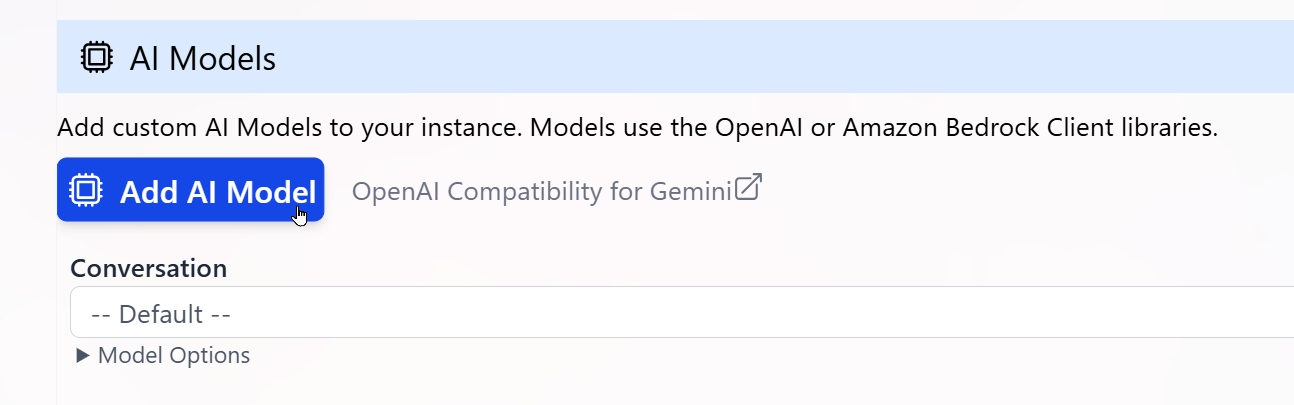 3. In the **Add AI Model** panel, enter the properties required to connect to your LLM:
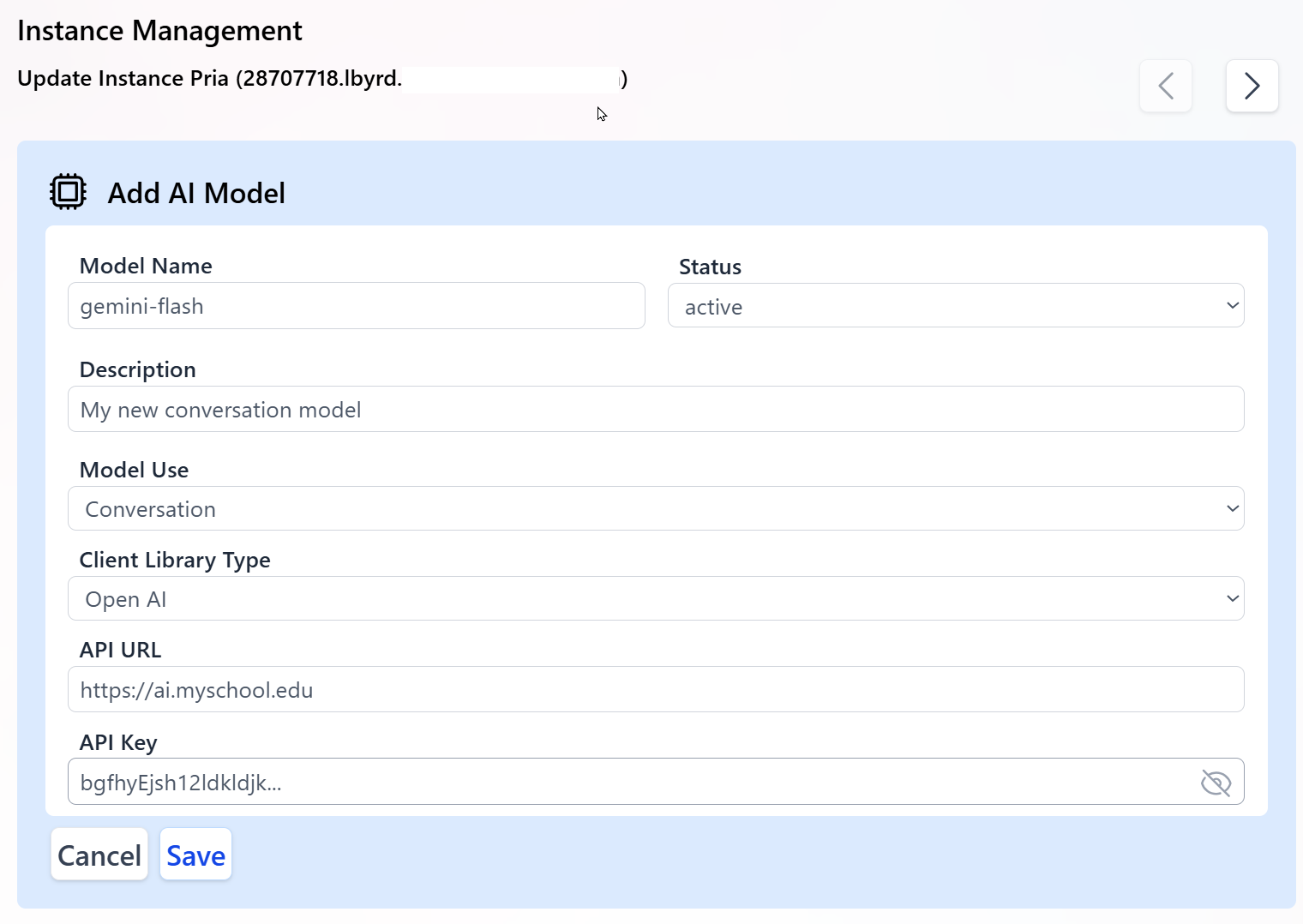 * **Model Name**
The exact model identifier published by your hosting platform.
This value is case sensitive and must match your provider's model name, for example:
`gemini-flash` or `projects/my-proj/locations/us/models/my-model`.
* **Status**
`Active` models are considered by the system for routing and selection.
`Inactive` models are ignored but kept in configuration.
* **Description**
Human-readable description of the LLM for admins and authors using this Digital Twin.
* **Model Use**
The specific usage for this model (for example, `Conversation`, `Image Generation`, `Document Summarization`).
This determines which internal calls will use this model.
* **Client Library Type**
Choose from:
* `Open AI` for OpenAI-compatible endpoints (including many custom or Vertex AI gateways exposing an OpenAI-style API).
* `Bedrock` for Amazon Bedrock-hosted models.
Most Gemini-based models connected through an OpenAI-compatible proxy should use `Open AI`.
* **API URL**
The base public URL of your model endpoint, for example:
`https://ai.my-school.edu` or your Bedrock-compatible endpoint.
Typically, the model name or ID is appended to this base URL when interacting with the LLM.
* **API Key**
The secret key used to authenticate requests to your endpoint.
Keep this key secure and confidential; rotate it periodically for security.
4. Click **Save** to register the new custom AI model.
* **Model Name**
The exact model identifier published by your hosting platform.
This value is case sensitive and must match your provider's model name, for example:
`gemini-flash` or `projects/my-proj/locations/us/models/my-model`.
* **Status**
`Active` models are considered by the system for routing and selection.
`Inactive` models are ignored but kept in configuration.
* **Description**
Human-readable description of the LLM for admins and authors using this Digital Twin.
* **Model Use**
The specific usage for this model (for example, `Conversation`, `Image Generation`, `Document Summarization`).
This determines which internal calls will use this model.
* **Client Library Type**
Choose from:
* `Open AI` for OpenAI-compatible endpoints (including many custom or Vertex AI gateways exposing an OpenAI-style API).
* `Bedrock` for Amazon Bedrock-hosted models.
Most Gemini-based models connected through an OpenAI-compatible proxy should use `Open AI`.
* **API URL**
The base public URL of your model endpoint, for example:
`https://ai.my-school.edu` or your Bedrock-compatible endpoint.
Typically, the model name or ID is appended to this base URL when interacting with the LLM.
* **API Key**
The secret key used to authenticate requests to your endpoint.
Keep this key secure and confidential; rotate it periodically for security.
4. Click **Save** to register the new custom AI model.
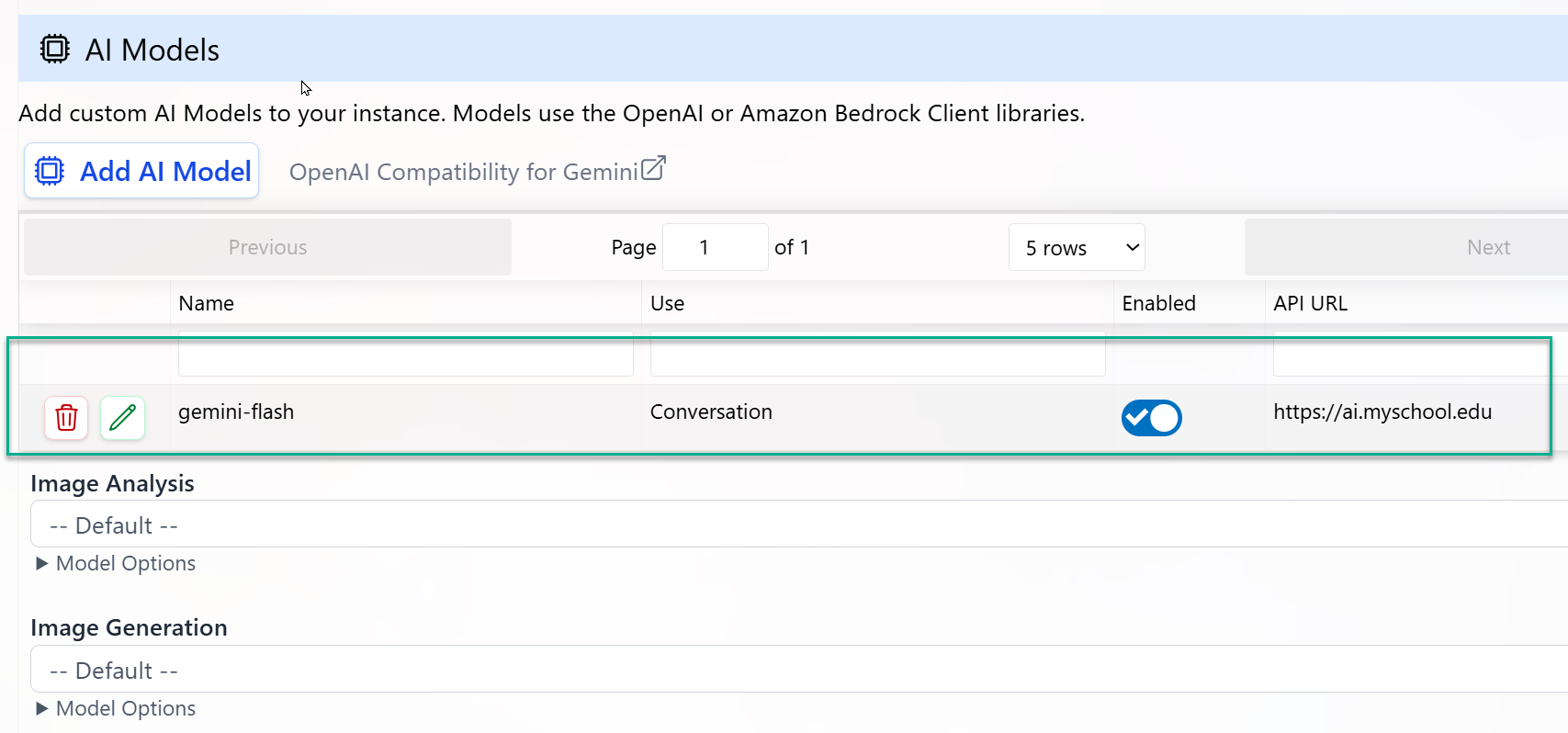 Once saved:
* The model appears in the list of custom AI models.
* For its configured **Model Use**, it will replace the platform default model.
* All conversations or tasks mapped to that **Model Use** will start using your custom model without any client-side code changes.
Use a non-production Digital Twin first to validate latency, cost, and behavior of your custom model before assigning it to high-traffic or mission-critical usages.
## End-to-End Workflow
Go to **Configuration → Personalization and AI Models** and enter API keys and endpoints for each provider you plan to use (OpenAI-compatible, Bedrock, or custom gateways).
For each **Model Use** (Conversation, Image, Audio, etc.), select the preferred model from the list of available platform and custom models.
Use the **Test** or preview mode to run conversations against your updated configuration. Validate:
* Response quality
* Latency
* Tool and streaming support (for Conversation models)
Use Analytics to track token usage, latency, and error rates per model. Adjust your model selection or routing preferences to balance performance and cost.
Once validated, deploy your Digital Twin to users through LMS integration (e.g., Canvas), Web SDK, or REST APIs—no additional code changes required when switching models.
Repeat the configuration setup for any additional twins so they can connect to the same custom LLM
Need help choosing models or configuring BYOM?
Praxis AI supports multi-LLM orchestration and can route across OpenAI, Anthropic, Amazon, Google, Mistral, xAI, Stability AI (media), and your own hosted models in a single Digital Twin configuration.
## Related
* [Personalization](/mdx/admin-guide/personalization) — Pick a model per Model Use for each Digital Twin
* [Configuration](/mdx/admin-guide/configuration) — Bring Your Own Key for each provider
* [Knowledge & RAG Configuration](/mdx/admin-guide/knowledge-rag-config) — Embeddings selection, chunking, KAG analysis model
* [Content Moderation](/mdx/admin-guide/moderation) — Moderation model selection and threshold tuning
* [Realtime Voice & Avatars](/mdx/admin-guide/realtime-voice) — Realtime model selection per provider
* [Chat Completions Integration](/mdx/integrations/chat-completions/introduction) — Per-endpoint model override for inbound API requests
Once saved:
* The model appears in the list of custom AI models.
* For its configured **Model Use**, it will replace the platform default model.
* All conversations or tasks mapped to that **Model Use** will start using your custom model without any client-side code changes.
Use a non-production Digital Twin first to validate latency, cost, and behavior of your custom model before assigning it to high-traffic or mission-critical usages.
## End-to-End Workflow
Go to **Configuration → Personalization and AI Models** and enter API keys and endpoints for each provider you plan to use (OpenAI-compatible, Bedrock, or custom gateways).
For each **Model Use** (Conversation, Image, Audio, etc.), select the preferred model from the list of available platform and custom models.
Use the **Test** or preview mode to run conversations against your updated configuration. Validate:
* Response quality
* Latency
* Tool and streaming support (for Conversation models)
Use Analytics to track token usage, latency, and error rates per model. Adjust your model selection or routing preferences to balance performance and cost.
Once validated, deploy your Digital Twin to users through LMS integration (e.g., Canvas), Web SDK, or REST APIs—no additional code changes required when switching models.
Repeat the configuration setup for any additional twins so they can connect to the same custom LLM
Need help choosing models or configuring BYOM?
Praxis AI supports multi-LLM orchestration and can route across OpenAI, Anthropic, Amazon, Google, Mistral, xAI, Stability AI (media), and your own hosted models in a single Digital Twin configuration.
## Related
* [Personalization](/mdx/admin-guide/personalization) — Pick a model per Model Use for each Digital Twin
* [Configuration](/mdx/admin-guide/configuration) — Bring Your Own Key for each provider
* [Knowledge & RAG Configuration](/mdx/admin-guide/knowledge-rag-config) — Embeddings selection, chunking, KAG analysis model
* [Content Moderation](/mdx/admin-guide/moderation) — Moderation model selection and threshold tuning
* [Realtime Voice & Avatars](/mdx/admin-guide/realtime-voice) — Realtime model selection per provider
* [Chat Completions Integration](/mdx/integrations/chat-completions/introduction) — Per-endpoint model override for inbound API requests