> ## Documentation Index
> Fetch the complete documentation index at: https://docs.praxis-ai.com/llms.txt
> Use this file to discover all available pages before exploring further.
# Histories
> Inspect every conversation users have had with your Digital Twin — for audit, debugging, compliance, and analytics.
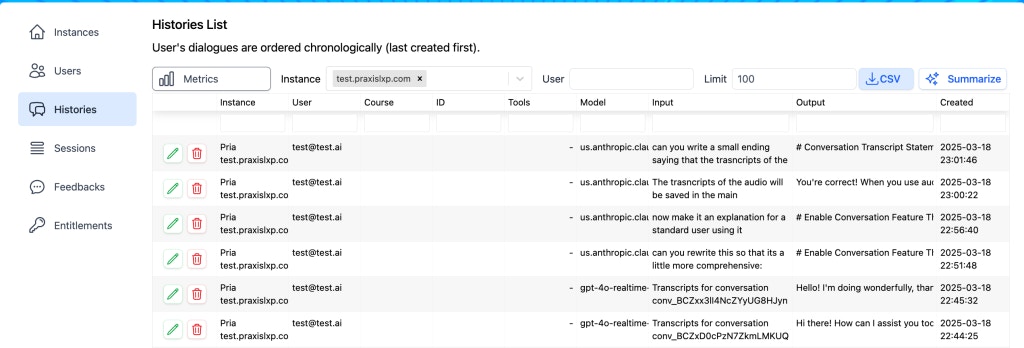
The **Histories** page is the complete log of every conversation users have had with your Digital Twin. It is what you reach for when answering questions like "What did the model actually say to this student?", "Why are we burning more tokens this week than last?", or "Show me every conversation that touched topic X."
 ## Overview
Every user message, every Pria response, every tool call, and every retrieval source used to ground a response is captured as a **History** record. Records are tied to the user, the instance, the [assistant](/mdx/admin-guide/assistants) (when one was used), the model that produced the response, and a timestamp. Together they form an append-only conversation log that powers:
* **Audit** — answer "who said what, when" for FERPA / GDPR access requests
* **Debugging** — reproduce a bad response by reading the exact context the model received
* **Analytics** — top users, most-frequent topics, model splits, error patterns
* **Quality work** — combined with [Feedback](/mdx/admin-guide/feedback), histories close the loop on what to improve
## Filtering and search
The filter bar at the top narrows the list. All filters compose; selections persist across pagination so you can sweep a large window without losing your place.
| Filter | Description |
| --------------------- | --------------------------------------------------------------------------------------- |
| **Instance Selector** | Show conversations for a specific Digital Twin instance |
| **Account** | When you administer multiple instances, scope to a whole account at once |
| **User Search** | Find conversations for a specific user by name or email |
| **Account Type** | Show conversations from regular `user` accounts or `admin` accounts |
| **Date Range** | Last day, week, month, or custom range |
| **Model** | Filter to a single model (useful when investigating a regression after a model change) |
| **Assistant** | Show only conversations routed to a specific [Assistant](/mdx/admin-guide/assistants) |
| **Keyword search** | Match on conversation content — find every conversation that mentioned a topic |
| **Has feedback** | Show only conversations that have an attached [Feedback](/mdx/admin-guide/feedback) row |
Combining filters is where the page earns its keep: "all conversations on Instance X with Model Y over the last 7 days that have a thumbs-down" is one filter combination away from a clean list of regression candidates.
## Drilling into a conversation
Click the green pencil button on any row to open the conversation viewer:
## Overview
Every user message, every Pria response, every tool call, and every retrieval source used to ground a response is captured as a **History** record. Records are tied to the user, the instance, the [assistant](/mdx/admin-guide/assistants) (when one was used), the model that produced the response, and a timestamp. Together they form an append-only conversation log that powers:
* **Audit** — answer "who said what, when" for FERPA / GDPR access requests
* **Debugging** — reproduce a bad response by reading the exact context the model received
* **Analytics** — top users, most-frequent topics, model splits, error patterns
* **Quality work** — combined with [Feedback](/mdx/admin-guide/feedback), histories close the loop on what to improve
## Filtering and search
The filter bar at the top narrows the list. All filters compose; selections persist across pagination so you can sweep a large window without losing your place.
| Filter | Description |
| --------------------- | --------------------------------------------------------------------------------------- |
| **Instance Selector** | Show conversations for a specific Digital Twin instance |
| **Account** | When you administer multiple instances, scope to a whole account at once |
| **User Search** | Find conversations for a specific user by name or email |
| **Account Type** | Show conversations from regular `user` accounts or `admin` accounts |
| **Date Range** | Last day, week, month, or custom range |
| **Model** | Filter to a single model (useful when investigating a regression after a model change) |
| **Assistant** | Show only conversations routed to a specific [Assistant](/mdx/admin-guide/assistants) |
| **Keyword search** | Match on conversation content — find every conversation that mentioned a topic |
| **Has feedback** | Show only conversations that have an attached [Feedback](/mdx/admin-guide/feedback) row |
Combining filters is where the page earns its keep: "all conversations on Instance X with Model Y over the last 7 days that have a thumbs-down" is one filter combination away from a clean list of regression candidates.
## Drilling into a conversation
Click the green pencil button on any row to open the conversation viewer:
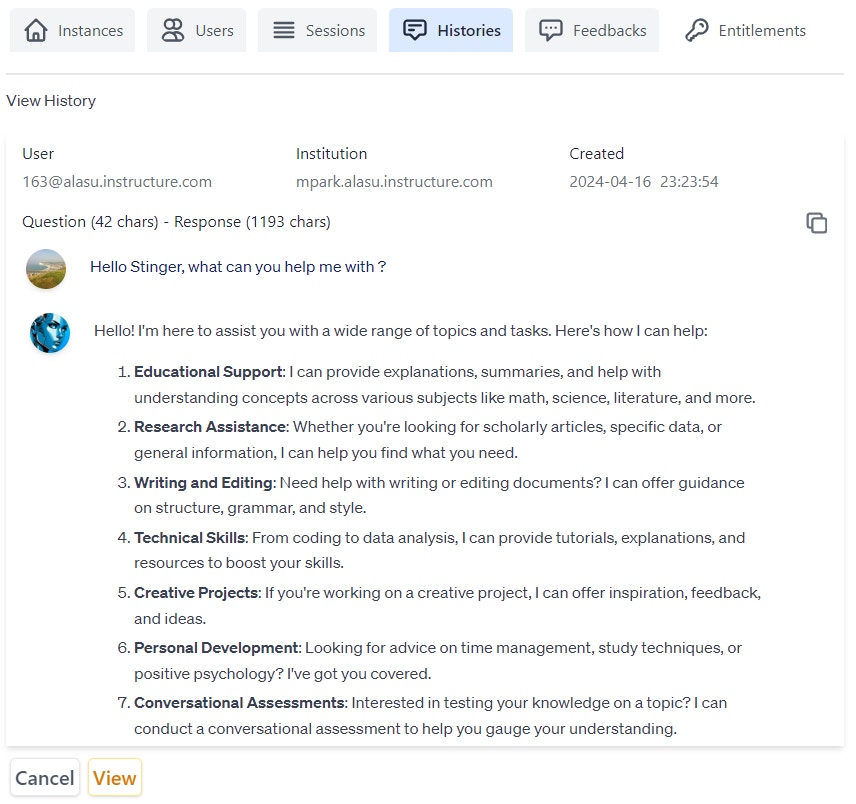 The viewer shows the full message thread end-to-end:
* **User turns** — exactly what the user typed (or said, in voice mode)
* **AI responses** — the model's reply, including any in-line citations
* **Tool calls** — when the model used a tool (RAG retrieval, web search, image generation, etc.), the call and its result are visible inline
* **Retrieval sources** — when grounding was used, the source documents and the specific chunks that scored highest are listed; click through to the original file in [Files](/mdx/admin-guide/knowledge-rag-config)
* **Model metadata** — which model produced each response, the token counts, and any reasoning effort applied
For voice conversations, the transcript is captured in text form so the conversation viewer remains a single, searchable surface across all modes.
## Summarize
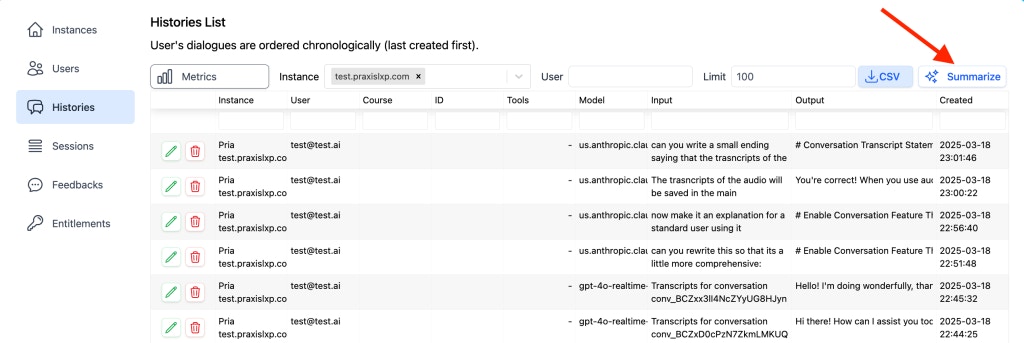
Pria can summarize a slice of conversation history into key discussion points, prevalent topics, and engagement patterns. Select the instance, narrow the date range, then click **Summarize** at the bottom of the page.
The viewer shows the full message thread end-to-end:
* **User turns** — exactly what the user typed (or said, in voice mode)
* **AI responses** — the model's reply, including any in-line citations
* **Tool calls** — when the model used a tool (RAG retrieval, web search, image generation, etc.), the call and its result are visible inline
* **Retrieval sources** — when grounding was used, the source documents and the specific chunks that scored highest are listed; click through to the original file in [Files](/mdx/admin-guide/knowledge-rag-config)
* **Model metadata** — which model produced each response, the token counts, and any reasoning effort applied
For voice conversations, the transcript is captured in text form so the conversation viewer remains a single, searchable surface across all modes.
## Summarize
Pria can summarize a slice of conversation history into key discussion points, prevalent topics, and engagement patterns. Select the instance, narrow the date range, then click **Summarize** at the bottom of the page.
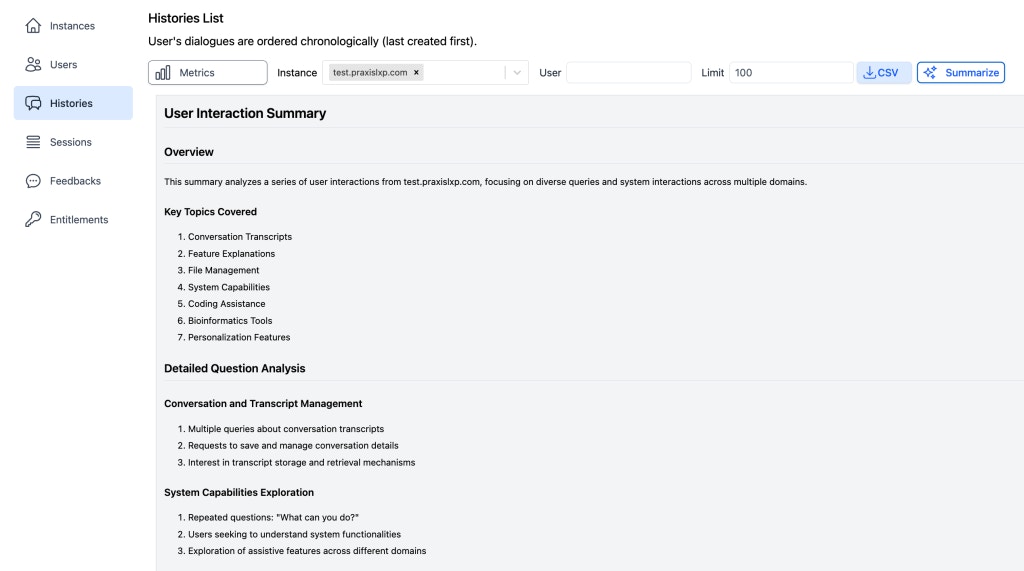
 The summary surfaces:
* The most-discussed topics across the selected window
* Common questions that recurred across users
* Apparent gaps where users asked things the Digital Twin could not confidently answer
The summary surfaces:
* The most-discussed topics across the selected window
* Common questions that recurred across users
* Apparent gaps where users asked things the Digital Twin could not confidently answer
 Use this regularly (weekly is a good cadence) to spot drift early — a topic that keeps recurring is often a sign that the [Instructions](/mdx/admin-guide/configuration) or [Files](/mdx/admin-guide/knowledge-rag-config) need an addition.
## Metrics
The Metrics tab gives quantitative cuts on the same underlying data: active users, total conversations, average conversation length, model usage split, and trendlines over time.
Use this regularly (weekly is a good cadence) to spot drift early — a topic that keeps recurring is often a sign that the [Instructions](/mdx/admin-guide/configuration) or [Files](/mdx/admin-guide/knowledge-rag-config) need an addition.
## Metrics
The Metrics tab gives quantitative cuts on the same underlying data: active users, total conversations, average conversation length, model usage split, and trendlines over time.
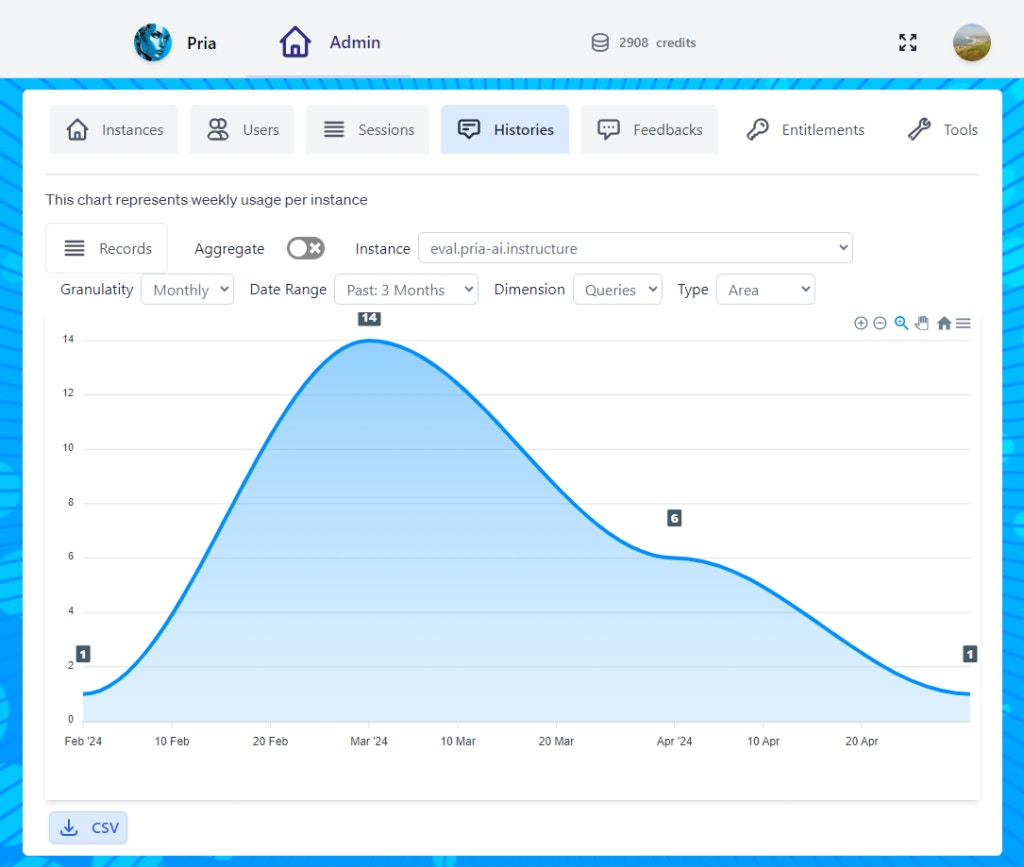 * **Filter by date range** to compare week-over-week or term-over-term
* **Drill into a single user** to understand individual engagement
* **Export to CSV** for sharing in slide decks or external reports
## Exporting
Three flavours of export, each useful for a different purpose:
* **Single conversation** — from the conversation viewer, copy the full thread as text or download as JSON. Best for sharing one specific exchange with a colleague or attaching to an incident ticket.
* **Bulk export** — from the filtered list, export the current view as CSV. Each row is one conversation with summary metadata (user, instance, model, message count, created at). Best for spreadsheets and downstream analytics pipelines.
* **JSON export** — for richer downstream processing (e.g. classification or sentiment work), JSON preserves the full message tree including tool calls and retrieval sources. Available from the conversation viewer.
For very large exports across multiple instances, contact the Praxis AI team at [humans@praxis-ai.com](mailto:humans@praxis-ai.com) to request a database-level dump.
## Compaction
Long conversations would otherwise grow without bound and burn tokens on every turn re-sending the entire history. Pria addresses this with **compaction**:
* Once a conversation grows past a threshold, an LLM summarizes the older turns into a compact representation
* Subsequent turns send the compact summary plus the most recent messages, instead of the entire raw transcript
* The **original messages are retained** in the Histories database — compaction is a token-saving runtime optimization, not a retention policy
* The compacted summary is cached per user, per instance, per course so the work isn't redone every turn
In the conversation viewer, compacted regions are clearly marked. Click to expand and read the original turns — auditors and FERPA requests always see the raw conversation, never just the summary.
The compaction cache itself is purged after 30 days of inactivity, so a conversation reopened months later will be re-compacted on its next active turn. The underlying messages remain intact.
## Privacy and retention
Histories contain personal information by their nature — user identity, what they asked, what they were told.
* **Encrypted at rest.** Database storage is encrypted; access is governed by Pria's authentication and entitlement layers.
* **Admin-only access.** Only users with the `histories.list` entitlement can view conversations; the `histories.delete` entitlement is required to soft-delete records.
* **FERPA considerations.** When your Digital Twin operates in an educational context, treat histories as covered educational records — restrict admin entitlements accordingly, and use the export to satisfy student access requests.
* **GDPR right-to-access.** Filter to the user's email, export, and deliver. The export is the lawful response.
* **Right-to-erasure.** Soft-delete (status → `deleted`) removes the conversation from the default view. For hard deletion of conversations to fulfil a confirmed erasure request, contact the Praxis AI team at [humans@praxis-ai.com](mailto:humans@praxis-ai.com).
Retention windows vary by deployment — see your published [Privacy & Educational Consent](/mdx/introduction/privacy-edu-consent) policy.
## Using histories for audit
Two common audit flows:
1. **FERPA / GDPR access request.** Filter by the user's email across all dates, export as CSV (or JSON for full fidelity), and deliver. The export is itself the access response.
2. **Incident review.** When a user reports that the Digital Twin said something incorrect or harmful, get the timestamp from the user, filter by user + time window, and open the exact conversation. The viewer shows the model, the retrieval sources, and any tool calls — enough to reproduce and root-cause.
For **security** incidents — misuse attempts, suspicious behaviour patterns — Pria surfaces them automatically in [Praxis Shield](/mdx/admin-guide/praxis-shield), where you can triage by severity and status. Histories remains the place to read the full surrounding conversation.
Keep an internal log of audit access (date, requester, scope) so the audit trail itself is auditable.
## Common queries
A few combinations you'll reach for repeatedly:
* **Top users this week** — sort by conversation count; useful for identifying power users to interview
* **Most-frequent topics** — combine the Summarize action with a tight date range
* **Model split** — Metrics tab, group by model; spot whether one model dominates and whether you want it to
* **Error patterns** — keyword-search for "I don't know", "I can't help", or "I'm not sure" to find places the Digital Twin punted; correlate with the [Files](/mdx/admin-guide/knowledge-rag-config) it should have grounded against
* **First-turn confusion** — short conversations (1–2 turns) that ended without follow-up; often signals onboarding or Instructions gaps
## Linking to Feedback for the qualitative view
[Histories](/mdx/admin-guide/histories) tells you *what was said*. [Feedback](/mdx/admin-guide/feedback) tells you *what the user thought of it*. Every Feedback row links back to the originating message; every History row with attached feedback shows the rating inline. Use them together — a thumbs-down with a comment plus the surrounding conversation gives you the full story.
## Related
* [Feedback](/mdx/admin-guide/feedback) — the qualitative companion to this quantitative log
* [Sessions](/mdx/admin-guide/sessions) — who was signed in when a conversation happened
* [Moderation](/mdx/admin-guide/moderation) — content moderation policies that may have intercepted parts of a conversation
* [Praxis Shield](/mdx/admin-guide/praxis-shield) — automatic security-incident detection and triage across conversations
* [Privacy & Educational Consent](/mdx/introduction/privacy-edu-consent) — retention windows and access policies
* [Configuration](/mdx/admin-guide/configuration) — the Instructions and model settings that shaped every history record
* [Assistants](/mdx/admin-guide/assistants) — assistant routing visible in the conversation viewer
* [Files](/mdx/admin-guide/knowledge-rag-config) — the source files that retrieval pulled from
* [Entitlements](/mdx/admin-guide/entitlements) — `histories.list` / `histories.delete` permissions
* **Filter by date range** to compare week-over-week or term-over-term
* **Drill into a single user** to understand individual engagement
* **Export to CSV** for sharing in slide decks or external reports
## Exporting
Three flavours of export, each useful for a different purpose:
* **Single conversation** — from the conversation viewer, copy the full thread as text or download as JSON. Best for sharing one specific exchange with a colleague or attaching to an incident ticket.
* **Bulk export** — from the filtered list, export the current view as CSV. Each row is one conversation with summary metadata (user, instance, model, message count, created at). Best for spreadsheets and downstream analytics pipelines.
* **JSON export** — for richer downstream processing (e.g. classification or sentiment work), JSON preserves the full message tree including tool calls and retrieval sources. Available from the conversation viewer.
For very large exports across multiple instances, contact the Praxis AI team at [humans@praxis-ai.com](mailto:humans@praxis-ai.com) to request a database-level dump.
## Compaction
Long conversations would otherwise grow without bound and burn tokens on every turn re-sending the entire history. Pria addresses this with **compaction**:
* Once a conversation grows past a threshold, an LLM summarizes the older turns into a compact representation
* Subsequent turns send the compact summary plus the most recent messages, instead of the entire raw transcript
* The **original messages are retained** in the Histories database — compaction is a token-saving runtime optimization, not a retention policy
* The compacted summary is cached per user, per instance, per course so the work isn't redone every turn
In the conversation viewer, compacted regions are clearly marked. Click to expand and read the original turns — auditors and FERPA requests always see the raw conversation, never just the summary.
The compaction cache itself is purged after 30 days of inactivity, so a conversation reopened months later will be re-compacted on its next active turn. The underlying messages remain intact.
## Privacy and retention
Histories contain personal information by their nature — user identity, what they asked, what they were told.
* **Encrypted at rest.** Database storage is encrypted; access is governed by Pria's authentication and entitlement layers.
* **Admin-only access.** Only users with the `histories.list` entitlement can view conversations; the `histories.delete` entitlement is required to soft-delete records.
* **FERPA considerations.** When your Digital Twin operates in an educational context, treat histories as covered educational records — restrict admin entitlements accordingly, and use the export to satisfy student access requests.
* **GDPR right-to-access.** Filter to the user's email, export, and deliver. The export is the lawful response.
* **Right-to-erasure.** Soft-delete (status → `deleted`) removes the conversation from the default view. For hard deletion of conversations to fulfil a confirmed erasure request, contact the Praxis AI team at [humans@praxis-ai.com](mailto:humans@praxis-ai.com).
Retention windows vary by deployment — see your published [Privacy & Educational Consent](/mdx/introduction/privacy-edu-consent) policy.
## Using histories for audit
Two common audit flows:
1. **FERPA / GDPR access request.** Filter by the user's email across all dates, export as CSV (or JSON for full fidelity), and deliver. The export is itself the access response.
2. **Incident review.** When a user reports that the Digital Twin said something incorrect or harmful, get the timestamp from the user, filter by user + time window, and open the exact conversation. The viewer shows the model, the retrieval sources, and any tool calls — enough to reproduce and root-cause.
For **security** incidents — misuse attempts, suspicious behaviour patterns — Pria surfaces them automatically in [Praxis Shield](/mdx/admin-guide/praxis-shield), where you can triage by severity and status. Histories remains the place to read the full surrounding conversation.
Keep an internal log of audit access (date, requester, scope) so the audit trail itself is auditable.
## Common queries
A few combinations you'll reach for repeatedly:
* **Top users this week** — sort by conversation count; useful for identifying power users to interview
* **Most-frequent topics** — combine the Summarize action with a tight date range
* **Model split** — Metrics tab, group by model; spot whether one model dominates and whether you want it to
* **Error patterns** — keyword-search for "I don't know", "I can't help", or "I'm not sure" to find places the Digital Twin punted; correlate with the [Files](/mdx/admin-guide/knowledge-rag-config) it should have grounded against
* **First-turn confusion** — short conversations (1–2 turns) that ended without follow-up; often signals onboarding or Instructions gaps
## Linking to Feedback for the qualitative view
[Histories](/mdx/admin-guide/histories) tells you *what was said*. [Feedback](/mdx/admin-guide/feedback) tells you *what the user thought of it*. Every Feedback row links back to the originating message; every History row with attached feedback shows the rating inline. Use them together — a thumbs-down with a comment plus the surrounding conversation gives you the full story.
## Related
* [Feedback](/mdx/admin-guide/feedback) — the qualitative companion to this quantitative log
* [Sessions](/mdx/admin-guide/sessions) — who was signed in when a conversation happened
* [Moderation](/mdx/admin-guide/moderation) — content moderation policies that may have intercepted parts of a conversation
* [Praxis Shield](/mdx/admin-guide/praxis-shield) — automatic security-incident detection and triage across conversations
* [Privacy & Educational Consent](/mdx/introduction/privacy-edu-consent) — retention windows and access policies
* [Configuration](/mdx/admin-guide/configuration) — the Instructions and model settings that shaped every history record
* [Assistants](/mdx/admin-guide/assistants) — assistant routing visible in the conversation viewer
* [Files](/mdx/admin-guide/knowledge-rag-config) — the source files that retrieval pulled from
* [Entitlements](/mdx/admin-guide/entitlements) — `histories.list` / `histories.delete` permissions