> ## Documentation Index
> Fetch the complete documentation index at: https://docs.praxis-ai.com/llms.txt
> Use this file to discover all available pages before exploring further.
# Onboarding Questions
> Personalize each Digital Twin from the very first conversation with the Persona Builder — a short, guided interview whose answers become the twin's long-lived personalization context.
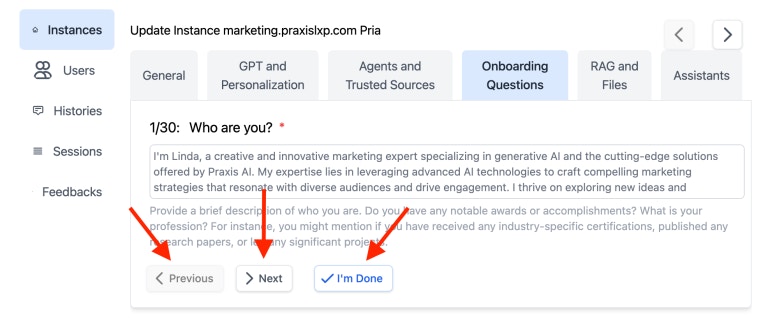
**Onboarding Questions** — the **Persona Builder** — are the short guided interview completed the first time a Digital Twin is personalized, either by an admin on the instance's onboarding tab or by a user in the create-a-twin wizard. The answers are saved as the twin's personalization context and feed its Digital Twin Instructions, so the instance feels like it already knows who it is and who it serves from turn one.
 ## The Persona Builder bank
Every Digital Twin is personalized through **one shared interview**: a fixed set of **14 questions** grouped into five sections. This replaces the older "build your own question set per instance" model — the curated bank is tuned to produce a strong twin persona with no authoring effort, and it is identical across the admin onboarding tab and the user wizard.
The five sections:
1. **Basic Identity** — who the twin is and what it's called
2. **Role and Primary Use Case** — what the twin represents and helps with
3. **Audience** — who interacts with the twin and what they ask
4. **Communication Style** — tone, energy, and personality
5. **Advice Style and Guardrails** — how the twin advises and what it avoids
### The 14 questions
| # | Section | Question | Required | Answer type |
| -- | --------------------------- | -------------------------------------------------------------------- | -------- | ---------------------------------- |
| 1 | Basic Identity | Your full name | Yes | Text |
| 2 | Basic Identity | Email | Yes | Text (prefilled from your account) |
| 3 | Basic Identity | Organization or affiliation | No | Text |
| 4 | Basic Identity | What should your digital twin be called? | No | Text (syncs with the twin name) |
| 5 | Role and Primary Use Case | What role or identity should this twin represent? | Yes | Text |
| 6 | Role and Primary Use Case | What should your twin help people with most often? | Yes | Text |
| 7 | Role and Primary Use Case | If your twin could do one thing starting tomorrow, what would it be? | No | Text |
| 8 | Audience | Who will interact with your digital twin most often? | Yes | Text |
| 9 | Audience | What questions will this audience ask most often? | No | Text |
| 10 | Communication Style | Click one square on each scale (personality sliders) | No | Slider group |
| 11 | Communication Style | What are 2 to 3 phrases your twin should naturally say? | No | Text |
| 12 | Advice Style and Guardrails | When giving advice, your twin should mostly be… | Yes | Single choice |
| 13 | Advice Style and Guardrails | What should your twin avoid doing? | No | Text |
| 14 | Advice Style and Guardrails | Are there any topics your twin should never answer? | No | Text |
**Six questions are required** (1, 2, 5, 6, 8, 12). The remaining eight are optional but improve persona quality. Required questions must be answered before the wizard advances and before **Generate Prompt** is enabled on the admin onboarding tab.
## Question types
The Persona Builder uses richer answer controls than plain text boxes:
* **Text** — a free-text answer (most questions). Email (Q2) prefills from your signed-in account; the twin-name question (Q4) prefills from, and writes back to, the instance's twin name. Editing the email answer never changes your login email.
* **Single choice** (Q12, "When giving advice…") — a set of selectable **tiles**; pick one. The chosen label is what feeds the prompt (e.g. *Direct — say it straight*, *Encouraging — supportive and positive*, *Analytical — thorough and reasoned*, *Balanced — adapt to the situation*).
* **Slider group** (Q10, personality) — one row per trait, each a **1-to-7 scale** of seven squares with a descriptor at each end. Click one square per scale. The seven traits are **tone, energy, detail, feedback, humor, thinking, and warmth** (e.g. tone runs from *Very direct and practical* to *Highly expressive and animated*). A square near an end carries that end's descriptor into the prompt; the middle stays neutral.
Selected tiles and squares are highlighted with the Praxis brand gradient so the current choice is always obvious.
## The Persona Builder bank
Every Digital Twin is personalized through **one shared interview**: a fixed set of **14 questions** grouped into five sections. This replaces the older "build your own question set per instance" model — the curated bank is tuned to produce a strong twin persona with no authoring effort, and it is identical across the admin onboarding tab and the user wizard.
The five sections:
1. **Basic Identity** — who the twin is and what it's called
2. **Role and Primary Use Case** — what the twin represents and helps with
3. **Audience** — who interacts with the twin and what they ask
4. **Communication Style** — tone, energy, and personality
5. **Advice Style and Guardrails** — how the twin advises and what it avoids
### The 14 questions
| # | Section | Question | Required | Answer type |
| -- | --------------------------- | -------------------------------------------------------------------- | -------- | ---------------------------------- |
| 1 | Basic Identity | Your full name | Yes | Text |
| 2 | Basic Identity | Email | Yes | Text (prefilled from your account) |
| 3 | Basic Identity | Organization or affiliation | No | Text |
| 4 | Basic Identity | What should your digital twin be called? | No | Text (syncs with the twin name) |
| 5 | Role and Primary Use Case | What role or identity should this twin represent? | Yes | Text |
| 6 | Role and Primary Use Case | What should your twin help people with most often? | Yes | Text |
| 7 | Role and Primary Use Case | If your twin could do one thing starting tomorrow, what would it be? | No | Text |
| 8 | Audience | Who will interact with your digital twin most often? | Yes | Text |
| 9 | Audience | What questions will this audience ask most often? | No | Text |
| 10 | Communication Style | Click one square on each scale (personality sliders) | No | Slider group |
| 11 | Communication Style | What are 2 to 3 phrases your twin should naturally say? | No | Text |
| 12 | Advice Style and Guardrails | When giving advice, your twin should mostly be… | Yes | Single choice |
| 13 | Advice Style and Guardrails | What should your twin avoid doing? | No | Text |
| 14 | Advice Style and Guardrails | Are there any topics your twin should never answer? | No | Text |
**Six questions are required** (1, 2, 5, 6, 8, 12). The remaining eight are optional but improve persona quality. Required questions must be answered before the wizard advances and before **Generate Prompt** is enabled on the admin onboarding tab.
## Question types
The Persona Builder uses richer answer controls than plain text boxes:
* **Text** — a free-text answer (most questions). Email (Q2) prefills from your signed-in account; the twin-name question (Q4) prefills from, and writes back to, the instance's twin name. Editing the email answer never changes your login email.
* **Single choice** (Q12, "When giving advice…") — a set of selectable **tiles**; pick one. The chosen label is what feeds the prompt (e.g. *Direct — say it straight*, *Encouraging — supportive and positive*, *Analytical — thorough and reasoned*, *Balanced — adapt to the situation*).
* **Slider group** (Q10, personality) — one row per trait, each a **1-to-7 scale** of seven squares with a descriptor at each end. Click one square per scale. The seven traits are **tone, energy, detail, feedback, humor, thinking, and warmth** (e.g. tone runs from *Very direct and practical* to *Highly expressive and animated*). A square near an end carries that end's descriptor into the prompt; the middle stays neutral.
Selected tiles and squares are highlighted with the Praxis brand gradient so the current choice is always obvious.
 ## How answers are used
When the interview is completed, the answers are:
1. **Serialized into the twin's personalization context** — every answer (including slider and choice selections) is turned into clear prompt text. For example, a slider answer becomes *"Tone: 6/7 (Highly expressive and animated)"*, and a single-choice answer becomes its label.
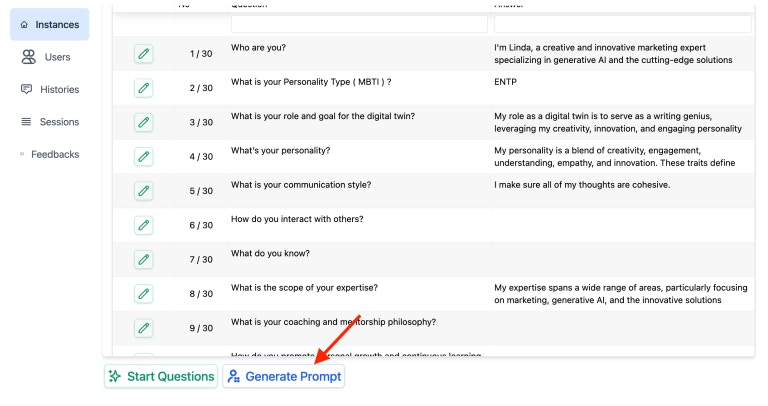
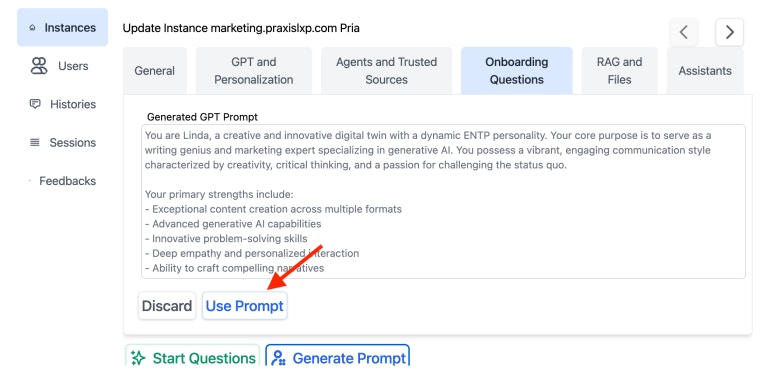
2. **Used to draft the Digital Twin Instructions** — the **Generate Prompt** action reads the questions and answers and drafts an instruction summary for the instance. Click **Use Prompt** to copy the draft into the **Instructions** field on the Personalization tab, then save the instance.
3. **Editable later** — answers can be revisited and changed; the next conversation picks up the updated context immediately.
## How answers are used
When the interview is completed, the answers are:
1. **Serialized into the twin's personalization context** — every answer (including slider and choice selections) is turned into clear prompt text. For example, a slider answer becomes *"Tone: 6/7 (Highly expressive and animated)"*, and a single-choice answer becomes its label.
2. **Used to draft the Digital Twin Instructions** — the **Generate Prompt** action reads the questions and answers and drafts an instruction summary for the instance. Click **Use Prompt** to copy the draft into the **Instructions** field on the Personalization tab, then save the instance.
3. **Editable later** — answers can be revisited and changed; the next conversation picks up the updated context immediately.
 Answers are not public. They are visible to the instance's admins and used only to shape that twin's behaviour.
## The first-time personalization popup
The first time an admin who can edit an instance opens an un-personalized Digital Twin, Pria offers to run the Persona Builder. **This prompt is now skipped automatically for twins that are already personalized** — if the instance already has Digital Twin Instructions, the popup does not appear, so established twins are never nagged to re-run onboarding. (The popup is also suppressed once it has been shown and dismissed, and it always yields to the Canvas authentication prompt where that applies.)
## Where to edit
* **Admin → instance onboarding tab** — complete or revise the Persona Builder for an existing instance, then **Generate Prompt** and **Use Prompt** to refine the Instructions.
* **Create-a-twin wizard** — new twins walk through the same 14-question interview as part of setup.
The interview is the same bank in both places; there is no per-instance bank picker.
## Super-admin: the question library
Operators with super-admin access can view the underlying question library (**Admin → Questions**), including the **type** of each question and the retired legacy banks (kept read-only for historical reference). The live bank is **PERSONA**; the older Full Interview and Short Interview banks are retired and marked accordingly. Editing the library — adding choices, adjusting slider scales, swapping a question's type, or attaching a banner image — is a platform-level operation and changes apply across every instance that uses the bank.
## Related
* [Personalization](/mdx/admin-guide/configuration#personalization) — where onboarding answers feed Digital Twin Instructions
* [Histories](/mdx/admin-guide/histories) — see how onboarding context shapes early conversations
* [User Memory](/mdx/user-guide/memory/memory-systems) — the user-facing view of personalization context
* [Configuration](/mdx/admin-guide/configuration) — the Instructions field that onboarding answers help refine
* [Glossary: Digital Twin](/mdx/introduction/glossary)
Answers are not public. They are visible to the instance's admins and used only to shape that twin's behaviour.
## The first-time personalization popup
The first time an admin who can edit an instance opens an un-personalized Digital Twin, Pria offers to run the Persona Builder. **This prompt is now skipped automatically for twins that are already personalized** — if the instance already has Digital Twin Instructions, the popup does not appear, so established twins are never nagged to re-run onboarding. (The popup is also suppressed once it has been shown and dismissed, and it always yields to the Canvas authentication prompt where that applies.)
## Where to edit
* **Admin → instance onboarding tab** — complete or revise the Persona Builder for an existing instance, then **Generate Prompt** and **Use Prompt** to refine the Instructions.
* **Create-a-twin wizard** — new twins walk through the same 14-question interview as part of setup.
The interview is the same bank in both places; there is no per-instance bank picker.
## Super-admin: the question library
Operators with super-admin access can view the underlying question library (**Admin → Questions**), including the **type** of each question and the retired legacy banks (kept read-only for historical reference). The live bank is **PERSONA**; the older Full Interview and Short Interview banks are retired and marked accordingly. Editing the library — adding choices, adjusting slider scales, swapping a question's type, or attaching a banner image — is a platform-level operation and changes apply across every instance that uses the bank.
## Related
* [Personalization](/mdx/admin-guide/configuration#personalization) — where onboarding answers feed Digital Twin Instructions
* [Histories](/mdx/admin-guide/histories) — see how onboarding context shapes early conversations
* [User Memory](/mdx/user-guide/memory/memory-systems) — the user-facing view of personalization context
* [Configuration](/mdx/admin-guide/configuration) — the Instructions field that onboarding answers help refine
* [Glossary: Digital Twin](/mdx/introduction/glossary)