> ## Documentation Index
> Fetch the complete documentation index at: https://docs.praxis-ai.com/llms.txt
> Use this file to discover all available pages before exploring further.
# JavaScript
> Use the Javascript SDK to interact with your Digital Twin programatically from any Web Application.
## Client SDK
The JavaScript SDK is available as soon as you integrate your application with either the Web SDK or via Canvas Theme. It enables client-side automation with your Digital Twin—such as sending messages, listing favorites, and running assistant instructions.
To use the JavaScript SDK, your Digital Twin must be integrated into a web application using the Web SDK or injected into Canvas via Theme.
## Integration Options
Integrate your Digital Twin in one of these ways to access the SDK:
* **Web SDK:** Embed the Digital Twin directly in your web app by installing the Web SDK for easy setup, user management, and customization.
* **Canvas Theme:** Inject the Digital Twin into Canvas using the Theme for direct access to SDK features within the Canvas LMS.
Both methods offer secure, flexible options to maximize your Digital Twin’s functionality. Select the approach that best fits your environment.
## Global Window Object
When your Digital Twin is integrated, the `pria` object is injected directly onto the global window (DOM), making it the central access point for all Pria SDK API calls from anywhere in your application. This allows you to easily interact with Pria’s messaging, UI control, and event management methods without additional imports or setup—simply reference `window.pria`.
```javascript theme={null}
const pria = {
load: priasdk, // Initialize the Pria SDK and establish middleware connection
send: priaSend, // Send API requests/messages to Pria
subscribe: priaSubscribe, // Listen for Pria responses or callback events
unsubscribe: priaUnsubscribe, // Remove listeners or callbacks from Pria
setVisible: priaSetVisible, // Show or hide Pria entirely (removes from DOM view)
isVisible: priaIsVisible, // Check if Pria is currently visible
isDisplayed: priaIsDisplayed, // Check if Pria UI panel is expanded
display: priaDisplay, // Expand or collapse the Pria UI panel
destroy: priaDestroy, // Clean up and remove Pria from the page
priaObj: priaObj, // Backing property bag that contains current cached user identity
isReady: priaIsReady, // True when Pria is ready to receive messages
isConvoReady: priaIsConvoReady, // True when real-time voice (convo) mode is authorized
version: 1 // Indicates the current SDK version
}
```
> By being attached to the DOM, `pria` acts as your always-available gateway for secure and seamless integration with all Pria interfaces and backend services—enabling features like messaging, automation, and UI control from any context in your client-side code.
### Messaging Technology
Communication between your web application and the Praxis AI Middleware via the Web SDK is powered by [browser messaging](https://developer.mozilla.org/en-US/docs/Web/API/Window/postMessage), which securely enables cross-origin interactions between window objects, such as between a main application and an embedded iframe or pop-up. Requests are sent to the backend middleware server using the `pria.send()` API method, ensuring safe and reliable message delivery for seamless integration and robust application workflows.
### Voice (Convo Mode) in Embedded Contexts
When your Digital Twin uses voice conversations (Convo Mode) inside an iframe you control — including LMS embeds such as Canvas — the **host page's iframe must delegate microphone and audio permissions**, or the browser will hard-block voice regardless of what the user allows:
```html theme={null}
```
Without this, the in-app "Tap to start talking" screen still renders, but tapping surfaces a microphone-permission error instead of starting the conversation.
If the instance has **Start Convo mode on login** enabled, the embedded app raises its tap-to-start screen automatically after the SDK session begins. Host-page display options (such as `convoMode` in `displayOptions`) and explicit `convo.start` / `convo.stop` commands keep priority over that instance-level setting.
## Sending a Request
### Request Message
To make a request, simply compose a Javascript object containing the command and arguments like below:
```javascript theme={null}
const request = {
command: '',
...arguments
}
```
### Available Commands
| Command | Description | Parameters |
| -------------------- | ----------------------------------- | --------------------------- |
| `post.message` | Send text message to Pria | inputs: \[Array of strings] |
| `convo.start` | Start speech-to-speech conversation | None |
| `convo.stop` | Stop speech-to-speech conversation | None |
| `assistants.list` | Get available assistants | None |
| `favorites.list` | Get list of user's favorites | None |
| `conversations.list` | Get list of user's conversations | None |
### Sample Requests
Send a text message to your digital twin:
```javascript theme={null}
const request = {
command: 'post.message',
inputs: ['How are you?', 'Today is my birthday!']
}
pria.send(request)
```
Start speech-to-speech conversation:
```javascript theme={null}
const request = {
command: 'convo.start'
}
pria.send(request)
```
Stop conversation mode:
```javascript theme={null}
const request = {
command: 'convo.stop'
}
pria.send(request)
```
List Assistants:
```javascript theme={null}
const request = {
command: 'assistants.list'
}
pria.send(request)
```
List Conversations:
```javascript theme={null}
const request = {
command: 'conversations.list'
}
pria.send(request)
```
List Favorites:
```javascript theme={null}
const request = {
command: 'favorites.list'
}
pria.send(request)
```
### Error Handling
The `pria.send()` function may throw these errors:
* "Connect Pria first, then retry" - Pria is not properly initialized
* "Function requires valid JSON" - Invalid request format
* "Unauthorized" - Request unauthorized for user
## Receiving Responses
### Subscribe to Responses
To receive responses from Pria, you must first subscribe:
```javascript theme={null}
const handlePriaResponse = (response) => {
console.log('Received from Pria:', response)
// Process the response here
}
pria.subscribe(handlePriaResponse)
```
### Response Message
A response message from the Pria AI Middleware follows a clear and structured format to ensure consistent integration and robust client parsing. Each response includes standard fields that define its source, content, format, and compatibility.
```json theme={null}
{
"type": "pria-response",
"response": {
"command": "post.message",
"content": {} | "",
"isError": false,
"type": "object"
},
"version": 1
}
```
**Response Fields**
| Field | Type | Description |
| ------------------ | ------- | --------------------------------------------------------------------------------------------- |
| `type` | String | Always `"pria-response"`. This identifies the message as originating from Pria AI Middleware. |
| `response` | Object | Contains the actual payload and control attributes for the message. |
| `response.content` | Mixed | The content of the response—can be a String (error, status) or an Object (structured output). |
| `response.type` | String | Indicates the type of `content`. `"object"` for JavaScript objects, `"string"` otherwise. |
| `response.isError` | Boolean | `true` if the message represents an error, `false` otherwise. |
| `response.command` | String | Indicates the command handled (e.g., `post.message`, `convo.stop`). |
| `version` | Integer | The message version number for client compatibility management. |
**type**
The literal string constant `"pria-response"`. Use as a filter or discriminator in your message handling logic.
**response**
Top-level object that wraps all core response details from Pria AI Middleware.
| Subfield | Description |
| --------- | -------------------------------------------------------------------------------------------------------------------- |
| `content` | The main body of the response. Can be a JavaScript object (structured data) or a string (simple message or error). |
| `type` | Specifies the JavaScript type of `content`. Values are `"object"` (for JSON objects) or `"string"` (for plain text). |
| `isError` | Boolean signaling error (`true` for errors, `false` for normal responses). |
| `command` | String describing the executed command (e.g., `post.message`, `convo.start`, or `convo.stop`). |
**version**
Integer value indicating the version of the response structure. Used for ensuring compatibility with various client parsers.
Always check the `version` field to ensure your parser correctly supports all required fields and response shapes.
### Sample Responses
```json theme={null}
{
"type": "pria-response",
"response": {
"command": "post.message",
"content": {
"success": true,
"outputs": ["I am doing great! Happy birthday by the way.."],
"usage": 12048,
"query_duration_ms": 9404,
"model": "us.anthropic.claude-3-5-sonnet-20240620-v1:0"
},
"isError": false,
"type": "object"
},
"version": 1
}
```
```json theme={null}
{
"type": "pria-response",
"response": {
"content": "Unauthorized",
"command": "convo.start",
"type": "string",
"isError": true
},
"version": 1
}
```
```json theme={null}
{
"type": "pria-response",
"response": {
"content": "Convo stopped (STS)",
"command": "convo.stop",
"type": "string",
"isError": false
},
"version": 1
}
```
See [Object Definitions](/mdx/sdk/object-definitions) for a complete list of responses
## UI Control Methods
The SDK provides several methods to control Pria's visibility and display state.
### Visibility Control
Control whether Pria is visible on the page at all. When hidden, both the button and UI panel are completely removed from view.
```javascript theme={null}
// Hide Pria entirely (removes from DOM view)
pria.setVisible(false)
// Show Pria (makes button/UI available)
pria.setVisible(true)
// Check if Pria is currently visible
const visible = pria.isVisible() // Returns true or false
```
### Display Control
Control whether the Pria UI panel is expanded or collapsed to the button.
```javascript theme={null}
// Expand the Pria UI panel
pria.display(true)
// Collapse to button only
pria.display(false)
// Check if UI panel is currently expanded
const expanded = pria.isDisplayed() // Returns true or false
```
### Ready State
Check if Pria is fully initialized and ready to receive commands before sending messages:
```javascript theme={null}
// Check if Pria is ready to receive messages
const ready = pria.isReady() // Returns true or false
// Wait for Pria to be ready before sending commands
if (pria.isReady()) {
pria.send({ command: 'assistants.list' })
}
```
Always check `isReady()` before sending commands to ensure the SDK is fully connected to the middleware.
**Recommended Ready Check Pattern:**
When integrating Pria, use this pattern to safely check if the SDK is ready:
```javascript theme={null}
/**
* Check if Pria SDK is ready to receive messages
* @returns {boolean} True if SDK is fully connected and ready
*/
function isPriaReady() {
return window.pria &&
typeof window.pria.isReady === 'function' &&
window.pria.isReady();
}
// Usage
if (isPriaReady()) {
window.pria.send({ command: 'convo.start' });
}
```
### Convo Ready State
After the user authenticates, the Digital Twin sends a `convo.ready` event to the SDK indicating whether real-time voice (speech-to-speech) mode is authorized for the current user. The SDK captures this and exposes it via `isConvoReady()`.
```javascript theme={null}
// Check if real-time voice mode is authorized for this user
const convoReady = pria.isConvoReady() // Returns true or false
```
`isConvoReady()` returns `false` until the Digital Twin sends the `convo.ready` event after login. This happens automatically — you do not need to request it.
**The `convo.ready` event:**
The `convo.ready` event is a proactive notification sent by the Digital Twin after the user logs in. It tells the embedding application whether real-time voice is available. You can listen for this event via `pria.subscribe()`:
```javascript theme={null}
pria.subscribe((data) => {
if (data?.type === 'pria-response' && data?.response?.command === 'convo.ready') {
const authorized = data.response.content?.authorized === true;
console.log('Voice mode authorized:', authorized);
if (authorized) {
// Voice is available — render your voice-first UI
}
}
});
```
**Full-screen voice mode example (hide UI while loading, show when voice is ready):**
This pattern keeps the Digital Twin hidden during initialization and only reveals it when voice mode is confirmed ready, providing a seamless voice-first experience:
```javascript theme={null}
// Step 1: Load SDK with UI hidden
const displayOptions = {
fullScreen: true,
openOnLoad: false, // Don't open the panel yet
noUI: true // Hide button and panel entirely during loading
};
PriaIntegration.loadSdk(
'https://pria.praxislxp.com',
displayOptions,
instanceConfig,
userConfig
);
// Step 2: Wait for SDK to be ready, then listen for convo.ready
const timer = setInterval(() => {
if (!window.pria?.isReady()) return;
clearInterval(timer);
window.pria.subscribe((data) => {
if (data?.type !== 'pria-response') return;
const command = data.response?.command;
// Step 3: When convo.ready arrives and is authorized, start voice mode
if (command === 'convo.ready' && data.response.content?.authorized) {
// Make the widget visible
window.pria.setVisible(true);
// Start voice mode (optionally target a specific assistant/conversation)
window.pria.send({
command: 'convo.start',
assistantId: '6bec24be-4e86-4071-b90f-d588', // optional
selectedCourse: { // optional
course_id: 123,
course_name: 'Customer Onboarding'
}
});
// Expand the UI panel to full screen
window.pria.display(true);
}
// Step 4: When convo starts, the voice interface is live
if (command === 'convo.start') {
console.log('Voice mode is live');
}
});
}, 500);
```
For a simpler approach without custom subscriber logic, use the `convoMode` display option which handles auto-start automatically. See [Convo Mode display option](/mdx/integrations/web/introduction#convo-mode-convomode).
### Cleanup and Destroy
Properly destroy and remove Pria when no longer needed:
```javascript theme={null}
// Remove Pria completely and clean up all resources
pria.destroy()
```
The `destroy()` method performs complete cleanup:
* Removes all UI elements (iframe, button, containers)
* Removes injected CSS and OAuth scripts
* Cleans up all event listeners (keyboard shortcuts, drag handlers, message handlers)
* Clears internal state and subscriber callbacks
* Removes `window.pria` and `window.priasdk` references
After calling `destroy()`, the SDK must be completely reloaded to use Pria again. All references to `pria` become invalid.
**Destroy and Reload Pattern:**
If using the Web SDK wrapper (`PriaIntegration`), use these methods for clean lifecycle management:
```javascript theme={null}
// Destroy SDK completely
PriaIntegration.destroySdk();
// Reload SDK with configuration
PriaIntegration.reloadSdk(
'https://pria.praxislxp.com',
displayOptions,
instanceConfig,
userConfig
);
// Check if SDK is ready via wrapper
if (PriaIntegration.isReady()) {
window.pria.send({ command: 'assistants.list' });
}
```
### UI Control Reference
| Method | Purpose | Effect |
| ------------------- | --------------------- | ------------------------------------------------------------------ |
| `isReady()` | Check ready state | Returns `true` if SDK is fully connected and ready |
| `isConvoReady()` | Check voice readiness | Returns `true` if real-time voice mode is authorized for this user |
| `setVisible(false)` | Hide Pria entirely | Button and UI panel are hidden via `display:none` |
| `setVisible(true)` | Show Pria | Button and UI panel become available |
| `display(false)` | Collapse UI | UI panel closes, button shows |
| `display(true)` | Expand UI | UI panel opens, button hides |
| `isVisible()` | Check visibility | Returns `true` if Pria is visible |
| `isDisplayed()` | Check panel state | Returns `true` if UI panel is expanded |
| `destroy()` | Remove Pria | Cleans up all resources and removes from page |
## Working with the SDK
### Authentication & Security
The SDK uses the identity of the user currently connected to the digital twin. Ensure proper authentication is in place before making requests.
### Requirements
* Pria must be properly configured and fully connected
* User must be authenticated with appropriate permissions
* Valid session must be established
### Content Format
Pria outputs content in [Markdown format](https://en.wikipedia.org/wiki/Markdown). Parse responses accordingly in your application.
### Error Handling
It is best practices to wrap function calls in a try/catch block to avoid unhandled exceptions
```javascript theme={null}
const sendMessage = async (message) => {
try {
const request = {
command: 'post.message',
inputs: [message]
}
pria.send(request)
} catch (error) {
console.error('Failed to send message:', error)
// Handle error appropriately
}
}
```
### Response Processing
It is best practive to handle responses from Pria by looking at response message type, isError, command, etc to handle responses for all situations
```javascript theme={null}
const handleResponse = (responseMessage) => {
if (responseMessage?.type !=="pria-response") return
const response = responseMessage?.response
if (!response) return;
if (response.isError) {
console.error('Pria error:', response.content)
return
}
// handle content as String
if (response.type==='string') {
console.log("Response:", response.response.content)
}
// handle response as object
else {
// handling response from messape.post
if (response.command == "post.message"){
const outputs = response.content?.outputs
if (outputs){
outputs.forEach(output => {
// Display or process each output
console.log(output)
})
}
}
}
}
```
### Cleanup
Consider removing the event handlers you have declared when subscribing to receive response messages before your application terminates
```javascript theme={null}
// Unsubscribe when component unmounts or page unloads
window.addEventListener('beforeunload', () => {
pria.unsubscribe(handleResponse)
})
```
## Troubleshooting
### Common Issues
| Issue | Solution |
| -------------------------- | ------------------------------------------ |
| "Connect Pria first" error | Ensure SDK is loaded and initialized |
| No responses received | Check if you've subscribed to responses |
| Unauthorized errors | Verify user authentication and permissions |
| Invalid JSON errors | Validate request format and structure |
### Debug Mode
Enable debug logging to troubleshoot integration issues:
```javascript theme={null}
// Add to your configuration
var displayOptions = {
// ... other options
debug: true // Enable debug logging
}
```
## SDK Playground Example
You can take a look at a running example at [SDK Playground Example](https://pria.praxislxp.com/pria-sdk-web-sample.html).
```
https://pria.praxislxp.com/pria-sdk-web-sample.html
```
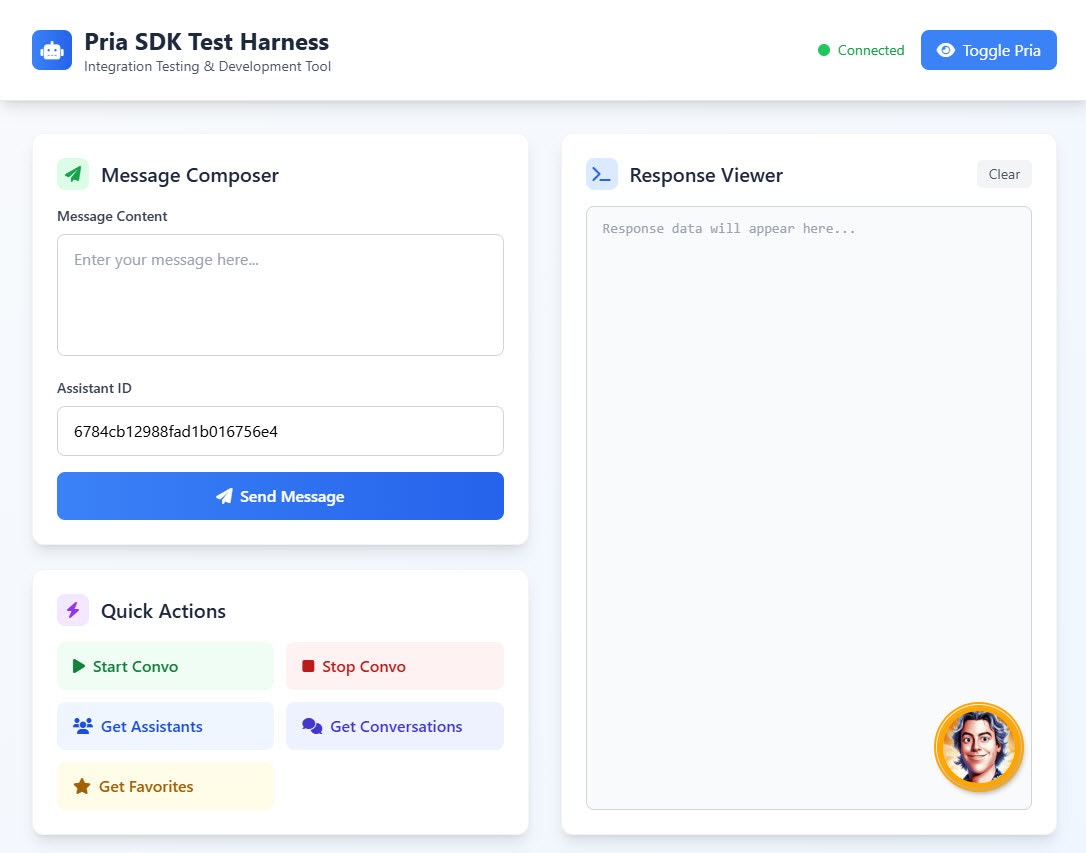 This example demonstrates how to cleanly initialize the integration, detects when sucessfully connected, execute specific commands; such as starting conversation, listing favorites, conversations or assistants, posting a new message, and more.
## API Class Example
This example is provided AS IS to demonstrate how you can cleanly integrate a Digital Twin in your Web Application and sendvarious commands programatically in response to user actions on the page. It is extracted from the playground example code.
```javascript theme={null}
/**
* Pria SDK Test Harness Application
* Enhanced version with modern JavaScript patterns and professional UI
*/
class PriaTestHarness {
constructor() {
this.pria = null;
this.waitForPriaTimer = null;
this.uiDisplayed = false;
this.isConnected = false;
// Configuration
this.config = {
displayOptions: {
buttonPositionRight: 'calc(50% - 40px)',
buttonPositionBottom: '80px'
},
instanceConfig: {
publicIdguest: '41407647-248c-4f0e-a317-71fc151ba8fb',
publicId: 'f831501f-b645-481a-9cbb-331509aaf8c1',
pictureUrl: 'https://ca.slack-edge.com/T08Q47N2NUT-U08PZ8CUVDK-d32d2c5679ad-512'
},
userConfig: {
email: 'alex@praxis-ai.com',
profilename: 'Alex Lebegue',
usertype: 1,
userid: 110,
roleid: 123,
rolename: "Course ABC",
partnerid: 1,
partnername: "ABC Global Inc."
},
conversation: {
id: 777,
name: "My Conversation"
}
};
this.init();
}
/**
* Initialize the application
*/
async init() {
try {
await this.loadPriaSDK();
this.bindEventListeners();
this.showToast('Application initialized successfully', 'success');
} catch (error) {
console.error('Failed to initialize application:', error);
this.showToast('Failed to initialize application', 'error');
}
}
/**
* Load the Pria SDK
*/
loadPriaSDK() {
return new Promise((resolve, reject) => {
const script = document.createElement('script');
script.src = 'pria-sdk-web.js';
script.async = true;
script.onload = () => {
console.log('Web SDK Script loaded');
const url = 'https://pria.praxislxp.com';
PriaIntegration.loadSdk(
url,
this.config.displayOptions,
this.config.instanceConfig,
this.config.userConfig
);
this.waitForPriaTimer = setInterval(() => this.waitForPria(), 2000);
resolve();
};
script.onerror = (error) => {
console.error('Failed to load Web SDK:', error);
reject(new Error('Web SDK loading failed'));
};
document.body.appendChild(script);
});
}
/**
* Wait for Pria to be available and set up subscriptions
*/
waitForPria() {
if (!window.pria) {
console.log("Waiting for Pria to load...");
return;
}
// console.log('Pria loaded:', JSON.stringify(window.pria.priaObj, null, 2));
clearInterval(this.waitForPriaTimer);
this.pria = window.pria;
this.isConnected = true;
this.updateConnectionStatus(true);
this.pria.subscribe(this.handlePriaResponse.bind(this));
this.showToast('Connected to Pria SDK', 'success');
window.addEventListener('beforeunload', () => {
this.pria.unsubscribe(handleResponse)
})
}
/**
* Handle responses from Pria
*/
handlePriaResponse(response) {
console.log("Response from Pria:", JSON.stringify(response, null, 2));
this.displayResponse(response);
this.hideLoading();
}
/**
* Bind event listeners to UI elements
*/
bindEventListeners() {
// Message sending
document.getElementById('send-message-btn').addEventListener('click', () => {
this.sendMessage();
});
// Quick actions
document.getElementById('start-conversation-btn').addEventListener('click', () => {
this.startConversation();
});
document.getElementById('stop-conversation-btn').addEventListener('click', () => {
this.stopConversation();
});
document.getElementById('get-assistants-btn').addEventListener('click', () => {
this.getAssistants();
});
document.getElementById('get-conversations-btn').addEventListener('click', () => {
this.getConversations();
});
document.getElementById('get-favorites-btn').addEventListener('click', () => {
this.getFavorites();
});
// Toggle Pria visibility
document.getElementById('toggle-pria-btn').addEventListener('click', () => {
this.togglePriaVisibility();
});
// Clear response
document.getElementById('clear-response-btn').addEventListener('click', () => {
this.clearResponse();
});
// Enter key support for message input
document.getElementById('message-input').addEventListener('keydown', (e) => {
if (e.ctrlKey && e.key === 'Enter') {
this.sendMessage();
}
});
}
/**
* Send a message to Pria
*/
sendMessage() {
if (!this.ensurePriaConnection()) return;
const message = document.getElementById('message-input').value.trim();
const assistantId = document.getElementById('assistant-id-input').value.trim();
if (!message) {
this.showToast('Please enter a message', 'warning');
return;
}
if (!assistantId) {
this.showToast('Please enter an assistant ID', 'warning');
return;
}
this.showLoading();
this.clearResponse();
const request = {
command: 'message.post',
inputs: [message],
assistantId: assistantId,
selectedCourse: {
course_id: this.config.conversation.id,
course_name: this.config.conversation.name
}
};
this.pria.send(request);
this.showPria();
this.showToast('Message sent', 'info');
}
/**
* Start a conversation
*/
startConversation() {
if (!this.ensurePriaConnection()) return;
this.showLoading();
this.clearResponse();
const request = {
command: 'convo.start',
assistantId: '674e9fd3d7e18aa82eb49fda',
selectedCourse: {
course_id: 22345,
course_name: 'Conversational Assist'
}
};
this.pria.send(request);
this.showPria();
this.showToast('Starting conversation', 'info');
}
/**
* Stop a conversation
*/
stopConversation() {
if (!this.ensurePriaConnection()) return;
const request = {
command: 'convo.stop'
};
this.pria.send(request);
this.showToast('Conversation stopped', 'info');
}
/**
* Get list of assistants
*/
getAssistants() {
if (!this.ensurePriaConnection()) return;
this.showLoading();
this.clearResponse();
const request = {
command: 'assistants.list'
};
this.pria.send(request);
this.showToast('Fetching assistants', 'info');
}
/**
* Get list of conversations
*/
getConversations() {
if (!this.ensurePriaConnection()) return;
this.showLoading();
this.clearResponse();
const request = {
command: 'conversations.list'
};
this.pria.send(request);
this.showToast('Fetching conversations', 'info');
}
/**
* Get list of favorites
*/
getFavorites() {
if (!this.ensurePriaConnection()) return;
this.showLoading();
this.clearResponse();
const request = {
command: 'favorites.list'
};
this.pria.send(request);
this.showToast('Fetching favorites', 'info');
}
/**
* Toggle Pria visibility
*/
togglePriaVisibility() {
if (!this.ensurePriaConnection()) return;
this.uiDisplayed = !this.uiDisplayed;
this.pria.display(this.uiDisplayed);
const btn = document.getElementById('toggle-pria-btn');
const icon = btn.querySelector('i');
const text = btn.querySelector('span');
if (this.uiDisplayed) {
icon.className = 'fas fa-eye-slash';
text.textContent = 'Hide Pria';
this.showToast('Pria UI shown', 'info');
} else {
icon.className = 'fas fa-eye';
text.textContent = 'Show Pria';
this.showToast('Pria UI hidden', 'info');
}
}
/**
* Show Pria interface
*/
showPria() {
if (this.pria && !this.uiDisplayed) {
this.pria.display(true)
this.uiDisplayed = true;
}
}
/**
* Display response in the viewer
*/
displayResponse(data) {
const viewer = document.getElementById('response-viewer');
viewer.value = data ? JSON.stringify(data, null, 2) : '';
}
/**
* Clear the response viewer
*/
clearResponse() {
document.getElementById('response-viewer').value = '';
}
/**
* Show loading indicator
*/
showLoading() {
document.getElementById('loading-indicator').classList.remove('hidden');
}
/**
* Hide loading indicator
*/
hideLoading() {
document.getElementById('loading-indicator').classList.add('hidden');
}
/**
* Update connection status indicator
*/
updateConnectionStatus(connected) {
const statusElement = document.getElementById('connection-status');
const dot = statusElement.querySelector('div');
const text = statusElement.querySelector('span');
if (connected) {
dot.className = 'w-3 h-3 bg-green-500 rounded-full';
text.textContent = 'Connected';
text.className = 'text-sm text-green-600';
} else {
dot.className = 'w-3 h-3 bg-red-500 rounded-full animate-pulse';
text.textContent = 'Disconnected';
text.className = 'text-sm text-red-600';
}
}
/**
* Ensure Pria connection exists
*/
ensurePriaConnection() {
if (!this.pria || !this.isConnected) {
this.showToast('Pria SDK not connected', 'error');
return false;
}
return true;
}
/**
* Show toast notification
*/
showToast(message, type = 'info') {
const container = document.getElementById('toast-container');
const toast = document.createElement('div');
const colors = {
success: 'bg-green-500',
error: 'bg-red-500',
warning: 'bg-yellow-500',
info: 'bg-blue-500'
};
const icons = {
success: 'fas fa-check-circle',
error: 'fas fa-exclamation-circle',
warning: 'fas fa-exclamation-triangle',
info: 'fas fa-info-circle'
};
toast.className = `${colors[type]} text-white px-6 py-3 rounded-lg shadow-lg flex items-center space-x-3 transform transition-all duration-300 translate-x-full`;
toast.innerHTML = `
${message}
`;
container.appendChild(toast);
// Animate in
setTimeout(() => {
toast.classList.remove('translate-x-full');
}, 100);
// Auto remove
setTimeout(() => {
toast.classList.add('translate-x-full');
setTimeout(() => {
if (container.contains(toast)) {
container.removeChild(toast);
}
}, 300);
}, 3000);
}
}
// Initialize the application when DOM is loaded
document.addEventListener('DOMContentLoaded', () => {
new PriaTestHarness();
});
```
This example demonstrates how to cleanly initialize the integration, detects when sucessfully connected, execute specific commands; such as starting conversation, listing favorites, conversations or assistants, posting a new message, and more.
## API Class Example
This example is provided AS IS to demonstrate how you can cleanly integrate a Digital Twin in your Web Application and sendvarious commands programatically in response to user actions on the page. It is extracted from the playground example code.
```javascript theme={null}
/**
* Pria SDK Test Harness Application
* Enhanced version with modern JavaScript patterns and professional UI
*/
class PriaTestHarness {
constructor() {
this.pria = null;
this.waitForPriaTimer = null;
this.uiDisplayed = false;
this.isConnected = false;
// Configuration
this.config = {
displayOptions: {
buttonPositionRight: 'calc(50% - 40px)',
buttonPositionBottom: '80px'
},
instanceConfig: {
publicIdguest: '41407647-248c-4f0e-a317-71fc151ba8fb',
publicId: 'f831501f-b645-481a-9cbb-331509aaf8c1',
pictureUrl: 'https://ca.slack-edge.com/T08Q47N2NUT-U08PZ8CUVDK-d32d2c5679ad-512'
},
userConfig: {
email: 'alex@praxis-ai.com',
profilename: 'Alex Lebegue',
usertype: 1,
userid: 110,
roleid: 123,
rolename: "Course ABC",
partnerid: 1,
partnername: "ABC Global Inc."
},
conversation: {
id: 777,
name: "My Conversation"
}
};
this.init();
}
/**
* Initialize the application
*/
async init() {
try {
await this.loadPriaSDK();
this.bindEventListeners();
this.showToast('Application initialized successfully', 'success');
} catch (error) {
console.error('Failed to initialize application:', error);
this.showToast('Failed to initialize application', 'error');
}
}
/**
* Load the Pria SDK
*/
loadPriaSDK() {
return new Promise((resolve, reject) => {
const script = document.createElement('script');
script.src = 'pria-sdk-web.js';
script.async = true;
script.onload = () => {
console.log('Web SDK Script loaded');
const url = 'https://pria.praxislxp.com';
PriaIntegration.loadSdk(
url,
this.config.displayOptions,
this.config.instanceConfig,
this.config.userConfig
);
this.waitForPriaTimer = setInterval(() => this.waitForPria(), 2000);
resolve();
};
script.onerror = (error) => {
console.error('Failed to load Web SDK:', error);
reject(new Error('Web SDK loading failed'));
};
document.body.appendChild(script);
});
}
/**
* Wait for Pria to be available and set up subscriptions
*/
waitForPria() {
if (!window.pria) {
console.log("Waiting for Pria to load...");
return;
}
// console.log('Pria loaded:', JSON.stringify(window.pria.priaObj, null, 2));
clearInterval(this.waitForPriaTimer);
this.pria = window.pria;
this.isConnected = true;
this.updateConnectionStatus(true);
this.pria.subscribe(this.handlePriaResponse.bind(this));
this.showToast('Connected to Pria SDK', 'success');
window.addEventListener('beforeunload', () => {
this.pria.unsubscribe(handleResponse)
})
}
/**
* Handle responses from Pria
*/
handlePriaResponse(response) {
console.log("Response from Pria:", JSON.stringify(response, null, 2));
this.displayResponse(response);
this.hideLoading();
}
/**
* Bind event listeners to UI elements
*/
bindEventListeners() {
// Message sending
document.getElementById('send-message-btn').addEventListener('click', () => {
this.sendMessage();
});
// Quick actions
document.getElementById('start-conversation-btn').addEventListener('click', () => {
this.startConversation();
});
document.getElementById('stop-conversation-btn').addEventListener('click', () => {
this.stopConversation();
});
document.getElementById('get-assistants-btn').addEventListener('click', () => {
this.getAssistants();
});
document.getElementById('get-conversations-btn').addEventListener('click', () => {
this.getConversations();
});
document.getElementById('get-favorites-btn').addEventListener('click', () => {
this.getFavorites();
});
// Toggle Pria visibility
document.getElementById('toggle-pria-btn').addEventListener('click', () => {
this.togglePriaVisibility();
});
// Clear response
document.getElementById('clear-response-btn').addEventListener('click', () => {
this.clearResponse();
});
// Enter key support for message input
document.getElementById('message-input').addEventListener('keydown', (e) => {
if (e.ctrlKey && e.key === 'Enter') {
this.sendMessage();
}
});
}
/**
* Send a message to Pria
*/
sendMessage() {
if (!this.ensurePriaConnection()) return;
const message = document.getElementById('message-input').value.trim();
const assistantId = document.getElementById('assistant-id-input').value.trim();
if (!message) {
this.showToast('Please enter a message', 'warning');
return;
}
if (!assistantId) {
this.showToast('Please enter an assistant ID', 'warning');
return;
}
this.showLoading();
this.clearResponse();
const request = {
command: 'message.post',
inputs: [message],
assistantId: assistantId,
selectedCourse: {
course_id: this.config.conversation.id,
course_name: this.config.conversation.name
}
};
this.pria.send(request);
this.showPria();
this.showToast('Message sent', 'info');
}
/**
* Start a conversation
*/
startConversation() {
if (!this.ensurePriaConnection()) return;
this.showLoading();
this.clearResponse();
const request = {
command: 'convo.start',
assistantId: '674e9fd3d7e18aa82eb49fda',
selectedCourse: {
course_id: 22345,
course_name: 'Conversational Assist'
}
};
this.pria.send(request);
this.showPria();
this.showToast('Starting conversation', 'info');
}
/**
* Stop a conversation
*/
stopConversation() {
if (!this.ensurePriaConnection()) return;
const request = {
command: 'convo.stop'
};
this.pria.send(request);
this.showToast('Conversation stopped', 'info');
}
/**
* Get list of assistants
*/
getAssistants() {
if (!this.ensurePriaConnection()) return;
this.showLoading();
this.clearResponse();
const request = {
command: 'assistants.list'
};
this.pria.send(request);
this.showToast('Fetching assistants', 'info');
}
/**
* Get list of conversations
*/
getConversations() {
if (!this.ensurePriaConnection()) return;
this.showLoading();
this.clearResponse();
const request = {
command: 'conversations.list'
};
this.pria.send(request);
this.showToast('Fetching conversations', 'info');
}
/**
* Get list of favorites
*/
getFavorites() {
if (!this.ensurePriaConnection()) return;
this.showLoading();
this.clearResponse();
const request = {
command: 'favorites.list'
};
this.pria.send(request);
this.showToast('Fetching favorites', 'info');
}
/**
* Toggle Pria visibility
*/
togglePriaVisibility() {
if (!this.ensurePriaConnection()) return;
this.uiDisplayed = !this.uiDisplayed;
this.pria.display(this.uiDisplayed);
const btn = document.getElementById('toggle-pria-btn');
const icon = btn.querySelector('i');
const text = btn.querySelector('span');
if (this.uiDisplayed) {
icon.className = 'fas fa-eye-slash';
text.textContent = 'Hide Pria';
this.showToast('Pria UI shown', 'info');
} else {
icon.className = 'fas fa-eye';
text.textContent = 'Show Pria';
this.showToast('Pria UI hidden', 'info');
}
}
/**
* Show Pria interface
*/
showPria() {
if (this.pria && !this.uiDisplayed) {
this.pria.display(true)
this.uiDisplayed = true;
}
}
/**
* Display response in the viewer
*/
displayResponse(data) {
const viewer = document.getElementById('response-viewer');
viewer.value = data ? JSON.stringify(data, null, 2) : '';
}
/**
* Clear the response viewer
*/
clearResponse() {
document.getElementById('response-viewer').value = '';
}
/**
* Show loading indicator
*/
showLoading() {
document.getElementById('loading-indicator').classList.remove('hidden');
}
/**
* Hide loading indicator
*/
hideLoading() {
document.getElementById('loading-indicator').classList.add('hidden');
}
/**
* Update connection status indicator
*/
updateConnectionStatus(connected) {
const statusElement = document.getElementById('connection-status');
const dot = statusElement.querySelector('div');
const text = statusElement.querySelector('span');
if (connected) {
dot.className = 'w-3 h-3 bg-green-500 rounded-full';
text.textContent = 'Connected';
text.className = 'text-sm text-green-600';
} else {
dot.className = 'w-3 h-3 bg-red-500 rounded-full animate-pulse';
text.textContent = 'Disconnected';
text.className = 'text-sm text-red-600';
}
}
/**
* Ensure Pria connection exists
*/
ensurePriaConnection() {
if (!this.pria || !this.isConnected) {
this.showToast('Pria SDK not connected', 'error');
return false;
}
return true;
}
/**
* Show toast notification
*/
showToast(message, type = 'info') {
const container = document.getElementById('toast-container');
const toast = document.createElement('div');
const colors = {
success: 'bg-green-500',
error: 'bg-red-500',
warning: 'bg-yellow-500',
info: 'bg-blue-500'
};
const icons = {
success: 'fas fa-check-circle',
error: 'fas fa-exclamation-circle',
warning: 'fas fa-exclamation-triangle',
info: 'fas fa-info-circle'
};
toast.className = `${colors[type]} text-white px-6 py-3 rounded-lg shadow-lg flex items-center space-x-3 transform transition-all duration-300 translate-x-full`;
toast.innerHTML = `
${message}
`;
container.appendChild(toast);
// Animate in
setTimeout(() => {
toast.classList.remove('translate-x-full');
}, 100);
// Auto remove
setTimeout(() => {
toast.classList.add('translate-x-full');
setTimeout(() => {
if (container.contains(toast)) {
container.removeChild(toast);
}
}, 300);
}, 3000);
}
}
// Initialize the application when DOM is loaded
document.addEventListener('DOMContentLoaded', () => {
new PriaTestHarness();
});
```