> ## Documentation Index
> Fetch the complete documentation index at: https://docs.praxis-ai.com/llms.txt
> Use this file to discover all available pages before exploring further.
# Credits
> Credits are the usage units that power your Digital Twin. Every conversation token, generated image, transcribed minute, and processed file deducts from your credit balance — this guide explains the rates, where credits live, and what happens when they run low.
You can manage your credits directly from your profile settings. If you're accessing your Digital Twin through an institutional account (university, enterprise, or organization), your credits are typically supplied by your institution.
 ***
## Adding Personal Credits
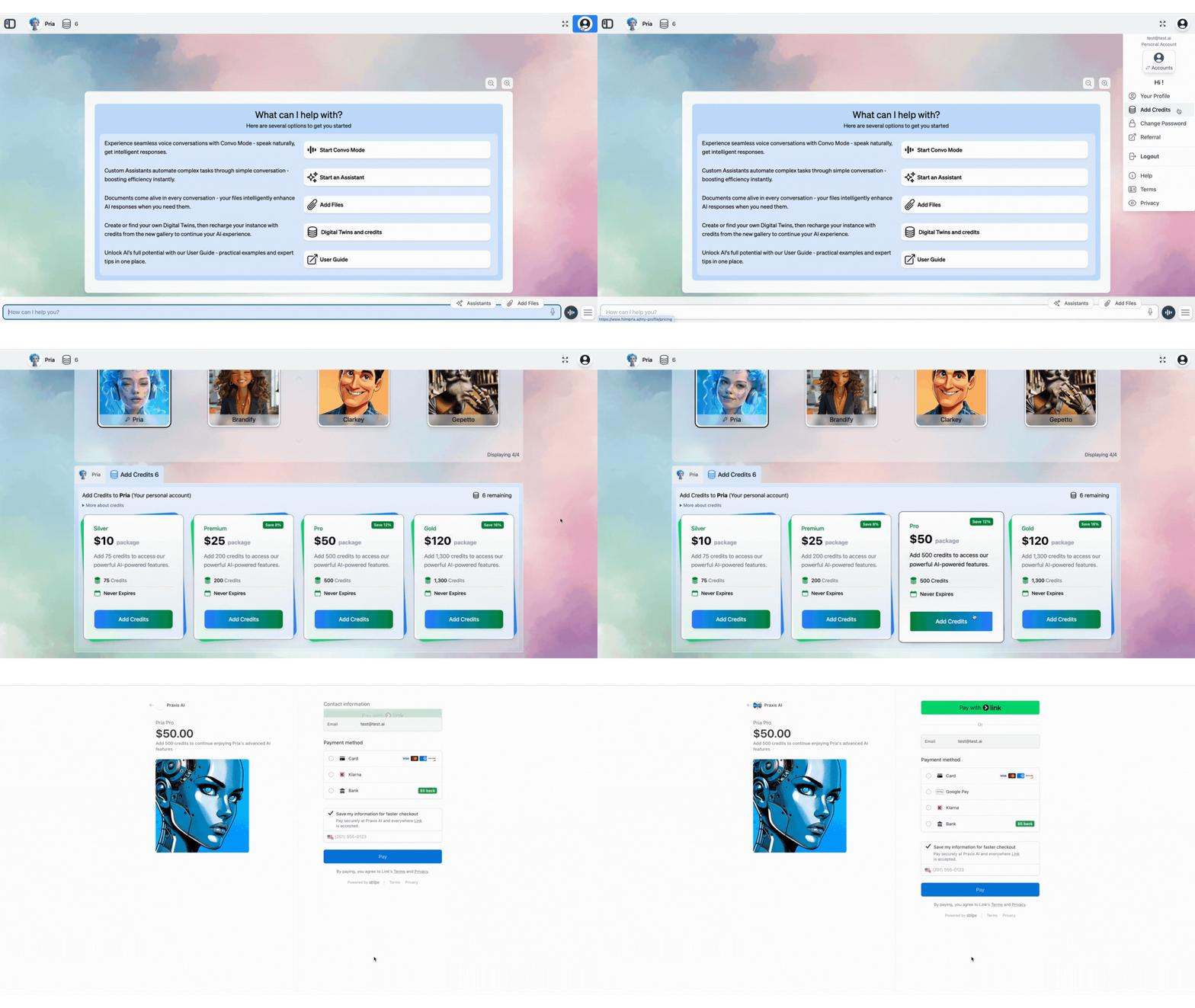
To add your own credits for personal use:
1. Click the **'Add Credits'** button in your profile settings
2. Scroll to the bottom of the page
3. Select your desired credit amount and complete payment
***
## Adding Personal Credits
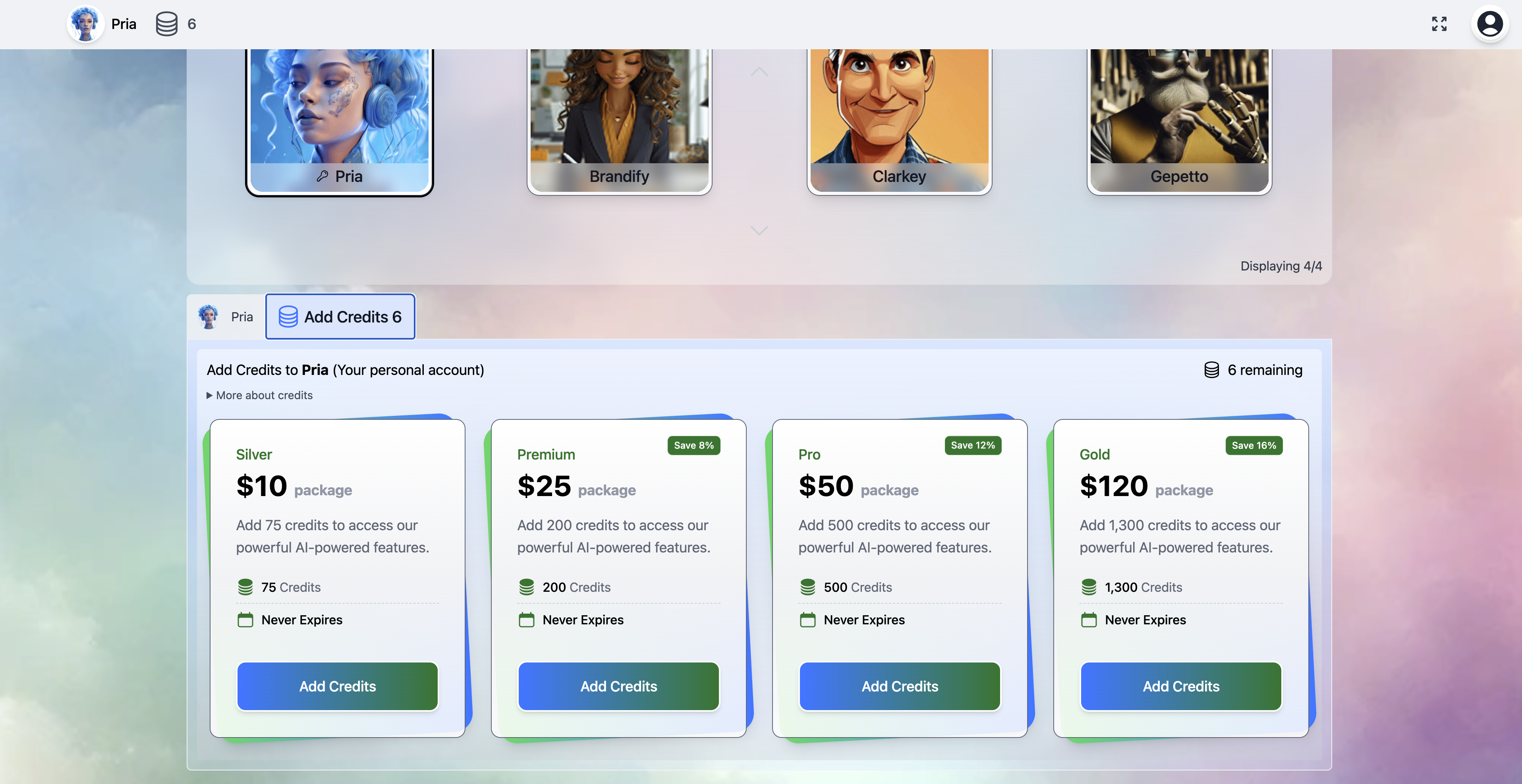
To add your own credits for personal use:
1. Click the **'Add Credits'** button in your profile settings
2. Scroll to the bottom of the page
3. Select your desired credit amount and complete payment
 ***
## How credits are consumed
Credits are deducted in real time as you interact with your Digital Twin. The core unit is the **token** — Pria converts every model's reported token usage into credits using a published per-model rate, and meters non-text actions (images, video, voice) separately.
### Token-to-credit conversion
| Token type | How it's billed |
| ------------------------------- | ------------------------------------------------------------------------------------------------------------------------------------------------------------------------ |
| **Input tokens** | Charged at the model's input rate. Larger prompts (long history, big attachments, retrieved RAG chunks) cost more. |
| **Output tokens** | Charged at the model's output rate, typically **3–5× the input rate** depending on provider. Streaming costs are billed once the response completes. |
| **Cached input tokens** | When a provider's cache hits (system prompt, repeated context), cached tokens are billed at **50% off** the input rate. Caching is automatic — you don't have to opt in. |
| **Thinking / reasoning tokens** | Reasoning models (OpenAI Responses API, Gemini 2.5+, gpt-realtime-2, Claude with thinking) bill thinking tokens at the output rate. Visible in the View Details card. |
| **Embedding tokens** | Charged at the embedding model's rate (much cheaper than chat tokens). Incurred when files are ingested and when queries are vectorised. |
The exact per-million-token rates vary by model and update with provider pricing. The full live table is visible under **Your Profile → Billing**.
### Non-text actions — metered separately
| Action | What's metered |
| -------------------------------- | ---------------------------------------------------------------------------------------------------------------------- |
| **Image generation** | Per-image flat rate; varies by provider, resolution, and quality tier (standard vs HD). |
| **Image editing / variations** | Per-image, generally same rate as generation. |
| **Video generation** | Per-second of generated video; high cost per second compared to text. |
| **Text-to-Speech (TTS)** | Per-minute of synthesized audio. |
| **Speech-to-Text (STT)** | Per-minute of transcribed audio. Audio Notes, Convo Mode transcripts, and large media chunked into segments all count. |
| **File upload processing** | Per-file flat fee plus embedding tokens; OCR for image PDFs adds vision tokens. |
| **Real-time voice (Convo Mode)** | Both input and output audio billed per-minute; varies by provider. |
| **Web search tool calls** | Per query; depends on which search provider your admin has configured. |
### At-a-glance cost table
The rough relative costs (lowest → highest) for common actions:
| Action | Typical relative cost |
| ------------------------------------------- | :-------------------: |
| Embedding tokens (RAG indexing) | **★** |
| Conversation tokens, short Q\&A | **★★** |
| Long-history conversation (with compaction) | **★★★** |
| File upload + OCR + KAG extraction (per MB) | **★★★** |
| TTS (per minute spoken) | **★★★** |
| STT (per minute transcribed) | **★★★** |
| Image generation (standard quality) | **★★★★** |
| Convo Mode (real-time voice, per minute) | **★★★★** |
| Reasoning-model heavy turns | **★★★★** |
| Image generation (HD) | **★★★★★** |
| Video generation (per second) | **★★★★★** |
Star ratings are relative — they convey order of magnitude, not exact rates. See **Your Profile → Billing** for current dollar/credit amounts.
***
## Where credits live — Account, Institution, User
Pria's credit pool is **hierarchical**: credits sit at one (or more) of three levels, and each conversation draws from the lowest level that has a positive balance.
| Level | Who owns it | Typical use |
| --------------- | ---------------------------------------------------------------- | ----------------------------------------------------------------------------------------------------------- |
| **Account** | The parent organisation (enterprise, university, company). | A shared pool that funds every institution under the account. Topped up via central billing. |
| **Institution** | A single Digital Twin instance (a department, a course, a team). | A per-twin allocation drawn from the account pool. Allows admins to cap spending by twin. |
| **User** | An individual signed-in user. | Personal credits you buy via **Add Credits**, or credits granted to you by an admin (referral bonus, etc.). |
**Draw order:** User credits → Institution credits → Account credits. If your user balance is positive it depletes first; once empty, conversations fall through to the institution pool, then the account pool.
For per-twin allocation, low-balance alerts, auto top-up rules, and the admin's view of the credit hierarchy, see the [Credit Management](/mdx/admin-guide/credit-management) admin guide.
**Add Credits in your profile = User-level credits.** They're yours regardless of which Digital Twin you use them on — handy if you switch between work and personal contexts.
***
## Low-balance behaviour
Pria tries hard to warn you before credits run out so you're never mid-conversation when the lights go off.
### Alerts
* **Low-balance banner** appears at the top of the interface when the active credit pool drops below a configurable threshold (default **10%** of the typical 7-day spend). Admins set the threshold under Credit Management.
* **Email notification** to billing contacts when an alert threshold trips, so the right people see it even if they aren't currently signed in.
* **Per-twin status chip** on the sidebar — the credit balance icon turns amber under 10% and red at 0.
### Auto top-up (if enabled)
Admins can enable **auto top-up** at the Account or Institution level: when the pool falls below a configured floor, Pria automatically purchases a top-up against the stored payment method. The new credits land before the pool depletes, so conversations never interrupt.
Auto top-up is **off by default** — turn it on under Credit Management → Auto top-up. The maximum top-up frequency and cap are set there too, so you can't accidentally drain a payment card.
### When credits hit zero
If the pool runs out and no auto top-up is configured:
* **In-flight conversation** — the running response finishes (Pria doesn't cut you off mid-sentence), but the next prompt is blocked.
* **New prompts** show a clear *"Your Digital Twin is out of credits"* dialog with a direct **Add Credits** button (users) or instruction to contact your admin (institution-funded users).
* **File uploads, image generation, voice** all fail with the same dialog rather than producing partial output.
* **Read-only features** (browsing past conversations, searching the vault, viewing files) continue to work — you only lose the ability to spend new credits.
Running out of credits in the middle of a long-running operation (large file ingestion, batch embedding, video generation) may abort the operation mid-way. The credits already spent are not refunded.
***
## Optimization tips
Most Digital Twins use 3–5× fewer credits with a small handful of habits. See [Credits Optimization](/mdx/user-guide/credits-optimization) for the full guide; the short version:
* **Lower Remember History** when long context isn't needed (quick lookups don't need 10 turns of history).
* **Tune your retrieval mode** — Disabled or RAG Only is cheaper than RAG + KAG Fusion; pick the right mode for the question.
* **Skip Indexing** on URL imports you only want to download, not embed.
* **Prefer text** over Convo Mode for fact lookups — voice is convenient but more expensive per turn.
* **Use Skip Indexing** for files you only need to store and open yourself (not search) — they skip the knowledge-processing pipeline entirely, so they cost nothing to index.
* **Sanitize noisy segments** so they're shorter to embed and retrieve.
* **Avoid HD image gen** unless you need print-grade output.
***
## Related
* [Credits Optimization](/mdx/user-guide/credits-optimization) — Practical tips to reduce credit consumption.
* [Credit Management (admin)](/mdx/admin-guide/credit-management) — Account/institution allocation, alerts, auto top-up.
* [Billing (admin)](/mdx/admin-guide/billing) — Payment methods, invoices, billing contacts.
* [Edit Profile](/mdx/user-guide/profile-settings/edit-profile) — Where the Add Credits and Billing tabs live.
* [Sidebar & History](/mdx/user-guide/interface/history-settings) — Remember History, the main lever for conversation cost.
* [AI Models](/mdx/admin-guide/ai-models) — Provider price tiers and reasoning support.
***
## How credits are consumed
Credits are deducted in real time as you interact with your Digital Twin. The core unit is the **token** — Pria converts every model's reported token usage into credits using a published per-model rate, and meters non-text actions (images, video, voice) separately.
### Token-to-credit conversion
| Token type | How it's billed |
| ------------------------------- | ------------------------------------------------------------------------------------------------------------------------------------------------------------------------ |
| **Input tokens** | Charged at the model's input rate. Larger prompts (long history, big attachments, retrieved RAG chunks) cost more. |
| **Output tokens** | Charged at the model's output rate, typically **3–5× the input rate** depending on provider. Streaming costs are billed once the response completes. |
| **Cached input tokens** | When a provider's cache hits (system prompt, repeated context), cached tokens are billed at **50% off** the input rate. Caching is automatic — you don't have to opt in. |
| **Thinking / reasoning tokens** | Reasoning models (OpenAI Responses API, Gemini 2.5+, gpt-realtime-2, Claude with thinking) bill thinking tokens at the output rate. Visible in the View Details card. |
| **Embedding tokens** | Charged at the embedding model's rate (much cheaper than chat tokens). Incurred when files are ingested and when queries are vectorised. |
The exact per-million-token rates vary by model and update with provider pricing. The full live table is visible under **Your Profile → Billing**.
### Non-text actions — metered separately
| Action | What's metered |
| -------------------------------- | ---------------------------------------------------------------------------------------------------------------------- |
| **Image generation** | Per-image flat rate; varies by provider, resolution, and quality tier (standard vs HD). |
| **Image editing / variations** | Per-image, generally same rate as generation. |
| **Video generation** | Per-second of generated video; high cost per second compared to text. |
| **Text-to-Speech (TTS)** | Per-minute of synthesized audio. |
| **Speech-to-Text (STT)** | Per-minute of transcribed audio. Audio Notes, Convo Mode transcripts, and large media chunked into segments all count. |
| **File upload processing** | Per-file flat fee plus embedding tokens; OCR for image PDFs adds vision tokens. |
| **Real-time voice (Convo Mode)** | Both input and output audio billed per-minute; varies by provider. |
| **Web search tool calls** | Per query; depends on which search provider your admin has configured. |
### At-a-glance cost table
The rough relative costs (lowest → highest) for common actions:
| Action | Typical relative cost |
| ------------------------------------------- | :-------------------: |
| Embedding tokens (RAG indexing) | **★** |
| Conversation tokens, short Q\&A | **★★** |
| Long-history conversation (with compaction) | **★★★** |
| File upload + OCR + KAG extraction (per MB) | **★★★** |
| TTS (per minute spoken) | **★★★** |
| STT (per minute transcribed) | **★★★** |
| Image generation (standard quality) | **★★★★** |
| Convo Mode (real-time voice, per minute) | **★★★★** |
| Reasoning-model heavy turns | **★★★★** |
| Image generation (HD) | **★★★★★** |
| Video generation (per second) | **★★★★★** |
Star ratings are relative — they convey order of magnitude, not exact rates. See **Your Profile → Billing** for current dollar/credit amounts.
***
## Where credits live — Account, Institution, User
Pria's credit pool is **hierarchical**: credits sit at one (or more) of three levels, and each conversation draws from the lowest level that has a positive balance.
| Level | Who owns it | Typical use |
| --------------- | ---------------------------------------------------------------- | ----------------------------------------------------------------------------------------------------------- |
| **Account** | The parent organisation (enterprise, university, company). | A shared pool that funds every institution under the account. Topped up via central billing. |
| **Institution** | A single Digital Twin instance (a department, a course, a team). | A per-twin allocation drawn from the account pool. Allows admins to cap spending by twin. |
| **User** | An individual signed-in user. | Personal credits you buy via **Add Credits**, or credits granted to you by an admin (referral bonus, etc.). |
**Draw order:** User credits → Institution credits → Account credits. If your user balance is positive it depletes first; once empty, conversations fall through to the institution pool, then the account pool.
For per-twin allocation, low-balance alerts, auto top-up rules, and the admin's view of the credit hierarchy, see the [Credit Management](/mdx/admin-guide/credit-management) admin guide.
**Add Credits in your profile = User-level credits.** They're yours regardless of which Digital Twin you use them on — handy if you switch between work and personal contexts.
***
## Low-balance behaviour
Pria tries hard to warn you before credits run out so you're never mid-conversation when the lights go off.
### Alerts
* **Low-balance banner** appears at the top of the interface when the active credit pool drops below a configurable threshold (default **10%** of the typical 7-day spend). Admins set the threshold under Credit Management.
* **Email notification** to billing contacts when an alert threshold trips, so the right people see it even if they aren't currently signed in.
* **Per-twin status chip** on the sidebar — the credit balance icon turns amber under 10% and red at 0.
### Auto top-up (if enabled)
Admins can enable **auto top-up** at the Account or Institution level: when the pool falls below a configured floor, Pria automatically purchases a top-up against the stored payment method. The new credits land before the pool depletes, so conversations never interrupt.
Auto top-up is **off by default** — turn it on under Credit Management → Auto top-up. The maximum top-up frequency and cap are set there too, so you can't accidentally drain a payment card.
### When credits hit zero
If the pool runs out and no auto top-up is configured:
* **In-flight conversation** — the running response finishes (Pria doesn't cut you off mid-sentence), but the next prompt is blocked.
* **New prompts** show a clear *"Your Digital Twin is out of credits"* dialog with a direct **Add Credits** button (users) or instruction to contact your admin (institution-funded users).
* **File uploads, image generation, voice** all fail with the same dialog rather than producing partial output.
* **Read-only features** (browsing past conversations, searching the vault, viewing files) continue to work — you only lose the ability to spend new credits.
Running out of credits in the middle of a long-running operation (large file ingestion, batch embedding, video generation) may abort the operation mid-way. The credits already spent are not refunded.
***
## Optimization tips
Most Digital Twins use 3–5× fewer credits with a small handful of habits. See [Credits Optimization](/mdx/user-guide/credits-optimization) for the full guide; the short version:
* **Lower Remember History** when long context isn't needed (quick lookups don't need 10 turns of history).
* **Tune your retrieval mode** — Disabled or RAG Only is cheaper than RAG + KAG Fusion; pick the right mode for the question.
* **Skip Indexing** on URL imports you only want to download, not embed.
* **Prefer text** over Convo Mode for fact lookups — voice is convenient but more expensive per turn.
* **Use Skip Indexing** for files you only need to store and open yourself (not search) — they skip the knowledge-processing pipeline entirely, so they cost nothing to index.
* **Sanitize noisy segments** so they're shorter to embed and retrieve.
* **Avoid HD image gen** unless you need print-grade output.
***
## Related
* [Credits Optimization](/mdx/user-guide/credits-optimization) — Practical tips to reduce credit consumption.
* [Credit Management (admin)](/mdx/admin-guide/credit-management) — Account/institution allocation, alerts, auto top-up.
* [Billing (admin)](/mdx/admin-guide/billing) — Payment methods, invoices, billing contacts.
* [Edit Profile](/mdx/user-guide/profile-settings/edit-profile) — Where the Add Credits and Billing tabs live.
* [Sidebar & History](/mdx/user-guide/interface/history-settings) — Remember History, the main lever for conversation cost.
* [AI Models](/mdx/admin-guide/ai-models) — Provider price tiers and reasoning support.