> ## Documentation Index
> Fetch the complete documentation index at: https://docs.praxis-ai.com/llms.txt
> Use this file to discover all available pages before exploring further.
# Reasoning & Thinking
> How Pria thinks before answering — the 5-level reasoning effort scale and the thinking blocks you see live.
Modern AI models can do more than blurt the first answer that comes to mind. The best ones quietly work through the problem first — drafting, checking, revising — before producing a final reply. That hidden draft is called **reasoning** (or "extended thinking", "chain of thought"). Pria gives you a single slider, the **Reasoning Effort** picker, to control how much of that thinking you want.
## What "reasoning" means
When a thinking model receives your question, it can spend extra time generating an internal monologue before it starts writing the reply:
* *"Let me re-read the question."*
* *"There are two ways to interpret this — I'll consider both."*
* *"That step looks wrong, let me redo it."*
You only see the polished final answer, but the reasoning step is what makes the difference between a snappy guess and a carefully argued response. Pria can also surface the live thinking stream so you can watch the model work — useful for transparency, debugging tricky problems, and learning how the model approaches a task.
Not every model supports reasoning. In the [model catalog](/mdx/user-guide/interface/model-selection), the Features icon marks the models that do.
***
## The 5 effort levels
No thinking. The model answers immediately from its first read. Fast and cheap. Good for casual chat, quick lookups, and voice conversations where latency matters.
A brief inner pass — usually a few seconds extra. Catches obvious mistakes without slowing things down much.
A solid amount of thinking. The model checks its work, considers alternatives, and reorders its plan if needed. A sensible default for most knowledge work.
Deep thinking. Several seconds to a minute of internal reasoning. Use for nuanced analysis, complex multi-step problems, and long-form writing where quality matters more than speed.
Maximum effort. The model uses the largest reasoning budget the provider allows. Slow and credit-heavy, but produces the highest-quality output for genuinely hard problems.
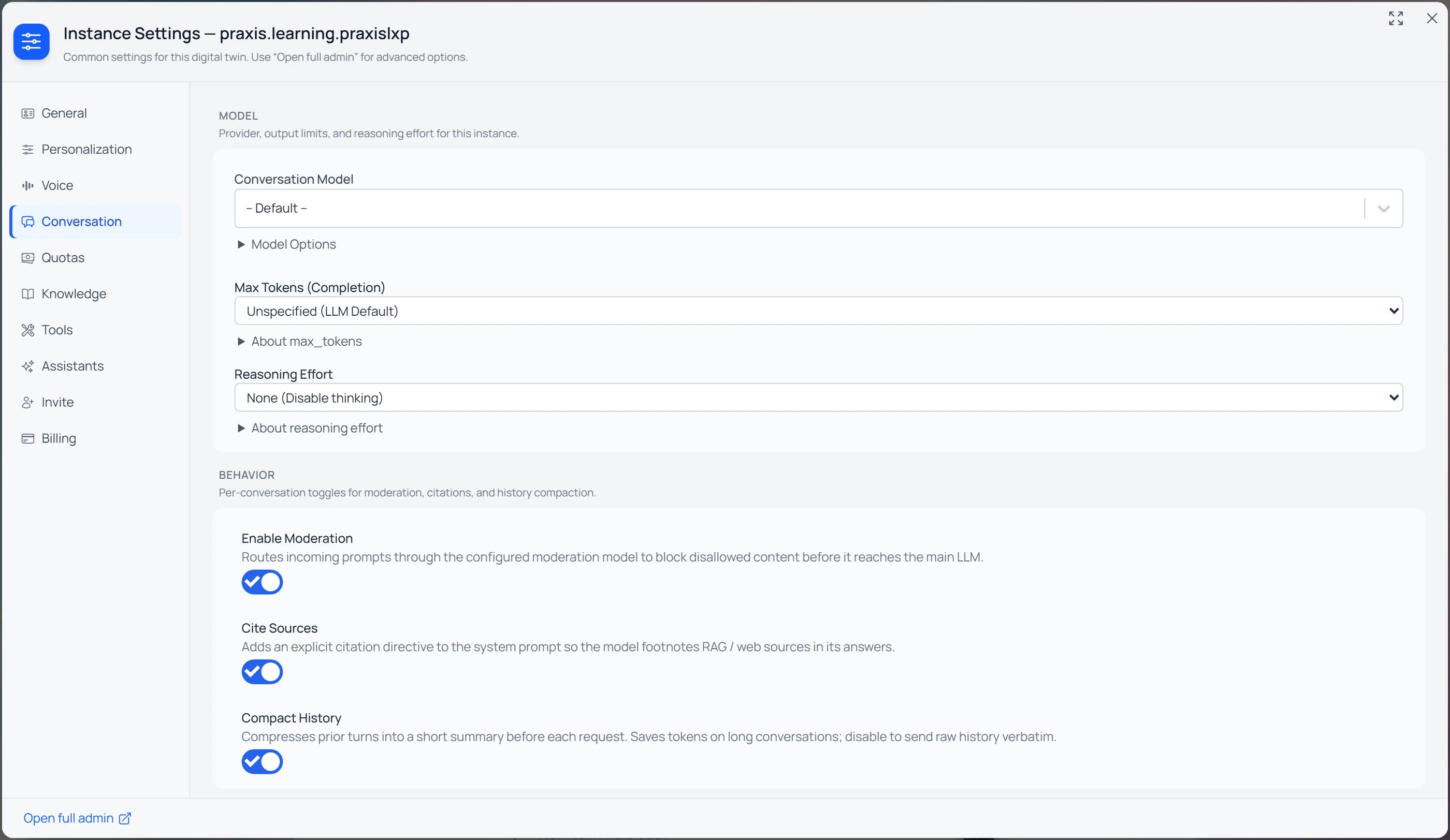
Reasoning Effort is set alongside the model, not per message: whoever manages the Twin picks it under **Settings → Instance → Conversation → Reasoning Effort** (just below the [Conversation Model](/mdx/user-guide/interface/model-selection)), and an **assistant** can pin its own effort level. Members of a Twin use the level it's set to. The dropdown's first option is **None (Disable thinking)**; the rest are **Low**, **Medium**, **High**, and **Max**.
 ***
## Per-model differences
Every AI provider implements thinking slightly differently. Pria abstracts the differences behind the same 5-level scale, but here's what's happening underneath:
Claude's "extended thinking" mode reserves a token budget for an internal reasoning block. Low/Medium/High/Max map to progressively larger budgets. The thinking tokens are billed but not shown in the final reply (unless you turn on the display toggle).
OpenAI reasoning models accept a `reasoning_effort` parameter directly. None / Low / Medium / High / Max pass through to the API. Newer GPT-5 generations also surface short "thinking summary" snippets which Pria can render live.
Gemini 3.x models use `thinkingLevel` (low/medium/high/max), older 2.5-pro models use `thinkingBudget` (a token count, minimum 128). Pria translates the unified scale into whichever knob the model supports.
Only `grok-3-mini` accepts an explicit reasoning effort. Grok 4 reasons automatically and ignores the slider — Max and Medium produce the same answer.
Models served via AWS Bedrock (Claude on Bedrock, Nova, Llama) inherit the underlying model's reasoning support and Pria's scale maps onto each one's native parameter.
Mistral and most older non-reasoning models don't accept the slider at all — the picker is greyed out and the model answers in its normal one-shot mode.
You don't need to know which knob a model uses — pick the level that matches the depth you want and Pria handles the translation.
***
## The thinking display toggle
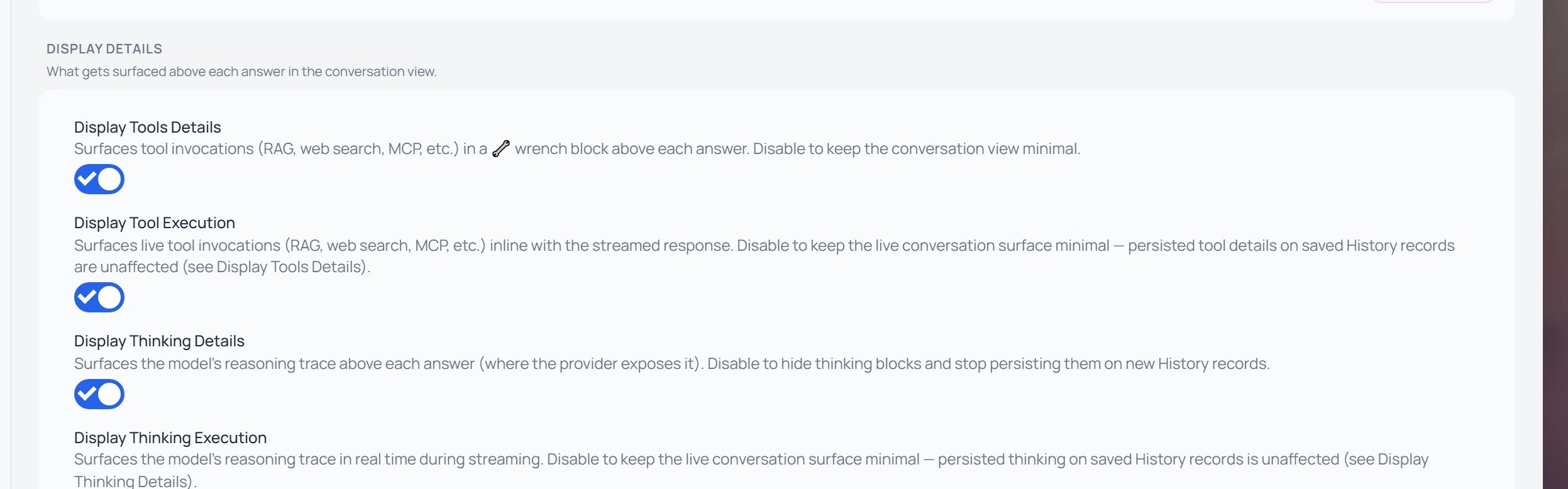
By default the reasoning trace can appear above each answer in a 💡 lightbulb block. Whether it does is a per-Twin choice, controlled by whoever manages the Digital Twin under **Settings → Instance → Personalization → Display Details**.
***
## Per-model differences
Every AI provider implements thinking slightly differently. Pria abstracts the differences behind the same 5-level scale, but here's what's happening underneath:
Claude's "extended thinking" mode reserves a token budget for an internal reasoning block. Low/Medium/High/Max map to progressively larger budgets. The thinking tokens are billed but not shown in the final reply (unless you turn on the display toggle).
OpenAI reasoning models accept a `reasoning_effort` parameter directly. None / Low / Medium / High / Max pass through to the API. Newer GPT-5 generations also surface short "thinking summary" snippets which Pria can render live.
Gemini 3.x models use `thinkingLevel` (low/medium/high/max), older 2.5-pro models use `thinkingBudget` (a token count, minimum 128). Pria translates the unified scale into whichever knob the model supports.
Only `grok-3-mini` accepts an explicit reasoning effort. Grok 4 reasons automatically and ignores the slider — Max and Medium produce the same answer.
Models served via AWS Bedrock (Claude on Bedrock, Nova, Llama) inherit the underlying model's reasoning support and Pria's scale maps onto each one's native parameter.
Mistral and most older non-reasoning models don't accept the slider at all — the picker is greyed out and the model answers in its normal one-shot mode.
You don't need to know which knob a model uses — pick the level that matches the depth you want and Pria handles the translation.
***
## The thinking display toggle
By default the reasoning trace can appear above each answer in a 💡 lightbulb block. Whether it does is a per-Twin choice, controlled by whoever manages the Digital Twin under **Settings → Instance → Personalization → Display Details**.
 ### Reading the four toggles
The screenshot shows **four** switches, because the same two-way split applies to the model's **tool activity** as well as its **thinking**. They form a simple grid:
| | **Details** — persisted, above each answer | **Execution** — live, while the response streams |
| --------------- | ------------------------------------------------------------------------------------------------------------------------------------------------ | ----------------------------------------------------------------------------------------------------- |
| **🔧 Tools** | **Display Tools Details** — tool/agent calls (RAG, web search, MCP, …) shown in a wrench block above the answer and **saved** on History records | **Display Tool Execution** — live ⚙️ Running… / 🔧 Ran ✓ indicators as the model works; **not** saved |
| **💡 Thinking** | **Display Thinking Details** — the reasoning trace shown in a lightbulb block above the answer and **saved** on History records | **Display Thinking Execution** — the reasoning trace shown live as it streams; **not** saved |
Two questions decide which toggle you want:
* **Tools or Thinking — *what* are you watching?** **🔧 Tools** is the model *acting* — calling retrieval, web search, or an MCP connector. **💡 Thinking** is the model *reasoning* — its internal chain-of-thought.
* **Details or Execution — *when* do you see it?** **Details** is the **persisted** block that stays above the answer (and is written to saved History). **Execution** is the **live** view that appears only while the reply streams and then disappears. Persistence always follows the matching *Details* toggle — so you can watch the live trace without keeping it, or keep the saved block without the live view.
When thinking display is on, the next reply renders a collapsible 💡 block above the final answer — expand it to read the model's work, or leave it folded. Because these are per-Twin settings, an administrator can keep thinking visible on a research twin and hidden on a customer-facing one.
***
## Reading thinking blocks during a stream
While a reasoning model is thinking, you'll see:
* **A growing "thinking" panel** above the reply area, streaming in real time.
* **A spinner / waveform** indicating the model is still planning.
* **The final answer appears below** once thinking finishes and the model begins composing the reply.
The thinking block is collapsible after the answer arrives — click the header to fold or unfold it. Long thinking sessions are scrollable inside the panel, so they don't push the answer off-screen.
Thinking content is informative, not authoritative. The final answer is what the model wants to commit to. Treat the thinking block as "showing the work", not as a second answer to react to.
***
## Cost & speed tradeoffs
| Level | Typical extra latency | Credit overhead | When it pays off |
| ------ | --------------------- | --------------- | ----------------------------- |
| None | 0 | 0 | Greetings, quick facts, voice |
| Low | 1–5s | \~10–20% | Light QA, drafting |
| Medium | 5–15s | \~30–60% | Default knowledge work |
| High | 15–60s | 2–4× | Analysis, long planning |
| Max | Up to several minutes | 5–10× | Hard, high-stakes problems |
Numbers are rough — they vary by model, question complexity, and provider. Watch the credit indicator on each reply to see the real cost.
***
## When to use Max
Reach for **Max** when the answer's quality matters more than time or cost:
* Deep research questions that require synthesising many sources.
* Long, multi-step plans you'll act on (project plans, architecture proposals).
* Nuanced analysis where small mistakes have big downstream cost.
* Hard puzzles, derivations, proofs, or ambiguous specifications.
* Final-draft writing on important material.
You'll usually pair Max with a frontier model (Claude Opus, GPT-5, Gemini 3 Pro, Grok 4) and a [Knowledge Mode](/mdx/user-guide/interface/knowledge-modes) that gives the model rich context.
***
## When to use None or Low
Drop to **None** or **Low** when speed and economy matter:
* Voice mode (long thinking pauses break the conversation's natural rhythm).
* Quick factual lookups ("what's the capital of…").
* Casual chitchat, small talk, formatting tweaks to existing text.
* Bulk drafting where you'll edit afterwards anyway.
* Repetitive workflows where the answer is well within the model's first-pass capability.
Setting effort to None on a reasoning-required problem doesn't break the model — it just produces a shallower, more error-prone answer. If a reply looks wrong, bump the slider and re-ask.
***
## Related
* [AI Models for Your Twin](/mdx/user-guide/interface/model-selection) — pick a model that supports thinking.
* [Knowledge Modes](/mdx/user-guide/interface/knowledge-modes) — feed the model your uploaded context for grounded reasoning.
* [Convo Mode](/mdx/user-guide/interface/convo-speech) — when to dial effort down for live voice.
* [Credits](/mdx/user-guide/credits) — how thinking tokens affect your spend.
* [Credit optimization](/mdx/user-guide/credits-optimization) — tactics for getting the depth you need without overspending.
### Reading the four toggles
The screenshot shows **four** switches, because the same two-way split applies to the model's **tool activity** as well as its **thinking**. They form a simple grid:
| | **Details** — persisted, above each answer | **Execution** — live, while the response streams |
| --------------- | ------------------------------------------------------------------------------------------------------------------------------------------------ | ----------------------------------------------------------------------------------------------------- |
| **🔧 Tools** | **Display Tools Details** — tool/agent calls (RAG, web search, MCP, …) shown in a wrench block above the answer and **saved** on History records | **Display Tool Execution** — live ⚙️ Running… / 🔧 Ran ✓ indicators as the model works; **not** saved |
| **💡 Thinking** | **Display Thinking Details** — the reasoning trace shown in a lightbulb block above the answer and **saved** on History records | **Display Thinking Execution** — the reasoning trace shown live as it streams; **not** saved |
Two questions decide which toggle you want:
* **Tools or Thinking — *what* are you watching?** **🔧 Tools** is the model *acting* — calling retrieval, web search, or an MCP connector. **💡 Thinking** is the model *reasoning* — its internal chain-of-thought.
* **Details or Execution — *when* do you see it?** **Details** is the **persisted** block that stays above the answer (and is written to saved History). **Execution** is the **live** view that appears only while the reply streams and then disappears. Persistence always follows the matching *Details* toggle — so you can watch the live trace without keeping it, or keep the saved block without the live view.
When thinking display is on, the next reply renders a collapsible 💡 block above the final answer — expand it to read the model's work, or leave it folded. Because these are per-Twin settings, an administrator can keep thinking visible on a research twin and hidden on a customer-facing one.
***
## Reading thinking blocks during a stream
While a reasoning model is thinking, you'll see:
* **A growing "thinking" panel** above the reply area, streaming in real time.
* **A spinner / waveform** indicating the model is still planning.
* **The final answer appears below** once thinking finishes and the model begins composing the reply.
The thinking block is collapsible after the answer arrives — click the header to fold or unfold it. Long thinking sessions are scrollable inside the panel, so they don't push the answer off-screen.
Thinking content is informative, not authoritative. The final answer is what the model wants to commit to. Treat the thinking block as "showing the work", not as a second answer to react to.
***
## Cost & speed tradeoffs
| Level | Typical extra latency | Credit overhead | When it pays off |
| ------ | --------------------- | --------------- | ----------------------------- |
| None | 0 | 0 | Greetings, quick facts, voice |
| Low | 1–5s | \~10–20% | Light QA, drafting |
| Medium | 5–15s | \~30–60% | Default knowledge work |
| High | 15–60s | 2–4× | Analysis, long planning |
| Max | Up to several minutes | 5–10× | Hard, high-stakes problems |
Numbers are rough — they vary by model, question complexity, and provider. Watch the credit indicator on each reply to see the real cost.
***
## When to use Max
Reach for **Max** when the answer's quality matters more than time or cost:
* Deep research questions that require synthesising many sources.
* Long, multi-step plans you'll act on (project plans, architecture proposals).
* Nuanced analysis where small mistakes have big downstream cost.
* Hard puzzles, derivations, proofs, or ambiguous specifications.
* Final-draft writing on important material.
You'll usually pair Max with a frontier model (Claude Opus, GPT-5, Gemini 3 Pro, Grok 4) and a [Knowledge Mode](/mdx/user-guide/interface/knowledge-modes) that gives the model rich context.
***
## When to use None or Low
Drop to **None** or **Low** when speed and economy matter:
* Voice mode (long thinking pauses break the conversation's natural rhythm).
* Quick factual lookups ("what's the capital of…").
* Casual chitchat, small talk, formatting tweaks to existing text.
* Bulk drafting where you'll edit afterwards anyway.
* Repetitive workflows where the answer is well within the model's first-pass capability.
Setting effort to None on a reasoning-required problem doesn't break the model — it just produces a shallower, more error-prone answer. If a reply looks wrong, bump the slider and re-ask.
***
## Related
* [AI Models for Your Twin](/mdx/user-guide/interface/model-selection) — pick a model that supports thinking.
* [Knowledge Modes](/mdx/user-guide/interface/knowledge-modes) — feed the model your uploaded context for grounded reasoning.
* [Convo Mode](/mdx/user-guide/interface/convo-speech) — when to dial effort down for live voice.
* [Credits](/mdx/user-guide/credits) — how thinking tokens affect your spend.
* [Credit optimization](/mdx/user-guide/credits-optimization) — tactics for getting the depth you need without overspending.