> ## Documentation Index
> Fetch the complete documentation index at: https://docs.praxis-ai.com/llms.txt
> Use this file to discover all available pages before exploring further.
# User Memory
> What Pria remembers about you across conversations — and how to view, edit, and delete every bit of it.
## What is User Memory?
User Memory is the set of **memory parameters** — small key/value facts with a description — that Pria keeps about you so every conversation starts already knowing your context: your role, your projects, how you like answers formatted.
Stored across sessions — available weeks or months later, no matter how long the break
Your memory parameters are yours alone; they're never visible to other users
Pria stores important facts automatically during conversation, and you can tell it explicitly what to remember
View, edit, and delete every parameter from the Memory panel in your profile
**Memory scope:** parameters created while chatting in a Digital Twin belong to your private memory **within that twin**; parameters created outside any twin are personal and follow you everywhere. A twin can also have [Shared Memory](/mdx/user-guide/memory/shared-memory) — team-wide parameters visible to all its members.
***
## How it works
During conversation, Pria stores important facts automatically (preferences, goals, role). You can also be explicit: *"Remember that I prefer concise documentation with clear examples."*
Each fact becomes a named parameter with a value and a description, organized into namespaces (e.g. `personal_info`, `work_context`, `technical_preferences`).
Stored parameters are available to Pria in later sessions, so it answers with your context already in mind — no re-explaining.
Just say so: *"Actually, my role changed to Senior Technical Writer."* Pria updates the relevant parameter.
**What's worth storing:** your role and company, communication and formatting preferences, technical stack choices, ongoing projects and deadlines, learning style. **What's not:** anything transient — that's what [Conversation History](/mdx/user-guide/memory/conversation-history) is for.
***
## Managing memory in chat
Ask Pria directly at any time:
```markdown theme={null}
"What do you remember about me?"
"Show my user memory as a table"
"Remember that I work in healthcare and need HIPAA-compliant suggestions"
"Update my company name to Acme Corporation"
"Forget my old project preferences"
"Clear my work_context namespace"
```
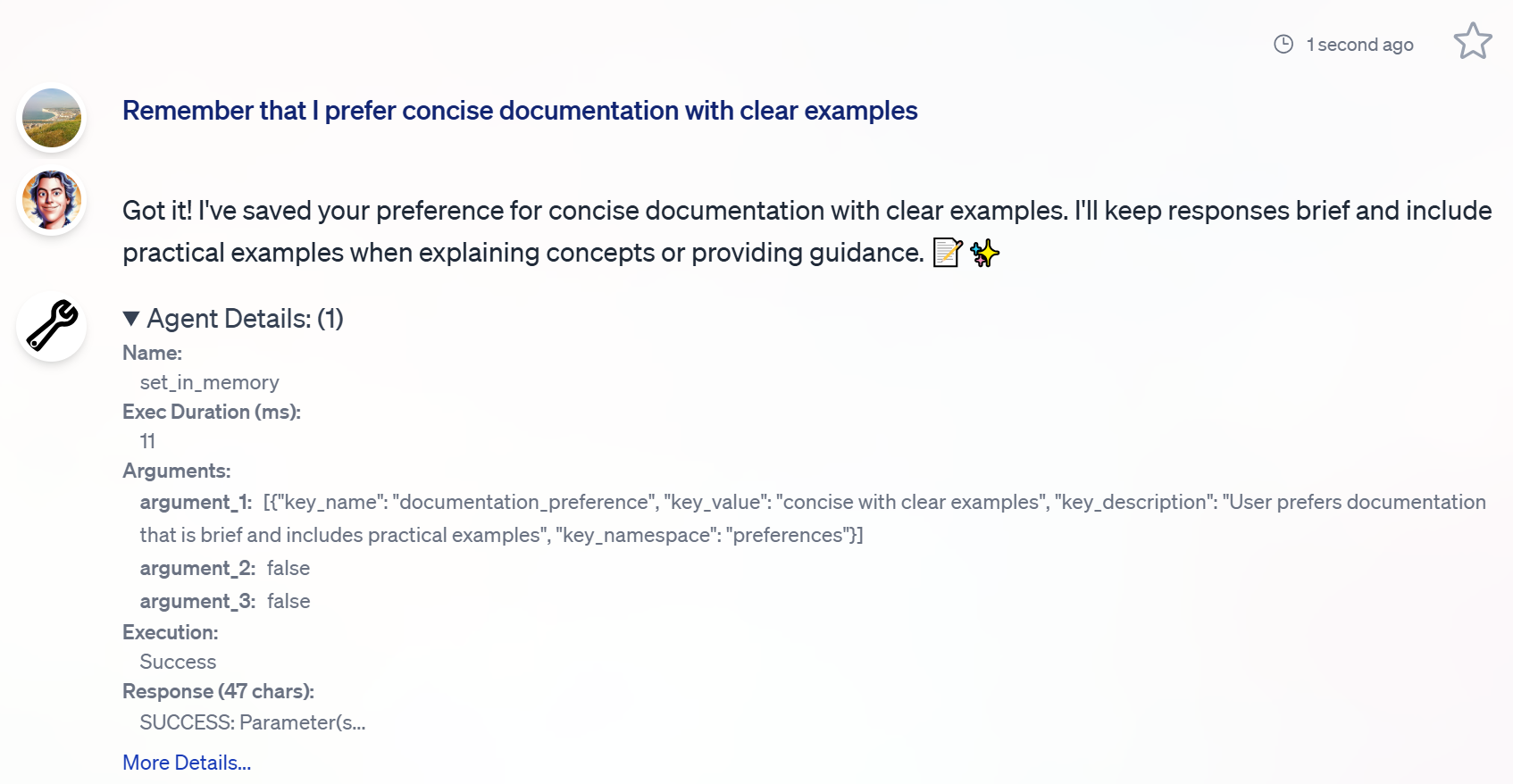 You can see exactly what was stored for each turn by expanding the **Tool Details** block on the response.
***
## The Memory panel — view, edit, delete
You don't have to go through chat. Open **My Profile → Memory** (or the sidebar's **Settings → Personal → Memory Parameters**) to manage everything directly:
* **Browse and search** every parameter — filter by name, value, or namespace.
* **Edit** a parameter's value or description inline.
* **Delete** individual parameters, or use **Clear** to remove everything currently matching your filter in one action.
* **Share / unshare** a parameter with your Digital Twin's [Shared Memory](/mdx/user-guide/memory/shared-memory) (only memories created inside that twin — purely personal memories can't be shared).
* **Export to CSV** for your own records.
Clearing memory removes personalization permanently — there's no undo. Filter first, then Clear, so you only remove what you mean to.
***
## The User Memory Optimizer assistant
Over time, memory accumulates scattered or duplicate parameters. The **User Memory Optimizer** assistant analyzes your stored memory, consolidates duplicates, fills obvious gaps, reorganizes namespaces, and removes stale entries — leaving a tighter set of parameters that personalizes better and costs fewer tokens.
You can see exactly what was stored for each turn by expanding the **Tool Details** block on the response.
***
## The Memory panel — view, edit, delete
You don't have to go through chat. Open **My Profile → Memory** (or the sidebar's **Settings → Personal → Memory Parameters**) to manage everything directly:
* **Browse and search** every parameter — filter by name, value, or namespace.
* **Edit** a parameter's value or description inline.
* **Delete** individual parameters, or use **Clear** to remove everything currently matching your filter in one action.
* **Share / unshare** a parameter with your Digital Twin's [Shared Memory](/mdx/user-guide/memory/shared-memory) (only memories created inside that twin — purely personal memories can't be shared).
* **Export to CSV** for your own records.
Clearing memory removes personalization permanently — there's no undo. Filter first, then Clear, so you only remove what you mean to.
***
## The User Memory Optimizer assistant
Over time, memory accumulates scattered or duplicate parameters. The **User Memory Optimizer** assistant analyzes your stored memory, consolidates duplicates, fills obvious gaps, reorganizes namespaces, and removes stale entries — leaving a tighter set of parameters that personalizes better and costs fewer tokens.
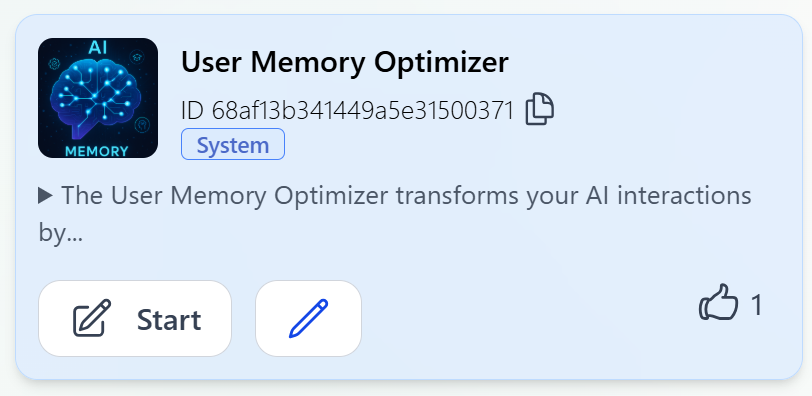 Run it when you start with a new Digital Twin, after a role change, or whenever responses start feeling less personalized.
***
## Turning User Memory off
**Your Profile → Knowledge → Memory** has an **Enable User Memory** switch (on by default) — also available as a quick toggle in the conversation action menu under **Knowledge → Memory**. Off: Pria stops saving new personal memories and stops using existing ones — nothing is deleted, the panel below stays fully usable, and your twin's [Shared Memory](/mdx/user-guide/memory/shared-memory) is unaffected. Details: [How Memory Handles Your Data](/mdx/user-guide/memory/memory-data-handling#can-i-turn-memory-off).
## Troubleshooting
| Symptom | Fix |
| ------------------------------------------- | --------------------------------------------------------------------------------- |
| Pria doesn't recall something you mentioned | Ask it explicitly to **remember** the fact — automatic capture is selective |
| Pria references an outdated role or project | Tell it the update in chat, or edit the parameter in the Memory panel |
| Conflicting or inconsistent personalization | Run the **User Memory Optimizer** to consolidate duplicates and resolve conflicts |
| You want to see everything stored | My Profile → Memory, or ask *"What do you remember about me?"* |
***
## Related
* [Memory Systems](/mdx/user-guide/memory/memory-systems) — how the three memory types fit together
* [Conversation History](/mdx/user-guide/memory/conversation-history) — short-term context for the current conversation
* [Shared Memory](/mdx/user-guide/memory/shared-memory) — team-wide knowledge for a Digital Twin
* [Your Data & Privacy](/mdx/user-guide/profile-settings/personal-data) — export or delete all of your data, memory included
* [How Memory Handles Your Data](/mdx/user-guide/memory/memory-data-handling) — storage, visibility, training, retention, and deletion answers
Run it when you start with a new Digital Twin, after a role change, or whenever responses start feeling less personalized.
***
## Turning User Memory off
**Your Profile → Knowledge → Memory** has an **Enable User Memory** switch (on by default) — also available as a quick toggle in the conversation action menu under **Knowledge → Memory**. Off: Pria stops saving new personal memories and stops using existing ones — nothing is deleted, the panel below stays fully usable, and your twin's [Shared Memory](/mdx/user-guide/memory/shared-memory) is unaffected. Details: [How Memory Handles Your Data](/mdx/user-guide/memory/memory-data-handling#can-i-turn-memory-off).
## Troubleshooting
| Symptom | Fix |
| ------------------------------------------- | --------------------------------------------------------------------------------- |
| Pria doesn't recall something you mentioned | Ask it explicitly to **remember** the fact — automatic capture is selective |
| Pria references an outdated role or project | Tell it the update in chat, or edit the parameter in the Memory panel |
| Conflicting or inconsistent personalization | Run the **User Memory Optimizer** to consolidate duplicates and resolve conflicts |
| You want to see everything stored | My Profile → Memory, or ask *"What do you remember about me?"* |
***
## Related
* [Memory Systems](/mdx/user-guide/memory/memory-systems) — how the three memory types fit together
* [Conversation History](/mdx/user-guide/memory/conversation-history) — short-term context for the current conversation
* [Shared Memory](/mdx/user-guide/memory/shared-memory) — team-wide knowledge for a Digital Twin
* [Your Data & Privacy](/mdx/user-guide/profile-settings/personal-data) — export or delete all of your data, memory included
* [How Memory Handles Your Data](/mdx/user-guide/memory/memory-data-handling) — storage, visibility, training, retention, and deletion answers