

Tools Reference
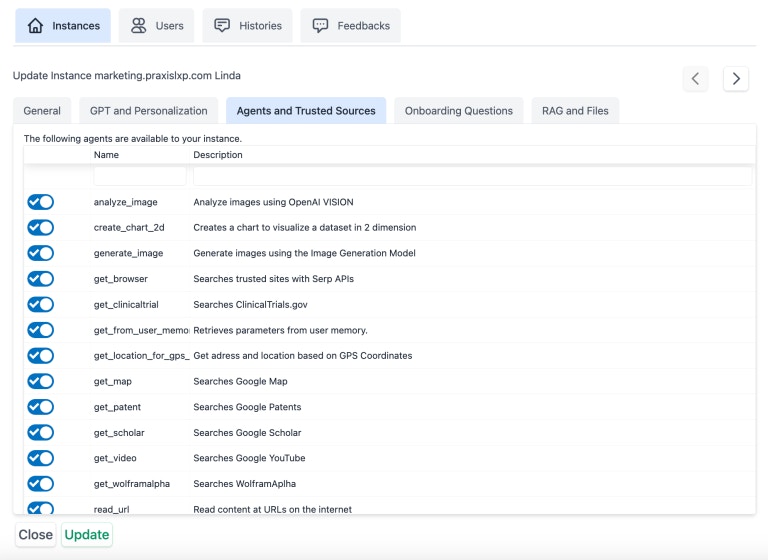
This is the complete list of built-in tools available to your Digital Twin. The AI automatically selects which tool(s) to use based on the conversation context.Some tools require additional configuration (e.g.,
call_canvas requires Canvas LMS integration, search_kaltura requires Kaltura credentials). Tools without required configuration are automatically disabled.Web & Research Tools
get_browser
get_browser
Searches trusted sites with Serp APIsUse for up-to-date information on broad topics when the exact URL is unknown:
- Current events, weather, stock tickers, sports scores
- General web research not covered by specialized tools
- Information you’re unfamiliar with
- “Search for the latest news on climate change.”
- “What’s the current weather in Tokyo?”
- “Find the most popular tourist attractions in Paris.”
Supports real-time voice conversations.
read_url
read_url
Read content at URLs on the internetAccess, retrieve, summarize, or save content from a known web page URL. Provides download links in Markdown format for public files.Examples:
- “Read the content from the Wikipedia page on the Roman Empire.”
- “Summarize the main points from https://example.com/article”
- “Save the content from this GitHub README to my files.”
Supports real-time voice conversations.
get_scholar
get_scholar
Searches Google ScholarSearch for scholarly articles and publications from peer-reviewed sources including NIH, NIM, PubMed, DOI, and more.Examples:
- “Find scholarly articles on artificial intelligence in healthcare.”
- “Search for recent studies on the effects of social media on mental health.”
- “What does the research say about intermittent fasting?”
get_patent
get_patent
Searches Google PatentsSearch for information about patents and inventions worldwide.Examples:
- “Who owns the patent for the smartphone?”
- “Find patents related to virtual reality technology filed in the last five years.”
- “Search for patent ID US10123456.”
get_clinicaltrial
get_clinicaltrial
Searches ClinicalTrials.govSearch clinical research studies worldwide from the US National Library of Medicine, including purpose, recruitment status, eligibility criteria, and locations.Examples:
- “Search for clinical trials related to diabetes treatment.”
- “Find clinical studies on mindfulness meditation for stress reduction.”
- “What’s the status of trial NCT06310070?”
get_wolframalpha
get_wolframalpha
Searches WolframAlpha for computations and visualizationsFactual lookups, quantitative analysis, symbolic/numeric computation (integrals, sequences, financial math), and visualizations across science, math, geography, economics, weather, population, music, and space.Examples:
- “What’s the nutritional content of an apple?”
- “Calculate the integral of sin(x) from 0 to π.”
- “Weather in NYC on July 4, 1776.”
- “California population from 1900 to 2020.”
- “Future value of $1,000 at 5% for 10 years.”
Supports real-time voice conversations.
Media & Content Tools
get_video
get_video
Searches Google YouTubeSearch for video content on specific topics from YouTube and other sources.Examples:
- “Find an educational video about the solar system.”
- “Show me a tutorial on how to bake sourdough bread.”
- “Search for analysis videos on current economic events.”
Supports real-time voice conversations.
transcribe_youtube
transcribe_youtube
Transcribe a video from YouTubeTranscribe video content when the full YouTube URL is known. Does not work for non-YouTube videos or audio files.Examples:
- “Transcribe the video at https://www.youtube.com/watch?v=Z8T149nP5cg”
- “Summarize the YouTube video at https://youtu.be/8nBFqZppIF0”
- “Download the transcript from this YouTube video.”
transcribe_audio
transcribe_audio
Transcribe an audio file from a URLTranscribe audio files with known extensions: mp3, mp4, mpeg, mpga, m4a, wav, and webm. Does not work for YouTube videos.Examples:
- “Transcribe the audio file at https://example.com/recording.mp3”
- “Convert this podcast episode to text.”
search_kaltura
search_kaltura
Search Kaltura for instructional videosSearch or list instructional videos on the Kaltura video streaming platform, including transcript extraction.Examples:
- “Find an Algebra video on Kaltura.”
- “What are my videos on Kaltura?”
- “Download the transcripts of a video about genome sequencing from Kaltura.”
- “Find videos from [email protected] on Kaltura.”
Supports real-time voice conversations.
search_image
search_image
Search for images using Unsplash.orgSearch for free images in the Unsplash database. Returns images with courtesy notices for attribution.Examples:
- “Find a sunset over the mountains.”
- “Search for 3 landscape photos of the ocean.”
- “Find a portrait-oriented image of a forest.”
Supports real-time voice conversations.
search_sound
search_sound
Search for sounds using Freesound.orgSearch for free sounds in the Freesound database. For sound effects, not music.Examples:
- “Find a sound of whales talking to each other.”
- “Search for thunder and rain sounds.”
- “Find 5 different bird call sounds.”
Supports real-time voice conversations.
get_map
get_map
Searches Google MapsSearch for places, points of interest, geographical information, or generate maps of specific areas.Examples:
- “Show me a map of downtown Paris.”
- “Find Italian restaurants in Downtown Seattle.”
- “What are the points of interest near Times Square?”
get_location_for_gps_coordinates
get_location_for_gps_coordinates
Get address from GPS coordinatesObtain the address of a place based on latitude and longitude coordinates.Examples:
- “What’s the address at coordinates 40.7128, -74.0060?”
- “What city is at latitude -21.2863697 and longitude 55.4108081?”
Supports real-time voice conversations.
Image Tools
generate_image
generate_image
Generate or edit images using AICreate new images or edit existing ones using the configured Image Generation Model (e.g., DALL-E, Amazon Titan). Prompts are automatically translated to English.Rules:
- No politicians or public figures
- No copyrighted characters (original descriptions only)
- Supports editing JPEG, PNG, and WebP files
- “Generate an image of a serene lake at sunset with mountains.”
- “Create a 3D picture of DNA proteins with bright colors.”
- “Edit this image to add a rainbow in the sky.”
- “Generate 3 variations of a futuristic cityscape.”
Supports real-time voice conversations.
analyze_image
analyze_image
Analyze and describe content in imagesIdentify, describe, extract text, count elements, determine emotions, historical context, cultural significance, and accessibility options in images.Examples:
- “Analyze this image of the Eiffel Tower for historical context.”
- “Extract the text contained in this screenshot.”
- “Describe the species of birds in this photo.”
- “Count the number of people in this image.”
Document & File Tools
call_rag
call_rag
Retrieve content from user files via semantic searchSearch for content relevant to the conversation contained in user files using Euclidean kNN (k-Nearest Neighbor) search. Results are ordered by relevance score.Examples:
- “Search my documents for information about project budgets.”
- “Find content in my files related to marketing strategies.”
- “What do my uploaded documents say about compliance requirements?”
Supports real-time voice conversations.
get_user_files
get_user_files
Retrieve user files with filteringAccess the user’s document library with metadata including summaries, types, dates, dimensions, and authors. Filter by file type or keyword search.Examples:
- “List all my uploaded documents.”
- “Show me my image files.”
- “Find files with ‘report’ in the name.”
- “What audio files do I have?”
Supports real-time voice conversations.
save_to_file
save_to_file
Save text content to user’s document collectionSave or append text content to files. Supports text-based formats only (MD, TXT, JSON, CSV, HTML, JS, CSS, XML, YAML). Binary formats (PDF, DOCX) are not supported.Examples:
- “Save this conversation summary to a file called meeting_notes.”
- “Create a new markdown file with this content.”
- “Append these notes to my existing research.txt file.”
- “Save this code snippet as a JavaScript file.”
Supports real-time voice conversations.
Memory Tools
set_in_memory
set_in_memory
Save parameters to user or shared memoryStore or clear parameters in memory. Parameters include namespace, name, value, and description. Shared memory is accessible by all users of the Digital Twin.Examples:
- “Remember that my birthday is December 30th, 1972.”
- “Remember I prefer short and concise responses.”
- “Save this copyright notice in shared memory: © 2025, Praxis-AI, Inc”
- “Clear all my stored preferences from memory.”
Supports real-time voice conversations.
get_from_memory
get_from_memory
Retrieve parameters from memoryRetrieve a list of parameters from user or shared memory, including namespaces, names, values, descriptions, and creation dates.Examples:
- “What’s my morning routine according to memory?”
- “What preferences have I stored?”
- “Show me all parameters in shared memory.”
- “What do you remember about my personal data?”
Supports real-time voice conversations.
Visualization Tools
create_chart_2d
create_chart_2d
Create 2D charts for data visualizationGenerate charts for visualizing single or multiple data series with categories on the x-axis.Examples:
- “Create a chart showing sales data from January to April.”
- “Generate a chart comparing monthly rainfall to temperature.”
- “Visualize this quarterly revenue data as a bar chart.”
LMS Integration Tools
call_canvas
call_canvas
Interact with Canvas LMSAccess course material, discussions, submissions, grades, announcements, and other Canvas features via the Canvas API. Supports both student and faculty contexts.Examples:
- “What are my assignments due this week?”
- “Show me the course syllabus.”
- “List discussion topics in my course.”
- “What’s my grade on the midterm exam?”
- “Post a comment on my assignment submission.”
Supports real-time voice conversations.
search_canvas
search_canvas
Search Canvas for course materialFallback search tool when
call_canvas is not available. Searches course material including syllabus, pages, content, assignments, grades, office hours, and announcements.Examples:- “When is my homework due this week for Intro to Marketing?”
- “Search for office hours in my course.”
- “Find content about Chapter 5 in my course.”
Bioinformatics Tools
search_blast
search_blast
BLAST sequence similarity searchFind regions of similarity between biological sequences using NCBI BLAST (nucleotide/protein comparison with statistical significance). Note: Queries may take several minutes.Supported Programs: megablast, blastn, blastp, rpsblast, blastx, tblastn, tblastxExamples:
- “Search blastp for this protein sequence: MKVKVLSLLVP…”
- “Run a megablast search against the nt database.”
- “Compare this DNA sequence to RefSeq genomes.”
Communication Tools
send_email
send_email
Send an emailSend emails with specified recipients, subject line, and HTML-formatted message body. Supports multiple recipients.Examples:
The AI will request confirmation before sending unless instructed otherwise in your Digital Twin’s system prompt.
- “Send an email to [email protected] about the meeting tomorrow.”
- “Email the team a summary of today’s discussion.”
- “Send this report to [email protected] and [email protected].”
Supports real-time voice conversations.
Assistant Tools
get_assistants
get_assistants
List available assistantsRetrieve a filtered or complete list of conversational assistants accessible to the current user. Returns assistant IDs and names.Examples:
- “What assistants are available?”
- “Find assistants with ‘math’ in the name.”
- “List all my assistants.”
Available in real-time voice mode only.
start_assistant
start_assistant
Activate an assistantInitialize and activate a specific conversational assistant, loading its specialized instructions into the current session.Examples:
- “Start the Math Tutor assistant.”
- “Switch to the Writing Coach.”
- “Activate the Code Review assistant.”
Available in real-time voice mode only.
API Integration Tools
call_rest
call_rest
Execute REST API callsExecute authenticated REST API calls to specific service endpoints. Use only when explicitly instructed or when other tools cannot access the target service.Supported Methods: GET, POST, PUT, DELETEExamples:
- “Call the attendance API endpoint with my bearer token.”
- “POST this data to the internal reporting service.”
- “Fetch data from our custom REST endpoint.”
Supports real-time voice conversations.
Tool Availability
Tools are automatically enabled or disabled based on your Digital Twin’s configuration:| Tool | Requires |
|---|---|
call_canvas, search_canvas | Canvas LMS integration |
search_kaltura | Kaltura credentials |
search_blast | Institutional account |
search_drive | Google Drive integration (coming soon) |
Real-Time Voice Support
Tools marked withSupports real-time voice conversations.
Available in real-time voice mode only.