Credits in Pria are Praxis Unified Credits. Each new user receives 50 free credits to explore the platform when they get started with their Digital Twin. Once you are ready for more credits, you can set up a subscription plan or purchase a discounted credit bundle.
Credit Bundle Dashboard in the Digital Twin Gallery
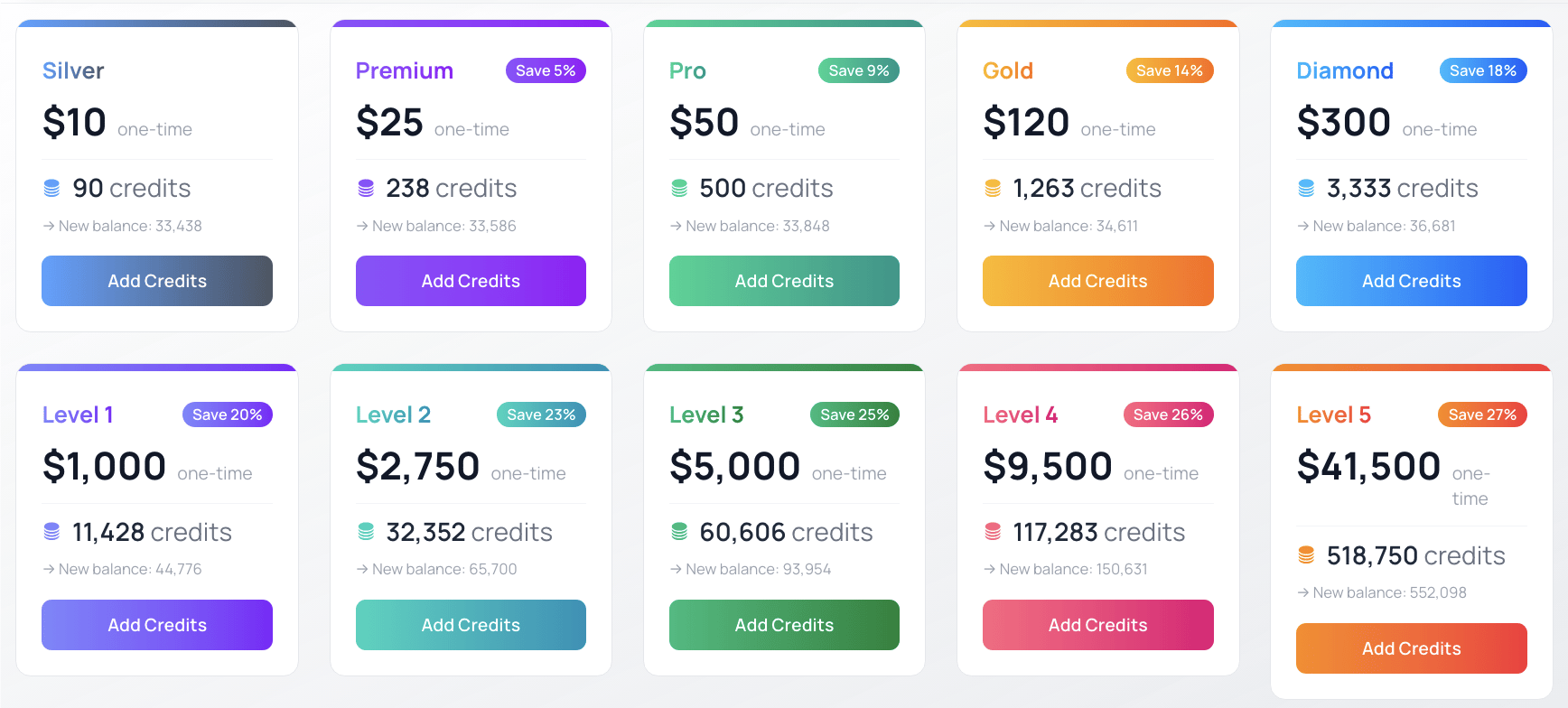
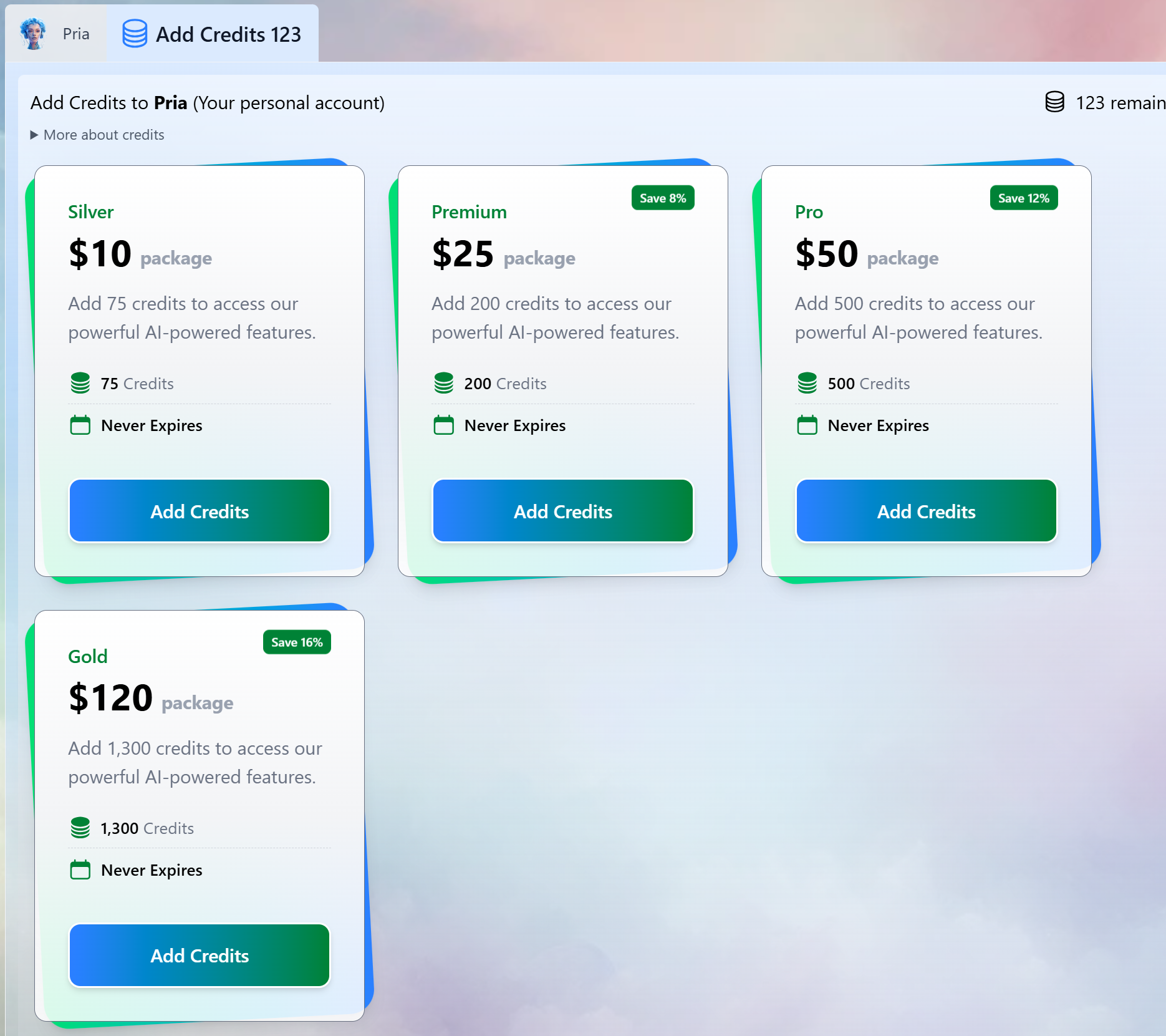
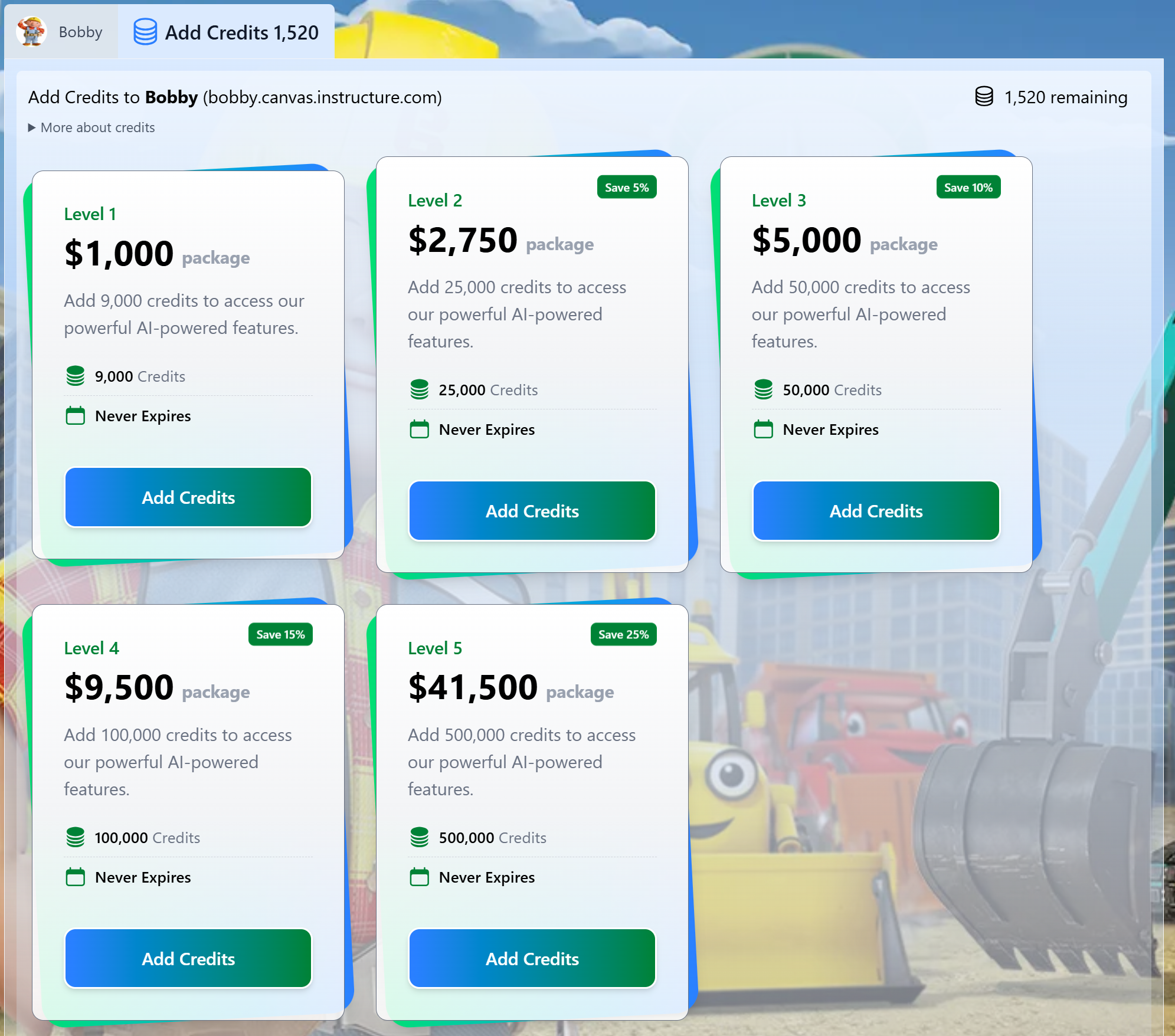
You can browse credit bundles by scrolling to the bottom of your Digital Twin gallery and clicking on Add Credits. These bundles can be purchased either individually or through your institution, ensuring uninterrupted access to AI-powered learning and productivity tools.
When considering which credit bundle is right for you, keep in mind that credits NEVER expire!
The Per Credit Usage model allows you to buy bundles of credits and apply them to your personal account or to the Digital Twins you manage for your school or organization.Each interaction consumes credits based on the tokens it processes (a token is a small piece of text, roughly four characters). Approximately 1 credit is used per 10,000 tokens of combined input and output, with a 1-credit minimum per AI call. Requests that fail before the AI does any work are never billed, and canceling a response never incurs a charge.
Bring Your Own Keys (BYOK): Customers who provide their own AI provider credentials (OpenAI, Anthropic, Gemini, Mistral, etc.) buy credits at a substantial 40% discount on standard pricing through our sales team, keeping direct control over provider usage while leveraging existing provider relationships and enterprise agreements. Standard setup and support charges remain unchanged. For details on connecting your own models, see Bring Your Own Model.
All credit packages are one-time purchases and credits never expire. Pricing starts at 11 cents per credit for the base tier, with increasing discounts as you purchase larger bundles. Savings percentages are calculated relative to the base rate of 11¢/credit.
Personal Credits
Digital Twin Credits
Standard Packages for Personal Use
Package
Price
Credits
Per Credit
Savings
Silver
$10
90
11.00¢
—
Premium
$25
238
10.50¢
Save 5%
Pro
$50
500
10.00¢
Save 9%
Gold
$120
1,263
9.50¢
Save 14%
Diamond
$300
3,333
9.00¢
Save 18%
Select in the Gallery
Packages for Personal Credits
Personal Use
Each user receives a default personal account called Pria, which serves as your dedicated digital assistant for handling personal tasks and inquiries. This account is designed specifically for your individual needs and can be managed independently by purchasing and adding credits directly to maintain its functionality and access to various services.
By default your personal account is awarded 50 credits to start.
If a public or shared Digital Twin does not provide a shared credit pool, your requests there are paid for from your own personal credits — so keep your personal balance topped up to keep using them.
Volume Packages for your Digital Twin
Package
Price
Credits
Per Credit
Savings
Level 1
$1,000
11,428
8.75¢
Save 20%
Level 2
$2,750
32,352
8.50¢
Save 23%
Level 3
$5,000
60,606
8.25¢
Save 25%
Level 4
$9,500
117,283
8.10¢
Save 26%
Level 5
$41,500
518,750
8.00¢
Save 27%
Larger volumes (Level 6 and beyond) are available by arrangement — contact humans@praxis-ai.com.Select in the Gallery
Packages for Digital Twins
Digital Twin Use
Credits added to your digital twin can be pooled and shared among all members of the digital twin community. When the Pool Credits setting is enabled in the Configuration, users will automatically draw from the pooled credit balance instead of consuming their individual personal credits, creating a collaborative resource system that benefits the entire group.Account-Level Credits
For institutions managing multiple Digital Twins, credits can also be managed at the Account level. An Account groups several Digital Twins together, so credits can be distributed centrally across all of them. Contact your administrator for account-level credit management.
Digital twins can be configured to either pool credits on behalf of their members or operate without credit pooling, requiring members to rely on their own personal credit balances. When pooling is disabled, each user must maintain and consume their individual credits for accessing services and features within the digital twin environment.
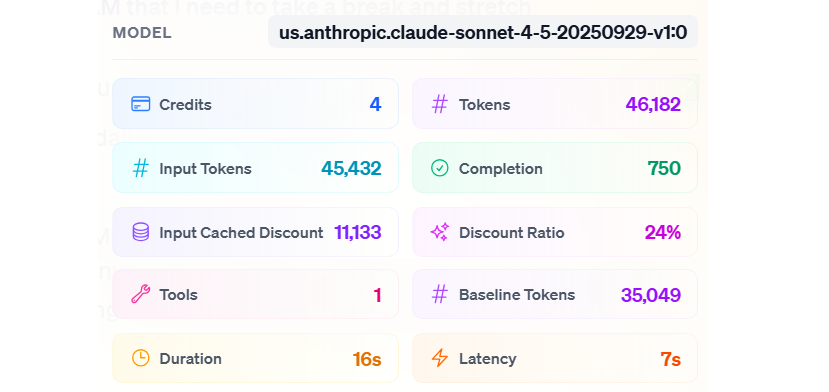
“Caching” is essentially the AI “remembering” parts of your conversation to work faster and more efficiently the next time.How it saves you money: When the AI uses this “memory” instead of processing everything from scratch, it costs you less — the cached portion is billed at a discount — Pria passes part of the provider’s own caching saving on to you, so the exact rate depends on the model provider. When you use models that support caching (for example, the OpenAI GPT‑5 family, GPT‑Realtime, or the Claude family, which provide strong caching behavior), you will benefit from these savings. These savings also apply in Convo Mode.How to see savings: You don’t have to guess if you’re saving money. You can view your actual savings in the Dialogue Report Card (the Usage Details panel under a reply) or the Admin → History section of your account, so administrators can review and validate the realized credit reductions.
Tokens
Total number of tokens processed by the model, including both input and output.Input Tokens
Number of tokens sent to the model for the interaction (prompt, system instructions, tools, etc.).Input Cached Discount
Portion of the input tokens that are recognized as cached and therefore discounted from the billable input. These tokens still count toward usage, but not fully toward cost.Discount Ratio
Percentage discount applied to the cached portion of the input tokens. A higher ratio means a larger cost reduction from caching.Baseline Tokens
Final effective token count used to compute credits after applying the caching discount. This is the value that is converted into credits.
In the example below, without any caching benefit, the interaction would have cost 5 credits.With caching enabled:
Some of the input is recognized as cached
The Input Cached Discount is applied
The Discount Ratio determines how much of those cached tokens are discounted
After applying the discount, the effective cost drops by 24% compared to the original 5-credit price, and the final (rounded) charge is only 4 credits.
Content generated by the LLM counts toward Completion tokens (output). For most models, these completion tokens are priced by the providers at roughly 4–10× the input-token rate. It is important to note that caching is applied only to input tokens—completion tokens are never cached by the underlying models.To your direct benefit, Praxis AI does not introduce any surcharge or special markup for completion tokens:
Completion tokens are billed using the same pricing curve as input tokens.
Caching discounts apply only to input tokens when the underlying model supports input caching.
As a result, you get transparent, predictable pricing for all generated output, without hidden multipliers or extra completion-specific fees.
A standard question-and-answer turn (one conversation model answering directly) costs 1 credit per 10,000 tokens of text handled, after any caching discount, rounded up to the next whole credit — once per turn.
Some Digital Twins can answer with a team of models instead of one (Agent Mode). When that happens, several models contribute to one answer — the conversation model, the manager coordinating the work, and the helpers it brings in.These turns do not use the flat 1-credit-per-10,000-tokens rule. They are billed on what the work actually cost, plus a small platform margin:
Every model that contributed is counted — the conversation model that wrote the answer, the manager that decided what to do, and each helper it dispatched.
Each is priced at its own listed rate — work done by an inexpensive helper model costs less than the same work on a premium model. Text served from the provider’s cache is priced at that provider’s cheaper cached rate.
A small platform margin is applied on top of the measured cost, identically across every model on the turn.
The fractional credits are added up and rounded up once, at the end of the whole turn — never per model. Ten helpers do not mean ten roundings.
Only work actually done is billed. A turn that fails before any model runs is never billed, a cancelled turn is never billed, and an agent run that fails partway bills the work completed up to that point.
The Dialogue Report Card’s Pricing tab shows the itemized bill per helper and per model for every turn, including the margin applied, so you can always see exactly where the credits went.
Why the flat rate is set aside here. An Agent Mode turn routinely reads hundreds of thousands of tokens of cached context across a dozen or more model calls. Charging the flat rate on that volume would bill well above what the work cost. Billing the true cost keeps agent turns honest in both directions — you pay for the team you actually used, at the rates those models actually charge.
Spoken conversations (Convo Mode, a one-to-one session) are metered in credits the same way as text: on the tokens of the conversation, totalled across the session and charged when the session ends. Spoken audio is counted in audio tokens, which every voice provider prices well above text tokens — so a spoken exchange costs more than the same exchange typed.In Convo Mode, the animated avatar (Anam) adds no separate per-minute charge to your credit balance. An avatar session bills on exactly the same tokens as a voice-only session of the same length; there is no “avatar minutes” line item. What makes the avatar the more expensive habit is that people stay in conversation with a face on screen much longer than they stay in a chat box, and the whole session is one bill.Meetings are different. When a Digital Twin joins a Zoom, Google Meet, or Teams call as the Meeting Agent, the avatar, the meeting bot, and live transcription are each metered per minute for the time the bot spends in the call (at one and a half times the providers’ cost), on top of the normal per-turn rule for whatever the twin actually says. See Meeting Agent for the full picture.
Bring your own Anam account: if your organisation supplies its own Anam credentials, Anam bills that account directly for avatar minutes, in both Convo Mode and meetings. That is a separate bill from your Pria credits, which continue to meter the conversation itself. On Praxis-managed Anam access there is no second bill — it is all in credits. Either way, in a meeting the meeting bot and transcription are always Praxis-managed, so their per-minute charges still bill in credits. See Anam Avatar.
With a Named User Subscription you buy one subscription per named person, for a year. The credits are pooled: each named person adds 1,000 credits to a shared annual pot, so 500 named users share 500,000 credits for the year, to be used among all of them, anytime, anywhere. This model suits schools, corporations, and other organisations that want to pool credits on behalf of their users.Below is the volume breakdown:
Tier
Users
Description
1
Up to 1,000
Annual subscription per named user
2
1,001 to 5,000
Annual subscription per named user
3
5,001 to 10,000
Annual subscription per named user
4
10,001 to 15,000
Annual subscription per named user
5
15,001 to 50,000
Annual subscription per named user
6
50,001 to 75,000
Annual subscription per named user
7
75,000+
Annual subscription per named user
Contact our sales representative to jump on this plan structure.