

Bypass System Context for Purpose‑Built Assistants
Every request to the AI normally carries the System Context — Pria’s standing, platform-wide guidance on how to use tools, which sources to trust first, safety guardrails, formatting rules and the personality framework — in addition to the Assistant’s own instructions. Some Assistants already have all their operating rules written into their Assistant instructions (how to use tools, how to format answers, how to behave). For those, sending the System Context again on every call is repeated text — and repeated text costs credits. The Bypass System Context toggle lets you skip this extra layer when it is not needed, reducing input tokens and saving credits.When to Use Bypass System Context
Enable Bypass System Context when:- The Assistant has a well‑defined, self‑contained instruction set.
- Tool usage conventions, output format, and interaction style are already encoded in the Assistant.
- You do not rely on global, shared rules from the System Context for this Assistant.
How to Enable Bypass System Context
You can find the Bypass System Context toggle in the Assistant panel for each Assistant.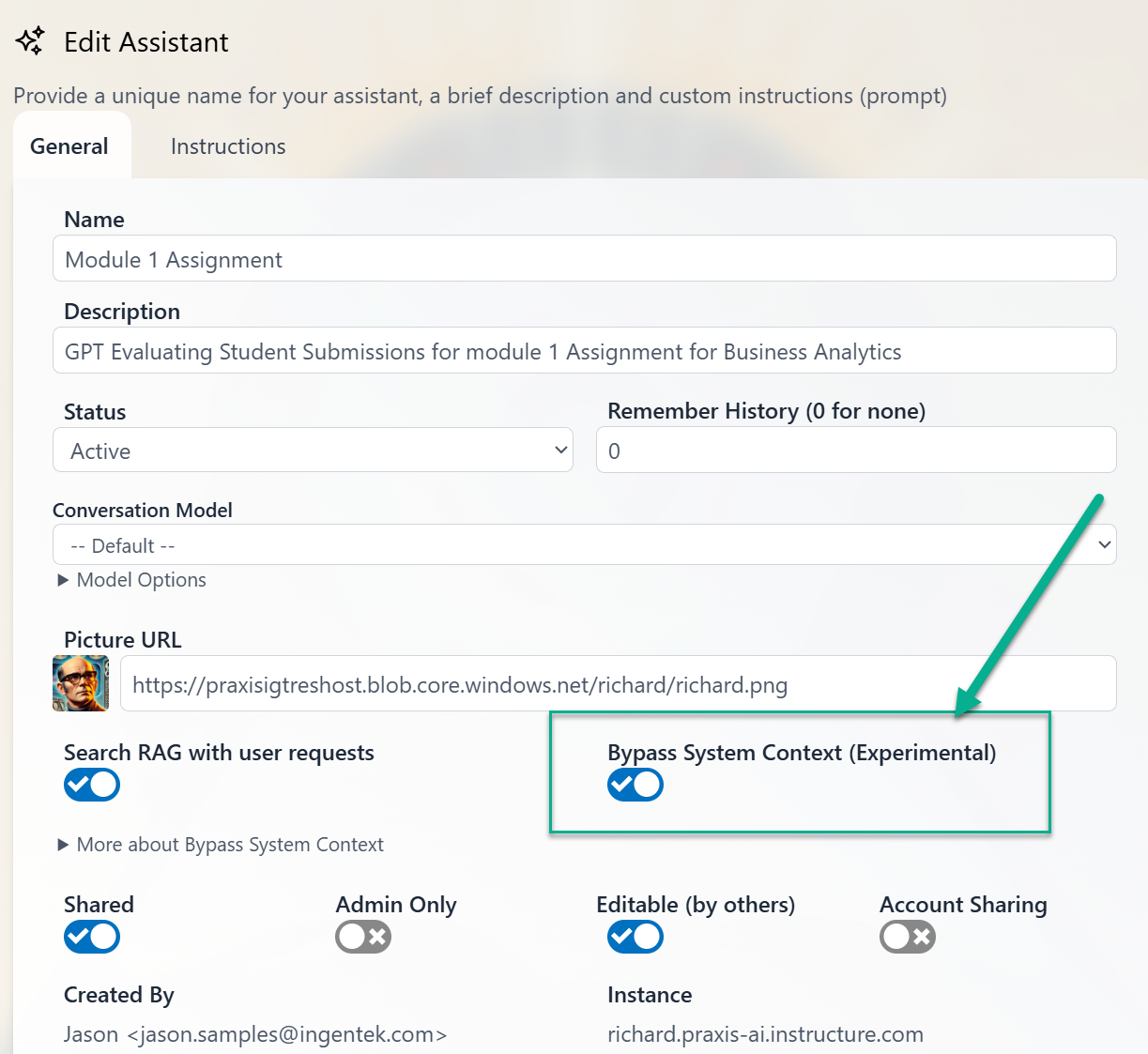
- The global System Context is not sent with each request for that Assistant.
- Only the Assistant’s own instructions and the active conversation context are included.
- Input token count decreases, which directly reduces credit usage.
Observing the Credit Savings
As soon as you enable the toggle and run a conversation, you can see the immediate impact in the credit usage views.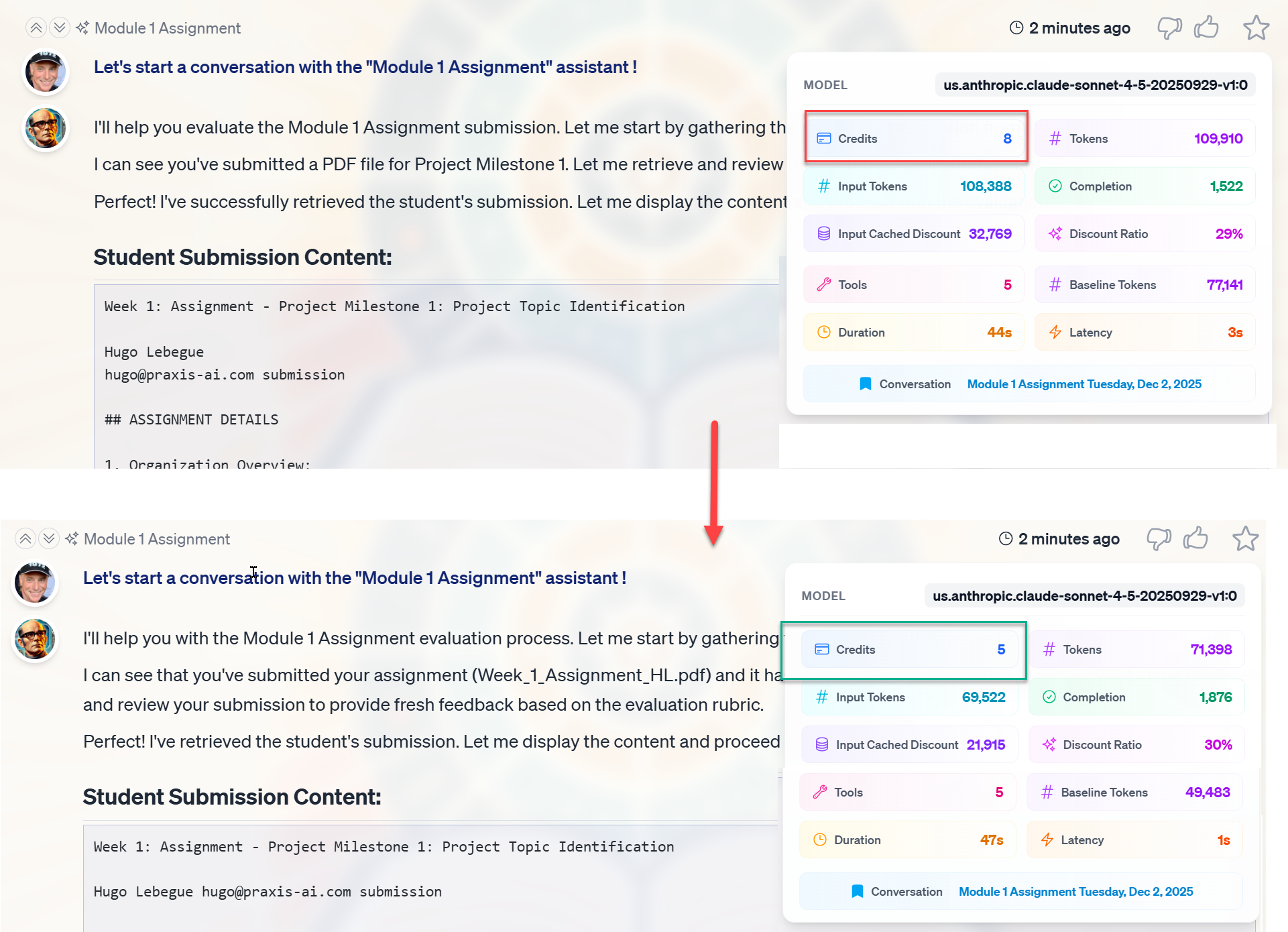
- Click the Usage Details (chart) button in a dialogue’s toolbar to open its usage panel and inspect detailed token and credit metrics for that specific exchange.
- Review the Credits used per dialogue; in the example, bypassing the System Context yields a visible gain (e.g., a reduction of 3 credits for the conversation).
Discounts on Cached Input Tokens
Praxis AI works with AI providers that support input token caching (such as modern OpenAI and Anthropic models), so that text the provider has already processed for you recently is billed at a lower rate — automatically.How Caching Works Conceptually
For models that support caching:- Adding to cache: The first time you send a chunk of prompt (e.g., long instructions, repeated context), the provider may store it in a cache. This step is slightly more expensive.
- Reusing cache: Subsequent calls that reuse the same content can be served more cheaply, because the model recognizes those tokens as cached.
- Cache lifetime: The cache typically lives for about 5 minutes and is automatically managed by providers like Anthropic and OpenAI. You do not need to manage it manually.
How Praxis AI Applies Caching Discounts
Praxis AI normalizes the provider‑level behavior into a consistent credit model:- We track input tokens and identify the portion recognized as cached by the provider.
- We then apply an Input Cached Discount to that cached portion.
- The Discount Ratio — how much of those cached tokens are forgiven — passes part of the provider’s net caching saving back to you, so it varies by model: providers with deeper cache discounts (such as Anthropic Claude models) produce a larger ratio than providers with more modest ones.
- The result is a lower Baseline Token count, which is what we finally convert into credits.
- It may cost slightly more for the first request when content is added to the cache.
- Subsequent requests benefit from reduced effective input tokens, producing visible credit savings.
- The Usage Details panel of each dialogue.
- Histories under Admin, for cross-assistant, cross-user analysis.
Example: Effective Discount on a Dialogue
In short: a conversation that would have cost 8 credits can come down to 5 when most of the repeated text is recognised from a moment ago. The full arithmetic, for those who want it:- Without caching, the interaction might cost 8 credits based on 71,398 tokens.
- With caching:
- Part of the input — say 48,700 tokens — is recognized as cached by the provider.
- The Input Cached Discount is applied to those cached tokens.
- With a Discount Ratio of 45% (a Claude-class model), about 21,915 tokens are forgiven.
- After applying the discount, the dialogue bills only 5 credits, based on the baseline of 49,483 tokens.
In Agent Mode, cached tokens are priced directly at each provider’s cheaper cached rates as part of the true-cost bill — the saving is built into each helper’s price shown on the dialogue’s Usage Details (Pricing tab) rather than appearing as a separate discount ratio.
Disable Tools (Reduce Tool Calls)
Pria’s standing instructions tell the AI how to use tools, with explicit rules to minimize unnecessary tool calls in order to keep credit usage and overall costs under control. While each tool call consumes additional credits, tools are essential for unlocking the full power of your digital twin—for example, by querying trusted sources, retrieving Canvas content, or accessing your organisation’s own data that the AI cannot see on its own. Every tool your Digital Twin can use has to be described to the AI on every single request — which tools exist, what they do, and when to use them. Each description costs tokens. To reduce prompt size and improve efficiency, you can configure which tools are enabled for a given digital twin and disable any tools that are not needed. This keeps the instructions short, reduces what each request costs, and focuses your digital twin on the capabilities that matter most for your use case.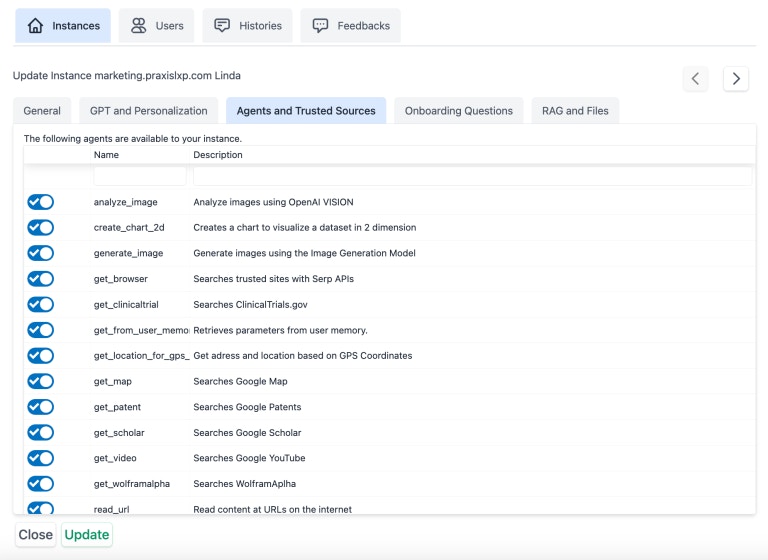
Tools Guidance (personal accounts)
If you use Pria without a Digital Twin, each question carries only a short version of the instructions that tell the AI how to use its tools, so it costs fewer credits. To get the detailed instructions back — useful for research — turn on Tools Guidance under your tools in Tools (the chat’s action menu; Studio UI: Settings › Tools). Leave it off when you don’t need it.Choose Voice and Avatar Deliberately
Spoken conversation is the single easiest way to spend credits quickly. Audio tokens are priced well above text tokens by every provider, and a voice session bills for the whole session — so the same question asked out loud costs meaningfully more than the same question typed. In a one-to-one Convo Mode session, the animated avatar (Anam) does not add a per-minute charge to your credit balance: an avatar session is metered on the tokens of the conversation, exactly like a voice-only session of the same length. What it changes is behaviour — people stay in conversation with a face on screen far longer than they stay in a chat box, and every extra minute is on the same bill. Sending your twin into a meeting instead of talking with it one-to-one is a different story: the Meeting Agent bills per minute of the time the bot is in the call (at one and a half times the providers’ cost), so keeping meetings short and leaving promptly when they’re done saves credits directly. To keep spoken sessions in proportion:- Reserve the avatar for where presence earns its price — sales, training, onboarding, accessibility. Use plain voice, or text, for quick fact lookups.
- Set a voice conversation model on the Digital Twin (or per assistant) that is fast and concise. Spoken turns should be short; a model that monologues costs you twice — once in output tokens and again in the minutes users spend listening.
- Give the session a clear ending. An intro message that tells users they are in a live session, and a habit of closing the tab when done, prevent sessions idling with the meter running.
- Prefer text for anything you’d want to re-read. Lookups, summaries, and anything a user will copy out are cheaper and more useful typed.
- Keep meetings tight. Since the Meeting Agent bills per minute the bot is in the call, ending the meeting promptly — including by asking Pria to leave once it’s no longer needed — keeps the bill down.
Putting It Together: Strategy for Optimizing Credits
To maximize the return on your investment dollars while maintaining quality:- Use Bypass System Context for Assistants whose behavior is fully defined by their own instructions to cut redundant tokens from every call.
- Leverage caching‑friendly patterns:
- Use models that support caching where suitable for your workload.
- Keep stable, reusable context consistent across requests (e.g., long instructions, shared reference text, tool use).
- Monitor discounts and performance:
- Regularly review each dialogue’s Usage Details and Histories under Admin.
- Track how often cached discounts appear and how they impact effective credits.
- Only use necessary tools:
- Disable unnecessary tools in your Digital Twin
- Provide additional instructions on when to use tools, or what tools to prioritize in your assistant instructions
- Match the modality to the job:
- Use voice and the avatar where presence matters; use text for lookups and anything worth re-reading.
- Set a fast, concise voice conversation model so spoken turns stay short. These mechanisms are intentionally generous and designed to keep Praxis AI cost‑competitive while helping you operate Assistants efficiently at scale.
More info
- Plans and Credits – Adding Credits – Adding credits to your digital twin
- Plans and Credits – Caching Discounts – Definitions for tokens, cached discounts, discount ratios, and baseline tokens..