

What “reasoning” means
When a thinking model receives your question, it can spend extra time generating an internal monologue before it starts writing the reply:- “Let me re-read the question.”
- “There are two ways to interpret this — I’ll consider both.”
- “That step looks wrong, let me redo it.”
Not every model supports reasoning. In the model catalog, the Features icon marks the models that do.
The 5 effort levels
None
No thinking. The model answers immediately from its first read. Fast and cheap. Good for casual chat, quick lookups, and voice conversations where latency matters.
Low
A brief inner pass — usually a few seconds extra. Catches obvious mistakes without slowing things down much.
Medium
A solid amount of thinking. The model checks its work, considers alternatives, and reorders its plan if needed. A sensible default for most knowledge work.
High
Deep thinking. Several seconds to a minute of internal reasoning. Use for nuanced analysis, complex multi-step problems, and long-form writing where quality matters more than speed.
Max
Maximum effort. The model uses the largest reasoning budget the provider allows. Slow and credit-heavy, but produces the highest-quality output for genuinely hard problems.
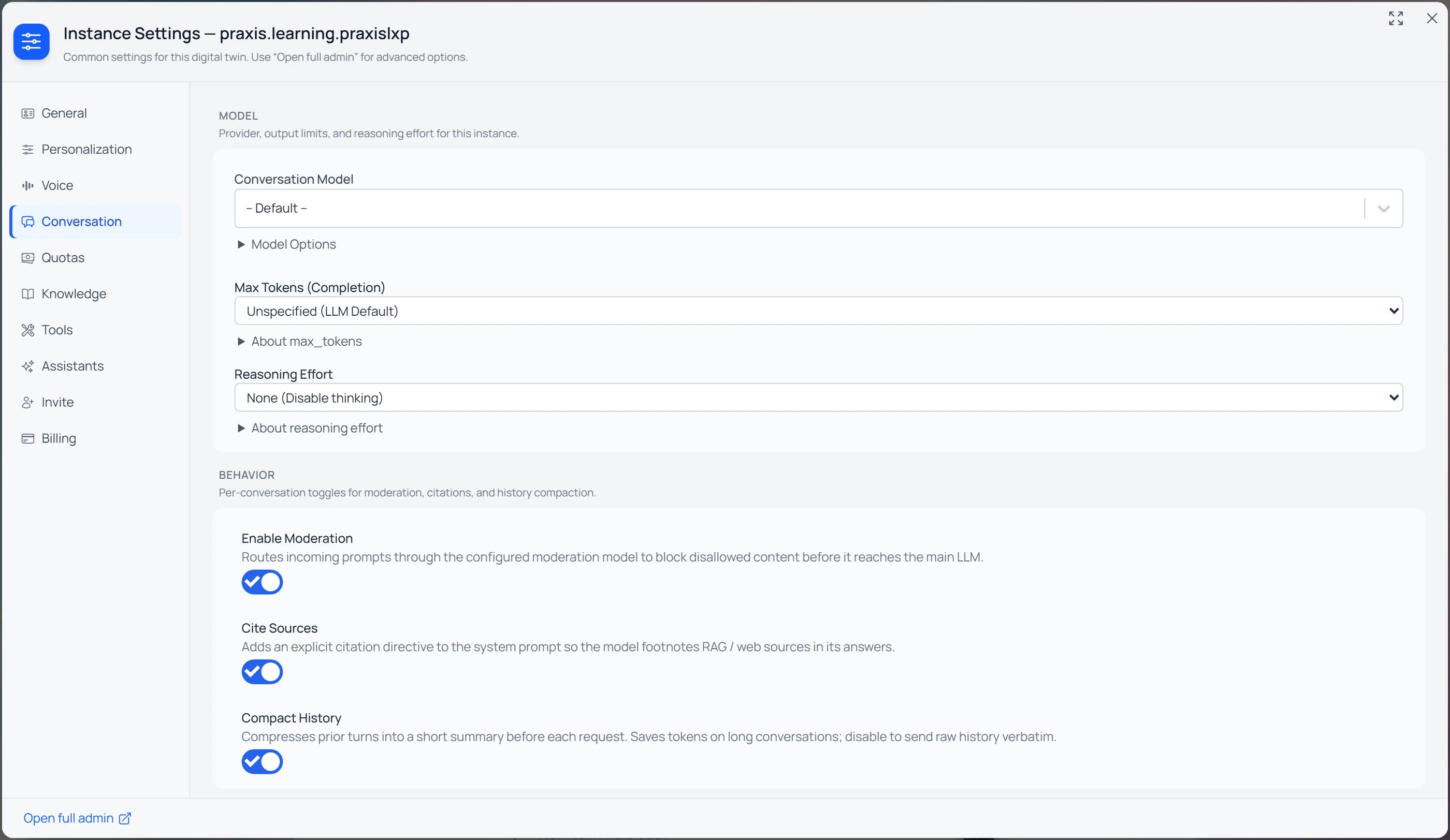
Instance Settings → Conversation: the Reasoning Effort dropdown sits with the Conversation Model and Max Tokens. The default is “None (Disable thinking)”.
Per-model differences
Every AI provider handles thinking a little differently. Pria translates the same five levels for each model, so you don’t need to know the details. What you may notice:- Models that don’t reason ignore the setting and answer in one pass.
- Some models can’t switch thinking off completely. With None they think at their lowest level; a few start at Low (for example, GPT-6.1 Sol).
- Some models decide for themselves how much to think. There, the level steers the depth rather than fixing it.
- Thinking is paid for even when you don’t see it. The display toggle below only changes what is shown.
The thinking display toggle
By default the reasoning trace can appear above each answer in a 💡 lightbulb block. Whether it does is a per-Twin choice, controlled by whoever manages the Digital Twin under Instance Settings → Conversation → Display Details.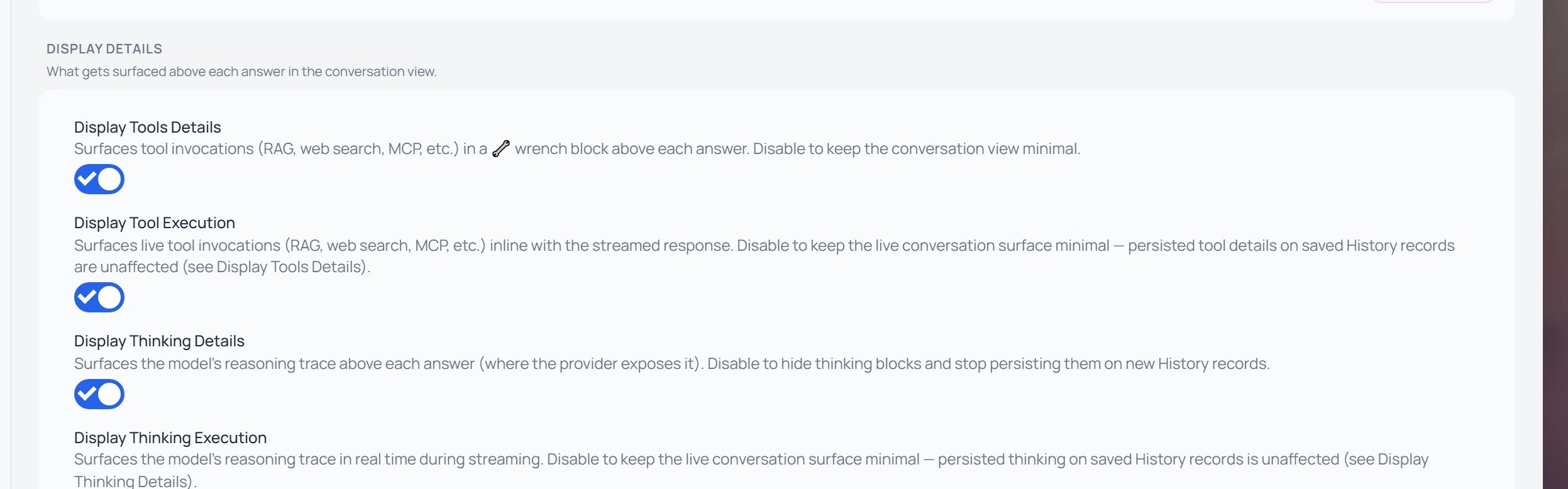
Instance Settings → Conversation → Display Details: the Tools and Thinking toggles, each split into a persisted (Details) and a live (Execution) view.
Reading the four toggles
The screenshot shows four switches, because the same two-way split applies to the model’s tool activity as well as its thinking. They form a simple grid:
Two questions decide which toggle you want:
- Tools or Thinking — what are you watching? 🔧 Tools is the model acting — calling retrieval, web search, or an MCP connector. 💡 Thinking is the model reasoning — its internal chain-of-thought.
- Details or Execution — when do you see it? Details = kept: the block stays above the answer, and it’s still there when you reopen the conversation later. Execution = live only: you watch it happen while the reply is being written, and then it’s gone. What is kept always follows the matching Details toggle — so you can watch the live trace without keeping it, or keep the saved block without the live view.
Reading thinking blocks during a stream
While a reasoning model is thinking, you’ll see:- A growing “thinking” panel above the reply area, streaming in real time.
- A spinner / waveform indicating the model is still planning.
- The final answer appears below once thinking finishes and the model begins composing the reply.
Thinking content is informative, not authoritative. The final answer is what the model wants to commit to. Treat the thinking block as “showing the work”, not as a second answer to react to.
Cost & speed tradeoffs
Numbers are rough — they vary by model, question complexity, and provider. Watch the credit indicator on each reply to see the real cost.
When to use Max
Reach for Max when the answer’s quality matters more than time or cost:- Deep research questions that require synthesizing many sources.
- Long, multi-step plans you’ll act on (project plans, architecture proposals).
- Nuanced analysis where small mistakes have big downstream cost.
- Hard puzzles, derivations, proofs, or ambiguous specifications.
- Final-draft writing on important material.
When to use None or Low
Drop to None or Low when speed and economy matter:- Voice mode (long thinking pauses break the conversation’s natural rhythm).
- Quick factual lookups (“what’s the capital of…”).
- Casual chitchat, small talk, formatting tweaks to existing text.
- Bulk drafting where you’ll edit afterwards anyway.
- Repetitive workflows where the answer is well within the model’s first-pass capability.
Related
- AI Models for Your Twin — pick a model that supports thinking.
- Knowledge Modes — feed the model your uploaded context for grounded reasoning.
- Convo Mode — when to dial effort down for live voice.
- Credits — how thinking tokens affect your spend.
- Credit optimization — tactics for getting the depth you need without overspending.