

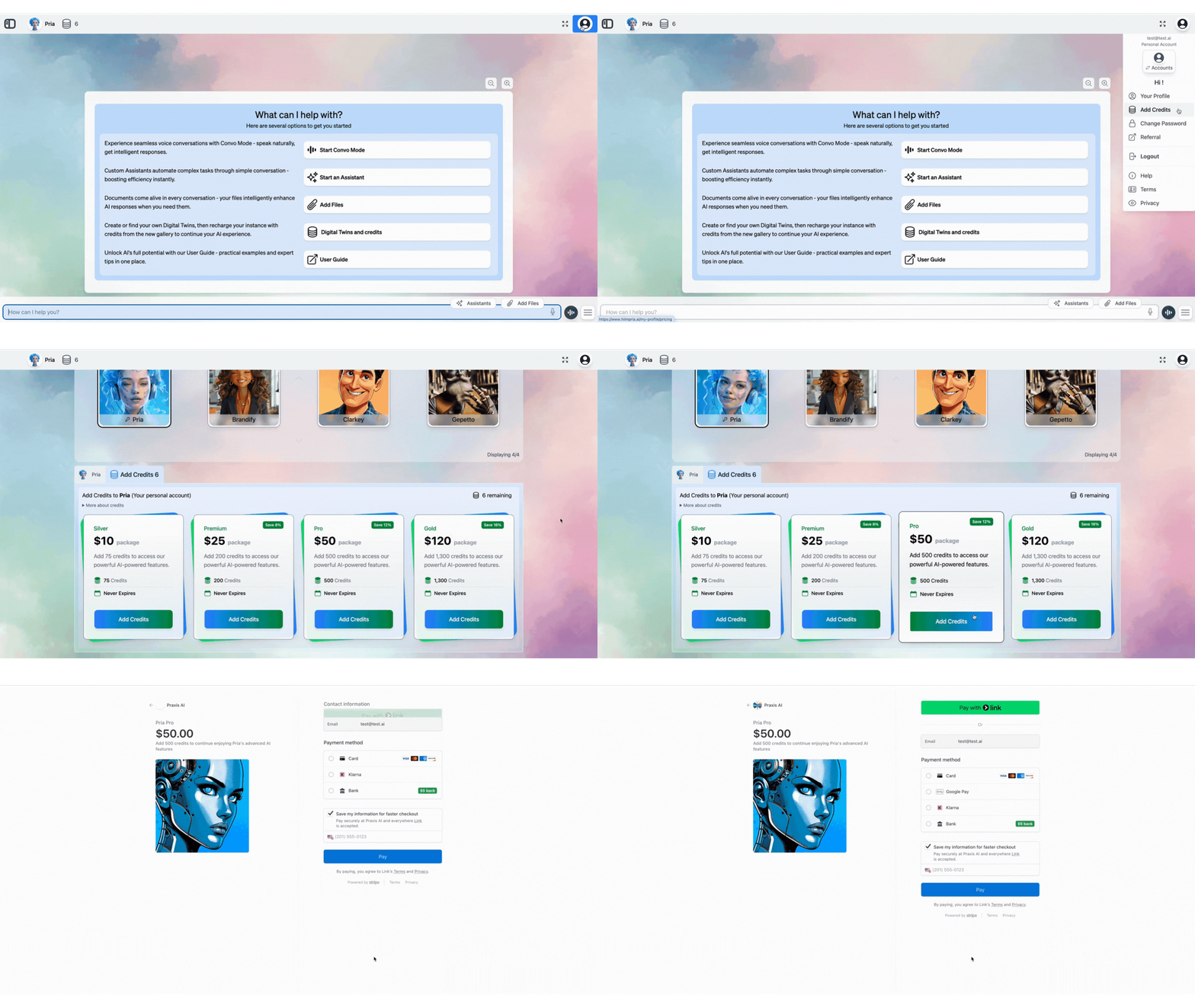
Adding Personal Credits
To add your own credits for personal use:- Click the ‘Add Credits’ button in your profile settings
- Scroll to the bottom of the page
- Select your desired credit amount and complete payment
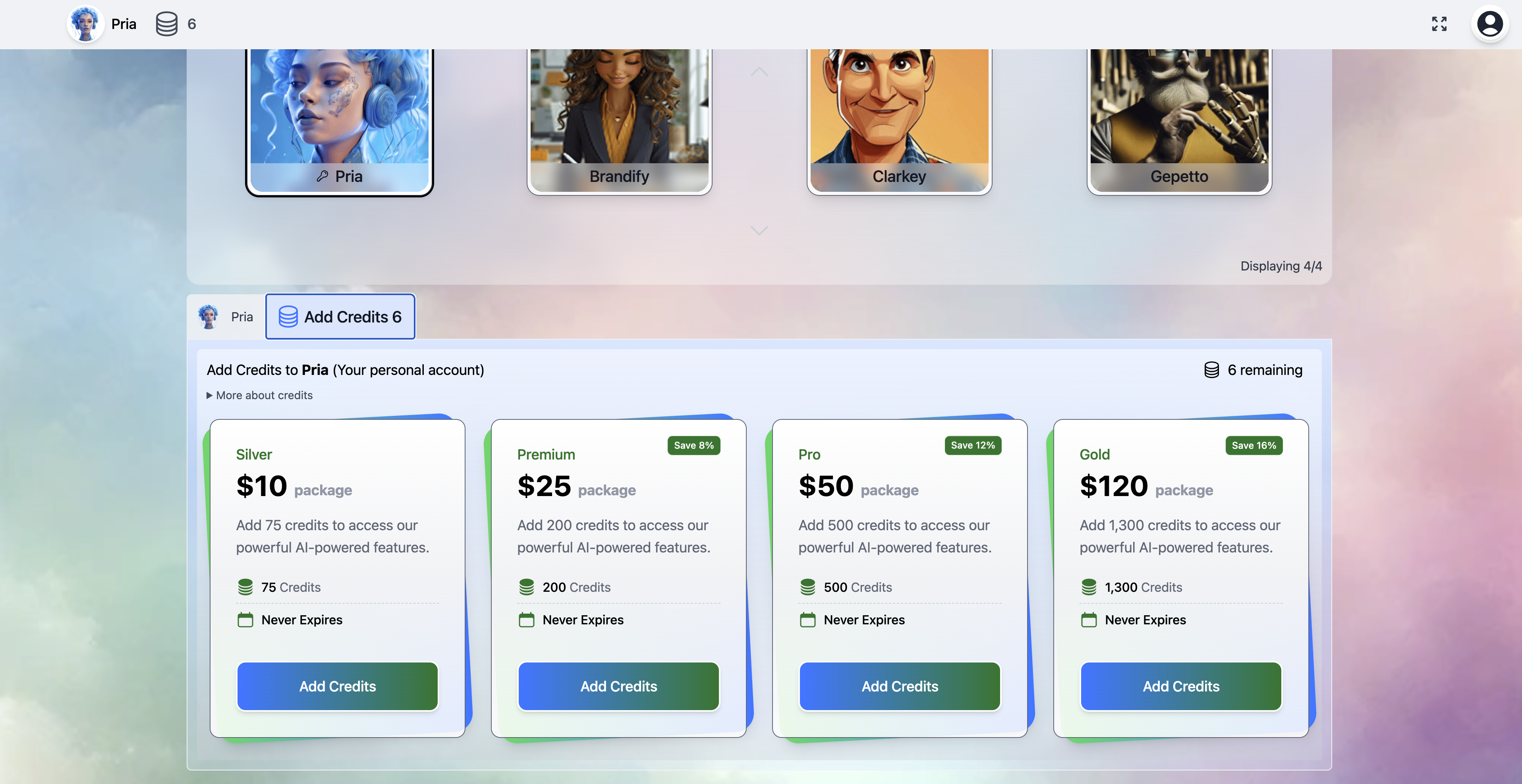
How credits are consumed
Credits are deducted in real time as you interact with your Digital Twin. The core unit is the token — everything the model reads and writes on a turn is counted, and the total is converted into credits.Standard conversations — one flat rate
A standard dialogue turn (one conversation model answering you directly) is billed at a flat rate: 10,000 tokens = 1 credit, counting input and output together, with a 1-credit minimum per turn and a single round-up per turn. There is no separate input rate, output rate, or per-model surcharge for standard turns — one simple rule covers them all.A few very-large-context models re-price the whole request at a higher rate once the prompt crosses the model’s long-context threshold — another reason to keep prompts lean.
Agent Mode — true cost, itemized
When a dialogue runs in Agent Mode, several model “lanes” contribute to one answer — the conversation model, the orchestrator coordinating the work, and the specialist workers it dispatches. These turns are billed differently: each lane is priced at its model’s actual catalog cost (with cached tokens priced at the provider’s cheaper cached rates), a small platform margin is applied, the fractions are summed across the whole turn, and the total is rounded up once — never per lane. The dialogue Report Card’s Pricing tab shows the itemized bill per lane and per model, including the margin applied, so you can always see exactly where the credits went.Failures and cancellations: a turn that errors before any real work is never billed, and a turn you cancel is never billed. An Agent Mode run that fails partway after doing real work bills only the work actually done — exactly what the Report Card itemizes.
Non-text actions — metered separately
At-a-glance cost table
The rough relative costs (lowest → highest) for common actions:Star ratings are relative — they convey order of magnitude, not exact rates. Your balance and usage history live under Your Profile → Billing; see Plans & Credits for the pricing rules.
Where credits live — Account, Institution, User
Pria’s credits sit at three levels:
Which pool pays is set by the twin’s Credit Management mode, not by which balance happens to be positive:
- Pool Credits — conversations on that twin draw from the institution’s pool. Depending on the account’s transfer policy, the pool can be refilled from the account reserve automatically when it runs low, only by an admin, or never.
- Personal Credits — each user pays from their own balance on that twin. Users on an unlimited monthly plan converse without their balance being deducted.
Low-balance behaviour
Pria tries to warn the right people before credits run out so you’re never mid-conversation when the lights go off.Alerts
- Admin notifications — when a twin’s shared pool drops below its threshold, a courtesy email goes out so the people who can top it up know, even if they aren’t signed in. (It’s skipped when the parent account is set to refill the pool automatically.)
- Credits display — your balance (or the twin’s pool balance, for admins of pooled twins) shows in the top navigation bar and highlights in red when it reaches zero.
Automatic refill (pooled twins)
If the parent account’s transfer policy is set to auto-refill on low credits, Pria automatically moves a batch of credits from the account reserve into the twin’s pool when it runs low — conversations continue without interruption for as long as the account reserve holds out. Admins configure the transfer policy under Credit Management.When credits hit zero
If the pool that pays for your conversations runs out:- In-flight response — the running response finishes (Pria doesn’t cut you off mid-sentence), but the next prompt is blocked.
- New prompts show a clear out-of-credits message with a direct path to Add Credits (personal-credit twins) or a note that your instance has no credits left (pooled twins — contact your admin).
- File uploads, image generation, voice are blocked the same way rather than producing partial output.
- Read-only features (browsing past conversations, viewing files) continue to work — you only lose the ability to spend new credits.
Optimization tips
A small handful of habits can cut credit consumption dramatically. See Credits Optimization for the full guide; the short version:- Lower Remember History when long context isn’t needed (quick lookups don’t need 10 turns of history).
- Tune your retrieval mode — Disabled or RAG Only is cheaper than RAG + KAG Fusion; pick the right mode for the question.
- Skip Indexing on URL imports you only want to download, not embed.
- Prefer text over Convo Mode for fact lookups — voice is convenient but more expensive per turn.
- Use Skip Indexing for files you only need to store and open yourself (not search) — they skip the knowledge-processing pipeline entirely, so they cost nothing to index.
- Sanitize noisy segments so they’re shorter to embed and retrieve.
- Avoid HD image gen unless you need print-grade output.
Related
- Plans & Credits — Pricing rules, caching discounts, Single-Shot and Agent Mode billing.
- Credits Optimization — Practical tips to reduce credit consumption.
- Credit Management (admin) — Account/institution allocation and transfer policies.
- Billing (admin) — Payment methods, invoices, billing contacts.
- Edit Profile — Where the Add Credits and Billing tabs live.
- Sidebar & History — Remember History, the main lever for conversation cost.
- AI Models — Provider price tiers and reasoning support.