

What knowledge retrieval does
Behind the scenes, every file you put in your IP Vault (your personal vault, your Digital Twin’s shared vault, and the account-wide vault) is processed and indexed. When you ask a question with retrieval turned on, Pria:- Searches the indexed content for the passages most relevant to your question.
- Hands those passages to the model as context.
- The model composes an answer that quotes or paraphrases your material and cites the source files.
Where the Knowledge controls live
Open the [+] (Actions) menu to the left of the input pill and choose Knowledge. The panel expands inline with everything that shapes a reply’s context: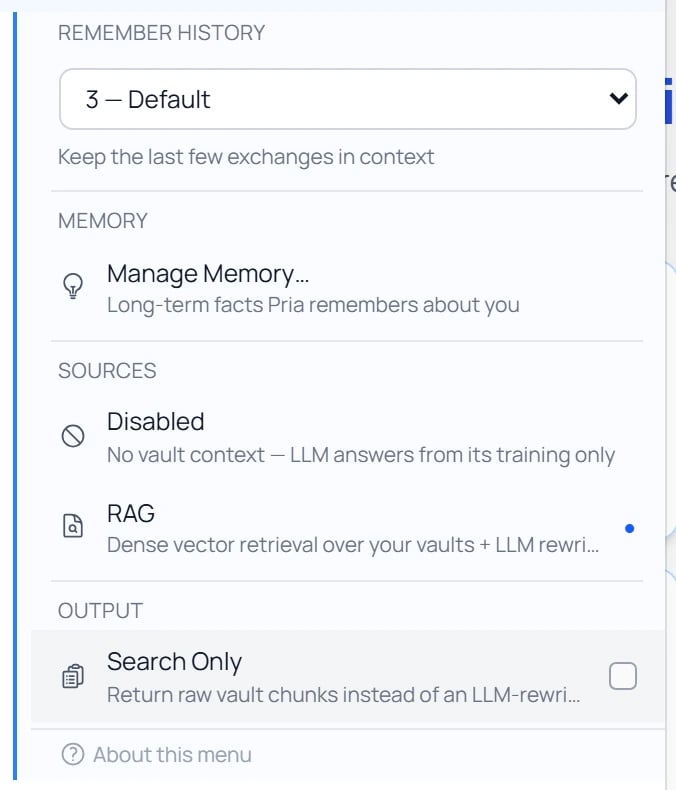
The [+] Actions menu → Knowledge panel: Remember History, the Memory switches with Manage Memory beneath them, the File Vault choice, and the Search Only output toggle.
- Remember History — how many recent exchanges stay in context (see Conversation History).
- Memory — the switches first, then the door to what they govern:
- Enable User Memory — whether Pria remembers personal facts about you (see User Memory).
- Enable Long-term Memory — whether this Digital Twin keeps its own memories; a platform administrator’s switch, shown read-only to twin administrators (see Twin Memory).
- Manage Memory… — sits under the two switches; opens the Memory panel with everything stored, while either kind of memory is on.
- File Vault — whether and how Pria reads your files (below). This section was called Sources until September 2026.
- Search Only — an output toggle (below).
File Vault: how Pria searches
File Vault is the core choice: whether Pria reads your files at all, and how. Where a knowledge graph is available it offers three choices — Disabled, RAG and RAG + KAG Fusion — and Pria uses RAG + KAG Fusion unless you choose RAG. Where there is no graph, it offers Disabled and RAG.Disabled
RAG
RAG + KAG Fusion
Search Only (toggle)
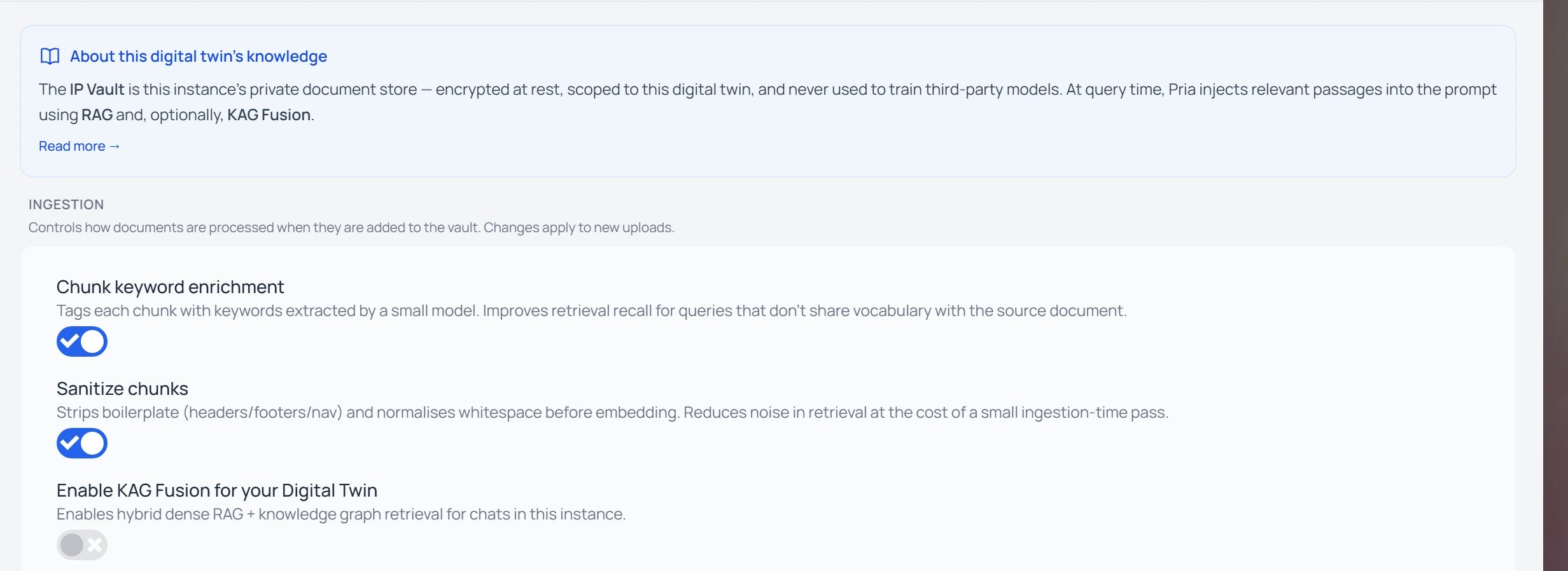
Instance Settings → Knowledge: an admin enables KAG Fusion (file search plus knowledge-graph search) and tunes file preparation for the Twin's vault.
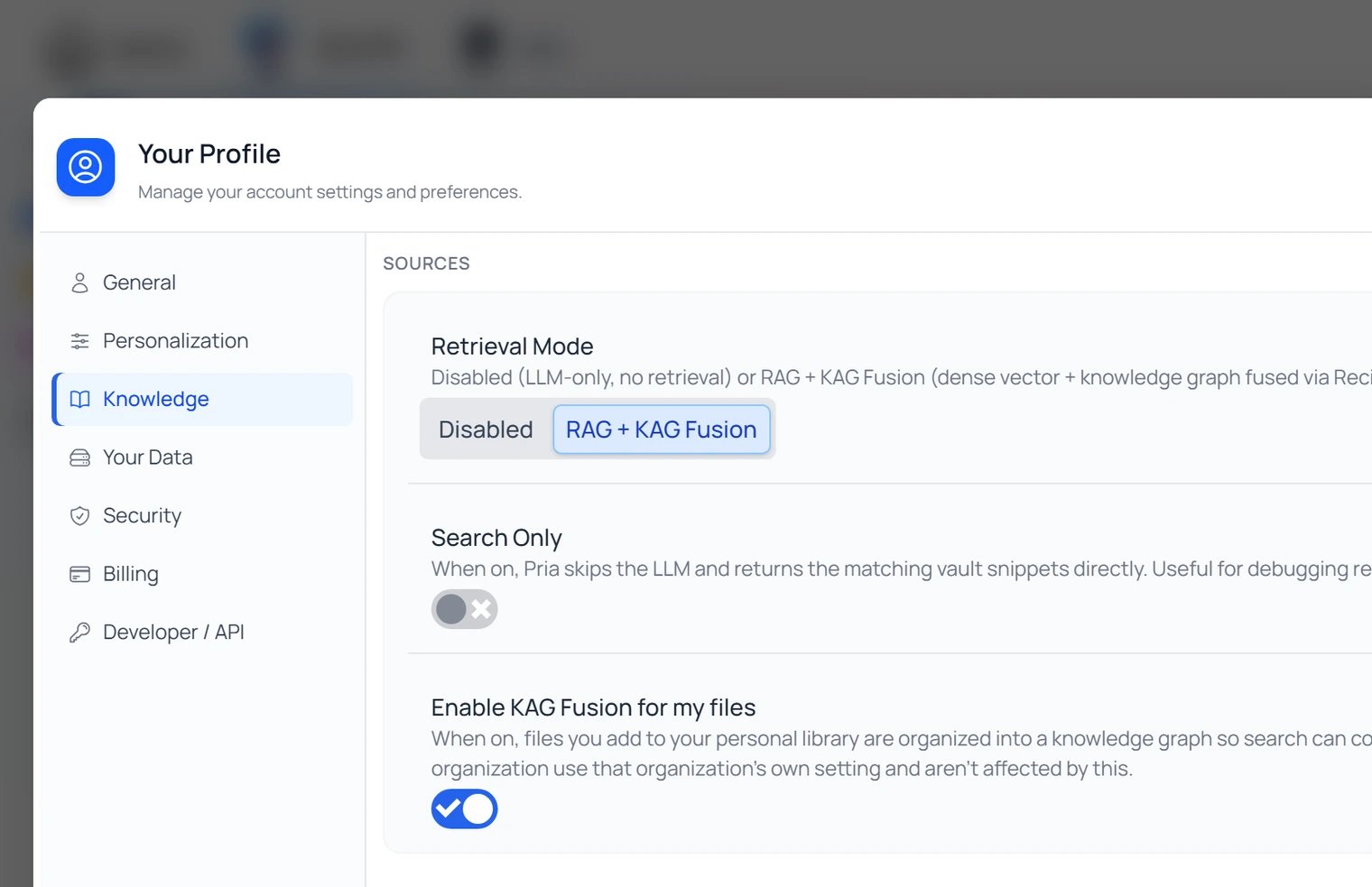
Settings → Personal → Knowledge: turn on “Enable KAG Fusion for my files” to build a knowledge graph over your personal vault. Files inside an organization's Twin follow that Twin's setting instead.
When to use each
Leave File Vault on (RAG / Fusion) for…
Leave File Vault on (RAG / Fusion) for…
- “What does the policy say about X?”
- “Summarize the second chapter.”
- “Find every place we mention vendor Y.”
- “How are X and Y related?” / “Who else works on Jane’s projects?” — these use the knowledge graph when one’s available.
- Most everyday questions where the answer is somewhere in your material.
Turn on Search Only for…
Turn on Search Only for…
- Skimming for primary sources before writing your own draft.
- Verifying a claim — get the passages without the AI rephrasing them.
- Checking what Pria is actually finding in your files.
- Quick lookups where you trust your own reading over a synthesized answer.
Set File Vault to Disabled for…
Set File Vault to Disabled for…
- General knowledge questions unrelated to your files.
- Comparing Pria’s “off-the-shelf” answer to a grounded one.
- Speed runs where you don’t need the retrieval step at all.
- Diagnosing whether a wrong answer was caused by retrieval picking the wrong passages.
Showing or hiding retrieved passages
When retrieval runs, Pria can show you exactly what it pulled in — a collapsible panel beneath each answer, so you can verify the reply against its sources. Whether the panel appears is governed by the Display RAG/KAG Search Details toggle under Instance Settings → Conversation → Display Details (the same place as the thinking-display toggles). In Search Only mode the passages are the entire response — there’s nothing to hide them under.KAG / RAG Search Results
Expand the KAG Search Results (or RAG Search Results) disclosure at the foot of a reply to see every passage that fed the answer. Each row shows the source file (and segment), a preview of the matched text, its Relevance score, and its Length, with numbered citations you can click to open the original.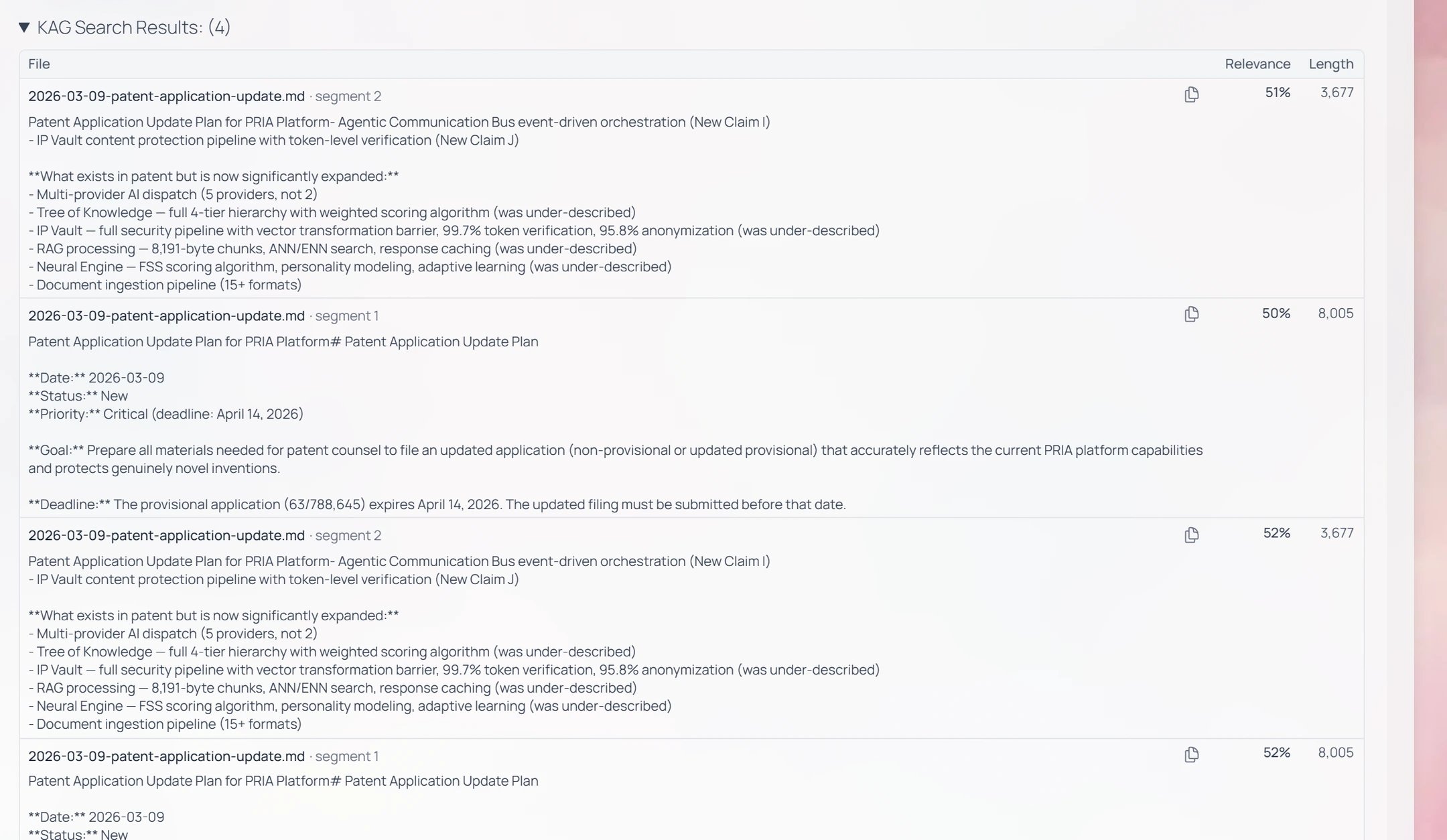
Expanding “KAG Search Results: (4)” reveals the four passages behind the answer — source file, preview, relevance %, and length.
patent-application-update.md, scored ~50–52% relevant — the answer is built from those passages, and the citations jump straight to them.
Agent Details — what ran
When a reply also runs a tool — image generation, web search, an MCP connector, code — a separate Tool Details (Agent Details) disclosure appears. Expanded, it shows, per call: the tool name, a Success / failure status, the execution duration, the Arguments it was invoked with, and the Response it returned.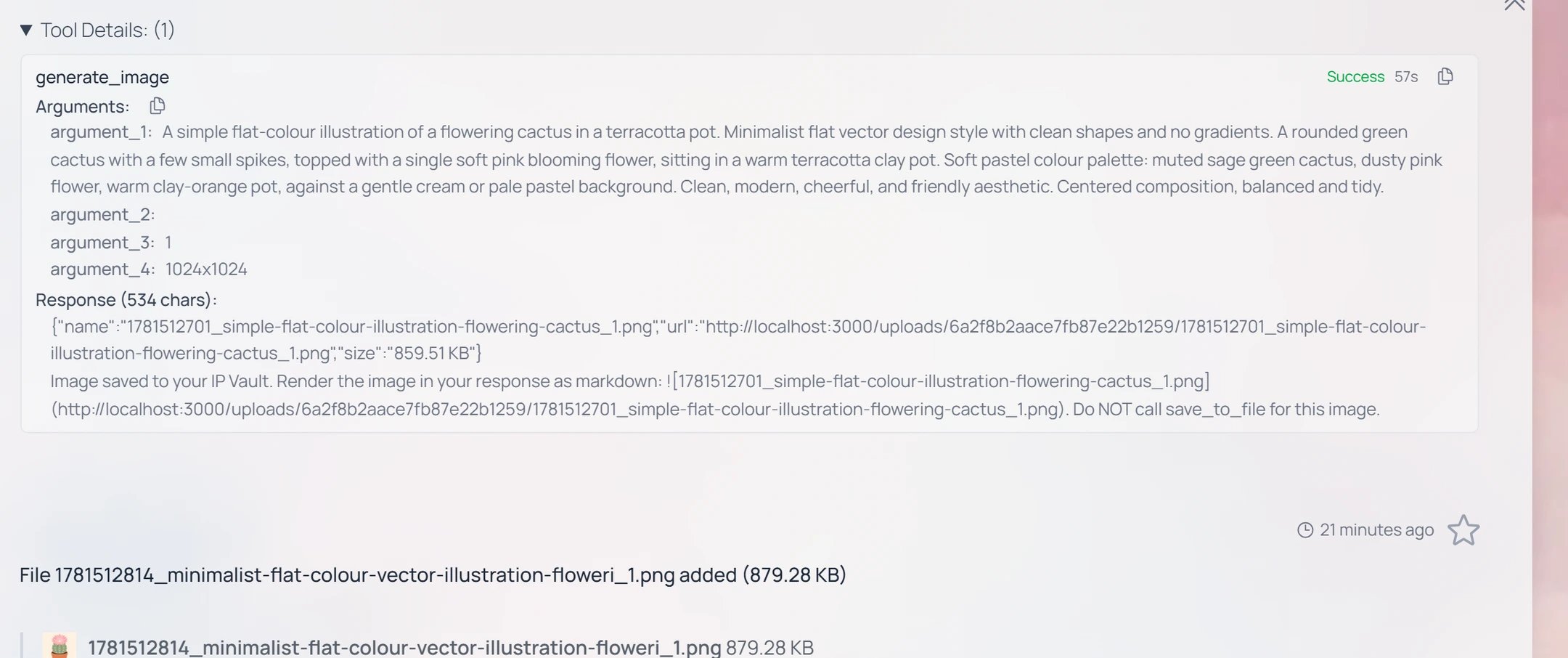
Tool Details for a tool call: the tool name, Success status, duration, the arguments passed, and the response returned.
File scope: which vault gets searched
Every retrieval call looks across the vaults you have access to:Limitations
- Confidential files stay locked for everyone but their owner. A file marked Confidential can still lend its knowledge to answers, but other members never see its details — retrieval shows them a ”🔒 CONFIDENTIAL” marker and a short redacted snippet instead of the document. Only the owner gets full citations and preview. See What Confidential really means.
- Very recent uploads may still be indexing. Large PDFs, audio, and video files take a few minutes to extract, chunk, and embed. If a brand-new file isn’t appearing in retrieval yet, give it a moment and check Files for processing status.
- Disabled closes the vault completely. Don’t leave File Vault off by accident if you actually need grounded answers. Since September 2026 Disabled also stops Pria opening, listing or searching your files when you ask it to directly — not only the automatic search behind an answer. Ask for a file while it is off and Pria tells you the file vault is switched off, instead of half-answering. Switch File Vault back on and everything returns.
- Fusion needs RAG. The knowledge-graph search always runs on top of the ordinary file search; there’s no “graph only”. With File Vault disabled, neither runs.
- Search quality depends on file quality. Scanned PDFs with no readable text layer (no OCR), password-locked files, and corrupt uploads can’t be indexed. Check the file status in the IP Vault to see what’s processed.
Related
- IP Vault — what the vault is and how scopes work.
- Managing Files — uploading, organizing, sharing, deleting.
- Audio Notes — voice memos that flow through the same retrieval pipeline.
- Conversation History — the Remember History control in the same menu.
- User Memory — the Manage Memory link in the same menu.
- Reasoning & Thinking — combine high effort with grounded retrieval for the best research answers.