

Session-Based Context
Only includes exchanges from the current conversation — unrelated threads never bleed in
Adjustable 0–15
A slider from 0 (no history) to 15 dialogue exchanges; the default is 3
Cost-Aware
More history = more tokens per request (1 credit ≈ 10,000 tokens)
Smart Compaction
Once a conversation runs past five exchanges, older ones are summarized to keep costs down
Your twin also keeps Long-term Memory — what it picks up on its own as you talk. It works alongside this, and does not replace it.
Adjusting Remember History
Open Your Profile → Personalization → Conversation Preferences for the full slider, or use the quick picker in the conversation’s [+] action menu → Knowledge. The slider runs from 0 to 15 with named marks: None (0) · Default (3) · Conversation (6) · Research (12).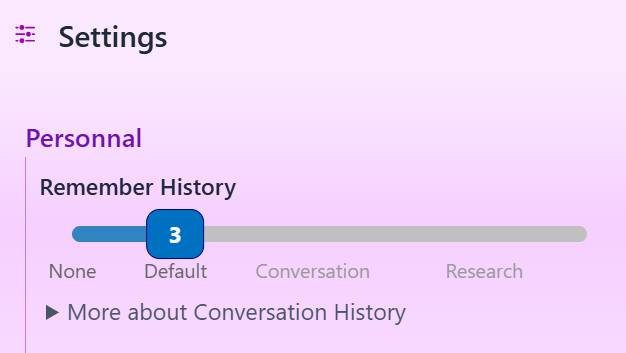
What it costs
Every exchange included in history adds its tokens to each new request. As a rough illustration: if each exchange averages 2,500 tokens, a setting of 8 adds ~20,000 history tokens to every prompt — about 2 credits before your new question is even counted. Three habits keep costs in check:- Match the setting to the task — high for deep work, low for quick questions.
- Start a new conversation when the topic changes — unrelated history is pure waste.
- Store lasting preferences in User Memory instead of repeating them in chat — memory parameters cost almost nothing compared to carried history.
Smart history compaction
Once a conversation has more than five exchanges to include, Pria summarizes the older ones instead of sending them word-for-word. The trigger is how many exchanges are actually there, not the number on the slider — so a setting of 12 in a three-exchange conversation compacts nothing, because there is nothing old enough to compact. You need the setting high enough to reach past five before it ever applies:- Your 3 most recent exchanges are always included verbatim — full detail on what you just discussed.
- Older exchanges are summarized into a concise context block that preserves key topics and decisions at a fraction of the tokens.
- Summaries are reused between requests in the same conversation, so follow-ups don’t pay to re-summarize the same history.
- If compaction is ever unavailable, your full history is used instead — nothing breaks.
Your Digital Twin’s administrator can switch compaction off (Instance Settings → Conversation → History Compaction, on by default). With it off, every exchange your setting includes is sent word-for-word — the savings described here do not apply, and a high setting costs proportionally more. If your credit use looks higher than this page suggests, that is the first thing to check.
Boundaries
- Each conversation keeps its own history — starting a new conversation starts a clean context.
- Assistants don’t share history — switching assistants switches threads.
- History is distinct from User Memory — history is the recent back-and-forth; User Memory is the durable facts Pria keeps about you across all conversations.
- There is an overall size limit on the history Pria carries. Beyond how many exchanges your setting includes, there is a ceiling on how much text they add up to. A handful of very large replies — a generated document, a long activity, a big table — can reach it on their own, and the oldest content is dropped to stay inside it. This is the usual reason a twin seems to forget something recent in a conversation full of long outputs; starting a fresh conversation for the new topic clears it.
Troubleshooting
Related
- Memory Systems — how the four memory systems fit together
- Twin Memory — Long-term Memory: what your twin keeps on its own between conversations
- User Memory — durable personal facts and preferences
- Shared Memory — team-wide knowledge for a Digital Twin
- Credit Optimization — more ways to stretch your credits