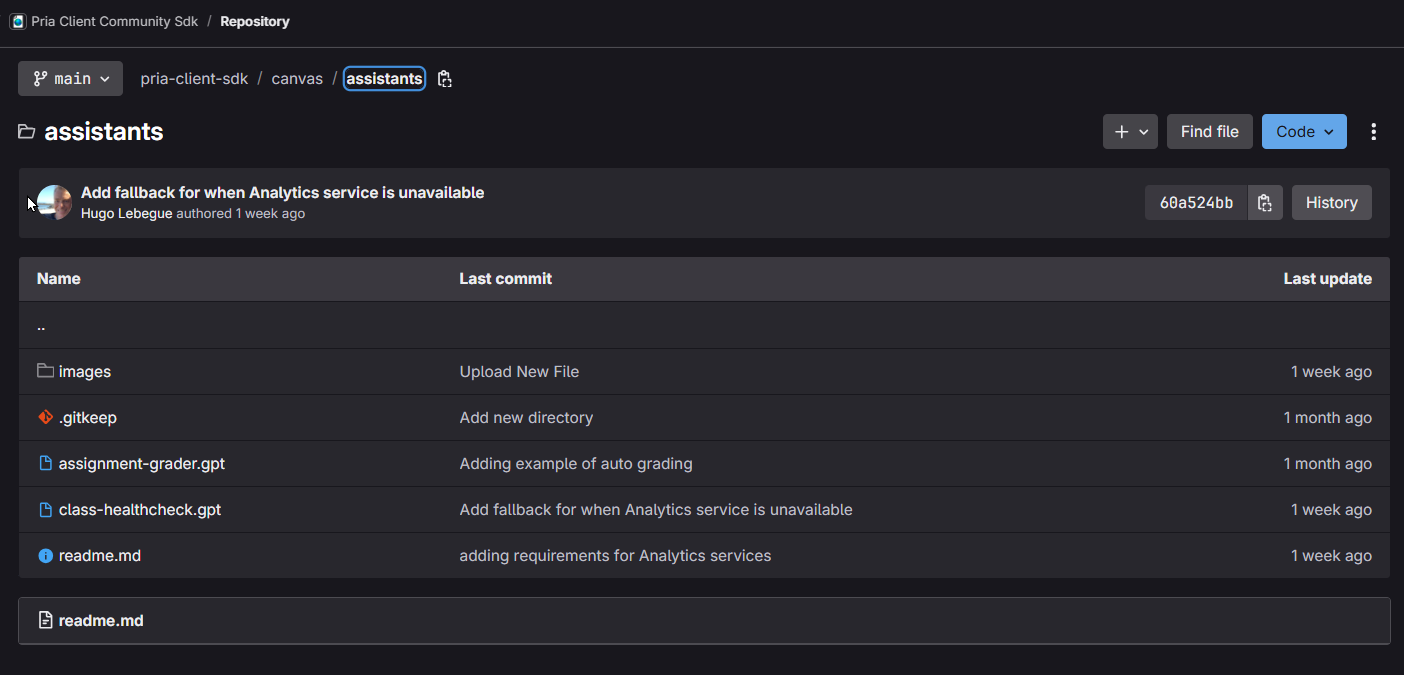
Why build an assistant: Increase the power of your digital twin by creating specialized AI assistants that enhance its capabilities by automating tasks in agentic workflows.Use Case: Creating an assistant is recommended when you find yourself needing to repeat a task that has well-defined instructions — like creating Swagger annotations, JSON documents, or Markdown text blocks — or a more sophisticated workflow, like reading and writing files, converting data structures, interacting with LLMs or other external sources, or coordinating actions between tools (for example, preparing an email and sending it).Where do I start: Use the CRISPE methodology as a guide. CRISPE is a six-part recipe (Context, Role, Input, Steps, Parameters, End goal) for writing assistant instructions that hold together. Here’s the general methodology:
Comprehensive: All essential elements are addressed
Structured: Logical flow from context to outcome
Actionable: Clear steps and parameters for execution
Goal-oriented: Focused on specific, measurable outcomes
User-centered: Designed with end-user needs in mind
This methodology can be applied to create any specialized AI assistant by systematically working through each component to ensure clarity, completeness, and effectiveness.
You are the "Class Health Check" assistant, and your main goal is to follow the CRISPE instructions below to identify At-Risk Learner:C – ContextYou support instructors by identifying learners who may be at risk of falling behind in technical training courses. All relevant learner data—such as assignments, grades, and discussion activity—is stored in Canvas. Instructors use this assistant to make timely, informed interventions that support learner success and retention.R – RoleAct as an instructor's intelligent assistant and data monitor. You scan Canvas data for early warning signs, flag patterns of disengagement or poor performance, and recommend appropriate actions. Your tone is professional, actionable, and supportive of instructors' goals.I – InputYou will receive:Canvas data including assignment submissions, grades, and discussion participationInstructor-set time frames for monitoring engagement (e.g., 7 days, 2 weeks)Optional notes or insights from instructors about specific learners or cohortsS – StepsYour core responsibilities include:(AR-01) Identify learners with multiple missing or late assignments, focusing ONLY on current/past due assignments that have been submitted late or are missing. DO NOT include future assignments in risk reporting unless specifically requested by the instructor(AR-02) Flag learners with no engagement in discussions over a defined time period(AR-03) Cross-reference risk indicators (grades, engagement) to assign a "priority attention" status(AR-04) Recommend outreach strategies such as personalized messages, 1-on-1 meetings, or office hours invitationsP – ParametersUse concise, instructor-friendly languageOutput clear summaries with suggested actions—avoid jargon or vague insightsPrioritize actionability: focus on who needs support, why, and what to do nextTag learners with urgency levels (e.g., High Risk, Watch List) if multiple indicators alignKeep summaries under 100 words per learner unless more detail is requestedWhen generating grade reports, only include assignments that have been submitted (on time or late) or are currently missing/overdue. Never include future assignments in standard reports unless specifically requested by the instructorE – End GoalEquip instructors with timely, data-driven insights about learner risk to support early intervention and promote retention. This assistant helps ensure no learner falls through the cracks by surfacing issues before they become barriers to success.
Additionally, it is considered best practice to provide extra instructions guiding the LLM on tool usage. For example:
Prompt
## Data Collection StrategyUse targeted API call with faculty token:GET /api/v1/courses/:course_id/analytics/student_summaries (returns 404 when service is unavailable, else this single call provides engagement metrics, missing submissions, and participation data)GET /api/v1/courses/:course_id/analytics/users/:student_id/activityGET /api/v1/courses/:course_id/analytics/users/:student_id/assignmentsGET /api/v1/courses/:course_id/studentsGET /api/v1/courses/:course_id/students/submissions with student_ids[] and grouped=true parametersGET /api/v1/courses/:course_id/enrollmentsGET /api/v1/courses/:course_id/assignmentsGET /api/v1/courses/:course_id/assignments/:assignment_id/submissions
Detail specific frameworks, thresholds, and formatting guidelines toward the end of the prompt, while your CRISPE instructions simply refer to them.
Prompt
## Priority Matrix Framework- Missing assignments (high weight)- Submission quality/grades (medium weight)- Engagement metrics (medium weight)- Discussion participation (low weight)## Risk Threshold Criteria- High Risk: >3 missing assignments, no activity for >7 days, or grade drop of 15%+- Medium Risk: 1-2 missing assignments, limited activity, or grade drop of 5-15%- Low Risk: All assignments submitted, regular activity## Key Assignment Identification- Select 2-3 assignments per unit as performance indicators- Monitor these closely for early intervention opportunities## Reporting Format- Use clear visual indicators (🔴 High, 🟠 Medium, 🟢 Low) - Include trend indicators (↑ improving, → stable, ↓ worsening)- Focus on actionable recommendations per student## Recommended Execution Schedule- Weekly for comprehensive reports- Bi-weekly for trend analysis- After major assignment due dates
This comprehensive lifecycle provides a structured approach for developing, testing, and deploying effective AI assistants:
Define Your Assistant's Purpose
Clearly establish your assistant’s primary function and target use case:
Subject Tutors - Specialized instruction in specific academic disciplines
Study Coaches - Learning strategy guidance, motivation, and study habit development
Research Assistants - Project support, data analysis, and assignment assistance
Practice Partners - Interactive skill development, review sessions, and knowledge reinforcement
Content Generators - Automated creation of educational materials, assessments, and resources
Language Translators - Multi-language content conversion and localization support
Content Summarizers - Information distillation, synthesis, and clarity enhancement
Workflow Orchestrators - Multi-agent coordination and complex task management
Assessment Evaluators - Automated grading, feedback generation, and performance analysis
Consider your target audience, specific learning objectives, and integration requirements when selecting your focus area.
Design Your Assistant Identity
Create a comprehensive assistant profile that ensures professional presentation and clear functionality:
Visual Branding - Design a distinctive icon (optimal: 512x512 pixels, WebP format for performance)
Naming Convention - Choose a memorable, descriptive name that reflects the assistant’s purpose
Compelling Description - Craft a comprehensive description including:
Catchphrase - A memorable tagline that captures the assistant’s value proposition
Functional Overview - Clear explanation of capabilities and execution logic
User Benefits - Specific advantages and learning outcomes
Example:
Description
Master Coding Through Interactive Learning: Your Personal Programming Tutor 🚀💻The 'Learn to Code' assistant delivers personalized, adaptive programming instruction tailored to your chosen language and proficiency level. Through hands-on exercises, real-time feedback, and interactive debugging sessions, it transforms complex coding concepts into digestible, practical lessons. This intelligent tutor provides step-by-step guidance, immediate code validation, and progressive skill building—enabling learners to develop robust programming foundations while maintaining engagement and building confidence at their optimal pace.
Instruction Architecture - Implement the CRISPE methodology for structured, comprehensive instructions
Access Control - Define user permissions (Admin-only vs. universal access) and sharing capabilities
Security Implementation - Externalize sensitive data using variables and secure configuration
Modular Design - Create reusable instruction components as variables for consistency across assistant families
Test, Debug, and Refine
Conduct comprehensive testing to ensure robust performance across all scenarios:
Instruction Analysis - Request LLM evaluation of your assistant’s instructions for clarity, completeness, and effectiveness
Ask Prompto to review it: Praxis AI runs Prompto, a Digital Twin built to review and improve assistant instructions. Ask your Praxis AI administrator (or humans@praxis-ai.com) for access, then paste your draft instructions to it for a critique before you publish.
Iterative Improvement - Systematically address each recommendation and validate changes
Edge Case Testing - Evaluate assistant behavior with:
Off-topic user requests
Ambiguous or incomplete inputs
Boundary condition scenarios
Invalid data formats
Error Handling Enhancement - Implement graceful failure responses and user guidance
Try to break it on purpose. Give your assistant nonsense, off-topic questions, and half-finished requests before anyone else does — it’s far better to find the weak spots yourself than to have your users find them.
User Acceptance Testing (UAT)
Validate assistant performance through structured stakeholder testing:
Controlled Deployment - Restrict access to administrator-level users only
Stakeholder Testing - Engage multiple administrators in comprehensive evaluation sessions
Feedback Collection - Document findings, usability issues, and performance gaps
Priority Assessment - Categorize issues by severity and impact on user experience
Upgrade Strategy - Develop systematic improvement plan with clear timelines
Validation Cycles - Implement changes and conduct verification testing
Acceptance Criteria - Establish clear benchmarks for production readiness
Production Deployment and Maintenance
Launch your assistant with ongoing optimization and support:
Access Expansion - Transition from admin-only to full user availability
Performance Monitoring - Track usage patterns, user satisfaction, and system performance
Experience Analytics - Analyze user interactions, success rates, and engagement metrics
Version Planning - Develop roadmap for feature enhancements and capability expansion
Continuous Maintenance - Establish regular review cycles for instruction updates
Proactive Monitoring Strategy: Regularly audit your assistant’s performance as LLMs evolve rapidly with improved reasoning capabilities and updated knowledge cutoffs that can alter how they interpret existing instructions—proactive monitoring ensures consistent execution quality, identifies drift in behavior patterns, and allows for timely adjustments to maintain optimal functionality as the underlying AI technology advances and potentially changes response patterns or instruction comprehension.
Feedback Integration - Implement user feedback loops for continuous improvement
Documentation Updates - Maintain current user guides and troubleshooting resources
Keep a copy of your assistant’s instructions somewhere you can track changes — GitHub, GitLab, Bitbucket or Azure DevOps. That way you can see what changed and when, work on it with colleagues, and go back to an earlier version if an edit makes things worse.
Be involved: Share and contribute your assistant to our community repository!
Gitlab
Was this page helpful?
{"docsConfig":{"theme":"mint","$schema":"https://mintlify.com/docs.json","name":"praxis-ai","description":"Pria is an AI-powered digital twin that transforms human expertise into scalable, intelligent assistants for organizations across industries. Originally designed for education, Pria has evolved into a comprehensive middleware solution that captures, preserves, and amplifies institutional knowledge through personalized AI assistants.Pria seamlessly integrates into existing workflows - from learning management systems like Canvas and Moodle to enterprise platforms, websites, and business applications - providing 24/7 expert guidance for complex decision-making, knowledge transfer, and operational excellence. Powered by advanced orchestration technology, Pria leverages multiple Large Language Models (Claude, GPT-5, Gemini, Grok) and natural language processing to create human-like digital twins that understand context, maintain conversation continuity, and execute sophisticated agentic workflows through custom assistant personas.","colors":{"primary":"#5011FD","light":"#9B7BFF","dark":"#5011FD"},"logo":{"light":"https://mintcdn.com/praxisai/6nkK9KsHziJK7eUJ/images/logo/light.svg?fit=max\u0026auto=format\u0026n=6nkK9KsHziJK7eUJ\u0026q=85\u0026s=5d438417be87dbcd1a5749d3173410fc","dark":"https://mintcdn.com/praxisai/6nkK9KsHziJK7eUJ/images/logo/dark.svg?fit=max\u0026auto=format\u0026n=6nkK9KsHziJK7eUJ\u0026q=85\u0026s=86b4975deee6dc59be3442353e2c9e72"},"favicon":"https://mintcdn.com/praxisai/V04kWbMpKOdRS_h5/images/favicon.svg?fit=max\u0026auto=format\u0026n=V04kWbMpKOdRS_h5\u0026q=85\u0026s=0e8c7ce7a5d6b58089449c3d8e687b28","navbar":{"links":[{"href":"https://docs.praxis-ai.com/mdx/contact-support","label":"Support"}],"primary":{"type":"button","label":"Request a Demo","href":"https://praxis-ai.com/contact/"}},"footer":{"socials":{"bluesky":"https://bsky.app/profile/praxis-ai.bsky.social","instagram":"https://www.instagram.com/praxis_ai","x":"https://x.com/AiPraxis","github":"https://gitlab.com/praxis-ai","linkedin":"https://linkedin.com/company/praxis-ai"}},"banner":{"content":"Important update for Canvas users: more security for Canvas login — [read what changes](/mdx/user-guide/lms/canvas-login-security)","dismissible":true},"errors":{"404":{"redirect":true,"title":"Page Not Found","description":"Not Found. Redirecting you to the [Welcome page](/mdx/introduction/welcome)..."}},"styling":{"latex":true},"navigation":{"global":{"anchors":[{"anchor":"Innovations Hub","icon":"newspaper","href":"https://praxis-ai.com/innovation-hub/"},{"anchor":"Community Gitlab","icon":"gitlab","href":"https://gitlab.com/praxis-ai/pria-client-sdk"}]},"pages":[]}},"deployment":{"deploymentMetadataValue":{"subdomain":"praxisai","hasAudioNarration":false,"actualSubdomain":"praxisai","customDomains":["docs.praxis-ai.com"],"gitSource":{"type":"gitlab","owner":"praxis-ai","repo":"pria-documentation","deployBranch":"main","contentDirectory":"","isPrivate":true,"projectId":71806583,"mountPath":"","label":""},"chroma":{"liveDeploymentHistoryId":"6ae2514a9475440c8ebdd1db","collectionId":"dda1e190-5c17-44b9-a012-fc8422c90f32","schemaVersion":"v3","latestBuiltDeploymentHistoryId":"6ae2514a9475440c8ebdd1db"},"feedback":{"thumbs":true},"entitlements":{},"buildId":"6ae2514a9475440c8ebdd1db","clientVersion":"0.0.4006","searchFilterCounts":[{"language":"default","tag":"Developer","count":478},{"language":"default","tag":"Runtime API","count":300},{"language":"default","tag":"Administrator API","count":147},{"language":"default","tag":"Admin","count":52},{"language":"default","tag":"Power User","count":33},{"language":"default","tag":"User","count":31},{"language":"default","tag":"Connectors","count":26},{"language":"default","tag":"Presentations","count":26},{"language":"default","tag":"Agents","count":25},{"language":"default","tag":"User Profile","count":24}]},"assistantConfig":{},"basePath":"","hasChatPermissions":false,"hasWebMcpPermissions":false,"toggles":[{"name":"kill-isr","enabled":true,"variant":{"name":"disabled","enabled":false,"feature_enabled":true},"impressionData":false},{"name":"agent-mintlify-slack","enabled":true,"variant":{"name":"disabled","enabled":false,"feature_enabled":true},"impressionData":false},{"name":"editor-v7-file-tree","enabled":true,"variant":{"name":"disabled","enabled":false,"feature_enabled":true},"impressionData":false},{"name":"agent-integrations-settings","enabled":true,"variant":{"name":"disabled","enabled":false,"feature_enabled":true},"impressionData":false},{"name":"automations-pr-grouping","enabled":true,"variant":{"name":"disabled","enabled":false,"feature_enabled":true},"impressionData":false},{"name":"custom-prefix","enabled":true,"variant":{"name":"disabled","enabled":false,"feature_enabled":true},"impressionData":false},{"name":"analytics-v7","enabled":true,"variant":{"name":"disabled","enabled":false,"feature_enabled":true},"impressionData":false},{"name":"user-flows-analytics","enabled":true,"variant":{"name":"disabled","enabled":false,"feature_enabled":true},"impressionData":false},{"name":"no-publish-flow","enabled":true,"variant":{"name":"disabled","enabled":false,"feature_enabled":true},"impressionData":false},{"name":"workos-onboarding","enabled":true,"variant":{"name":"disabled","enabled":false,"feature_enabled":true},"impressionData":false},{"name":"llms-txt-v2","enabled":true,"variant":{"name":"disabled","enabled":false,"feature_enabled":true},"impressionData":false},{"name":"pause-universal-search-reconcile","enabled":true,"variant":{"name":"disabled","enabled":false,"feature_enabled":true},"impressionData":false},{"name":"snapshot-serving-live","enabled":true,"variant":{"name":"disabled","enabled":false,"feature_enabled":true},"impressionData":false},{"name":"stripTemperatureMiddleware","enabled":true,"variant":{"name":"disabled","enabled":false,"feature_enabled":true},"impressionData":false},{"name":"per-site-search-delta","enabled":true,"variant":{"name":"disabled","enabled":false,"feature_enabled":true},"impressionData":false},{"name":"support-platform-pylon-zendesk","enabled":true,"variant":{"name":"disabled","enabled":false,"feature_enabled":true},"impressionData":false},{"name":"snapshot-serving","enabled":true,"variant":{"name":"disabled","enabled":false,"feature_enabled":true},"impressionData":false},{"name":"instant-rollback","enabled":true,"variant":{"name":"disabled","enabled":false,"feature_enabled":true},"impressionData":false},{"name":"granular-notifications-server","enabled":true,"variant":{"name":"disabled","enabled":false,"feature_enabled":true},"impressionData":false},{"name":"granular-notifications","enabled":true,"variant":{"name":"disabled","enabled":false,"feature_enabled":true},"impressionData":false},{"name":"editor-private-page-search","enabled":true,"variant":{"name":"disabled","enabled":false,"feature_enabled":true},"impressionData":false},{"name":"automations-fable","enabled":true,"variant":{"name":"disabled","enabled":false,"feature_enabled":true},"impressionData":false},{"name":"fixed-ai-action-pricing","enabled":true,"variant":{"name":"disabled","enabled":false,"feature_enabled":true},"impressionData":false},{"name":"automation-resolve-merge-conflict","enabled":true,"variant":{"name":"disabled","enabled":false,"feature_enabled":true},"impressionData":false},{"name":"scoped-publishing","enabled":true,"variant":{"name":"disabled","enabled":false,"feature_enabled":true},"impressionData":false},{"name":"mintql","enabled":true,"variant":{"name":"disabled","enabled":false,"feature_enabled":true},"impressionData":false},{"name":"page-level-analytics","enabled":true,"variant":{"name":"disabled","enabled":false,"feature_enabled":true},"impressionData":false},{"name":"editor-version-history-v2","enabled":true,"variant":{"name":"disabled","enabled":false,"feature_enabled":true},"impressionData":false},{"name":"editor-nav-generations","enabled":true,"variant":{"name":"disabled","enabled":false,"feature_enabled":true},"impressionData":false},{"name":"billing-page-v2","enabled":true,"variant":{"name":"disabled","enabled":false,"feature_enabled":true},"impressionData":false},{"name":"workspace-projects","enabled":true,"variant":{"name":"disabled","enabled":false,"feature_enabled":true},"impressionData":false},{"name":"assistant-v5","enabled":true,"variant":{"name":"disabled","enabled":false,"feature_enabled":true},"impressionData":false},{"name":"byok-sep-25","enabled":true,"variant":{"name":"disabled","enabled":false,"feature_enabled":true},"impressionData":false},{"name":"fork-pr-previews","enabled":true,"variant":{"name":"disabled","enabled":false,"feature_enabled":true},"impressionData":false},{"name":"revalidation-jwt","enabled":true,"variant":{"name":"disabled","enabled":false,"feature_enabled":true},"impressionData":false},{"name":"vite-origin","enabled":true,"variant":{"name":"disabled","enabled":false,"feature_enabled":true},"impressionData":false},{"name":"editor-agent-model-picker","enabled":true,"variant":{"name":"disabled","enabled":false,"feature_enabled":true},"impressionData":false},{"name":"billing-updated-9-15","enabled":true,"variant":{"name":"disabled","enabled":false,"feature_enabled":true},"impressionData":false},{"name":"workos-sso-scim","enabled":true,"variant":{"name":"disabled","enabled":false,"feature_enabled":true},"impressionData":false},{"name":"hobby-abuse-scan","enabled":true,"variant":{"name":"disabled","enabled":false,"feature_enabled":true},"impressionData":false},{"name":"dashboard-inbox","enabled":true,"variant":{"name":"disabled","enabled":false,"feature_enabled":true},"impressionData":false},{"name":"workos-signup","enabled":true,"variant":{"name":"disabled","enabled":false,"feature_enabled":true},"impressionData":false},{"name":"workos-enabled","enabled":true,"variant":{"name":"disabled","enabled":false,"feature_enabled":true},"impressionData":false}],"googleFontsInlined":false},"customCss":[],"page":{"pagePath":"mdx/user-guide/assistants-personalization/building","slug":"/mdx/user-guide/assistants-personalization/building","pageMetadata":{"title":"Creating Assistants","description":"Advanced guide to building custom assistants using the CRISPE methodology","icon":"wrench","href":"/mdx/user-guide/assistants-personalization/building"},"description":{"compiledSource":"\"use strict\";\nconst {jsx: _jsx} = arguments[0];\nconst {useMDXComponents: _provideComponents} = arguments[0];\nfunction _createMdxContent(props) {\n const _components = {\n p: \"p\",\n ..._provideComponents(),\n ...props.components\n };\n return _jsx(_components.p, {\n children: \"Advanced guide to building custom assistants using the CRISPE methodology\"\n });\n}\nfunction MDXContent(props = {}) {\n const {wrapper: MDXLayout} = {\n ..._provideComponents(),\n ...props.components\n };\n return MDXLayout ? _jsx(MDXLayout, {\n ...props,\n children: _jsx(_createMdxContent, {\n ...props\n })\n }) : _createMdxContent(props);\n}\nreturn {\n default: MDXContent\n};\n","frontmatter":{},"scope":{}},"pageType":"default","mdx":{"mdxSource":{"compiledSource":"\"use strict\";const{Fragment:_Fragment,jsx:_jsx,jsxs:_jsxs}=arguments[0];const{useMDXComponents:_provideComponents}=arguments[0];function _createMdxContent(props){const _components={a:`a`,code:`code`,em:`em`,li:`li`,p:`p`,pre:`pre`,span:`span`,strong:`strong`,ul:`ul`,..._provideComponents(),...props.components},{CodeBlock,Frame,Heading,Info,OptimizedImage,Step,Steps,Tip}=_components;if(!CodeBlock)_missingMdxReference(`CodeBlock`,true);if(!Frame)_missingMdxReference(`Frame`,true);if(!Heading)_missingMdxReference(`Heading`,true);if(!Info)_missingMdxReference(`Info`,true);if(!OptimizedImage)_missingMdxReference(`OptimizedImage`,true);if(!Step)_missingMdxReference(`Step`,true);if(!Steps)_missingMdxReference(`Steps`,true);if(!Tip)_missingMdxReference(`Tip`,true);return _jsxs(_Fragment,{children:[_jsxs(Tip,{children:[_jsx(_components.p,{children:`Before you start: Check if an assistant hasn’t already been created on our community repository first`}),_jsx(_components.p,{children:_jsx(_components.a,{href:`https://gitlab.com/praxis-ai/pria-client-sdk/-/tree/df69e667b4be55888c80ee4de6c40719e3768c40/canvas/assistants`,children:`Gitlab`})}),_jsx(Frame,{caption:`Education-ready Community Assistants`,children:_jsx(OptimizedImage,{src:`https://mintcdn.com/praxisai/RQ_2cJOeV_FmtYkN/images/user-guide/assistants-personalization/assistants-community-gitlab.png?fit=max\u0026auto=format\u0026n=RQ_2cJOeV_FmtYkN\u0026q=85\u0026s=f74c3b2cb52b259546328a5abda4e8d2`,alt:`Gallery Create Digital Twin`,\"data-og-width\":`1404`,width:`1404`,\"data-og-height\":`675`,height:`675`,\"data-path\":`images/user-guide/assistants-personalization/assistants-community-gitlab.png`,\"data-optimize\":`true`,\"data-opv\":`3`,srcset:`https://mintcdn.com/praxisai/RQ_2cJOeV_FmtYkN/images/user-guide/assistants-personalization/assistants-community-gitlab.png?w=280\u0026fit=max\u0026auto=format\u0026n=RQ_2cJOeV_FmtYkN\u0026q=85\u0026s=dea117f9d15b92ced7ba5e4900dfa447 280w, https://mintcdn.com/praxisai/RQ_2cJOeV_FmtYkN/images/user-guide/assistants-personalization/assistants-community-gitlab.png?w=560\u0026fit=max\u0026auto=format\u0026n=RQ_2cJOeV_FmtYkN\u0026q=85\u0026s=29e9702ce65fa670c1180c2a86be3816 560w, https://mintcdn.com/praxisai/RQ_2cJOeV_FmtYkN/images/user-guide/assistants-personalization/assistants-community-gitlab.png?w=840\u0026fit=max\u0026auto=format\u0026n=RQ_2cJOeV_FmtYkN\u0026q=85\u0026s=3bec00d422856beb422396026ff1c3a8 840w, https://mintcdn.com/praxisai/RQ_2cJOeV_FmtYkN/images/user-guide/assistants-personalization/assistants-community-gitlab.png?w=1100\u0026fit=max\u0026auto=format\u0026n=RQ_2cJOeV_FmtYkN\u0026q=85\u0026s=5b2a6ac31117321a6f296d2b2baf08ee 1100w, https://mintcdn.com/praxisai/RQ_2cJOeV_FmtYkN/images/user-guide/assistants-personalization/assistants-community-gitlab.png?w=1650\u0026fit=max\u0026auto=format\u0026n=RQ_2cJOeV_FmtYkN\u0026q=85\u0026s=e0b1e1e43938d37b52ae77780aec8311 1650w, https://mintcdn.com/praxisai/RQ_2cJOeV_FmtYkN/images/user-guide/assistants-personalization/assistants-community-gitlab.png?w=2500\u0026fit=max\u0026auto=format\u0026n=RQ_2cJOeV_FmtYkN\u0026q=85\u0026s=d7020d8acb92b537aa580b28d633e70c 2500w`})})]}),`\n`,_jsx(Heading,{level:`2`,id:`building-your-assistant`,children:`Building Your Assistant`}),`\n`,_jsxs(_components.p,{children:[_jsx(_components.strong,{children:`Why build an assistant`}),`: Increase the power of your digital twin by creating specialized AI assistants that enhance its capabilities by automating tasks in agentic workflows.`]}),`\n`,_jsxs(_components.p,{children:[_jsx(_components.strong,{children:`Use Case`}),`: Creating an assistant is recommended when you find yourself needing to repeat a task that has well-defined instructions — like creating Swagger annotations, JSON documents, or Markdown text blocks — or a more sophisticated workflow, like reading and writing files, converting data structures, interacting with LLMs or other external sources, or coordinating actions between tools (for example, preparing an email and sending it).`]}),`\n`,_jsxs(_components.p,{children:[_jsx(_components.strong,{children:`Where do I start`}),`: Use the `,_jsx(_components.strong,{children:`CRISPE methodology`}),` as a guide. CRISPE is a six-part recipe (Context, Role, Input, Steps, Parameters, End goal) for writing assistant instructions that hold together. Here’s the general methodology:`]}),`\n`,_jsx(Heading,{level:`2`,id:`crispe-methodology-framework`,children:`CRISPE Methodology Framework`}),`\n`,_jsxs(_components.p,{children:[_jsx(_components.strong,{children:`CRISPE`}),` is an acronym that provides a systematic approach to creating comprehensive AI assistant instructions:`]}),`\n`,_jsxs(Heading,{level:`3`,id:`c-context-`,children:[_jsx(_components.strong,{children:`C - Context`}),` 🎯`]}),`\n`,_jsxs(_components.p,{children:[`Establishes the `,_jsx(_components.strong,{children:`situational background`}),` and `,_jsx(_components.strong,{children:`purpose`}),` of the assistant. This section defines:`]}),`\n`,_jsxs(_components.ul,{children:[`\n`,_jsx(_components.li,{children:`The problem domain or environment`}),`\n`,_jsx(_components.li,{children:`Who the assistant serves`}),`\n`,_jsx(_components.li,{children:`What systems or data sources are involved`}),`\n`,_jsx(_components.li,{children:`The broader organizational or educational context`}),`\n`]}),`\n`,_jsxs(Heading,{level:`3`,id:`r-role-`,children:[_jsx(_components.strong,{children:`R - Role`}),` 👤`]}),`\n`,_jsxs(_components.p,{children:[`Defines the `,_jsx(_components.strong,{children:`persona and responsibilities`}),` of the assistant. This includes:`]}),`\n`,_jsxs(_components.ul,{children:[`\n`,_jsx(_components.li,{children:`The specific character or professional identity the AI should adopt`}),`\n`,_jsx(_components.li,{children:`Behavioral expectations and tone`}),`\n`,_jsx(_components.li,{children:`Core competencies and areas of expertise`}),`\n`,_jsx(_components.li,{children:`How the assistant should interact with users`}),`\n`]}),`\n`,_jsxs(Heading,{level:`3`,id:`i-input-`,children:[_jsx(_components.strong,{children:`I - Input`}),` 📥`]}),`\n`,_jsxs(_components.p,{children:[`Specifies the `,_jsx(_components.strong,{children:`types of data and information`}),` the assistant will receive:`]}),`\n`,_jsxs(_components.ul,{children:[`\n`,_jsx(_components.li,{children:`Data sources and formats`}),`\n`,_jsx(_components.li,{children:`User-provided parameters`}),`\n`,_jsx(_components.li,{children:`Optional vs. required inputs`}),`\n`,_jsx(_components.li,{children:`Contextual information from various systems`}),`\n`]}),`\n`,_jsxs(Heading,{level:`3`,id:`s-steps-`,children:[_jsx(_components.strong,{children:`S - Steps`}),` 📋`]}),`\n`,_jsxs(_components.p,{children:[`Outlines the `,_jsx(_components.strong,{children:`specific processes and workflows`}),` the assistant must follow:`]}),`\n`,_jsxs(_components.ul,{children:[`\n`,_jsx(_components.li,{children:`Sequential actions to take`}),`\n`,_jsx(_components.li,{children:`Decision-making criteria`}),`\n`,_jsx(_components.li,{children:`Analytical procedures`}),`\n`,_jsx(_components.li,{children:`Output generation methods`}),`\n`]}),`\n`,_jsxs(Heading,{level:`3`,id:`p-parameters-`,children:[_jsx(_components.strong,{children:`P - Parameters`}),` ⚙️`]}),`\n`,_jsxs(_components.p,{children:[`Establishes `,_jsx(_components.strong,{children:`operational constraints and guidelines`}),`:`]}),`\n`,_jsxs(_components.ul,{children:[`\n`,_jsx(_components.li,{children:`Communication style requirements`}),`\n`,_jsx(_components.li,{children:`Output format specifications`}),`\n`,_jsx(_components.li,{children:`Quality standards and limitations`}),`\n`,_jsx(_components.li,{children:`Behavioral boundaries and restrictions`}),`\n`]}),`\n`,_jsxs(Heading,{level:`3`,id:`e-end-goal-`,children:[_jsx(_components.strong,{children:`E - End Goal`}),` 🎯`]}),`\n`,_jsxs(_components.p,{children:[`Clearly states the `,_jsx(_components.strong,{children:`ultimate objective and success metrics`}),`:`]}),`\n`,_jsxs(_components.ul,{children:[`\n`,_jsx(_components.li,{children:`Desired outcomes for users`}),`\n`,_jsx(_components.li,{children:`Value proposition`}),`\n`,_jsx(_components.li,{children:`Success indicators`}),`\n`,_jsx(_components.li,{children:`Long-term impact expectations`}),`\n`]}),`\n`,_jsx(Heading,{level:`2`,id:`benefits-of-crispe-methodology`,children:`Benefits of CRISPE Methodology`}),`\n`,_jsx(_components.p,{children:`The CRISPE framework ensures AI assistants are:`}),`\n`,_jsxs(_components.ul,{children:[`\n`,_jsxs(_components.li,{children:[_jsx(_components.strong,{children:`Comprehensive`}),`: All essential elements are addressed`]}),`\n`,_jsxs(_components.li,{children:[_jsx(_components.strong,{children:`Structured`}),`: Logical flow from context to outcome`]}),`\n`,_jsxs(_components.li,{children:[_jsx(_components.strong,{children:`Actionable`}),`: Clear steps and parameters for execution`]}),`\n`,_jsxs(_components.li,{children:[_jsx(_components.strong,{children:`Goal-oriented`}),`: Focused on specific, measurable outcomes`]}),`\n`,_jsxs(_components.li,{children:[_jsx(_components.strong,{children:`User-centered`}),`: Designed with end-user needs in mind`]}),`\n`]}),`\n`,_jsx(_components.p,{children:`This methodology can be applied to create any specialized AI assistant by systematically working through each component to ensure clarity, completeness, and effectiveness.`}),`\n`,_jsx(Heading,{level:`2`,id:`class-health-check-example`,children:`Class Health Check Example`}),`\n`,_jsx(_components.p,{children:`The Class Health Check assistant is built on this methodology:`}),`\n`,_jsx(Heading,{level:`3`,id:`core-code`,children:`Core code`}),`\n`,_jsx(CodeBlock,{filename:`Prompt`,icon:`comment`,wrap:`true`,expandable:`true`,numberOfLines:`36`,language:`markdown`,children:_jsx(_components.pre,{className:`shiki shiki-themes github-light-default dark-plus`,style:{backgroundColor:`#ffffff`,\"--shiki-dark-bg\":`#0B0C0E`,color:`#1f2328`,\"--shiki-dark\":`#D4D4D4`},language:`markdown`,children:_jsxs(_components.code,{language:`markdown`,numberOfLines:`36`,children:[_jsx(_components.span,{className:`line`,children:_jsx(_components.span,{style:{color:`#1F2328`,\"--shiki-dark\":`#D4D4D4`},children:`You are the \"Class Health Check\" assistant, and your main goal is to follow the CRISPE instructions below to identify At-Risk Learner:`})}),`\n`,_jsx(_components.span,{className:`line`}),`\n`,_jsx(_components.span,{className:`line`,children:_jsx(_components.span,{style:{color:`#1F2328`,\"--shiki-dark\":`#D4D4D4`},children:`C – Context`})}),`\n`,_jsx(_components.span,{className:`line`,children:_jsx(_components.span,{style:{color:`#1F2328`,\"--shiki-dark\":`#D4D4D4`},children:`You support instructors by identifying learners who may be at risk of falling behind in technical training courses. All relevant learner data—such as assignments, grades, and discussion activity—is stored in Canvas. Instructors use this assistant to make timely, informed interventions that support learner success and retention.`})}),`\n`,_jsx(_components.span,{className:`line`}),`\n`,_jsx(_components.span,{className:`line`,children:_jsx(_components.span,{style:{color:`#1F2328`,\"--shiki-dark\":`#D4D4D4`},children:`R – Role`})}),`\n`,_jsx(_components.span,{className:`line`,children:_jsx(_components.span,{style:{color:`#1F2328`,\"--shiki-dark\":`#D4D4D4`},children:`Act as an instructor's intelligent assistant and data monitor. You scan Canvas data for early warning signs, flag patterns of disengagement or poor performance, and recommend appropriate actions. Your tone is professional, actionable, and supportive of instructors' goals.`})}),`\n`,_jsx(_components.span,{className:`line`}),`\n`,_jsx(_components.span,{className:`line`,children:_jsx(_components.span,{style:{color:`#1F2328`,\"--shiki-dark\":`#D4D4D4`},children:`I – Input`})}),`\n`,_jsx(_components.span,{className:`line`,children:_jsx(_components.span,{style:{color:`#1F2328`,\"--shiki-dark\":`#D4D4D4`},children:`You will receive:`})}),`\n`,_jsx(_components.span,{className:`line`}),`\n`,_jsx(_components.span,{className:`line`,children:_jsx(_components.span,{style:{color:`#1F2328`,\"--shiki-dark\":`#D4D4D4`},children:`Canvas data including assignment submissions, grades, and discussion participation`})}),`\n`,_jsx(_components.span,{className:`line`,children:_jsx(_components.span,{style:{color:`#1F2328`,\"--shiki-dark\":`#D4D4D4`},children:`Instructor-set time frames for monitoring engagement (e.g., 7 days, 2 weeks)`})}),`\n`,_jsx(_components.span,{className:`line`,children:_jsx(_components.span,{style:{color:`#1F2328`,\"--shiki-dark\":`#D4D4D4`},children:`Optional notes or insights from instructors about specific learners or cohorts`})}),`\n`,_jsx(_components.span,{className:`line`}),`\n`,_jsx(_components.span,{className:`line`,children:_jsx(_components.span,{style:{color:`#1F2328`,\"--shiki-dark\":`#D4D4D4`},children:`S – Steps`})}),`\n`,_jsx(_components.span,{className:`line`,children:_jsx(_components.span,{style:{color:`#1F2328`,\"--shiki-dark\":`#D4D4D4`},children:`Your core responsibilities include:`})}),`\n`,_jsx(_components.span,{className:`line`}),`\n`,_jsx(_components.span,{className:`line`,children:_jsx(_components.span,{style:{color:`#1F2328`,\"--shiki-dark\":`#D4D4D4`},children:`(AR-01) Identify learners with multiple missing or late assignments, focusing ONLY on current/past due assignments that have been submitted late or are missing. DO NOT include future assignments in risk reporting unless specifically requested by the instructor`})}),`\n`,_jsx(_components.span,{className:`line`}),`\n`,_jsx(_components.span,{className:`line`,children:_jsx(_components.span,{style:{color:`#1F2328`,\"--shiki-dark\":`#D4D4D4`},children:`(AR-02) Flag learners with no engagement in discussions over a defined time period`})}),`\n`,_jsx(_components.span,{className:`line`}),`\n`,_jsx(_components.span,{className:`line`,children:_jsx(_components.span,{style:{color:`#1F2328`,\"--shiki-dark\":`#D4D4D4`},children:`(AR-03) Cross-reference risk indicators (grades, engagement) to assign a \"priority attention\" status`})}),`\n`,_jsx(_components.span,{className:`line`}),`\n`,_jsx(_components.span,{className:`line`,children:_jsx(_components.span,{style:{color:`#1F2328`,\"--shiki-dark\":`#D4D4D4`},children:`(AR-04) Recommend outreach strategies such as personalized messages, 1-on-1 meetings, or office hours invitations`})}),`\n`,_jsx(_components.span,{className:`line`}),`\n`,_jsx(_components.span,{className:`line`,children:_jsx(_components.span,{style:{color:`#1F2328`,\"--shiki-dark\":`#D4D4D4`},children:`P – Parameters`})}),`\n`,_jsx(_components.span,{className:`line`,children:_jsx(_components.span,{style:{color:`#1F2328`,\"--shiki-dark\":`#D4D4D4`},children:`Use concise, instructor-friendly language`})}),`\n`,_jsx(_components.span,{className:`line`,children:_jsx(_components.span,{style:{color:`#1F2328`,\"--shiki-dark\":`#D4D4D4`},children:`Output clear summaries with suggested actions—avoid jargon or vague insights`})}),`\n`,_jsx(_components.span,{className:`line`,children:_jsx(_components.span,{style:{color:`#1F2328`,\"--shiki-dark\":`#D4D4D4`},children:`Prioritize actionability: focus on who needs support, why, and what to do next`})}),`\n`,_jsx(_components.span,{className:`line`,children:_jsx(_components.span,{style:{color:`#1F2328`,\"--shiki-dark\":`#D4D4D4`},children:`Tag learners with urgency levels (e.g., High Risk, Watch List) if multiple indicators align`})}),`\n`,_jsx(_components.span,{className:`line`,children:_jsx(_components.span,{style:{color:`#1F2328`,\"--shiki-dark\":`#D4D4D4`},children:`Keep summaries under 100 words per learner unless more detail is requested`})}),`\n`,_jsx(_components.span,{className:`line`,children:_jsx(_components.span,{style:{color:`#1F2328`,\"--shiki-dark\":`#D4D4D4`},children:`When generating grade reports, only include assignments that have been submitted (on time or late) or are currently missing/overdue. Never include future assignments in standard reports unless specifically requested by the instructor`})}),`\n`,_jsx(_components.span,{className:`line`}),`\n`,_jsx(_components.span,{className:`line`,children:_jsx(_components.span,{style:{color:`#1F2328`,\"--shiki-dark\":`#D4D4D4`},children:`E – End Goal`})}),`\n`,_jsx(_components.span,{className:`line`,children:_jsx(_components.span,{style:{color:`#1F2328`,\"--shiki-dark\":`#D4D4D4`},children:`Equip instructors with timely, data-driven insights about learner risk to support early intervention and promote retention. This assistant helps ensure no learner falls through the cracks by surfacing issues before they become barriers to success.`})}),`\n`]})})}),`\n`,_jsx(Heading,{level:`3`,id:`guidelines-for-tool-usage`,children:`Guidelines for Tool Usage`}),`\n`,_jsx(_components.p,{children:`Additionally, it is considered best practice to provide extra instructions guiding the LLM on tool usage. For example:`}),`\n`,_jsx(CodeBlock,{filename:`Prompt`,icon:`comment`,wrap:`true`,expandable:`true`,numberOfLines:`10`,language:`markdown`,children:_jsx(_components.pre,{className:`shiki shiki-themes github-light-default dark-plus`,style:{backgroundColor:`#ffffff`,\"--shiki-dark-bg\":`#0B0C0E`,color:`#1f2328`,\"--shiki-dark\":`#D4D4D4`},language:`markdown`,children:_jsxs(_components.code,{language:`markdown`,numberOfLines:`10`,children:[_jsx(_components.span,{className:`line`,children:_jsx(_components.span,{style:{color:`#0550AE`,\"--shiki-light-font-weight\":`bold`,\"--shiki-dark\":`#569CD6`,\"--shiki-dark-font-weight\":`bold`},children:`## Data Collection Strategy`})}),`\n`,_jsx(_components.span,{className:`line`,children:_jsx(_components.span,{style:{color:`#1F2328`,\"--shiki-dark\":`#D4D4D4`},children:`Use targeted API call with faculty token:`})}),`\n`,_jsx(_components.span,{className:`line`,children:_jsx(_components.span,{style:{color:`#1F2328`,\"--shiki-dark\":`#D4D4D4`},children:`GET /api/v1/courses/:course_id/analytics/student_summaries (returns 404 when service is unavailable, else this single call provides engagement metrics, missing submissions, and participation data)`})}),`\n`,_jsx(_components.span,{className:`line`,children:_jsx(_components.span,{style:{color:`#1F2328`,\"--shiki-dark\":`#D4D4D4`},children:`GET /api/v1/courses/:course_id/analytics/users/:student_id/activity`})}),`\n`,_jsx(_components.span,{className:`line`,children:_jsx(_components.span,{style:{color:`#1F2328`,\"--shiki-dark\":`#D4D4D4`},children:`GET /api/v1/courses/:course_id/analytics/users/:student_id/assignments`})}),`\n`,_jsx(_components.span,{className:`line`,children:_jsx(_components.span,{style:{color:`#1F2328`,\"--shiki-dark\":`#D4D4D4`},children:`GET /api/v1/courses/:course_id/students`})}),`\n`,_jsx(_components.span,{className:`line`,children:_jsx(_components.span,{style:{color:`#1F2328`,\"--shiki-dark\":`#D4D4D4`},children:`GET /api/v1/courses/:course_id/students/submissions with student_ids[] and grouped=true parameters`})}),`\n`,_jsx(_components.span,{className:`line`,children:_jsx(_components.span,{style:{color:`#1F2328`,\"--shiki-dark\":`#D4D4D4`},children:`GET /api/v1/courses/:course_id/enrollments`})}),`\n`,_jsx(_components.span,{className:`line`,children:_jsx(_components.span,{style:{color:`#1F2328`,\"--shiki-dark\":`#D4D4D4`},children:`GET /api/v1/courses/:course_id/assignments`})}),`\n`,_jsx(_components.span,{className:`line`,children:_jsx(_components.span,{style:{color:`#1F2328`,\"--shiki-dark\":`#D4D4D4`},children:`GET /api/v1/courses/:course_id/assignments/:assignment_id/submissions`})}),`\n`]})})}),`\n`,_jsx(Heading,{level:`3`,id:`framework-separated-from-core-instructions`,children:`Framework separated from core instructions`}),`\n`,_jsx(_components.p,{children:`Detail specific frameworks, thresholds, and formatting guidelines toward the end of the prompt, while your CRISPE instructions simply refer to them.`}),`\n`,_jsx(CodeBlock,{filename:`Prompt`,icon:`comment`,wrap:`true`,expandable:`true`,numberOfLines:`24`,language:`markdown`,children:_jsx(_components.pre,{className:`shiki shiki-themes github-light-default dark-plus`,style:{backgroundColor:`#ffffff`,\"--shiki-dark-bg\":`#0B0C0E`,color:`#1f2328`,\"--shiki-dark\":`#D4D4D4`},language:`markdown`,children:_jsxs(_components.code,{language:`markdown`,numberOfLines:`24`,children:[_jsx(_components.span,{className:`line`,children:_jsx(_components.span,{style:{color:`#0550AE`,\"--shiki-light-font-weight\":`bold`,\"--shiki-dark\":`#569CD6`,\"--shiki-dark-font-weight\":`bold`},children:`## Priority Matrix Framework`})}),`\n`,_jsxs(_components.span,{className:`line`,children:[_jsx(_components.span,{style:{color:`#953800`,\"--shiki-dark\":`#6796E6`},children:`-`}),_jsx(_components.span,{style:{color:`#1F2328`,\"--shiki-dark\":`#D4D4D4`},children:` Missing assignments (high weight)`})]}),`\n`,_jsxs(_components.span,{className:`line`,children:[_jsx(_components.span,{style:{color:`#953800`,\"--shiki-dark\":`#6796E6`},children:`-`}),_jsx(_components.span,{style:{color:`#1F2328`,\"--shiki-dark\":`#D4D4D4`},children:` Submission quality/grades (medium weight)`})]}),`\n`,_jsxs(_components.span,{className:`line`,children:[_jsx(_components.span,{style:{color:`#953800`,\"--shiki-dark\":`#6796E6`},children:`-`}),_jsx(_components.span,{style:{color:`#1F2328`,\"--shiki-dark\":`#D4D4D4`},children:` Engagement metrics (medium weight)`})]}),`\n`,_jsxs(_components.span,{className:`line`,children:[_jsx(_components.span,{style:{color:`#953800`,\"--shiki-dark\":`#6796E6`},children:`-`}),_jsx(_components.span,{style:{color:`#1F2328`,\"--shiki-dark\":`#D4D4D4`},children:` Discussion participation (low weight)`})]}),`\n`,_jsx(_components.span,{className:`line`}),`\n`,_jsx(_components.span,{className:`line`,children:_jsx(_components.span,{style:{color:`#0550AE`,\"--shiki-light-font-weight\":`bold`,\"--shiki-dark\":`#569CD6`,\"--shiki-dark-font-weight\":`bold`},children:`## Risk Threshold Criteria`})}),`\n`,_jsxs(_components.span,{className:`line`,children:[_jsx(_components.span,{style:{color:`#953800`,\"--shiki-dark\":`#6796E6`},children:`-`}),_jsx(_components.span,{style:{color:`#1F2328`,\"--shiki-dark\":`#D4D4D4`},children:` High Risk: >3 missing assignments, no activity for >7 days, or grade drop of 15%+`})]}),`\n`,_jsxs(_components.span,{className:`line`,children:[_jsx(_components.span,{style:{color:`#953800`,\"--shiki-dark\":`#6796E6`},children:`-`}),_jsx(_components.span,{style:{color:`#1F2328`,\"--shiki-dark\":`#D4D4D4`},children:` Medium Risk: 1-2 missing assignments, limited activity, or grade drop of 5-15%`})]}),`\n`,_jsxs(_components.span,{className:`line`,children:[_jsx(_components.span,{style:{color:`#953800`,\"--shiki-dark\":`#6796E6`},children:`-`}),_jsx(_components.span,{style:{color:`#1F2328`,\"--shiki-dark\":`#D4D4D4`},children:` Low Risk: All assignments submitted, regular activity`})]}),`\n`,_jsx(_components.span,{className:`line`}),`\n`,_jsx(_components.span,{className:`line`,children:_jsx(_components.span,{style:{color:`#0550AE`,\"--shiki-light-font-weight\":`bold`,\"--shiki-dark\":`#569CD6`,\"--shiki-dark-font-weight\":`bold`},children:`## Key Assignment Identification`})}),`\n`,_jsxs(_components.span,{className:`line`,children:[_jsx(_components.span,{style:{color:`#953800`,\"--shiki-dark\":`#6796E6`},children:`-`}),_jsx(_components.span,{style:{color:`#1F2328`,\"--shiki-dark\":`#D4D4D4`},children:` Select 2-3 assignments per unit as performance indicators`})]}),`\n`,_jsxs(_components.span,{className:`line`,children:[_jsx(_components.span,{style:{color:`#953800`,\"--shiki-dark\":`#6796E6`},children:`-`}),_jsx(_components.span,{style:{color:`#1F2328`,\"--shiki-dark\":`#D4D4D4`},children:` Monitor these closely for early intervention opportunities`})]}),`\n`,_jsx(_components.span,{className:`line`}),`\n`,_jsx(_components.span,{className:`line`,children:_jsx(_components.span,{style:{color:`#0550AE`,\"--shiki-light-font-weight\":`bold`,\"--shiki-dark\":`#569CD6`,\"--shiki-dark-font-weight\":`bold`},children:`## Reporting Format`})}),`\n`,_jsxs(_components.span,{className:`line`,children:[_jsx(_components.span,{style:{color:`#953800`,\"--shiki-dark\":`#6796E6`},children:`-`}),_jsx(_components.span,{style:{color:`#1F2328`,\"--shiki-dark\":`#D4D4D4`},children:` Use clear visual indicators (🔴 High, 🟠 Medium, 🟢 Low) `})]}),`\n`,_jsxs(_components.span,{className:`line`,children:[_jsx(_components.span,{style:{color:`#953800`,\"--shiki-dark\":`#6796E6`},children:`-`}),_jsx(_components.span,{style:{color:`#1F2328`,\"--shiki-dark\":`#D4D4D4`},children:` Include trend indicators (↑ improving, → stable, ↓ worsening)`})]}),`\n`,_jsxs(_components.span,{className:`line`,children:[_jsx(_components.span,{style:{color:`#953800`,\"--shiki-dark\":`#6796E6`},children:`-`}),_jsx(_components.span,{style:{color:`#1F2328`,\"--shiki-dark\":`#D4D4D4`},children:` Focus on actionable recommendations per student`})]}),`\n`,_jsx(_components.span,{className:`line`}),`\n`,_jsx(_components.span,{className:`line`,children:_jsx(_components.span,{style:{color:`#0550AE`,\"--shiki-light-font-weight\":`bold`,\"--shiki-dark\":`#569CD6`,\"--shiki-dark-font-weight\":`bold`},children:`## Recommended Execution Schedule`})}),`\n`,_jsxs(_components.span,{className:`line`,children:[_jsx(_components.span,{style:{color:`#953800`,\"--shiki-dark\":`#6796E6`},children:`-`}),_jsx(_components.span,{style:{color:`#1F2328`,\"--shiki-dark\":`#D4D4D4`},children:` Weekly for comprehensive reports`})]}),`\n`,_jsxs(_components.span,{className:`line`,children:[_jsx(_components.span,{style:{color:`#953800`,\"--shiki-dark\":`#6796E6`},children:`-`}),_jsx(_components.span,{style:{color:`#1F2328`,\"--shiki-dark\":`#D4D4D4`},children:` Bi-weekly for trend analysis`})]}),`\n`,_jsxs(_components.span,{className:`line`,children:[_jsx(_components.span,{style:{color:`#953800`,\"--shiki-dark\":`#6796E6`},children:`-`}),_jsx(_components.span,{style:{color:`#1F2328`,\"--shiki-dark\":`#D4D4D4`},children:` After major assignment due dates`})]}),`\n`]})})}),`\n`,_jsxs(_components.p,{children:[`The complete code is available on `,_jsx(_components.a,{href:`https://gitlab.com/praxis-ai/pria-client-sdk/-/blob/df69e667b4be55888c80ee4de6c40719e3768c40/canvas/assistants/class-healthcheck.gpt`,children:`Gitlab`})]}),`\n`,_jsx(Heading,{level:`2`,id:`use-variables`,children:`Use Variables`}),`\n`,_jsx(_components.p,{children:`Externalize sensitive information or reusable instructions into variables.`}),`\n`,_jsx(Heading,{level:`2`,id:`assistant-engineering-lifecycle`,children:`Assistant Engineering Lifecycle`}),`\n`,_jsx(_components.p,{children:`This comprehensive lifecycle provides a structured approach for developing, testing, and deploying effective AI assistants:`}),`\n`,_jsxs(Steps,{children:[_jsxs(Step,{title:`Define Your Assistant's Purpose`,icon:`palette`,children:[_jsx(_components.p,{children:`Clearly establish your assistant’s primary function and target use case:`}),_jsxs(_components.ul,{children:[`\n`,_jsxs(_components.li,{children:[_jsx(_components.strong,{children:`Subject Tutors`}),` - Specialized instruction in specific academic disciplines`]}),`\n`,_jsxs(_components.li,{children:[_jsx(_components.strong,{children:`Study Coaches`}),` - Learning strategy guidance, motivation, and study habit development`]}),`\n`,_jsxs(_components.li,{children:[_jsx(_components.strong,{children:`Research Assistants`}),` - Project support, data analysis, and assignment assistance`]}),`\n`,_jsxs(_components.li,{children:[_jsx(_components.strong,{children:`Practice Partners`}),` - Interactive skill development, review sessions, and knowledge reinforcement`]}),`\n`,_jsxs(_components.li,{children:[_jsx(_components.strong,{children:`Content Generators`}),` - Automated creation of educational materials, assessments, and resources`]}),`\n`,_jsxs(_components.li,{children:[_jsx(_components.strong,{children:`Language Translators`}),` - Multi-language content conversion and localization support`]}),`\n`,_jsxs(_components.li,{children:[_jsx(_components.strong,{children:`Content Summarizers`}),` - Information distillation, synthesis, and clarity enhancement`]}),`\n`,_jsxs(_components.li,{children:[_jsx(_components.strong,{children:`Workflow Orchestrators`}),` - Multi-agent coordination and complex task management`]}),`\n`,_jsxs(_components.li,{children:[_jsx(_components.strong,{children:`Assessment Evaluators`}),` - Automated grading, feedback generation, and performance analysis`]}),`\n`]}),_jsx(_components.p,{children:_jsx(_components.em,{children:`Consider your target audience, specific learning objectives, and integration requirements when selecting your focus area.`})})]}),_jsxs(Step,{title:`Design Your Assistant Identity`,icon:`pencil`,children:[_jsx(_components.p,{children:`Create a comprehensive assistant profile that ensures professional presentation and clear functionality:`}),_jsxs(_components.ul,{children:[`\n`,_jsxs(_components.li,{children:[`\n`,_jsxs(_components.p,{children:[_jsx(_components.strong,{children:`Visual Branding`}),` - Design a distinctive icon (optimal: 512x512 pixels, WebP format for performance)`]}),`\n`]}),`\n`,_jsxs(_components.li,{children:[`\n`,_jsxs(_components.p,{children:[_jsx(_components.strong,{children:`Naming Convention`}),` - Choose a memorable, descriptive name that reflects the assistant’s purpose`]}),`\n`]}),`\n`,_jsxs(_components.li,{children:[`\n`,_jsxs(_components.p,{children:[_jsx(_components.strong,{children:`Compelling Description`}),` - Craft a comprehensive description including:`]}),`\n`,_jsxs(_components.ul,{children:[`\n`,_jsxs(_components.li,{children:[_jsx(_components.strong,{children:`Catchphrase`}),` - A memorable tagline that captures the assistant’s value proposition`]}),`\n`,_jsxs(_components.li,{children:[_jsx(_components.strong,{children:`Functional Overview`}),` - Clear explanation of capabilities and execution logic`]}),`\n`,_jsxs(_components.li,{children:[_jsx(_components.strong,{children:`User Benefits`}),` - Specific advantages and learning outcomes`]}),`\n`]}),`\n`,_jsx(_components.p,{children:_jsx(_components.em,{children:`Example:`})}),`\n`,_jsx(CodeBlock,{filename:`Description`,icon:`comment`,wrap:`true`,expandable:`true`,numberOfLines:`3`,language:`markdown`,children:_jsx(_components.pre,{className:`shiki shiki-themes github-light-default dark-plus`,style:{backgroundColor:`#ffffff`,\"--shiki-dark-bg\":`#0B0C0E`,color:`#1f2328`,\"--shiki-dark\":`#D4D4D4`},language:`markdown`,children:_jsxs(_components.code,{language:`markdown`,numberOfLines:`3`,children:[_jsx(_components.span,{className:`line`,children:_jsx(_components.span,{style:{color:`#1F2328`,\"--shiki-dark\":`#D4D4D4`},children:`Master Coding Through Interactive Learning: Your Personal Programming Tutor 🚀💻`})}),`\n`,_jsx(_components.span,{className:`line`}),`\n`,_jsx(_components.span,{className:`line`,children:_jsx(_components.span,{style:{color:`#1F2328`,\"--shiki-dark\":`#D4D4D4`},children:`The 'Learn to Code' assistant delivers personalized, adaptive programming instruction tailored to your chosen language and proficiency level. Through hands-on exercises, real-time feedback, and interactive debugging sessions, it transforms complex coding concepts into digestible, practical lessons. This intelligent tutor provides step-by-step guidance, immediate code validation, and progressive skill building—enabling learners to develop robust programming foundations while maintaining engagement and building confidence at their optimal pace.`})}),`\n`]})})}),`\n`]}),`\n`,_jsxs(_components.li,{children:[`\n`,_jsxs(_components.p,{children:[_jsx(_components.strong,{children:`Instruction Architecture`}),` - Implement the CRISPE methodology for structured, comprehensive instructions`]}),`\n`]}),`\n`,_jsxs(_components.li,{children:[`\n`,_jsxs(_components.p,{children:[_jsx(_components.strong,{children:`Access Control`}),` - Define user permissions (Admin-only vs. universal access) and sharing capabilities`]}),`\n`]}),`\n`,_jsxs(_components.li,{children:[`\n`,_jsxs(_components.p,{children:[_jsx(_components.strong,{children:`Security Implementation`}),` - Externalize sensitive data using variables and secure configuration`]}),`\n`]}),`\n`,_jsxs(_components.li,{children:[`\n`,_jsxs(_components.p,{children:[_jsx(_components.strong,{children:`Modular Design`}),` - Create reusable instruction components as variables for consistency across assistant families`]}),`\n`]}),`\n`]})]}),_jsxs(Step,{title:`Test, Debug, and Refine`,icon:`code`,children:[_jsx(_components.p,{children:`Conduct comprehensive testing to ensure robust performance across all scenarios:`}),_jsxs(_components.ul,{children:[`\n`,_jsxs(_components.li,{children:[_jsx(_components.strong,{children:`Instruction Analysis`}),` - Request LLM evaluation of your assistant’s instructions for clarity, completeness, and effectiveness`]}),`\n`,_jsxs(_components.li,{children:[_jsx(_components.strong,{children:`Performance Grading`}),` - Obtain objective assessment scores and detailed improvement recommendations`]}),`\n`]}),_jsx(Tip,{children:_jsxs(_components.p,{children:[_jsx(_components.strong,{children:`Ask Prompto to review it`}),`: Praxis AI runs `,_jsx(_components.strong,{children:`Prompto`}),`, a Digital Twin built to review and improve assistant instructions. Ask your Praxis AI administrator (or `,_jsx(_components.a,{href:`mailto:humans@praxis-ai.com`,children:`humans@praxis-ai.com`}),`) for access, then paste your draft instructions to it for a critique before you publish.`]})}),_jsxs(_components.ul,{children:[`\n`,_jsxs(_components.li,{children:[_jsx(_components.strong,{children:`Iterative Improvement`}),` - Systematically address each recommendation and validate changes`]}),`\n`,_jsxs(_components.li,{children:[_jsx(_components.strong,{children:`Edge Case Testing`}),` - Evaluate assistant behavior with:`,`\n`,_jsxs(_components.ul,{children:[`\n`,_jsx(_components.li,{children:`Off-topic user requests`}),`\n`,_jsx(_components.li,{children:`Ambiguous or incomplete inputs`}),`\n`,_jsx(_components.li,{children:`Boundary condition scenarios`}),`\n`,_jsx(_components.li,{children:`Invalid data formats`}),`\n`]}),`\n`]}),`\n`,_jsxs(_components.li,{children:[_jsx(_components.strong,{children:`Error Handling Enhancement`}),` - Implement graceful failure responses and user guidance`]}),`\n`]}),_jsx(Tip,{children:_jsxs(_components.p,{children:[_jsx(_components.strong,{children:`Try to break it on purpose.`}),` Give your assistant nonsense, off-topic questions, and half-finished requests before anyone else does — it’s far better to find the weak spots yourself than to have your users find them.`]})})]}),_jsxs(Step,{title:`User Acceptance Testing (UAT)`,icon:`flag`,children:[_jsx(_components.p,{children:`Validate assistant performance through structured stakeholder testing:`}),_jsxs(_components.ul,{children:[`\n`,_jsxs(_components.li,{children:[_jsx(_components.strong,{children:`Controlled Deployment`}),` - Restrict access to administrator-level users only`]}),`\n`,_jsxs(_components.li,{children:[_jsx(_components.strong,{children:`Stakeholder Testing`}),` - Engage multiple administrators in comprehensive evaluation sessions`]}),`\n`,_jsxs(_components.li,{children:[_jsx(_components.strong,{children:`Feedback Collection`}),` - Document findings, usability issues, and performance gaps`]}),`\n`,_jsxs(_components.li,{children:[_jsx(_components.strong,{children:`Priority Assessment`}),` - Categorize issues by severity and impact on user experience`]}),`\n`,_jsxs(_components.li,{children:[_jsx(_components.strong,{children:`Upgrade Strategy`}),` - Develop systematic improvement plan with clear timelines`]}),`\n`,_jsxs(_components.li,{children:[_jsx(_components.strong,{children:`Validation Cycles`}),` - Implement changes and conduct verification testing`]}),`\n`,_jsxs(_components.li,{children:[_jsx(_components.strong,{children:`Acceptance Criteria`}),` - Establish clear benchmarks for production readiness`]}),`\n`]})]}),_jsxs(Step,{title:`Production Deployment and Maintenance`,icon:`wand-magic-sparkles`,children:[_jsx(_components.p,{children:`Launch your assistant with ongoing optimization and support:`}),_jsxs(_components.ul,{children:[`\n`,_jsxs(_components.li,{children:[_jsx(_components.strong,{children:`Access Expansion`}),` - Transition from admin-only to full user availability`]}),`\n`,_jsxs(_components.li,{children:[_jsx(_components.strong,{children:`Performance Monitoring`}),` - Track usage patterns, user satisfaction, and system performance`]}),`\n`,_jsxs(_components.li,{children:[_jsx(_components.strong,{children:`Experience Analytics`}),` - Analyze user interactions, success rates, and engagement metrics`]}),`\n`,_jsxs(_components.li,{children:[_jsx(_components.strong,{children:`Version Planning`}),` - Develop roadmap for feature enhancements and capability expansion`]}),`\n`,_jsxs(_components.li,{children:[_jsx(_components.strong,{children:`Continuous Maintenance`}),` - Establish regular review cycles for instruction updates`]}),`\n`]}),_jsx(Tip,{children:_jsxs(_components.p,{children:[_jsx(_components.strong,{children:`Proactive Monitoring Strategy`}),`: Regularly audit your assistant’s performance as LLMs evolve rapidly with improved reasoning capabilities and updated knowledge cutoffs that can alter how they interpret existing instructions—proactive monitoring ensures consistent execution quality, identifies drift in behavior patterns, and allows for timely adjustments to maintain optimal functionality as the underlying AI technology advances and potentially changes response patterns or instruction comprehension.`]})}),_jsxs(_components.ul,{children:[`\n`,_jsxs(_components.li,{children:[_jsx(_components.strong,{children:`Feedback Integration`}),` - Implement user feedback loops for continuous improvement`]}),`\n`,_jsxs(_components.li,{children:[_jsx(_components.strong,{children:`Documentation Updates`}),` - Maintain current user guides and troubleshooting resources`]}),`\n`]})]})]}),`\n`,_jsx(Heading,{level:`2`,id:`version-control-integration`,children:`Version Control Integration`}),`\n`,_jsx(_components.p,{children:`Keep a copy of your assistant’s instructions somewhere you can track changes — GitHub, GitLab, Bitbucket or Azure DevOps. That way you can see what changed and when, work on it with colleagues, and go back to an earlier version if an edit makes things worse.`}),`\n`,_jsx(Info,{children:_jsxs(_components.p,{children:[`Be involved: Share and contribute your assistant to our community repository!\n`,_jsx(_components.a,{href:`https://gitlab.com/praxis-ai/pria-client-sdk/-/tree/df69e667b4be55888c80ee4de6c40719e3768c40/canvas/assistants`,children:`Gitlab`})]})})]})}function MDXContent(props={}){const{wrapper:MDXLayout}={..._provideComponents(),...props.components};return MDXLayout?_jsx(MDXLayout,{...props,children:_jsx(_createMdxContent,{...props})}):_createMdxContent(props)}return{default:MDXContent};function _missingMdxReference(id,component){throw new Error(`Expected `+(component?`component`:`object`)+\" `\"+id+\"` to be defined: you likely forgot to import, pass, or provide it.\")}","frontmatter":{},"scope":{"config":{},"pageMetadata":{"title":"Creating Assistants","description":"Advanced guide to building custom assistants using the CRISPE methodology","icon":"wrench","href":"/mdx/user-guide/assistants-personalization/building"}}},"mdxSourceWithNoJs":null},"mdxExtracts":{"tableOfContents":[{"title":"Building Your Assistant","slug":"building-your-assistant","depth":2,"children":[]},{"title":"CRISPE Methodology Framework","slug":"crispe-methodology-framework","depth":2,"children":[{"title":"C - Context 🎯","slug":"c-context-","depth":3,"children":[]},{"title":"R - Role 👤","slug":"r-role-","depth":3,"children":[]},{"title":"I - Input 📥","slug":"i-input-","depth":3,"children":[]},{"title":"S - Steps 📋","slug":"s-steps-","depth":3,"children":[]},{"title":"P - Parameters ⚙️","slug":"p-parameters-","depth":3,"children":[]},{"title":"E - End Goal 🎯","slug":"e-end-goal-","depth":3,"children":[]}]},{"title":"Benefits of CRISPE Methodology","slug":"benefits-of-crispe-methodology","depth":2,"children":[]},{"title":"Class Health Check Example","slug":"class-health-check-example","depth":2,"children":[{"title":"Core code","slug":"core-code","depth":3,"children":[]},{"title":"Guidelines for Tool Usage","slug":"guidelines-for-tool-usage","depth":3,"children":[]},{"title":"Framework separated from core instructions","slug":"framework-separated-from-core-instructions","depth":3,"children":[]}]},{"title":"Use Variables","slug":"use-variables","depth":2,"children":[]},{"title":"Assistant Engineering Lifecycle","slug":"assistant-engineering-lifecycle","depth":2,"children":[]},{"title":"Version Control Integration","slug":"version-control-integration","depth":2,"children":[]}],"codeExamples":{}},"jsLinks":[],"subdomain":"praxisai","siteName":"praxis-ai","title":"Creating Assistants - praxis-ai","navMaps":{"firstHrefInVersion":{},"firstHrefInLanguage":{}},"lastModified":"2026-09-16T17:25:05.559Z","originalFileLocation":"mdx/user-guide/assistants-personalization/building.mdx"},"headHtml":"\u003cscript data-mint-head>(function(){var d=document.documentElement,p=null;if(!p){try{p=localStorage.getItem(\"isDarkMode\")}catch(e){}if(p==='true')p='dark';else if(p==='false')p='light';if(p!=='light'\u0026\u0026p!=='dark'\u0026\u0026p!=='system')p=\"system\"}var r=p==='system'?(matchMedia(\"(prefers-color-scheme: dark)\").matches?'dark':'light'):p;d.classList.remove(r==='dark'?'light':'dark');d.classList.add(r);d.setAttribute(\"data-theme-preference\",p)})();\u003c/script>\u003cmeta data-mint-head name=\"description\" content=\"Advanced guide to building custom assistants using the CRISPE methodology\">\u003cmeta data-mint-head name=\"application-name\" content=\"praxis-ai\">\u003cmeta data-mint-head name=\"generator\" content=\"Mintlify\">\u003clink data-mint-head rel=\"icon\" type=\"image/png\" sizes=\"192x192\" href=\"/mintlify-assets/_mintlify/favicons/praxisai/XTh1KbQ9ZEBjlBJJ/_generated/favicon/android-chrome-192x192.png\" media=\"(prefers-color-scheme: light)\">\u003clink data-mint-head rel=\"apple-touch-icon\" type=\"image/png\" sizes=\"180x180\" href=\"/mintlify-assets/_mintlify/favicons/praxisai/XTh1KbQ9ZEBjlBJJ/_generated/favicon/apple-touch-icon.png\">\u003clink data-mint-head rel=\"icon\" type=\"image/png\" sizes=\"16x16\" href=\"/mintlify-assets/_mintlify/favicons/praxisai/XTh1KbQ9ZEBjlBJJ/_generated/favicon/favicon-16x16.png\" media=\"(prefers-color-scheme: light)\">\u003clink data-mint-head rel=\"icon\" type=\"image/png\" sizes=\"32x32\" href=\"/mintlify-assets/_mintlify/favicons/praxisai/XTh1KbQ9ZEBjlBJJ/_generated/favicon/favicon-32x32.png\" media=\"(prefers-color-scheme: light)\">\u003clink data-mint-head rel=\"shortcut icon\" type=\"image/x-icon\" href=\"/mintlify-assets/_mintlify/favicons/praxisai/XTh1KbQ9ZEBjlBJJ/_generated/favicon/favicon.ico\" media=\"(prefers-color-scheme: light)\">\u003clink data-mint-head rel=\"icon\" type=\"image/png\" sizes=\"192x192\" href=\"/mintlify-assets/_mintlify/favicons/praxisai/XTh1KbQ9ZEBjlBJJ/_generated/favicon-dark/android-chrome-192x192.png\" media=\"(prefers-color-scheme: dark)\">\u003clink data-mint-head rel=\"icon\" type=\"image/png\" sizes=\"16x16\" href=\"/mintlify-assets/_mintlify/favicons/praxisai/XTh1KbQ9ZEBjlBJJ/_generated/favicon-dark/favicon-16x16.png\" media=\"(prefers-color-scheme: dark)\">\u003clink data-mint-head rel=\"icon\" type=\"image/png\" sizes=\"32x32\" href=\"/mintlify-assets/_mintlify/favicons/praxisai/XTh1KbQ9ZEBjlBJJ/_generated/favicon-dark/favicon-32x32.png\" media=\"(prefers-color-scheme: dark)\">\u003clink data-mint-head rel=\"shortcut icon\" type=\"image/x-icon\" href=\"/mintlify-assets/_mintlify/favicons/praxisai/XTh1KbQ9ZEBjlBJJ/_generated/favicon-dark/favicon.ico\" media=\"(prefers-color-scheme: dark)\">\u003cmeta data-mint-head property=\"og:title\" content=\"Creating Assistants - praxis-ai\">\u003cmeta data-mint-head property=\"og:description\" content=\"Advanced guide to building custom assistants using the CRISPE methodology\">\u003cmeta data-mint-head property=\"og:site_name\" content=\"praxis-ai\">\u003cmeta data-mint-head property=\"og:url\" content=\"https://docs.praxis-ai.com/mdx/user-guide/assistants-personalization/building\">\u003cmeta data-mint-head property=\"og:type\" content=\"website\">\u003cmeta data-mint-head property=\"og:image\" content=\"https://praxisai.mintlify.app/_mintlify/api/og/v2?division=Assistants\u0026amp;title=Creating+Assistants\u0026amp;description=Advanced+guide+to+building+custom+assistants+using+the+CRISPE+methodology\u0026amp;theme=3e471d4a71780917dfd4dd5f\u0026amp;signature=5d168401c99dae05013dc28f80a0d3f1fc06483b8dd093cea9debe4c7a25e3e0\">\u003cmeta data-mint-head property=\"og:image:width\" content=\"1200\">\u003cmeta data-mint-head property=\"og:image:height\" content=\"630\">\u003cmeta data-mint-head name=\"twitter:card\" content=\"summary_large_image\">\u003cmeta data-mint-head name=\"twitter:title\" content=\"Creating Assistants - praxis-ai\">\u003cmeta data-mint-head name=\"twitter:description\" content=\"Advanced guide to building custom assistants using the CRISPE methodology\">\u003cmeta data-mint-head name=\"twitter:image\" content=\"https://praxisai.mintlify.app/_mintlify/api/og/v2?division=Assistants\u0026amp;title=Creating+Assistants\u0026amp;description=Advanced+guide+to+building+custom+assistants+using+the+CRISPE+methodology\u0026amp;theme=3e471d4a71780917dfd4dd5f\u0026amp;signature=5d168401c99dae05013dc28f80a0d3f1fc06483b8dd093cea9debe4c7a25e3e0\">\u003cmeta data-mint-head name=\"twitter:image:width\" content=\"1200\">\u003cmeta data-mint-head name=\"twitter:image:height\" content=\"630\">\u003cmeta data-mint-head name=\"msapplication-config\" content=\"/mintlify-assets/_mintlify/favicons/praxisai/XTh1KbQ9ZEBjlBJJ/_generated/favicon/browserconfig.xml\">\u003cmeta data-mint-head name=\"apple-mobile-web-app-title\" content=\"praxis-ai\">\u003cmeta data-mint-head name=\"msapplication-TileColor\" content=\"#5011FD\">\u003clink data-mint-head rel=\"canonical\" href=\"https://docs.praxis-ai.com/mdx/user-guide/assistants-personalization/building\">\u003clink data-mint-head rel=\"alternate\" type=\"application/xml\" href=\"/sitemap.xml\">\u003clink data-mint-head rel=\"alternate\" type=\"text/markdown\" href=\"/mdx/user-guide/assistants-personalization/building.md\">\u003cscript data-mint-head type=\"application/ld+json\">{\"@context\":\"https://schema.org\",\"@graph\":[{\"@type\":\"Organization\",\"@id\":\"https://docs.praxis-ai.com/#organization\",\"name\":\"praxis-ai\",\"url\":\"https://docs.praxis-ai.com\",\"logo\":{\"@type\":\"ImageObject\",\"url\":\"https://mintcdn.com/praxisai/6nkK9KsHziJK7eUJ/images/logo/light.svg?fit=max\u0026auto=format\u0026n=6nkK9KsHziJK7eUJ\u0026q=85\u0026s=5d438417be87dbcd1a5749d3173410fc\"}},{\"@type\":\"WebSite\",\"@id\":\"https://docs.praxis-ai.com#website\",\"name\":\"praxis-ai\",\"url\":\"https://docs.praxis-ai.com\",\"publisher\":{\"@id\":\"https://docs.praxis-ai.com/#organization\"}},{\"@type\":\"WebPage\",\"@id\":\"https://docs.praxis-ai.com/mdx/user-guide/assistants-personalization/building#webpage\",\"url\":\"https://docs.praxis-ai.com/mdx/user-guide/assistants-personalization/building\",\"name\":\"Creating Assistants\",\"description\":\"Advanced guide to building custom assistants using the CRISPE methodology\",\"dateModified\":\"2026-09-16T17:25:05.559Z\",\"isPartOf\":{\"@id\":\"https://docs.praxis-ai.com#website\"},\"breadcrumb\":{\"@id\":\"https://docs.praxis-ai.com/mdx/user-guide/assistants-personalization/building#breadcrumb\"}},{\"@type\":\"BreadcrumbList\",\"@id\":\"https://docs.praxis-ai.com/mdx/user-guide/assistants-personalization/building#breadcrumb\",\"itemListElement\":[{\"@type\":\"ListItem\",\"position\":1,\"name\":\"Assistants\",\"item\":\"https://docs.praxis-ai.com/mdx/user-guide/assistants-personalization/assistants\"},{\"@type\":\"ListItem\",\"position\":2,\"name\":\"Creating Assistants\",\"item\":\"https://docs.praxis-ai.com/mdx/user-guide/assistants-personalization/building\"}]},{\"@type\":[\"Article\",\"TechArticle\"],\"@id\":\"https://docs.praxis-ai.com/mdx/user-guide/assistants-personalization/building#article\",\"headline\":\"Creating Assistants\",\"name\":\"Creating Assistants\",\"description\":\"Advanced guide to building custom assistants using the CRISPE methodology\",\"url\":\"https://docs.praxis-ai.com/mdx/user-guide/assistants-personalization/building\",\"mainEntityOfPage\":{\"@id\":\"https://docs.praxis-ai.com/mdx/user-guide/assistants-personalization/building#webpage\"},\"dateModified\":\"2026-09-16T17:25:05.559Z\",\"publisher\":{\"@id\":\"https://docs.praxis-ai.com/#organization\"},\"isPartOf\":{\"@id\":\"https://docs.praxis-ai.com#website\"}}]}\u003c/script>\u003cscript data-mint-head type=\"application/ld+json\">{\"@context\":\"https://schema.org\",\"@type\":\"WebSite\",\"name\":\"praxis-ai\",\"creator\":{\"@type\":\"Organization\",\"name\":\"Mintlify\",\"url\":\"https://mintlify.com\"}}\u003c/script>","siteName":"praxis-ai","nav":{"global":{"anchors":[{"anchor":"Innovations Hub","icon":"newspaper","href":"https://praxis-ai.com/innovation-hub/"},{"anchor":"Community Gitlab","icon":"gitlab","href":"https://gitlab.com/praxis-ai/pria-client-sdk"}]},"tabs":[{"tab":"Overview","pages":[{"title":"Overview","href":"/mdx/introduction/welcome"}]},{"tab":"New User","pages":[{"title":"New User","href":"/mdx/user-guide/introduction"}]},{"tab":"Power User","groups":[{"group":"Digital Twin Capabilities","pages":[{"title":"Content Creation","icon":"pen-nib","href":"/mdx/user-guide/capabilities/content-creation"},{"title":"Sharing in Pria","icon":"share","href":"/mdx/user-guide/capabilities/sharing"},{"title":"Media Analysis","icon":"photo-film","href":"/mdx/user-guide/capabilities/media-analysis"},{"title":"Data \u0026 Charts","icon":"chart-line","href":"/mdx/user-guide/capabilities/data-visualization"},{"title":"Code \u0026 Development","icon":"code","href":"/mdx/user-guide/capabilities/code-development"},{"title":"Science \u0026 Research","icon":"flask","href":"/mdx/user-guide/capabilities/science-research"}]},{"group":"Files","pages":[{"title":"IP Vault","icon":"lock","href":"/mdx/user-guide/files-documents/ipvault"},{"title":"Managing Files","icon":"folder","href":"/mdx/user-guide/files-documents/managing-files"},{"title":"Searching Inside Your Files","icon":"search","href":"/mdx/user-guide/files-documents/file-search"},{"title":"File Processing Status","icon":"diagram-project","href":"/mdx/user-guide/files-documents/file-processing"},{"title":"Organizing Files into Collections","icon":"folder-tree","href":"/mdx/user-guide/files-documents/collections"},{"title":"Sources \u0026 Citations","icon":"quote-left","href":"/mdx/user-guide/files-documents/citations"},{"title":"Audio Notes","icon":"microphone","href":"/mdx/user-guide/files-documents/audio-notes"}]},{"group":"Assistants","pages":[{"title":"What are Assistants","icon":"wand-magic-sparkles","href":"/mdx/user-guide/assistants-personalization/assistants"},{"title":"Assistant Library","description":"Browse ready-made assistants for education, development, and general use.","icon":"table-cells","href":"/mdx/user-guide/assistants-personalization/assistant-library"},{"title":"Creating Assistants","icon":"wrench","href":"/mdx/user-guide/assistants-personalization/building"}]},{"group":"Memory","pages":[{"title":"Memory Systems","description":"Your digital twin uses four complementary memory systems to provide both immediate context and long-term personalization","icon":"memory","href":"/mdx/user-guide/memory/memory-systems"},{"title":"Conversation History","icon":"clock","href":"/mdx/user-guide/memory/conversation-history"},{"title":"User Memory","icon":"brain","href":"/mdx/user-guide/memory/user-memory"},{"title":"Twin Memory","icon":"brain","href":"/mdx/user-guide/memory/twin-memory"},{"title":"Shared Memory","icon":"users","href":"/mdx/user-guide/memory/shared-memory"},{"title":"How Memory Handles Your Data","icon":"shield-halved","href":"/mdx/user-guide/memory/memory-data-handling"}]},{"group":"Settings \u0026 Account","pages":[{"title":"Credits","icon":"coins","href":"/mdx/user-guide/credits"},{"title":"Credit Optimization","icon":"lightbulb","href":"/mdx/user-guide/credits-optimization"},{"title":"Referral Program","icon":"gift","href":"/mdx/user-guide/referral"},{"title":"Edit Profile","icon":"id-badge","href":"/mdx/user-guide/profile-settings/edit-profile"},{"title":"Instance Settings","sidebarTitle":"Instance Settings (twin admins)","icon":"sliders","href":"/mdx/user-guide/profile-settings/instance-settings"},{"title":"Inviting Users to Your Twin","icon":"user-plus","href":"/mdx/user-guide/profile-settings/instance-invite"},{"title":"Change Password","icon":"user-lock","href":"/mdx/user-guide/profile-settings/change-password"},{"title":"Two-Step Verification (MFA)","icon":"shield-halved","href":"/mdx/user-guide/profile-settings/two-step-verification"},{"title":"Personal API Keys","icon":"key","href":"/mdx/user-guide/profile-settings/api-keys"},{"title":"Google Services","icon":"google","href":"/mdx/user-guide/profile-settings/google-services"},{"title":"Microsoft Services","icon":"microsoft","href":"/mdx/user-guide/profile-settings/microsoft-services"},{"title":"Your Data \u0026 Privacy","icon":"shield-halved","href":"/mdx/user-guide/profile-settings/personal-data"}]}]},{"tab":"Admin","pages":[{"title":"Admin","href":"/mdx/admin-guide/introduction"}]},{"tab":"Developer","pages":[{"title":"Developer","href":"/mdx/integrations/overview"}]},{"tab":"LXP","pages":[{"title":"LXP","href":"/mdx/lxp/introduction"}]},{"tab":"What's New?","pages":[{"title":"What's New?","href":"/mdx/changelog"}]}]},"title":"Creating Assistants - praxis-ai","buildId":"dpl_2xiSHD9XEvLsPGPcfoMtkLTB3dy9","deploymentId":"dpl_2xiSHD9XEvLsPGPcfoMtkLTB3dy9","dynamics":["10e4515597","07c022d89b","a74be98ba7"],"chunks":["BannerMarkdown-B-Glu166.js","dist-zbf22OZA.js","lib-DuNMoZ05.js","lib-B8HbPgcC.js","clsx-Cs6nMGht.js","html-void-elements-mCSPHezU.js","katex-YMM-FMeD.js","marked.esm-CZWythHk.js","Frame-DYplxqhs.js","DynamicMarkdown-Cc6AuSHS.js","zoom-image-lightbox-BNnMwe0F.js","lightbox-handle-r17bVUz3.js"]}