

Responsive Breakpoints
When writing custom CSS, use the following media queries for responsive layouts:max-sm @media not all and (min-width: 640px) { ... }
max-md @media not all and (min-width: 768px) { ... }
max-lg @media not all and (min-width: 1024px) { ... }
max-xl @media not all and (min-width: 1280px) { ... }
max-2xl @media not all and (min-width: 1536px) { ... }
CSS Class Reference
Every customizable CSS class available in the Pria UI, organized by section.Global
| Class | Used In | Purpose |
|---|---|---|
.pria-ui-background | Main layout | Root background container for the entire application |
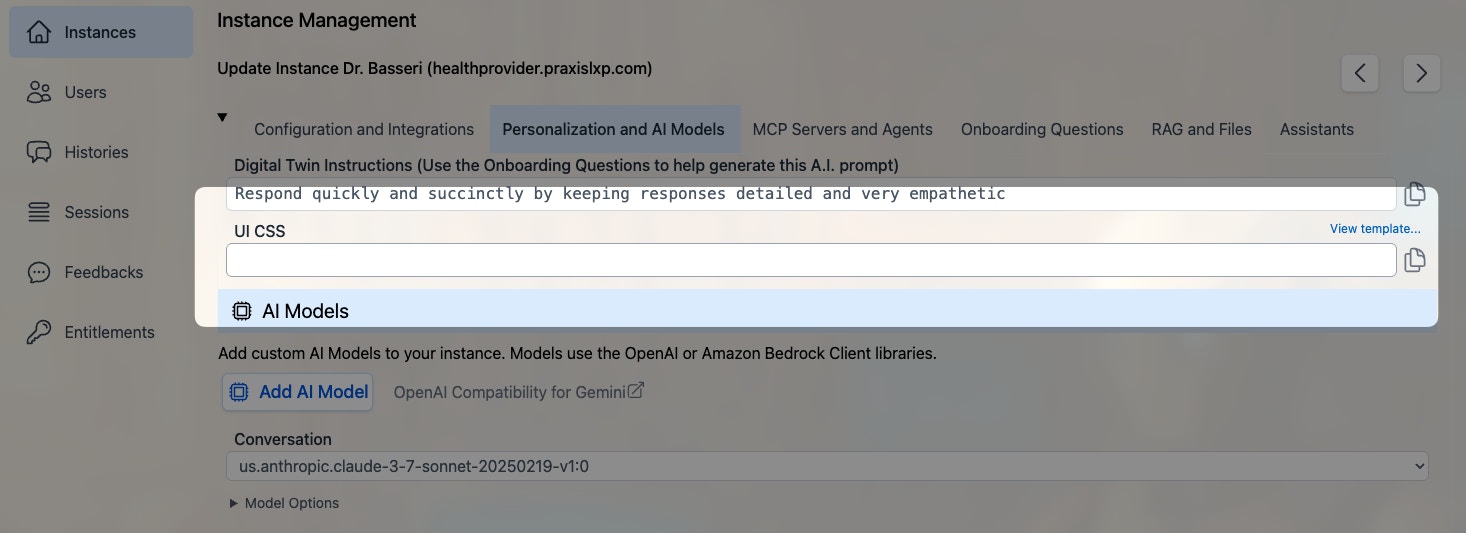
.pria-ui-template | Admin settings | Reference to the CSS template file (link in admin UI) |
Top Navigation Bar
| Class | Used In | Purpose |
|---|---|---|
.pria-ui-topbar | Top bar | Main navigation bar across the top of the screen |
.pria-ui-top-btn | Top bar | Individual navigation buttons (Home, Admin, Credits, etc.) |
.pria-ui-favorites-bar | Top bar | Horizontal scrollable bar of favorite institution shortcuts |
.pria-top-navigation-menu | Top bar | Profile dropdown menu that appears when clicking the user avatar |
Sidebar / Conversation List
| Class | Used In | Purpose |
|---|---|---|
.pria-ui-sidebar | Sidebar | Left sidebar panel listing conversations |
.pria-ui-sidebar-close | Sidebar | Close button to collapse the sidebar |
.pria-ui-sidebar-search | Sidebar | Search input field for filtering conversations |
.pria-ui-conversation-current | Sidebar | Highlight style on the currently active conversation |
.pria-ui-course-name | Message headers | Inline display showing the conversation/course name with bookmark icon |
Main Content Area
| Class | Used In | Purpose |
|---|---|---|
.pria-ui-main | Main panel | Primary content area to the right of the sidebar |
.pria-ui-messages | Messages | Scrollable container holding all conversation messages |
Messages
| Class | Used In | Purpose |
|---|---|---|
.pria-ui-message | Messages | Wrapper for an individual message (input + output pair) |
.pria-message-in | Messages | User’s input message text block |
.pria-message-out | Messages | AI’s output message text block |
.pria-ui-input-icon | Messages | Container for the user avatar icon beside input messages |
.pria-ui-output-icon | Messages | Container for the AI/assistant avatar icon beside output messages |
.pria-ui-assistant-name | Message headers | Inline display of assistant name with sparkles icon |
.pria-ui-dialogue-created | Message headers | Expandable timestamp showing when the dialog was created |
.pria-ui-dialogue-favorite | Message headers | Star button to toggle a dialog as favorite |
.pria-usage-infocard | Messages | Hover card showing dialog metadata (tokens, credits, duration) |
Message Toolbar
| Class | Used In | Purpose |
|---|---|---|
.pria-message-tools | Message toolbar | Outer container for the per-message action bar |
.pria-ui-tools-btn | Message toolbar | Base class on every tool button (share, view, delete, copy) |
.pria-ui-tools-tooltip | Message toolbar | Tooltip label that appears on hover above each button |
.pria-ui-tools-check | Message toolbar | Checkmark icon shown briefly after a successful copy |
.pria-ui-tools-share-btn | Message toolbar | Share Link button wrapper |
.pria-ui-tools-share | Message toolbar | Share Link icon |
.pria-ui-tools-view-btn | Message toolbar | View Details button wrapper |
.pria-ui-tools-view | Message toolbar | View Details icon |
.pria-ui-tools-delete-btn | Message toolbar | Delete Dialog button wrapper |
.pria-ui-tools-delete | Message toolbar | Delete / Recover icon |
.pria-ui-tools-copyinput-btn | Message toolbar | Copy Input button wrapper |
.pria-ui-tools-copyinput | Message toolbar | Copy Input icon |
.pria-ui-tools-copyoutput-btn | Message toolbar | Copy Output button wrapper |
.pria-ui-tools-copyoutput | Message toolbar | Copy Output icon |
.pria-ui-tools-confirm | Message toolbar | Delete confirmation bar (are you sure?) |
.pria-ui-tools-confirm-yes | Message toolbar | Confirm delete button |
.pria-ui-tools-confirm-cancel | Message toolbar | Cancel delete button |
Text-to-Speech
| Class | Used In | Purpose |
|---|---|---|
.pria-ui-tools-tts | Message toolbar | Wrapper for all TTS controls |
.pria-ui-tools-speak | Message toolbar | Speak button (starts text-to-speech) |
.pria-ui-tools-speak-icon | Message toolbar | Speaker icon inside the Speak button |
.pria-ui-tools-stop | Message toolbar | Stop button (stops playback) |
.pria-ui-tools-stop-icon | Message toolbar | Stop icon inside the Stop button |
.pria-ui-tools-voice | Message toolbar | Voice selector button |
.pria-ui-tools-voice-icon | Message toolbar | Music note icon inside the Voice button |
.pria-ui-tools-voice-name | Message toolbar | Voice name label (hidden on small screens) |
Input Area
| Class | Used In | Purpose |
|---|---|---|
.pria-ui-input | Input area | Main input section at the bottom of the conversation |
.pria-ui-entrysearch | Input area | The text input/search field where users type messages |
.pria-ui-tb-btn | Input toolbar | Toolbar buttons below the input (send, attach, etc.) |
.pria-ui-dictate-btn | Input area | Microphone button for voice input/dictation |
.pria-ui-input-options | Input area | Collapsible container for input options (file upload, paste, etc.) |
.pria-ui-embed-uploads | Input area | Drag-and-drop upload area showing dropped files/URLs |
Streaming / Live Response
| Class | Used In | Purpose |
|---|---|---|
.pria-ui-stream-message | Streaming | Wrapper for the entire streaming message display |
.pria-ui-stream-controls | Streaming | Container for streaming control buttons (abort, pause) |
.pria-ui-rtstream | Streaming | Real-time audio stream container for live conversation |
.pria-ui-rtstream-icon | Streaming | Pulsing status indicator icon during active RT audio stream |
Welcome Screen
| Class | Used In | Purpose |
|---|---|---|
.pria-ui-welcome | Welcome | Welcome screen displayed when no conversation is active |
.pria-ui-welcome-options | Welcome | Suggested prompt buttons/options on the welcome screen |
Zoom Controls
| Class | Used In | Purpose |
|---|---|---|
.pria-ui-zoomin | Messages | Zoom in button for message text size |
.pria-ui-zoomout | Messages | Zoom out button for message text size |
Assistants
| Class | Used In | Purpose |
|---|---|---|
.pria-ui-assistants | Assistants panel | Outer container for the assistants section |
.pria-ui-assistants-list | Assistants panel | Responsive grid container for displaying assistant cards |
.pria-ui-assistant | Assistants panel | Individual assistant card |
.pria-ui-assistant.active | Assistants panel | Active (published and enabled) assistant card |
.pria-ui-assistant.inactive | Assistants panel | Inactive (disabled) assistant card |
.pria-ui-assistant.unpublished | Assistants panel | Unpublished (draft) assistant card |
.pria-ui-assistant-name | Message headers | Assistant name display with sparkles icon in message headers |
.pria-ui-assistant-badges | Assistants panel | Container for scope, status, and permission badges on assistant cards |
.pria-ui-assistant-actions | Assistants panel | Container for start/edit/delete action buttons on assistant cards |
.pria-ui-assistant-model | Assistants panel | Modal container for adding/editing assistant settings |
Voices / Language Selection
| Class | Used In | Purpose |
|---|---|---|
.pria-ui-voices | Voices panel | Container for voice selection options |
.pria-ui-languages-selection | Languages panel | Container for language/locale selection |
Files / Uploads
| Class | Used In | Purpose |
|---|---|---|
.pria-ui-files | Files panel | Outer container for the files section |
.pria-ui-files-sort | Files toolbar | Sort buttons (by name or date) in the files toolbar |
.pria-ui-file | Files panel | Individual file card |
.pria-ui-file.selected | Files panel | Currently selected file card |
.pria-ui-file.active | Files panel | Active (included in context) file card |
.pria-ui-file.inactive | Files panel | Inactive (excluded from context) file card |
.pria-ui-file.error | Files panel | File card in error state (failed processing) |
.pria-ui-collection | Files panel | Collection (folder) card in the files view |
.pria-ui-uploads | Files panel | Container for file upload area |
.pria-ui-vault-health-summary | Files panel | Stats chips showing total, included, and unused file counts |
Gallery (Digital Twins)
| Class | Used In | Purpose |
|---|---|---|
.pria-ui-gallery | Gallery | Outer container for the digital twins gallery |
.pria-ui-gallery-header | Gallery | Header section of the gallery |
.pria-ui-gallery-carousel | Gallery | Scrollable carousel of digital twin cards |
.pria-ui-gallery-card | Gallery | Individual digital twin card |
.pria-ui-gallery-card.selected | Gallery | Currently selected digital twin card |
Realtime / Conversation Mode
| Class | Used In | Purpose |
|---|---|---|
.pria-ui-rt-window | RT Audio | Draggable floating window for real-time audio conversation |
.pria-ui-convo-container | RT Audio | Inner circular container holding the animated avatar with status colors. Contains also contracted/expanded class |
.pria-ui-convo-tools | RT Audio | Tools + transcript column. In transcript mode it sits below the avatar on portrait phones and to its right on tablets, desktops and landscape phones; the root carries pria-ui-convo-split in that layout. Contains also contracted/expanded class |
.pria-ui-convo-avatar-image | RT Audio | The avatar image element inside the RT audio window |
.pria-ui-convo-tools-panel | RT Audio | Tools panel (Start/End, Mute, Contract, message box) — pinned at the bottom of the column in transcript mode |
.pria-ui-rt-idle | RT Audio | State class: no active audio (default) |
.pria-ui-rt-input-active | RT Audio | State class: user is speaking (mic input detected) |
.pria-ui-rt-output-active | RT Audio | State class: AI is speaking (audio output active) |
.pria-ui-rt-muted | RT Audio | State class: microphone is muted |
Pricing Page
| Class | Used In | Purpose |
|---|---|---|
.pria-ui-pricing-header | Pricing | Header section of the pricing page |
.pria-ui-pricing-container | Pricing | Main container for pricing plans |
.pria-ui-pricing-loading | Pricing | Loading state placeholder |
.pria-ui-pricing-modal | Pricing | Payment modal dialog |
.pria-ui-pricing-tabs | Pricing | Tab bar for switching between pricing views |
.pria-ui-pricing-actions | Pricing | Action buttons (subscribe, buy credits, etc.) |
.pria-ui-pricing-about-header | Pricing | Header for the “about” section |
.pria-ui-pricing-about | Pricing | About/description section on the pricing page |
.pria-ui-pricing-badges | Pricing | Badge display area on the pricing page |
Badges / Tags
These classes are reserved for future use and available for custom styling of badge elements.| Class | Used In | Purpose |
|---|---|---|
.pria-ui-badge | Badges | Generic badge/tag element |
.pria-ui-badge-membership | Badges | Membership level badge |
.pria-ui-badge-role | Badges | User role badge |
.pria-ui-badge-credits | Badges | Credits count badge |
.pria-ui-badge-pool | Badges | Pool credits badge |
.pria-ui-badge-sharing | Badges | Sharing status badge |
Charts / Visualization
| Class | Used In | Purpose |
|---|---|---|
.pria-ui-chartcontainer | Charts | Container for chart/visualization components |
Admin Section
| Class | Used In | Purpose |
|---|---|---|
.pria-ui-wrapper | Admin | Outer wrapper for admin page content |
.pria-ui-tabpane | Admin | Content pane for admin tab sections |
.pria-ui-button-bar | Admin / Tabs | Horizontal tab bar or button group container |
Profile Section
| Class | Used In | Purpose |
|---|---|---|
.pria-ui-profile-header | Profile | Header section of the user profile page |
Feedback / Output
| Class | Used In | Purpose |
|---|---|---|
.pria-ui-feedback | Feedback | Container for the feedback/review section |
.pria-ui-output | Output | Generic output display container |
Error Display
| Class | Used In | Purpose |
|---|---|---|
.pria-ui-error | Error banner | Outer wrapper for error notification banners |
.pria-ui-error-inner | Error banner | Inner container with gradient background and border styling |
.pria-ui-error-icon | Error banner | Container for the error exclamation icon |
.pria-ui-error-message | Error banner | Text content area of the error message |
.pria-ui-error-dismiss | Error banner | Dismiss/close button to hide the error |
Collapsible Sections
| Class | Used In | Purpose |
|---|---|---|
.pria-ui-details | Collapsible | <details> element wrapper for expandable sections |
.pria-ui-summary | Collapsible | <summary> element (clickable header) for collapsible sections |
View-Specific Sections
| Class | Used In | Purpose |
|---|---|---|
.pria-ui-view-upload | Upload view | Container for the file upload management page |
.pria-ui-view-upload-inner | Upload view | Inner content area of the upload view |
.pria-ui-upload-top | Upload view | Top toolbar of the upload view |
.pria-ui-view-history | History view | Container for the conversation history page |
.pria-ui-view-history-inner | History view | Inner content area of the history view |
.pria-ui-view-history-inner-dialogues | History view | List of dialogues within a history conversation |
.pria-ui-tool-icon | History view | Icon for tool/function calls in history |
Authentication Buttons
| Class | Used In | Purpose |
|---|---|---|
.pria-login-btn | Login page | Primary login button |
.pria-signup-btn | Login page | Sign-up / register button |
.pria-request-tojoin-cancel-btn | Login page | Cancel button on the “request to join” form |
.pria-request-tojoin-join-btn | Login page | Submit button on the “request to join” form |
Example: Halve the RT Audio Avatar
To resize the animated avatar in the real-time conversation window to half its default size, add this CSS to your institution’s custom CSS:/* Shrink the RT conversation avatar to half size */
.pria-ui-convo-avatar-image {
min-width: 10.25rem !important;
min-height: 10.25rem !important;
}
.pria-ui-convo-container {
width: 10.75rem !important;
min-height: 10.75rem !important;
}
transform for a proportional scale that keeps everything aligned:
.pria-ui-convo-container {
    transform: scale(0.5);
    transform-origin: top right;
}
Example: Custom Background
Apply a radial gradient background across all major UI sections:.pria-ui-topbar,
.pria-ui-sidebar,
.pria-ui-background,
.pria-ui-messages,
.pria-ui-input,
.pria-ui-profile-header,
.pria-ui-entrysearch,
.pria-ui-wrapper,
.pria-ui-tabpane,
.pria-ui-files,
.pria-ui-assistants,
.pria-ui-uploads,
.pria-ui-voices,
.pria-ui-chartcontainer,
.pria-ui-feedback,
.pria-ui-output,
.pria-ui-gallery,
.pria-ui-pricing-container {
background: radial-gradient(circle, #FFFFE0, #fff7e6, #FFA500);
background-size: cover;
background-attachment: fixed;
}
Example: Custom Gallery Card Selection
.pria-ui-gallery-card.selected {
    border-color: #3b82f6 !important;
    box-shadow: 0 10px 25px -5px rgba(59, 130, 246, 0.3) !important;
}
Example: Custom File Card States
.pria-ui-file.selected {
    background-color: rgba(255, 255, 255, 0.75) !important;
}
.pria-ui-file.active {
    background-color: rgba(255, 255, 255, 0.5) !important;
}
.pria-ui-file.inactive {
    background-color: rgba(0, 255, 0, 0.1) !important;
}
.pria-ui-file.error {
    background-color: rgba(255, 0, 0, 0.1) !important;
}
We are actively working on creating a library of color templates to facilitate the selection. For any help modifying the CSS template, just ask Pria!