

Overview
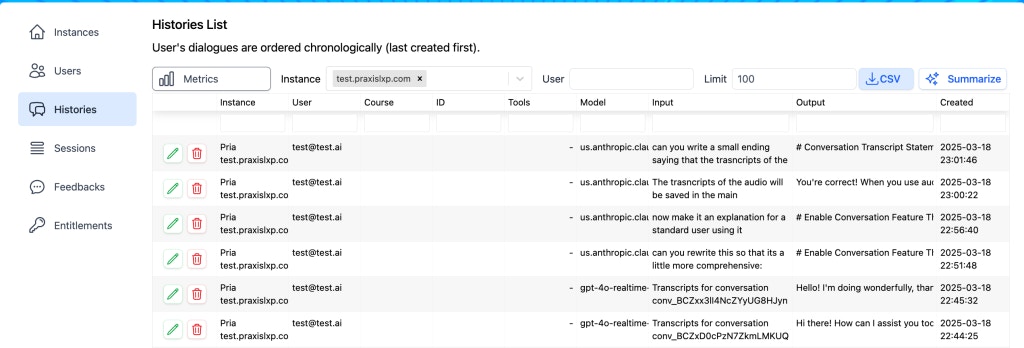
Every user message, every Pria response, every tool call, and every retrieval source used to ground a response is captured as a History record. Records are tied to the user, the instance, the assistant (when one was used), the model that produced the response, and a timestamp. Together they form an append-only conversation log that powers:- Audit — answer “who said what, when” for FERPA / GDPR access requests
- Debugging — reproduce a bad response by reading the exact context the model received
- Analytics — top users, most-frequent topics, model splits, error patterns
- Quality work — combined with Feedback, histories close the loop on what to improve
Filtering and search
The filter bar at the top narrows the list. All filters compose; selections persist across pagination so you can sweep a large window without losing your place.
On top of the toolbar filters, every column on the Records table has its own filter box — Model, Assistant, Vote (thumbs up/down), Course, and the Input / Output columns, which match on conversation content so you can find every conversation that mentioned a topic. Use the Columns button to show or hide columns.
Combining filters is where the page earns its keep: “all conversations on Instance X with Model Y over the last 7 days that have a thumbs-down” is one filter combination away from a clean list of regression candidates.
Drilling into a conversation
Click the green pencil button on any row to open the conversation viewer: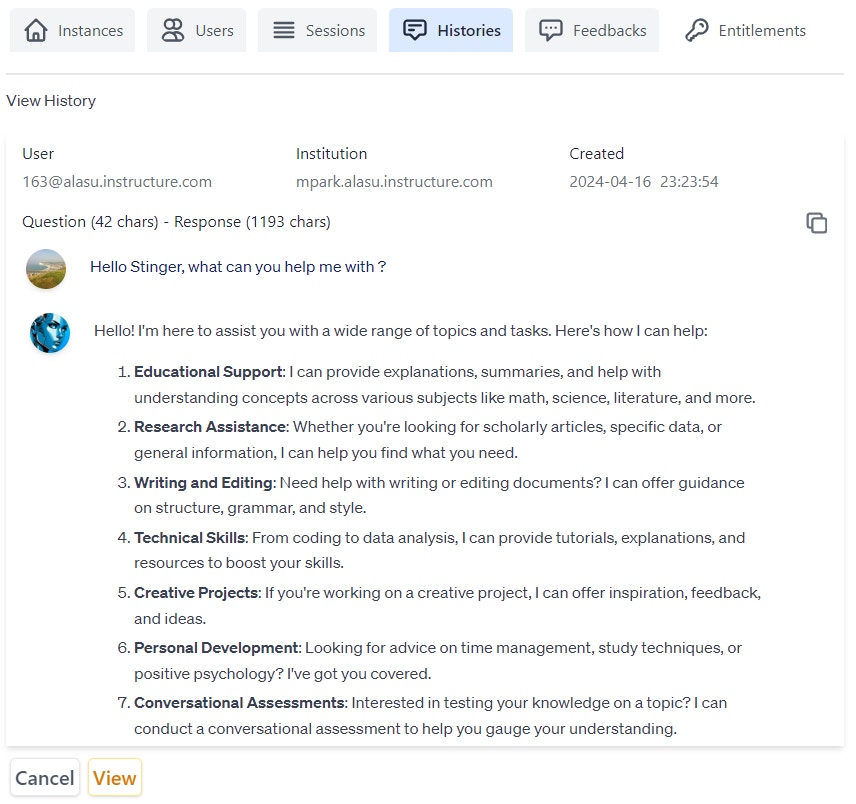
- User turns — exactly what the user typed (or said, in voice mode)
- AI responses — the model’s reply, including any in-line citations
- Tool calls — when the model used a tool (RAG retrieval, web search, image generation, etc.), the call and its result are visible inline
- Retrieval sources — when grounding was used, the source documents and the specific chunks that scored highest are listed; click through to the original file in Files
- Model metadata — which model produced each response, the token counts, and any reasoning effort applied
Summarize
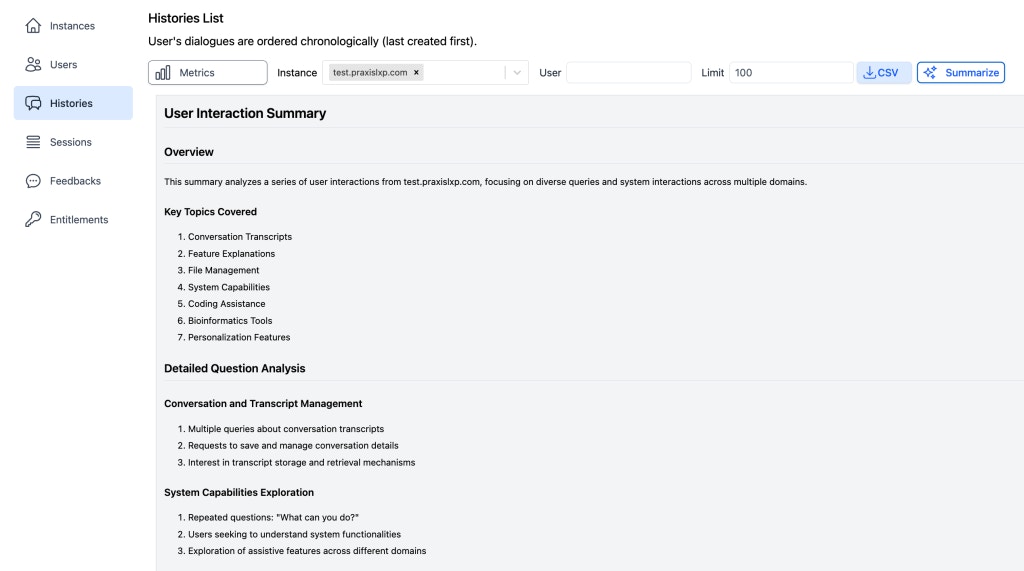
Pria can summarize a slice of conversation history into key discussion points, prevalent topics, and engagement patterns. Select the instance, narrow the date range, then click Summarize at the bottom of the page.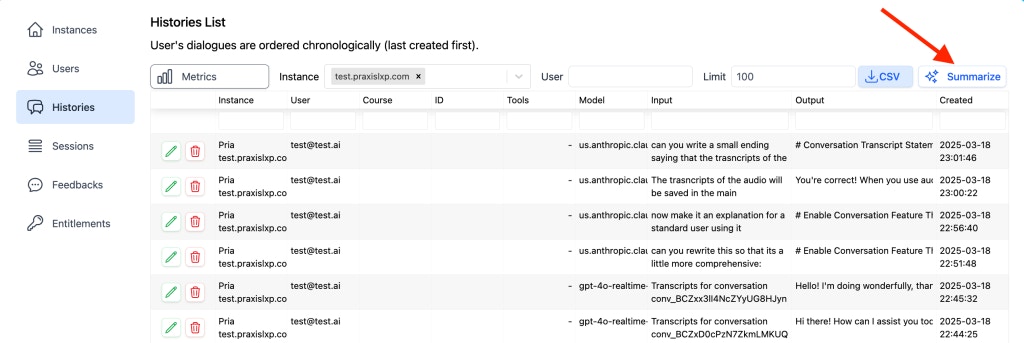
- The most-discussed topics across the selected window
- Common questions that recurred across users
- Apparent gaps where users asked things the Digital Twin could not confidently answer
Usage and Charts
Two companion tabs give quantitative cuts on the same underlying data:- Usage — a per-user consumption table (queries, credits, and quota-cap standing per period), with its own column selection and CSV export
- Charts — visual trendlines: model distribution, peak usage hours, and activity over time
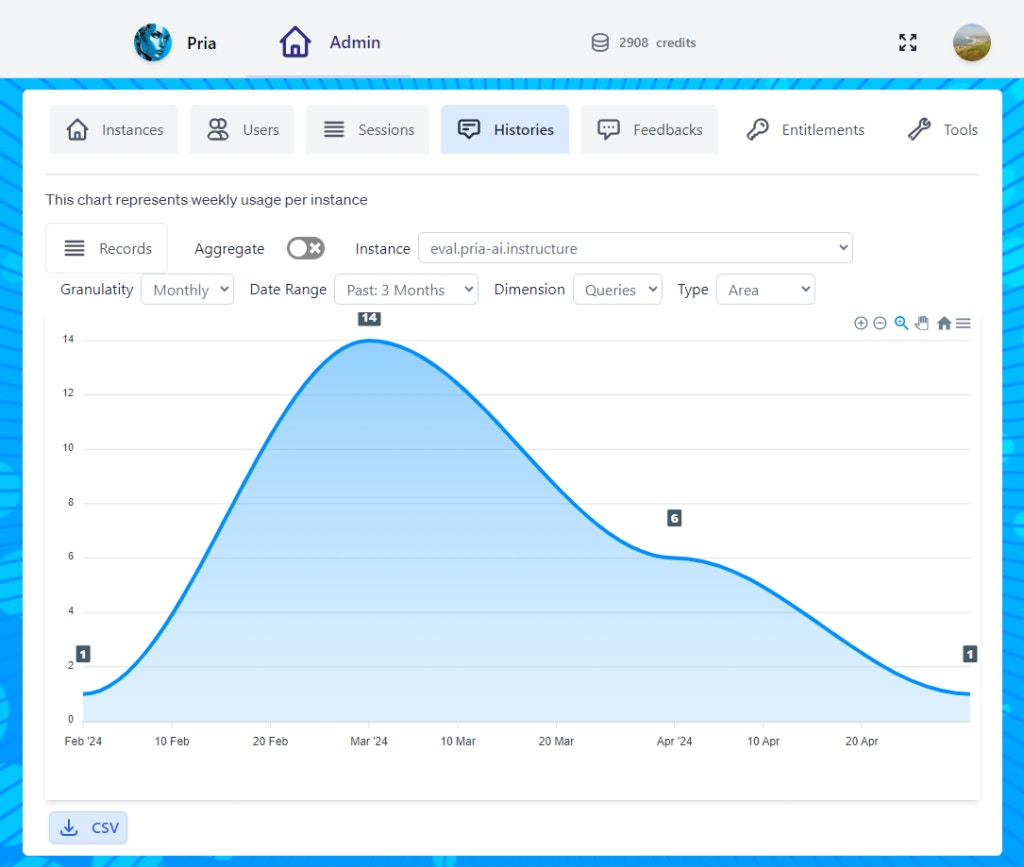
- Filter by date range to compare week-over-week or term-over-term
- Drill into a single user to understand individual engagement
- Export to CSV for sharing in slide decks or external reports
Exporting
Two flavours of export, each useful for a different purpose:- Single conversation — from the conversation viewer, copy the full dialogue (or a link to it) to the clipboard. Best for sharing one specific exchange with a colleague or attaching to an incident ticket.
- Bulk export — from the filtered list, export the current view as CSV. The export mirrors the columns you have visible, one row per conversation record. Best for spreadsheets and downstream analytics pipelines.
Compaction
Long conversations would otherwise grow without bound and burn tokens on every turn re-sending the entire history. Pria addresses this with compaction:- Once a conversation grows past a threshold, an LLM summarizes the older turns into a compact representation
- Subsequent turns send the compact summary plus the most recent messages, instead of the entire raw transcript
- The original messages are retained in the Histories database — compaction is a token-saving runtime optimization, not a retention policy
- The compacted summary is cached per user, per instance, per course so the work isn’t redone every turn
Privacy and retention
Histories contain personal information by their nature — user identity, what they asked, what they were told.- Encrypted at rest. Database storage is encrypted; access is governed by Pria’s authentication and entitlement layers.
- Admin-only access. Only users with the
histories.listentitlement can view conversations; thehistories.deleteentitlement is required to soft-delete records. - FERPA considerations. When your Digital Twin operates in an educational context, treat histories as covered educational records — restrict admin entitlements accordingly, and use the export to satisfy student access requests.
- GDPR right-to-access. Filter to the user’s email, export, and deliver. The export is the lawful response.
- Right-to-erasure. Soft-delete (status →
deleted) removes the conversation from the default view. For hard deletion of conversations to fulfil a confirmed erasure request, contact the Praxis AI team at humans@praxis-ai.com.
Using histories for audit
Two common audit flows:- FERPA / GDPR access request. Filter by the user’s email across all dates, enable the Input/Output columns, export as CSV, and deliver. The export is itself the access response.
- Incident review. When a user reports that the Digital Twin said something incorrect or harmful, get the timestamp from the user, filter by user + time window, and open the exact conversation. The viewer shows the model, the retrieval sources, and any tool calls — enough to reproduce and root-cause.
For security incidents — misuse attempts, suspicious behaviour patterns — Pria surfaces them automatically in Praxis Shield, where you can triage by severity and status. Histories remains the place to read the full surrounding conversation.
Common queries
A few combinations you’ll reach for repeatedly:- Top users this week — sort by conversation count; useful for identifying power users to interview
- Most-frequent topics — combine the Summarize action with a tight date range
- Model split — Metrics tab, group by model; spot whether one model dominates and whether you want it to
- Error patterns — keyword-search for “I don’t know”, “I can’t help”, or “I’m not sure” to find places the Digital Twin punted; correlate with the Files it should have grounded against
- First-turn confusion — short conversations (1–2 turns) that ended without follow-up; often signals onboarding or Instructions gaps
Linking to Feedback for the qualitative view
Histories tells you what was said. Feedback tells you what the user thought of it. Every Feedback row links back to the originating message; every History row with attached feedback shows the rating inline. Use them together — a thumbs-down with a comment plus the surrounding conversation gives you the full story.Related
- Feedback — the qualitative companion to this quantitative log
- Sessions — who was signed in when a conversation happened
- Moderation — content moderation policies that may have intercepted parts of a conversation
- Praxis Shield — automatic security-incident detection and triage across conversations
- Privacy & Educational Consent — retention windows and access policies
- Configuration — the Instructions and model settings that shaped every history record
- Assistants — assistant routing visible in the conversation viewer
- Files — the source files that retrieval pulled from
- Entitlements —
histories.list/histories.deletepermissions